
Veeam
Last updated on:
In this page
Overview
Veeam is a data protection and disaster recovery solution designed for modern IT environments. It provides backup, replication, and recovery capabilities for virtual, physical, cloud, and SaaS workloads.
Veeam extension scope
The Veeam extension for EventLog Analyzer is designed to enable seamless integration of log data from Veeam Backup & Replication or Veeam ONE into the EventLog Analyzer ecosystem. This extension provides features such as log collection, parsing, reporting, alerting, correlation, and advanced log search capabilities.
Audited Veeam events
Authentication and authorization
- MFA management
- Password and credential management
- Four-eyes authorization events
Identity management
- User and group management
Malware detection
- Malware detection configuration changes
- Malware detection session completion events
- Malware activity detection events
- Malware remediation actions
Configuration management
- Global network traffic rule changes
- Global VM exclusion changes
- General settings changes
- Host configurations
Jobs
- Job sessions history
- Job configurations
- Restore sessions history
Infrastructure management
- Failover plan management
- Failover plan execution history
- Infrastructure location changes
Licensing
- License updates
How to configure Veeam log source
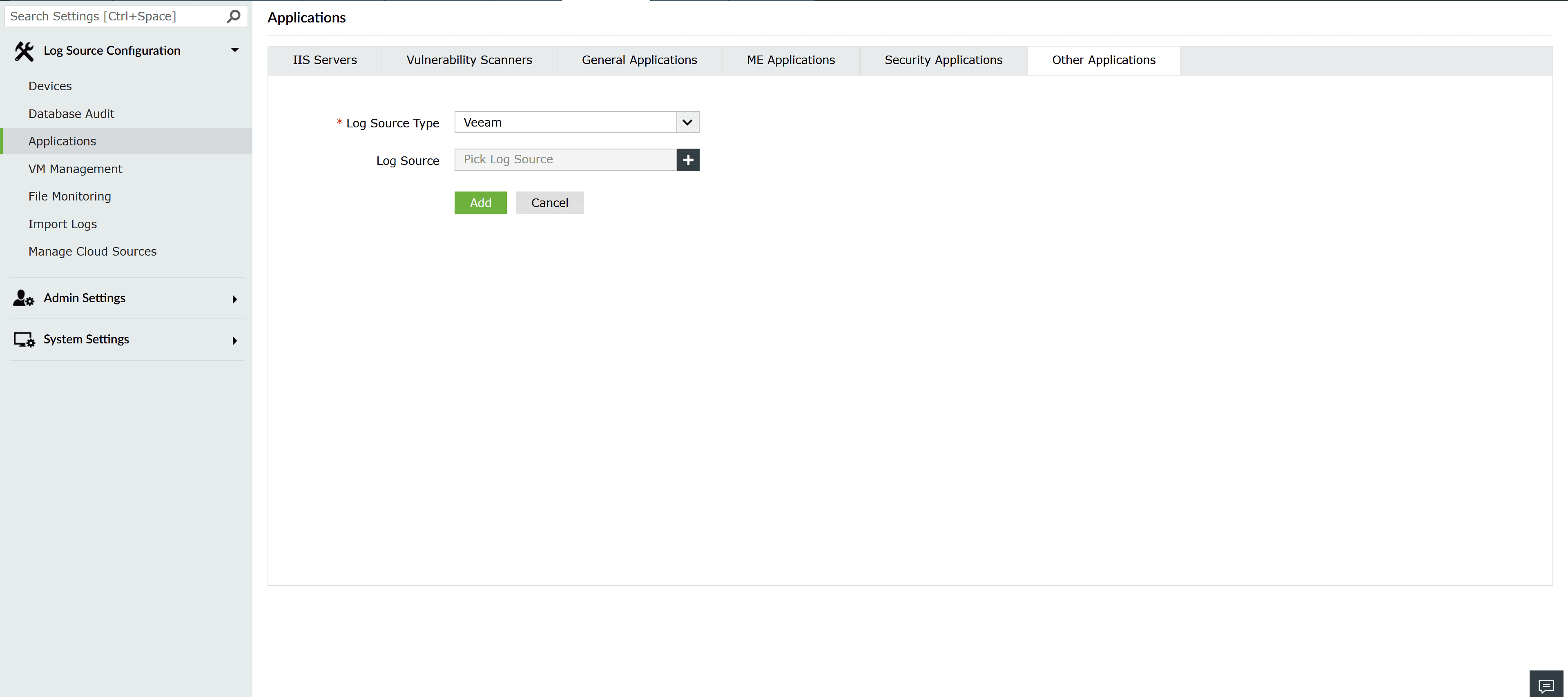
- After installing the Veeam extension, configure the log sources by navigating to Settings > Applications > Other Applications.
- Select Veeam from the Log Source Type dropdown.
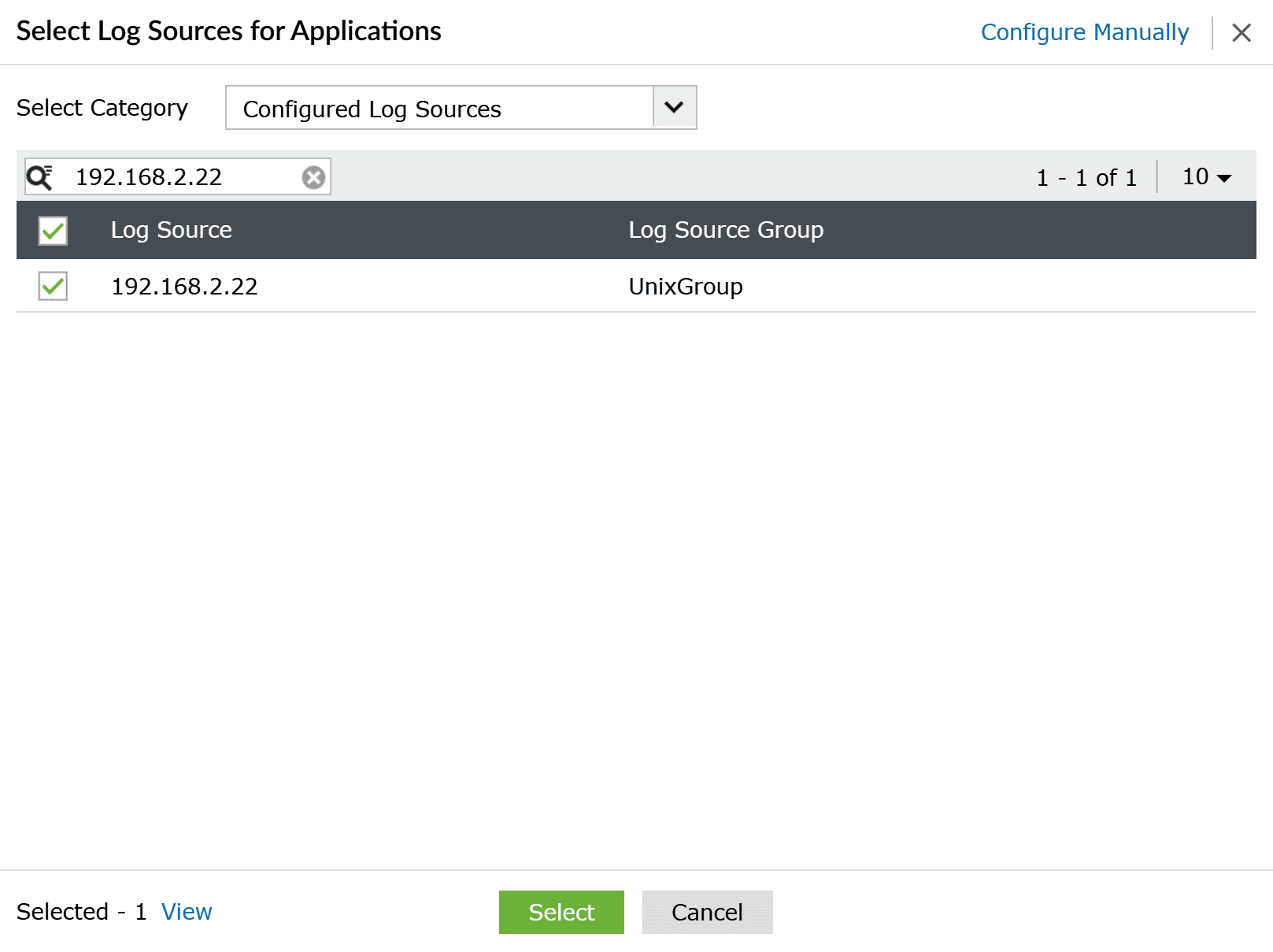
- Click the + icon to add a new device.
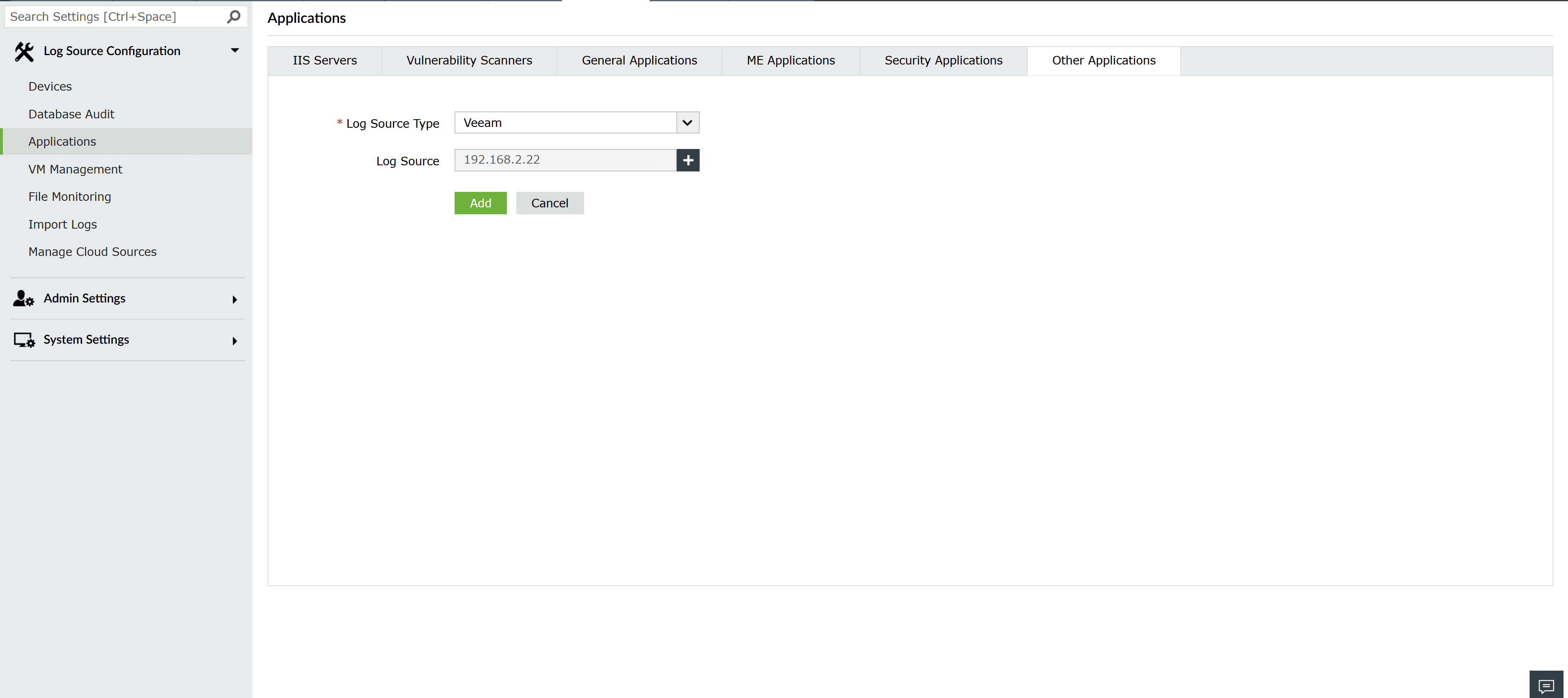
- Choose a pre-configured host where Veeam Backup & Replication Server or Veeam ONE Server is installed. If the host is not pre-configured, click Configure Manually and enter the hostname or IP.
- Click Add to save the configuration.
Enabling event forwarding
After configuring the log source, enable event forwarding in either Veeam ONE or Veeam Backup & Replication to send events to EventLog Analyzer. This requires a Veeam Data Platform Advanced or Premium license that supports syslog event forwarding.
Event forwarding in Veeam ONE
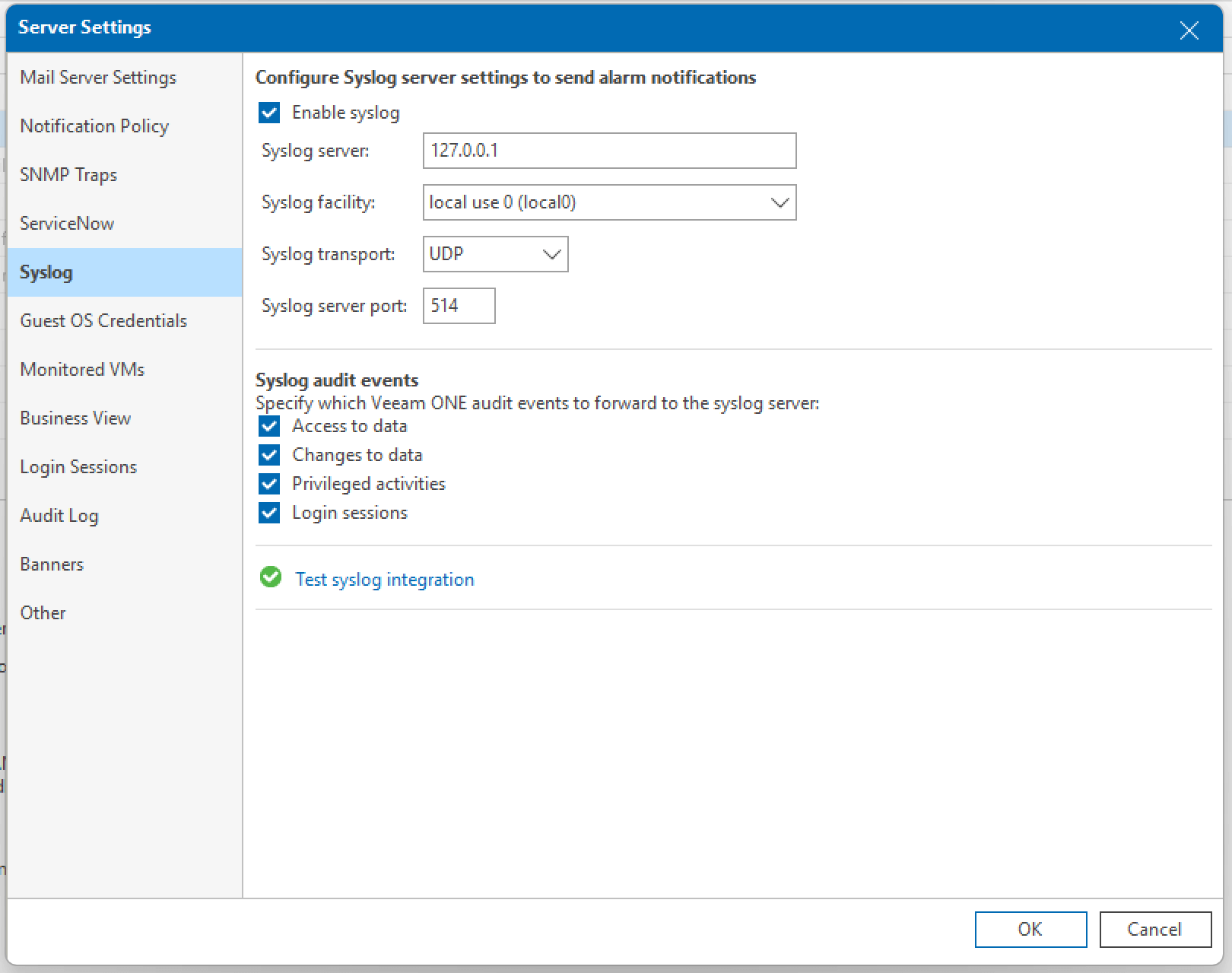
- Open Veeam ONE Client and navigate to Server Settings > Syslog.
- Check Enable Syslog.
- In Syslog server, enter the Hostname or IP of the EventLog Analyzer server in the log source.
- Select mail under the Syslog facility dropdown.
- Choose UDP or TCP under the Syslog transport dropdown.
- Enter a port in which the EventLog Analyzer server is listening for Syslogs.
- Check all options under Syslog audit events to enable comprehensive search and reporting in EventLog Analyzer.
- Click OK to save the configuration.
For detailed steps, refer to the official guide on Syslog integration in Veeam ONE.
Event forwarding in Veeam Backup & Replication
- Open Veeam Backup & Replication Console and go to Options > Event Forwarding.
- Click Add under Syslog servers to configure a Syslog server.
- In the Server field, provide the Hostname or IP of the EventLog Analyzer server.
- Enter a port in which the EventLog Analyzer server is listening for Syslogs.
- Select UDP or TCP under the Transport dropdown.
- Click OK to add the syslog server, then click Apply to save changes.
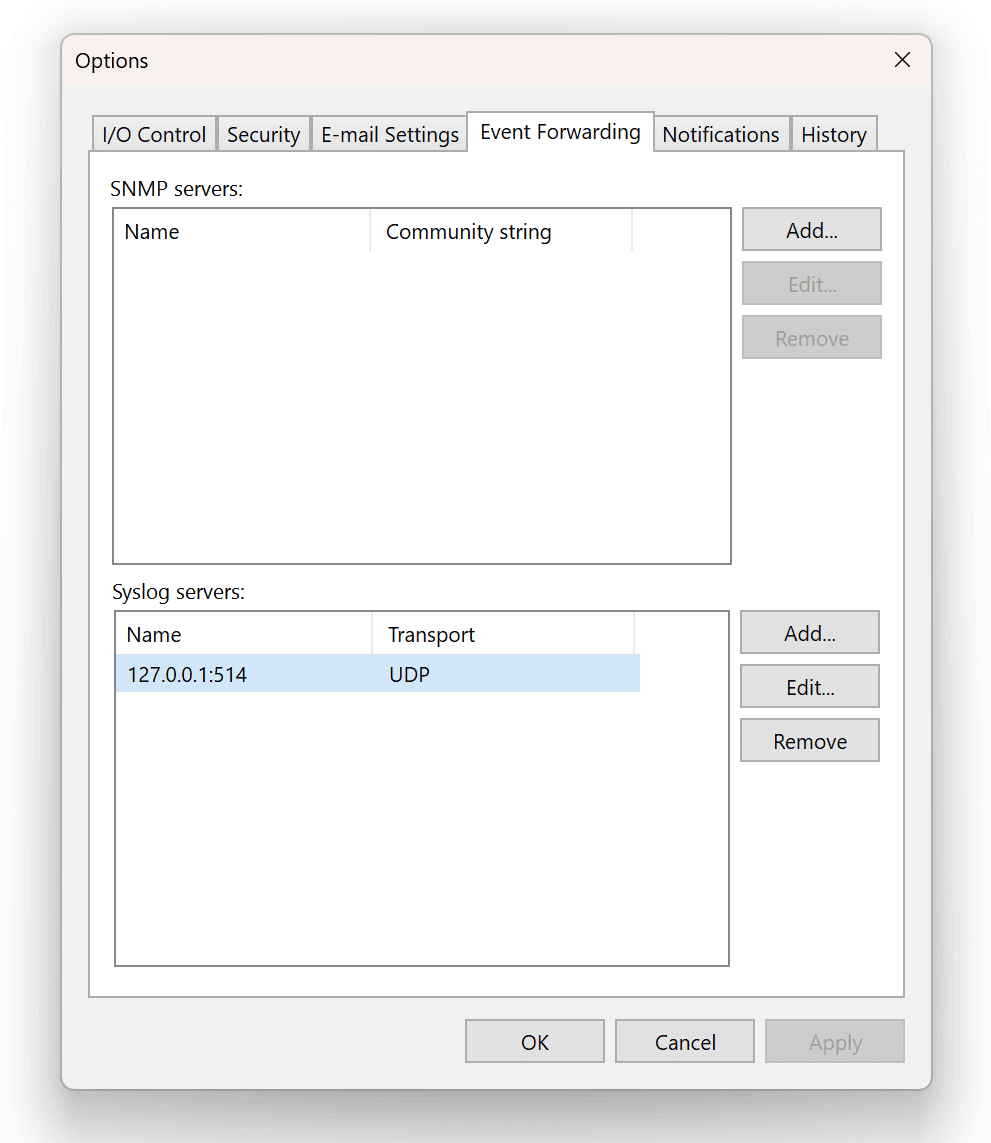
For more details, refer to the official guide on Syslog integration in Veeam Backup & Replication.
Enabling correlation profiles
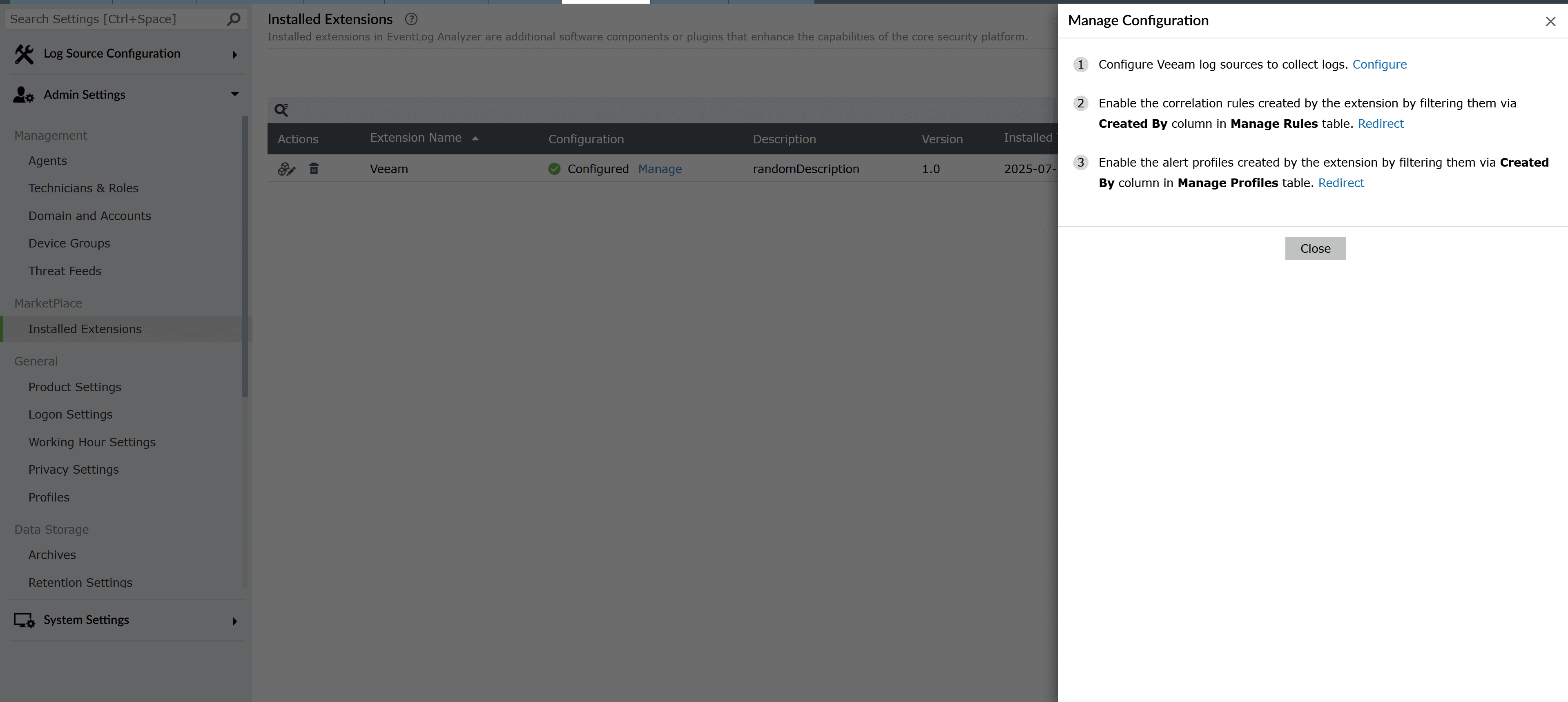
- Go to Settings > Marketplace > Installed Extensions. Click Manage under Configuration to open the Manage Configuration page.
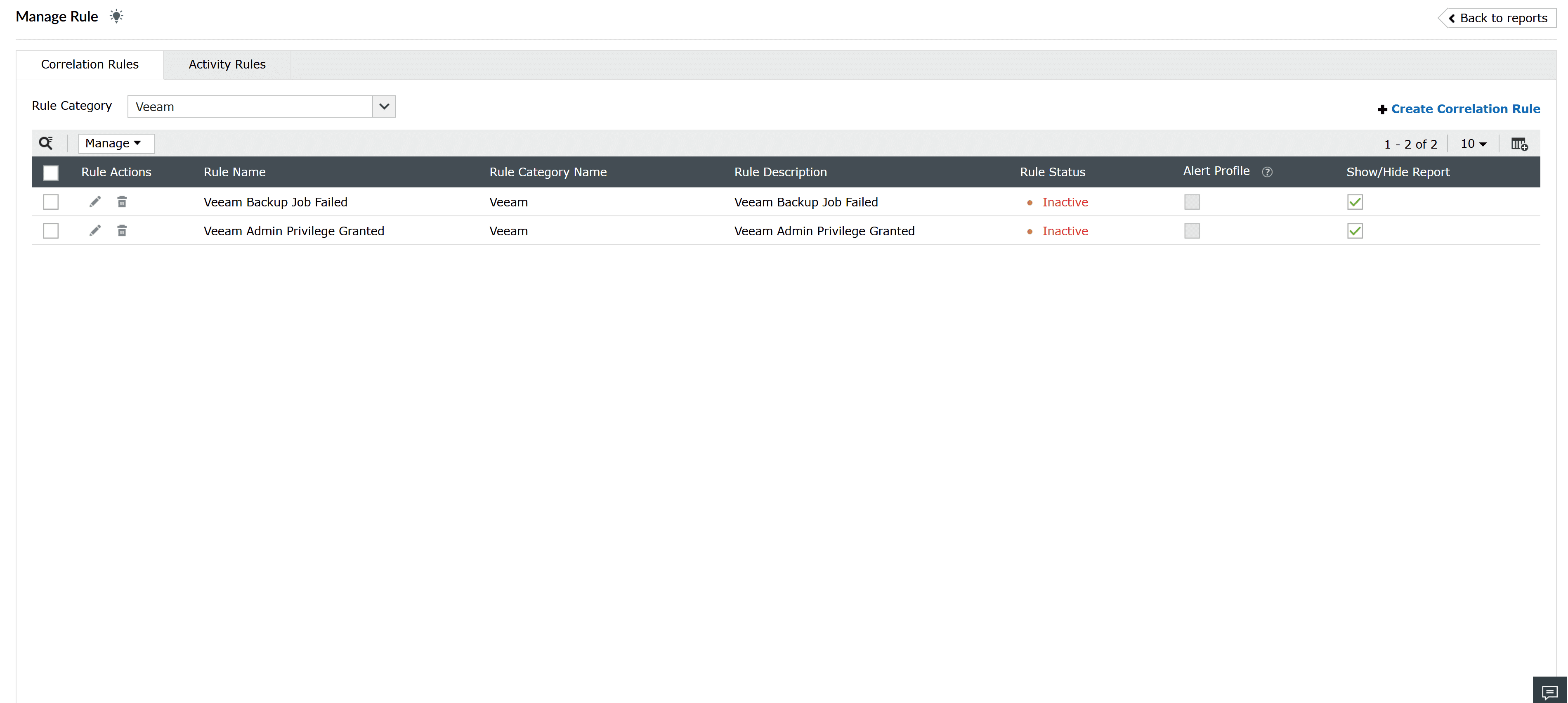
- Click Redirect next to Correlation Rules to open the Correlation tab. Select Veeam from the Rule Category selector to view the available correlation rules.
- Review the available correlation rules and enable the required ones.
Enabling alert profiles
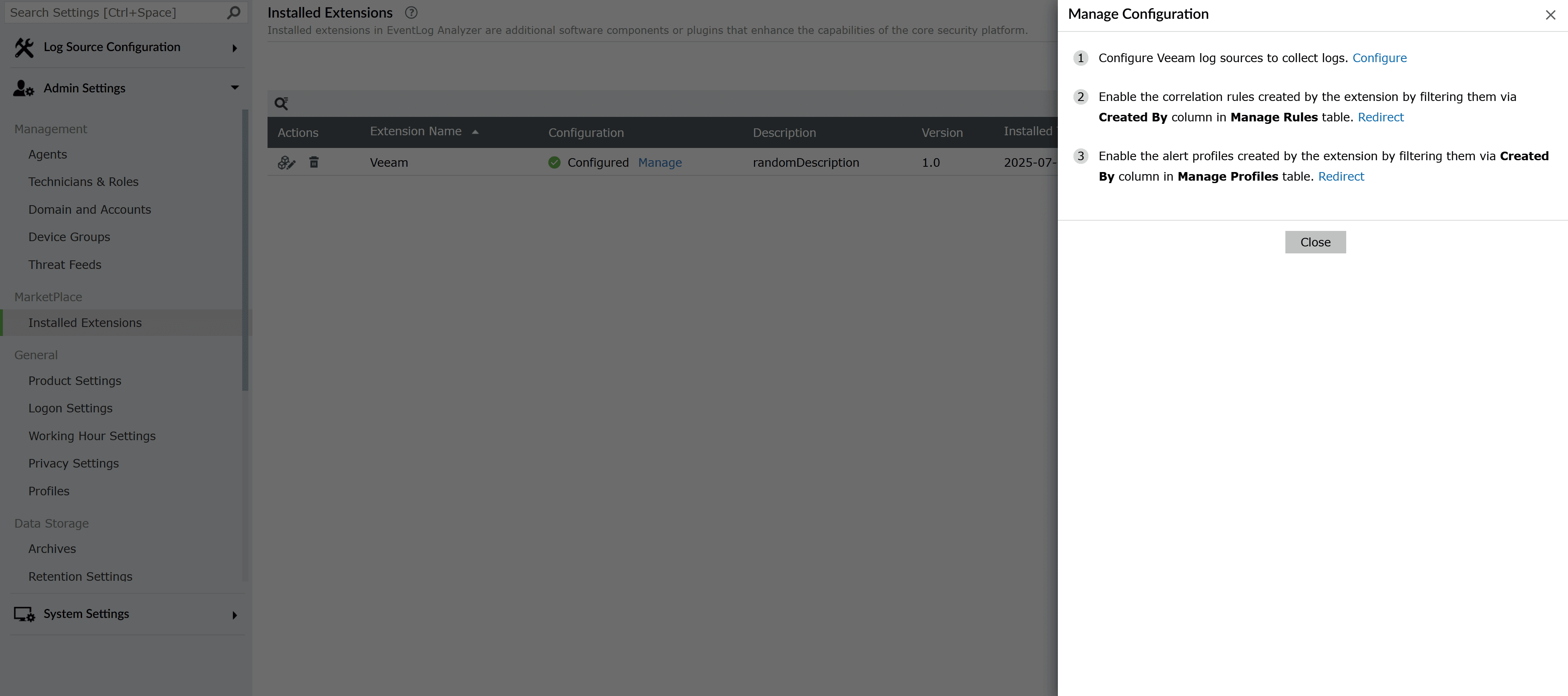
- After configuring the log source, navigate to Settings > Marketplace > Installed Extensions. Click Manage under configuration to open the Manage Configuration page.
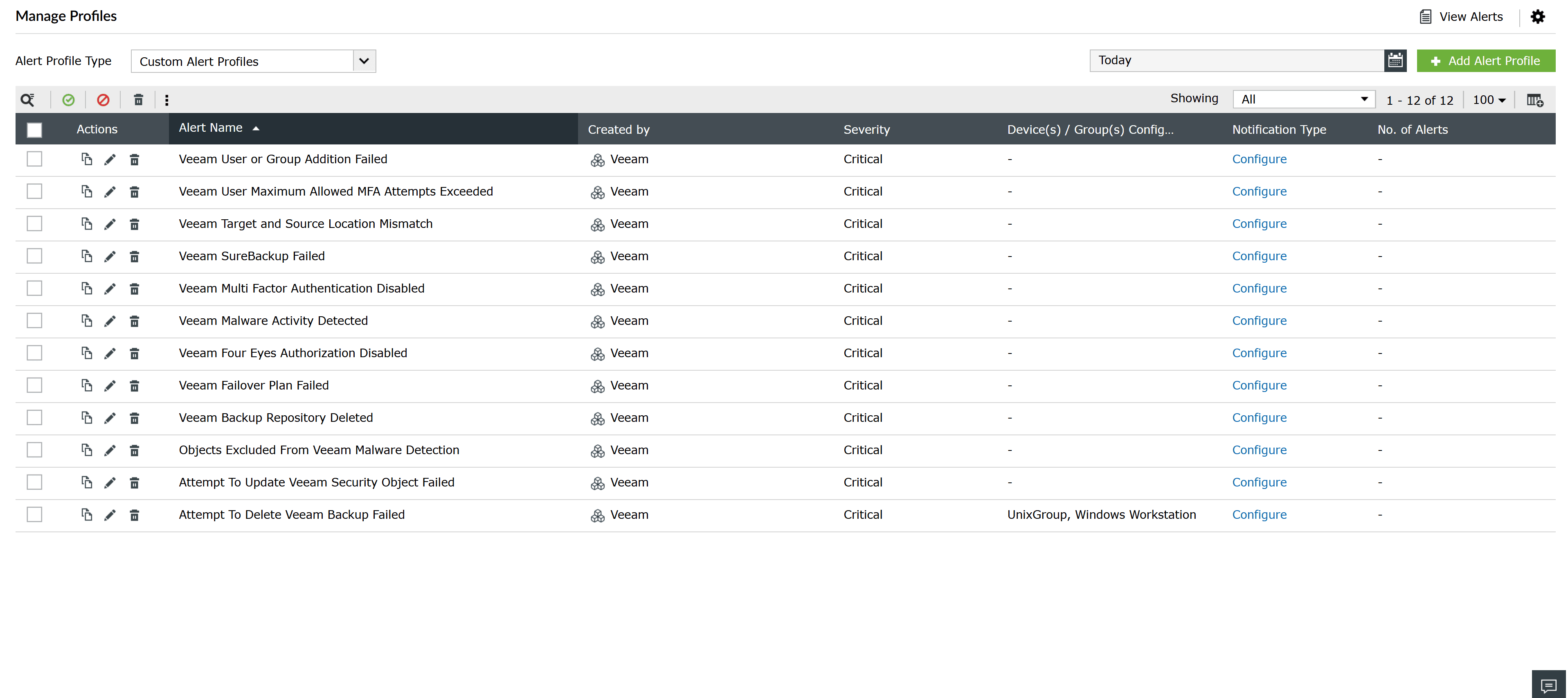
- Click Redirect next to Alert Profiles to navigate to the Alerts tab. Extension alert profiles appear under Custom Alert Profiles. Use the Created By column to identify Veeam alert profiles.
- Browse the available alert profiles and enable the required ones.
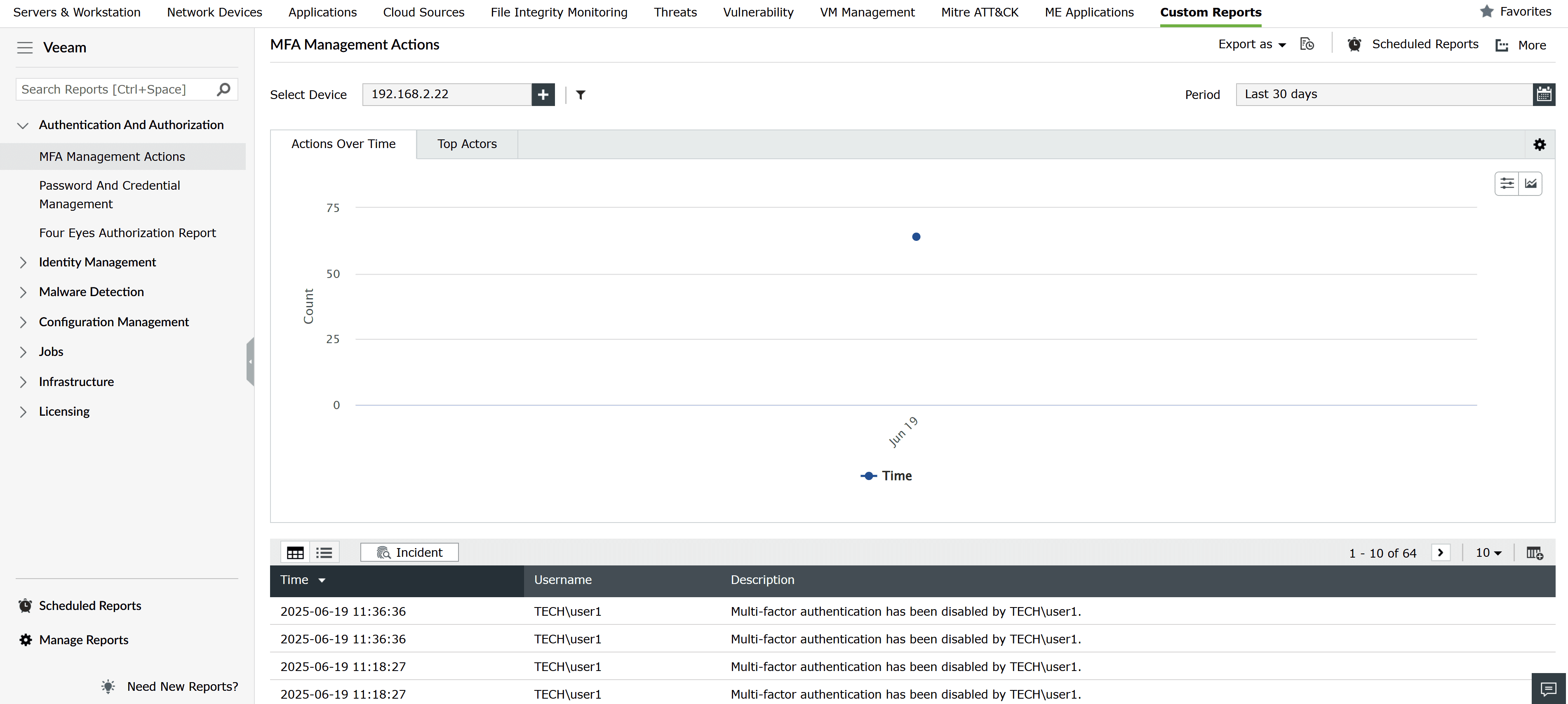
Viewing Veeam reports
To view Veeam reports, navigate to the Reports tab and select Veeam under custom reports.
Veeam events
Below is a list of Veeam events that EventLog Analyzer can track, helping you monitor backup and recovery activities effectively.
| Instance ID | Event name |
|---|---|
| 151 | File Backup Job Finished |
| 190 | Backup Job Finished |
| 194 | File to Tape Job Finished |
| 195 | Tape Erase Job Finished |
| 199 | Tape Export Job Finished |
| 200 | Tape Copy Job Finished |
| 203 | Tape Eject Job Finished |
| 205 | Move To Media Pool Job Finished |
| 206 | Delete From Library Job Finished |
| 208 | Tape Import Job Finished |
| 23010 | Job Created |
| 23050 | Job Settings Updated |
| 23090 | Job Deleted |
| 23110 | Objects for Job Added |
| 23130 | Objects for Job Changed |
| 23210 | SureBackup Job Created |
| 23220 | SureBackup Job Settings Updated |
| 23230 | SureBackup Job Deleted |
| 23310 | Objects for SureBackup Job Added |
| 23320 | Objects for SureBackup Job Deleted |
| 23410 | Job Assigned as Secondary Destination |
| 23420 | Job No Longer Used as Secondary Destination |
| 23440 | Tape Job Created |
| 23450 | Tape Job Settings Updated |
| 23490 | Tape Job Deleted |
| 23510 | Objects for Tape Job Added |
| 23520 | Objects for Tape Job Deleted |
| 23530 | Objects for Tape Job Changed |
| 24010 | License Installed |
| 24030 | License Expired |
| 24050 | License Support Expired |
| 24060 | License Grace Period Started |
| 24070 | License Limit Exceeded |
| 24080 | License Removed |
| 25300 | Credential Record Added |
| 25400 | Credential Record Updated |
| 25500 | Credential Record Deleted |
| 25900 | Failover Plan Created |
| 26000 | Failover Plan Settings Updated |
| 26010 | Target Location Does Not Match Source Location |
| 26100 | Failover Plan Deleted |
| 26110 | Failover Plan Failed |
| 26600 | Failover Plan Started |
| 26700 | Failover Plan Stopped |
| 28300 | Host Added |
| 28400 | Host Settings Updated |
| 28500 | Host Deleted |
| 31000 | General Settings Updated |
| 31100 | Global Settings for Network Traffic Rules Updated |
| 31200 | User or Group Added |
| 31210 | Adding User or Group Failed |
| 31400 | User or Group Deleted |
| 31600 | Encryption Password Added |
| 31700 | Encryption Password Updated |
| 31800 | Encryption Password Deleted |
| 31900 | SSH Credentials Changed |
| 32120 | Objects for Job Deleted |
| 32300 | Global Network Traffic Rules Added |
| 32400 | Global Network Traffic Rules Deleted |
| 32500 | Global Network Traffic Rules Updated |
| 32600 | Preferred Networks Updated |
| 32700 | Preferred Networks Added |
| 32800 | Preferred Networks Deleted |
| 36022 | Backup Job for Application Backup Policy Finished |
| 36026 | Log Backup Job for Application Backup Policy Finished |
| 390 | SureBackup Job Finished |
| 40200 | Multi-Factor Authentication Enabled |
| 40201 | Multi-Factor Authentication Disabled |
| 40202 | Multi-Factor Authentication Token Revoked |
| 40203 | Multi-Factor Authentication for User Enabled |
| 40204 | Multi-Factor Authentication for User Disabled |
| 40206 | Allowed Attempts for Multi-Factor Authentication Exceeded |
| 40290 | Restore Session Finished |
| 40400 | Global VM Exclusions Added |
| 40500 | Global VM Exclusions Deleted |
| 40600 | Global VM Exclusions Changed |
| 40700 | Configuration Backup Job Finished |
| 40900 | Location Added |
| 40901 | Location Settings Updated |
| 40902 | Location Deleted |
| 40903 | Object Location Changed |
| 41600 | Malware Activity Detected |
| 41710 | Health Check Job Finished |
| 41800 | Attempt to Delete Backup Failed |
| 41810 | Attempt To Update Security Object Failed |
| 42210 | Malware Detection Session Finished |
| 42260 | Objects Added to Malware Detection Exclusions |
| 42270 | Objects Deleted from Malware Detection Exclusions |
| 42280 | Malware Detection Exclusions List Updated |
| 42290 | Malware Detection Settings Updated |
| 42400 | Four-Eyes Authorization Enabled |
| 42401 | Four-Eyes Authorization Disabled |
| 42402 | Four-Eyes Authorization Request Created |
| 42403 | Four-Eyes Authorization Request Approved |
| 42404 | Four-Eyes Authorization Request Rejected |
| 42405 | Four-Eyes Authorization Request Expired |
| 451 | File Backup Copy Job Finished |
| 490 | Backup Copy Job Finished |
| 590 | File Copy Job Finished |
| 592 | VM Copy Job Finished |
| 610 | Quick Migration Finished |
| 28200 | Backup Repository Deleted |
| 42260 | Objects Added to Malware Detection Exclusions |
| 41610 | Object Marked as Clean |
| 42220 | Restore Point Marked as Infected |
| 42230 | Restore Point Marked as Clean |