
Okta
Last updated on:
In this page
Overview
Okta is a cloud-based Identity and Access Management (IAM) platform designed to secure user authentication and manage access to applications, devices, and APIs. It offers key features like Single Sign-On (SSO), Multi-Factor Authentication (MFA), lifecycle management, and directory integration, helping organizations streamline access control.
The Okta extension for ManageEngine Log360 Cloud integrates identity event visibility with automated response, enabling security teams to monitor authentication activity, detect anomalies, and trigger SOAR actions from correlated incidents, without switching consoles. By combining Log360 Cloud's correlation capabilities with Okta's identity control mechanisms, organizations can rapidly contain threats such as account takeovers and unauthorized access.
Use cases
Automatically contain compromised accounts
When Log360 Cloud detects suspicious authentication patterns, such as impossible travel, repeated MFA failures, or access from unknown locations, it can automatically trigger account suspension or session termination actions through the Okta extension.
This enables immediate containment, preventing an attacker from leveraging a compromised account to access sensitive applications. Instead of waiting for manual analyst intervention, the response is executed as part of a predefined playbook, reducing dwell time.
For example: If a brute-force login attempt is detected followed by a successful authentication from an anomalous IP, Log360 Cloud can automatically suspend the user, end all active sessions, and expire the user's password, while recording analyst notes for audit tracking.
Similarly, you can automate actions such as:
- Deactivate or suspend user accounts using okta_deactivateUser or okta_suspendAUser to immediately block access when a user is flagged as compromised.
- Terminate all active sessions using okta_endUserSession to revoke access across all applications instantly.
- Enforce re-authentication by expiring or resetting passwords using okta_expirePassword or okta_resetPassword.
- Manage group membership dynamically using okta_addToGroup or okta_removeFromGroup to enforce access policies in response to detected threats.
Pre-requisites
- Before creating a connection for a pre-defined service, ensure that the corresponding integration/extension is installed in Log360 Cloud.
- Only after installing the extension, the service will appear in the Connections page for connection setup.
Okta extension scope
Okta extension allows users to add their Okta domains to collect Okta system logs to Log360 cloud. This extension provides features such as log collection, parsing, reporting, alerting, correlation, and advanced log search capabilities for monitoring web traffic and server performance.
Audited Okta events
Okta provides detailed logs for all actions that modify the Okta domain. These logs capture key system events, including changes to user accounts, groups, and applications.
Major logged events
- User lifecycle management
- User creation, modification, and deletion
- Activation, deactivation, suspension, and unsuspension of user accounts
- Group management
- Creation and deletion of groups
- User assignments to and removals from groups
- Application management
- Creation, update, integration, and deletion of applications
- Assignment and removal of users from applications
- Log in to the product console.
- Navigate to Settings tab and select Admin.
- Under Marketplace, select Installed Extensions to view the installed Okta extension.
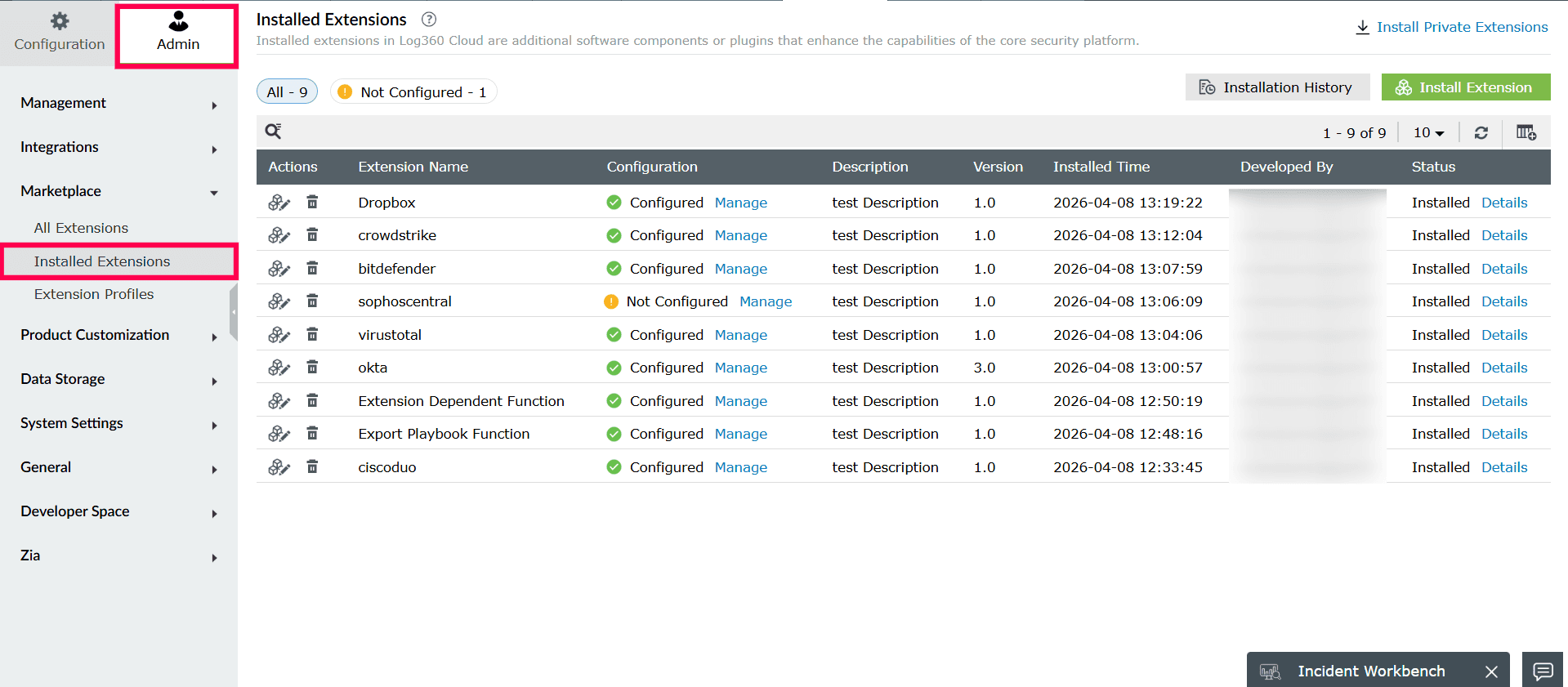
Figure 1: Viewing Installed Extensions - Click Manage under Configuration to open the Manage Configuration page.
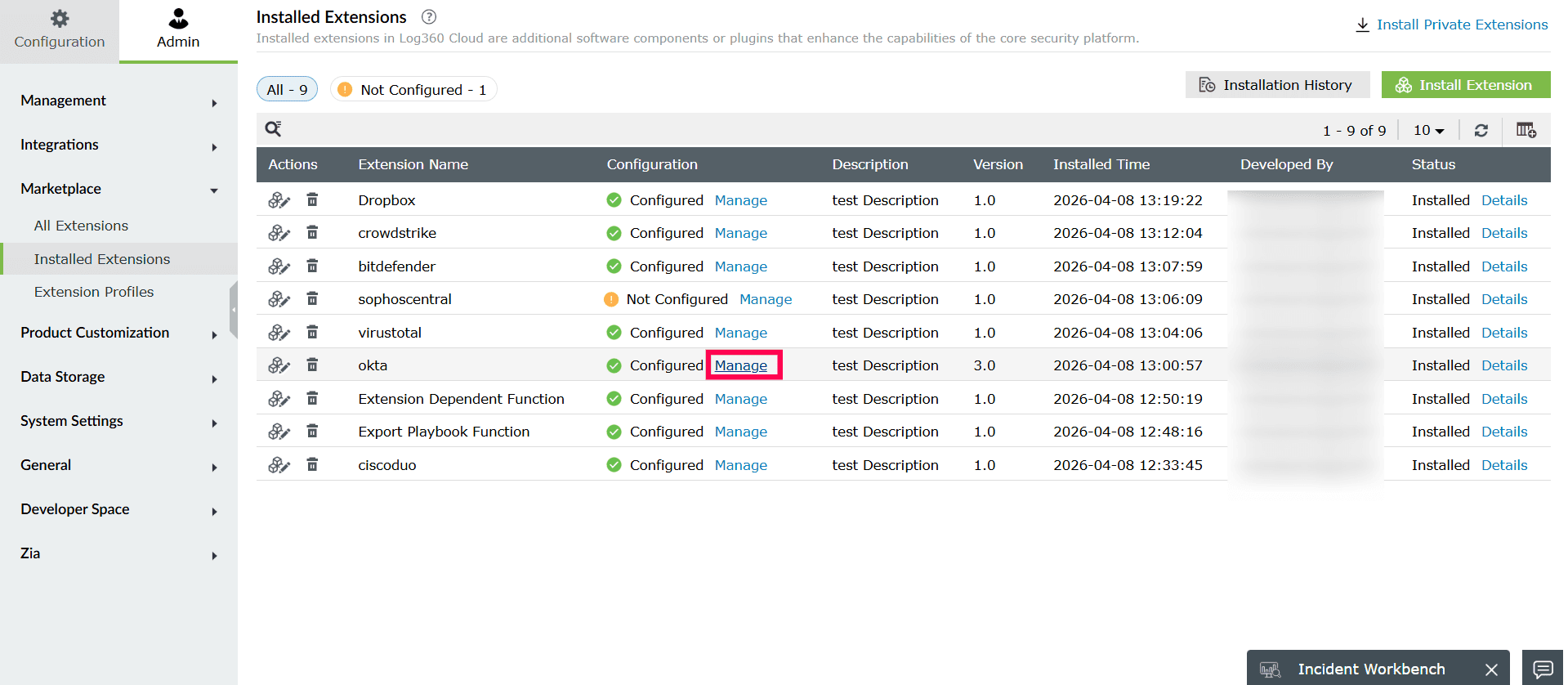
Figure 2: Managing extensions - To configure the Okta log source, click Configure to open the configuration page.
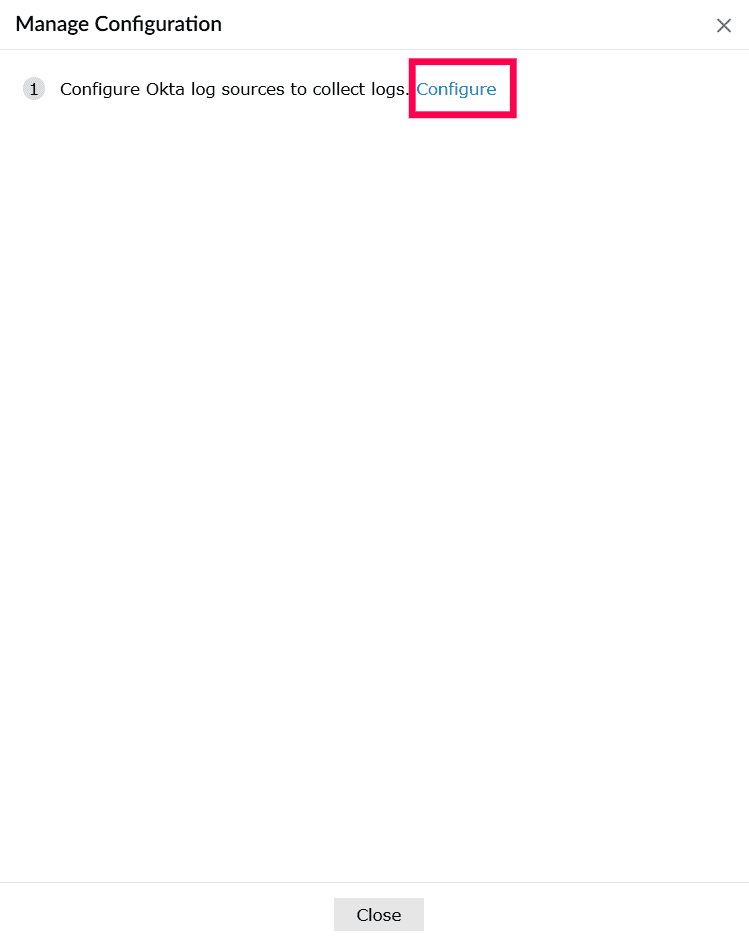
Figure 3: Configuring Okta - In the Log Source Type dropdown, select Okta System Events.
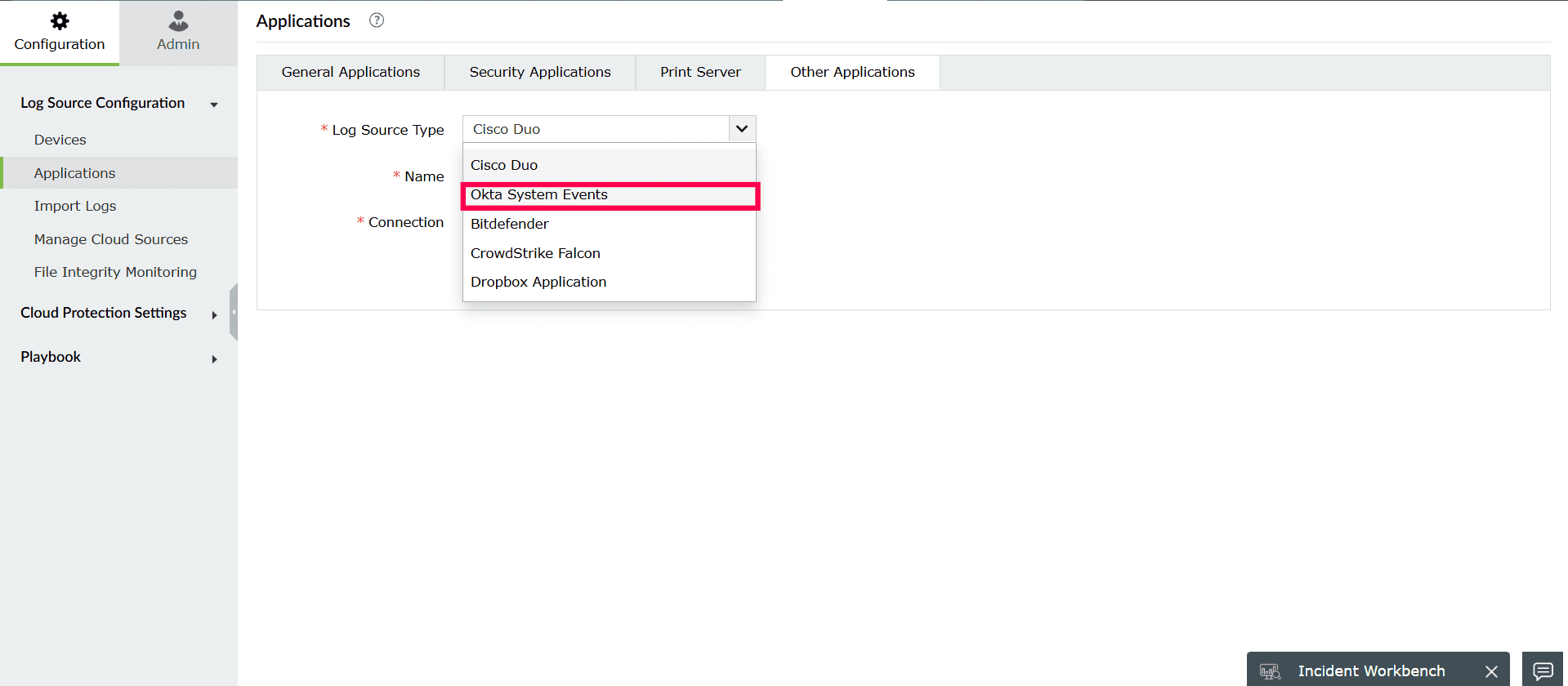
Figure 4: Selecting Log Source Type - In the Name field, enter a name for the Okta source.
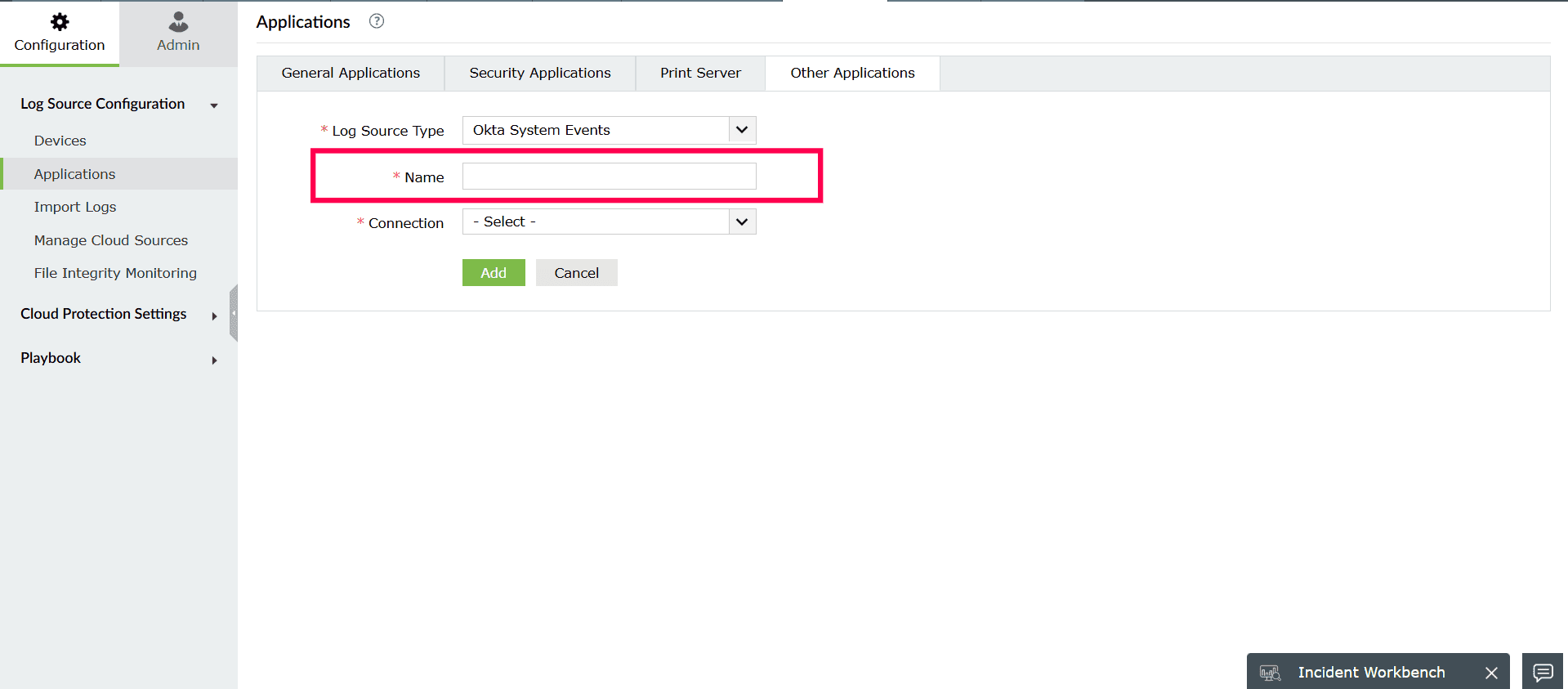
Figure 5: Entering a name for Okta source - From the Connection dropdown, choose one of the following options:
- Select an existing connection, if already created.
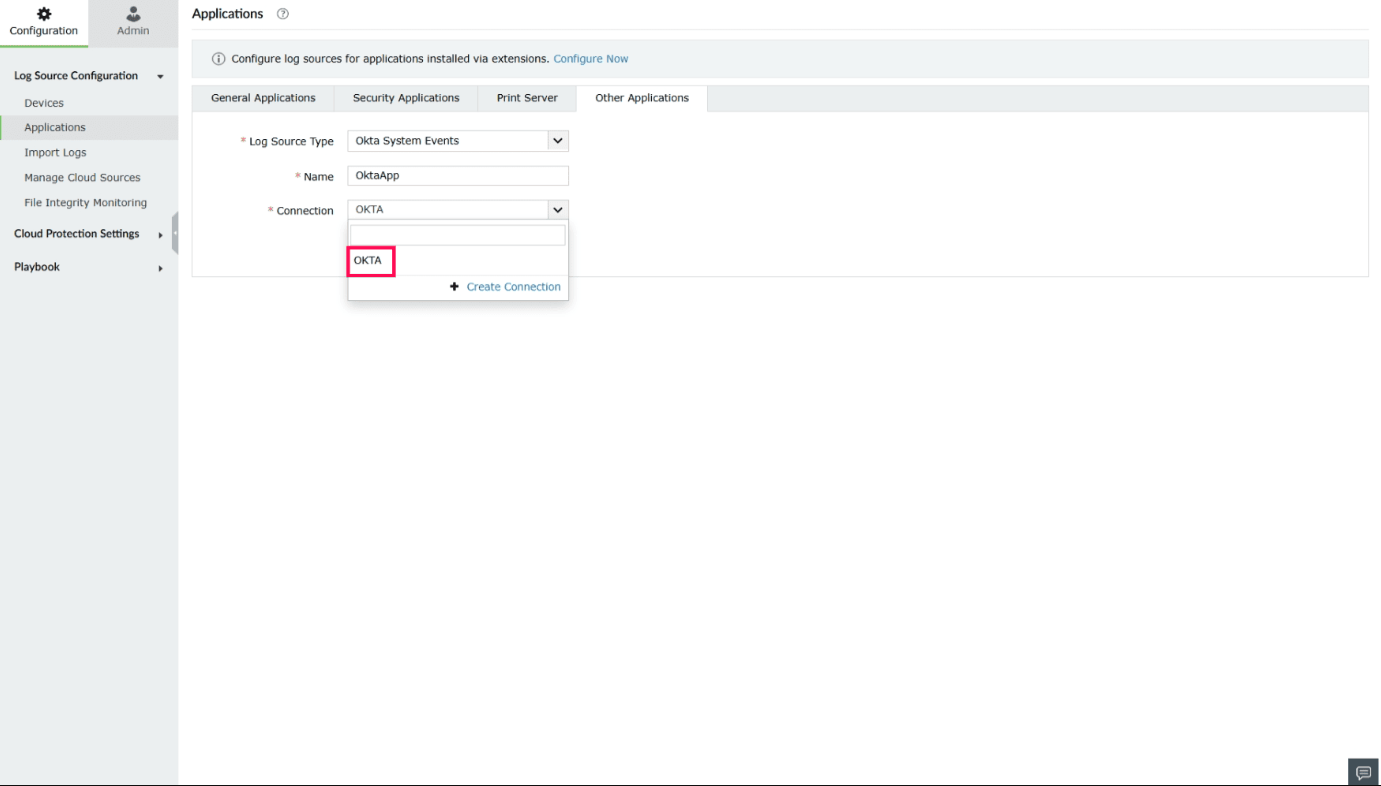
Figure 6: Selecting an existing connection - Click Create Connection to create a new connection.
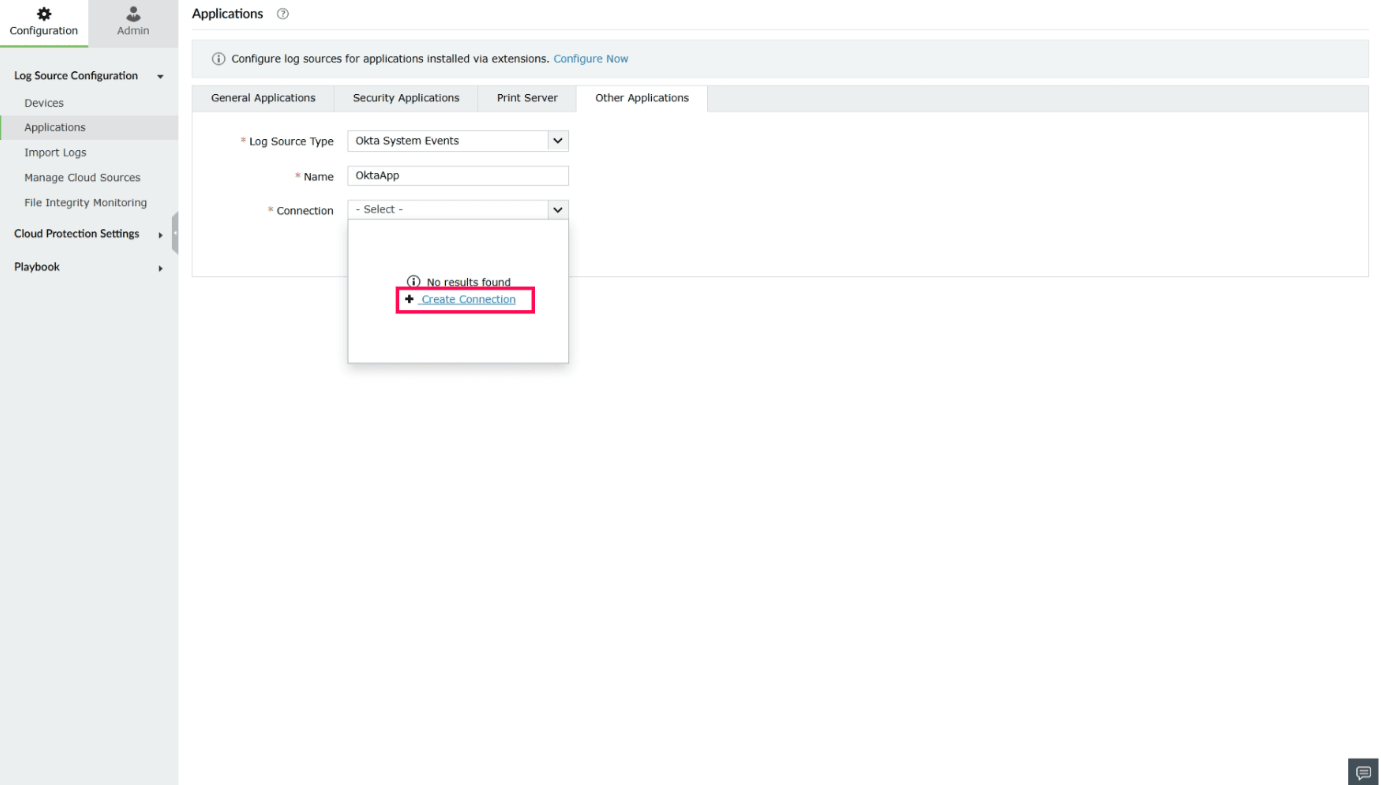
Figure 7: Creating a connection
- Select an existing connection, if already created.
- In the Create Connection - Okta window, provide the following details:
- Authentication Type: Preselected based on the integration.
- Connection Name: Enter a name to identify the connection.
NOTE Please refer to this page to identify the Okta domain URL.
- Organization URL: Enter your Okta domain (for example, exampledomain.okta.com).
- Auth Token: Enter the auth token associated with your Okta account.
NOTE- Read-only administrator role is enough to fetch and display all the relevant Okta data in Log360 Cloud.
- Refer to this page to create an authentication token.
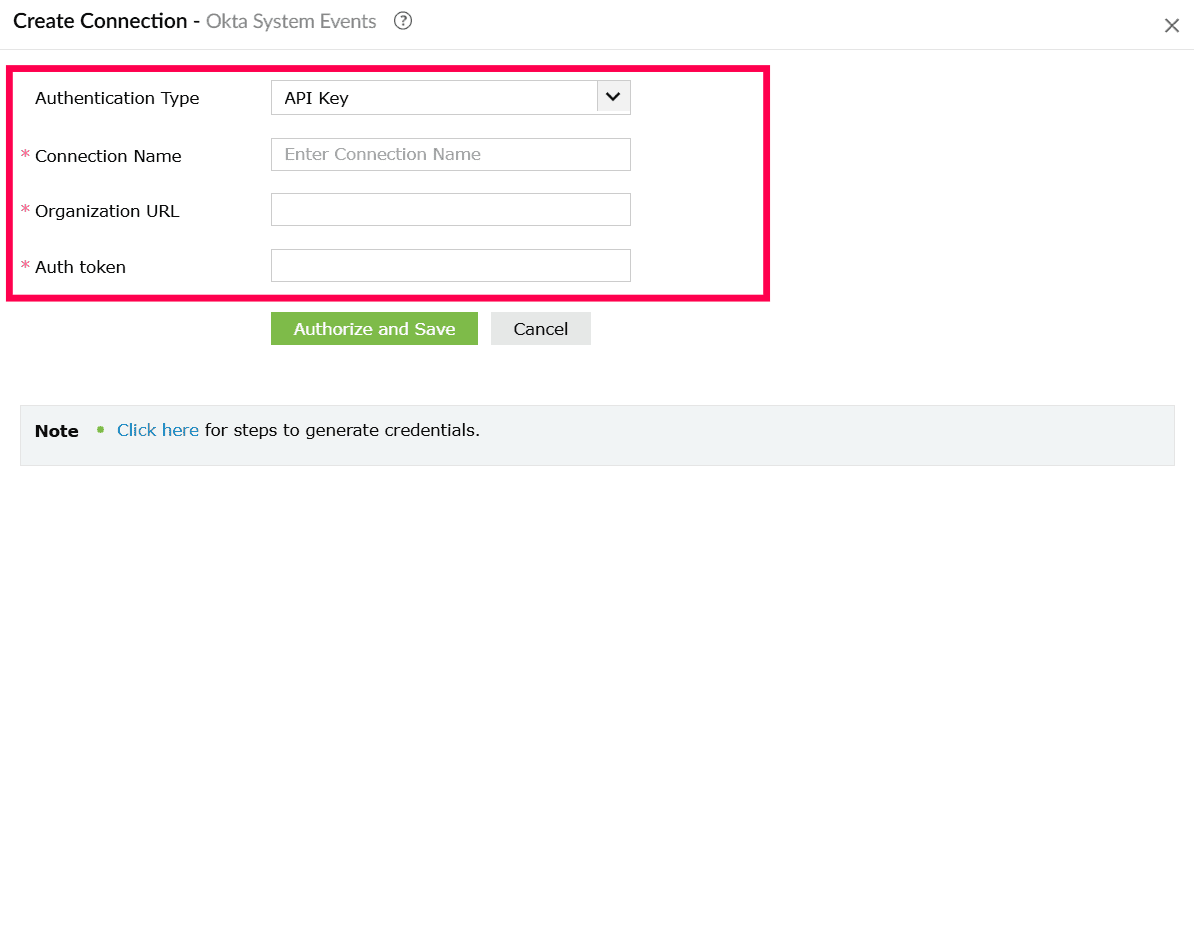
Figure 8: Creating a connection - Click Authorize and Save to complete authentication and create the connection.
- In the Application page, click Add to configure Okta as a log source.
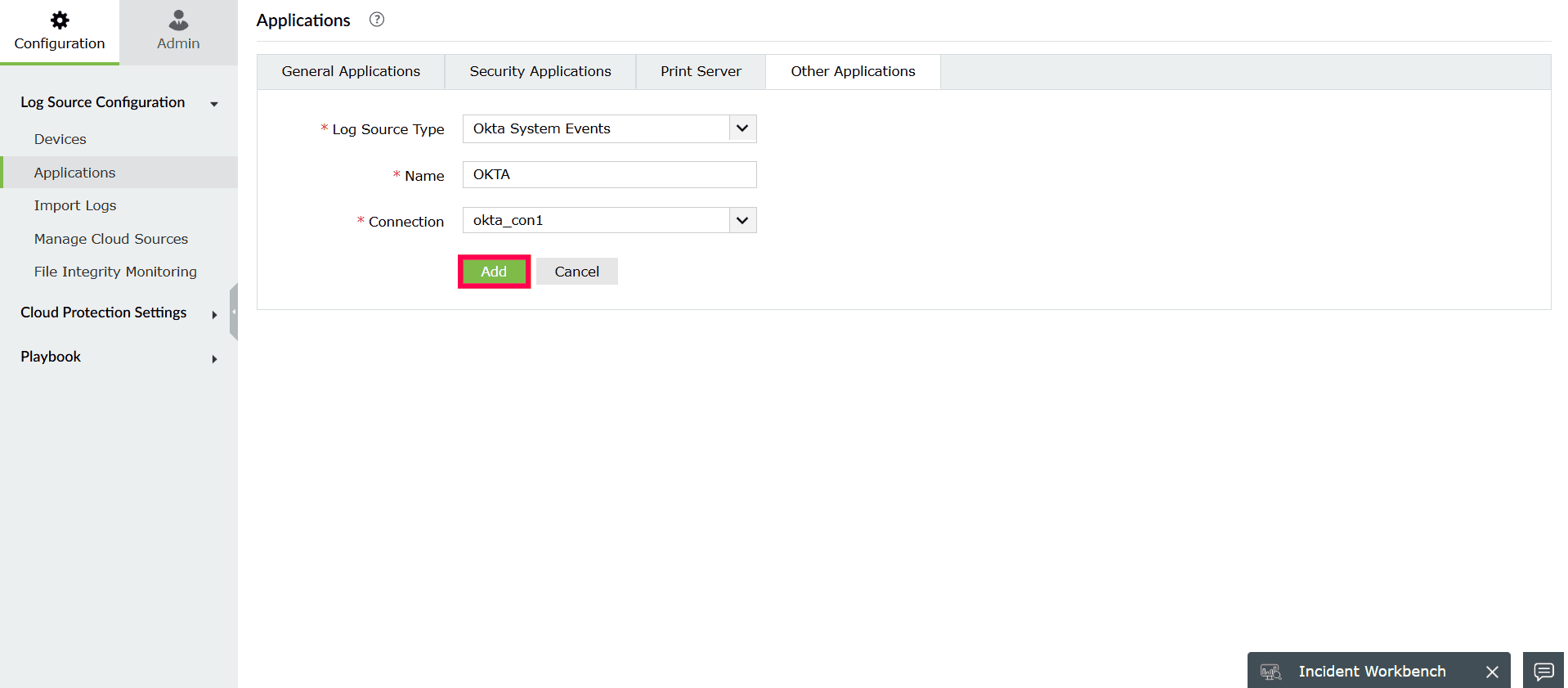
Figure 9: Configuring Okta as a log source - All Events
- Important Events
- Password Reset
- User Locked Out
- Privileged Application Access
- Request Blocked
- User Authentication SSO
- Privileged Application Access
- User Locked Out
- Suspicious Activity
- Self Service Unlock
- User Session Start
- Password Reset
- Request Blocked
- User Account Created
- User Account Activated
- User Account Deactivated
- User Account Suspended
- User Account Unsuspended
- User Added to an Application
- User Removed from an Application
- Username Changed
- User Added to Group
- User Removed from Group
- Application Created
- Application Updated
- Application Deactivated
- Application Activated
- Log in to the product console.
- Navigate to the Settings tab and select Admin.
- Under Integrations, select Connections.
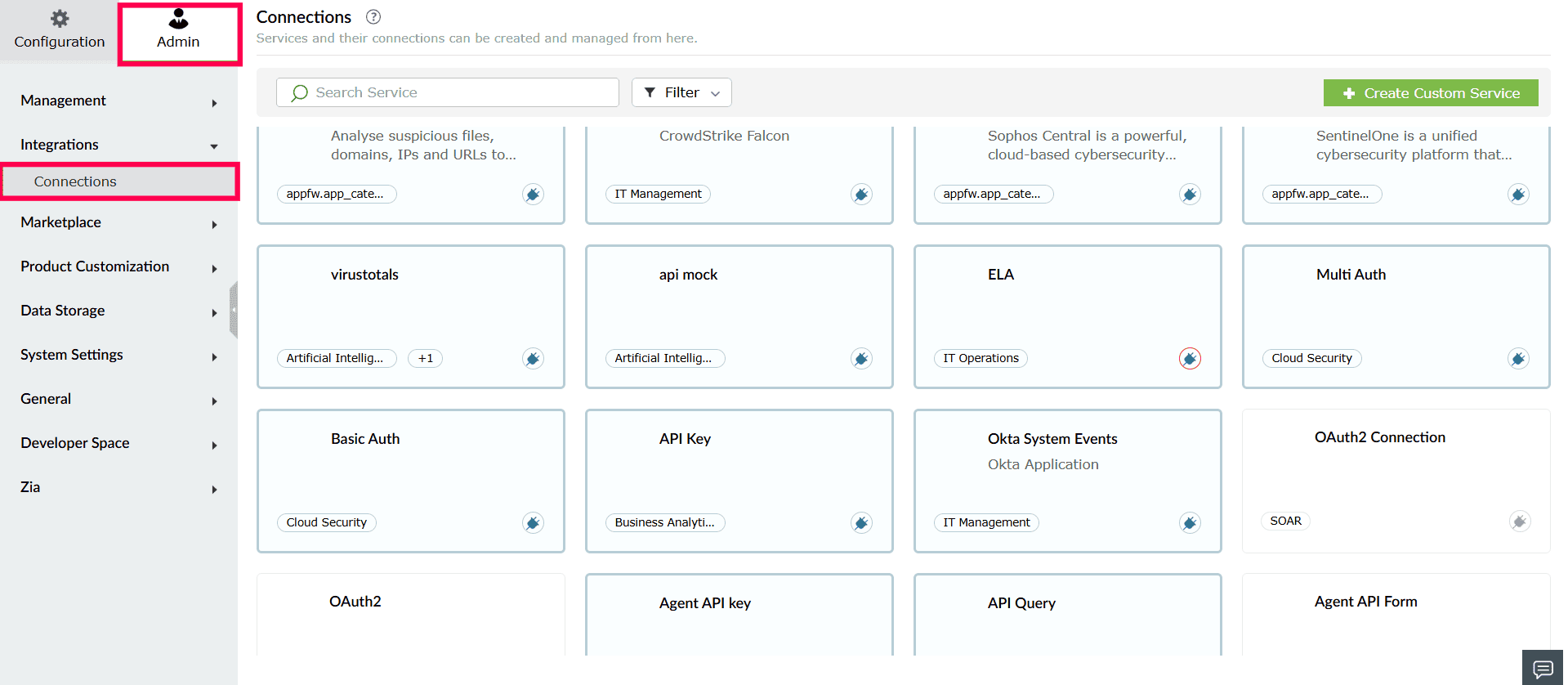
Figure 10: Viewing Connections - From the list of available integrations, select Okta.
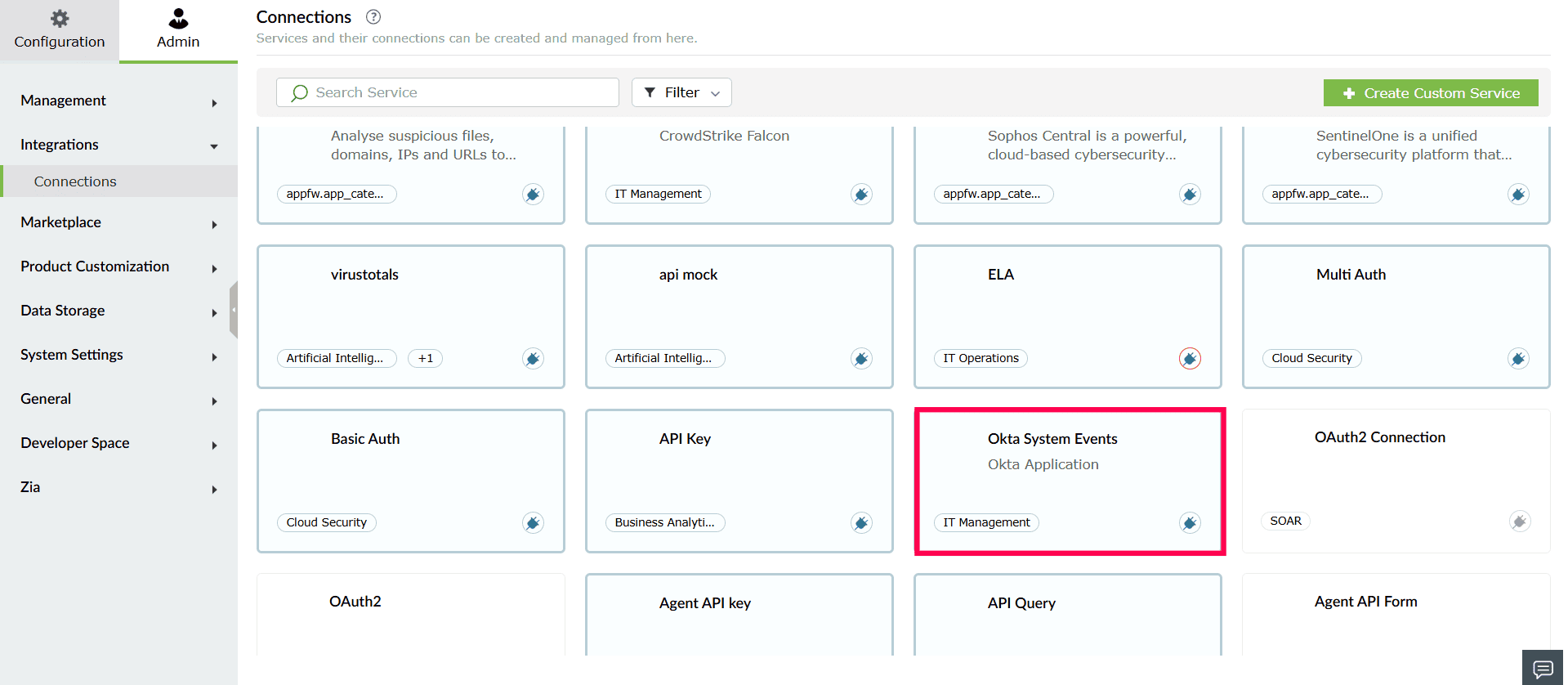
Figure 11: Selecting Okta - In the window that opens, click Create Connection.
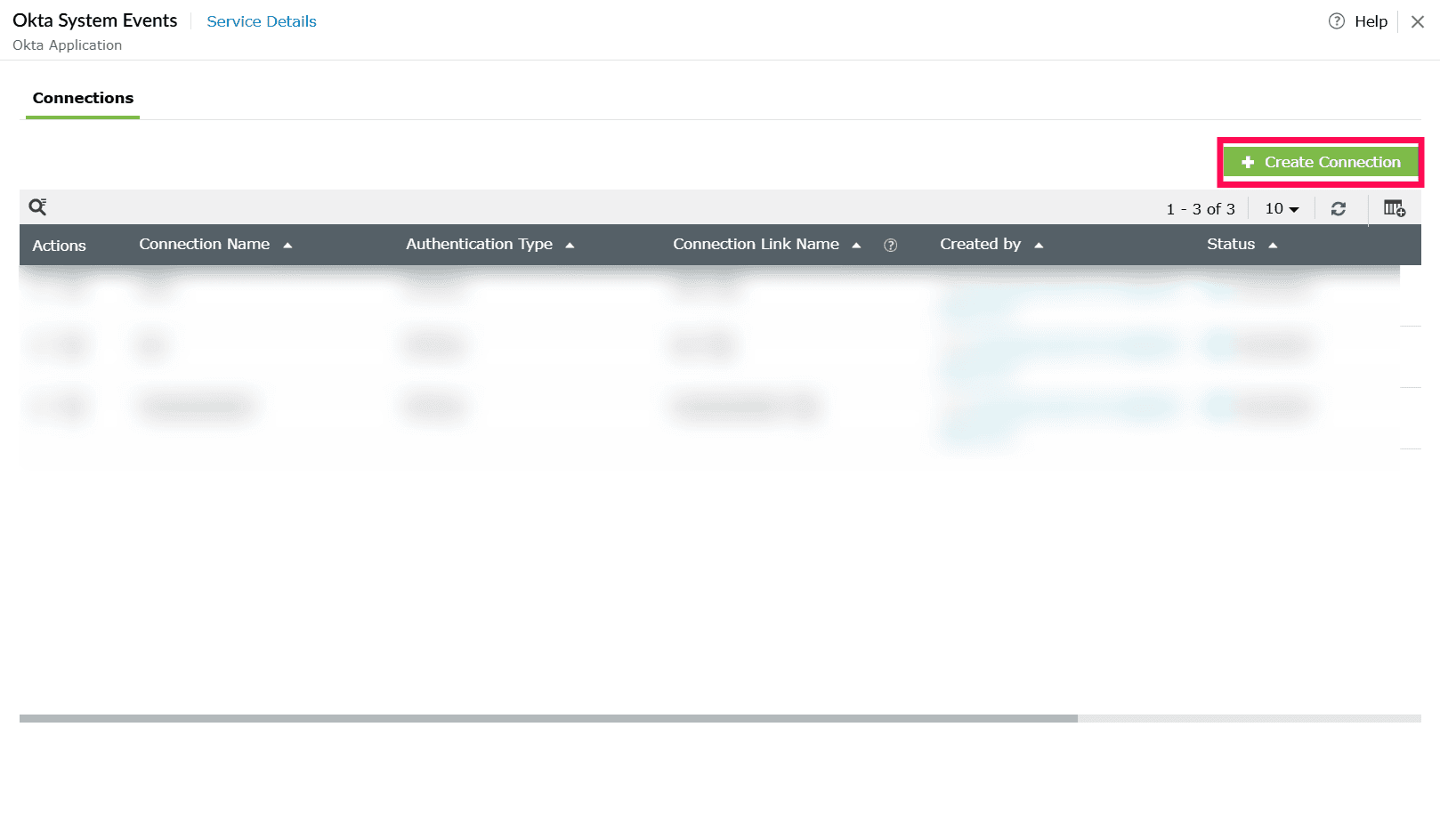
Figure 12: Creating a connection - In the Create Connection - Okta window, provide the following details:
- Authentication Type: Preselected based on the integration.
- Connection Name: Enter a name to identify the connection.
NOTE Please refer to this page to identify the Okta domain URL.
- Organization URL: Enter your Okta domain (for example, exampledomain.okta.com).
- Auth Token: Enter the auth token associated with your Okta account.
NOTE- Read-only administrator role is enough to fetch and display all the relevant Okta data in Log360 Cloud.
- Refer to this page to create an authentication token.
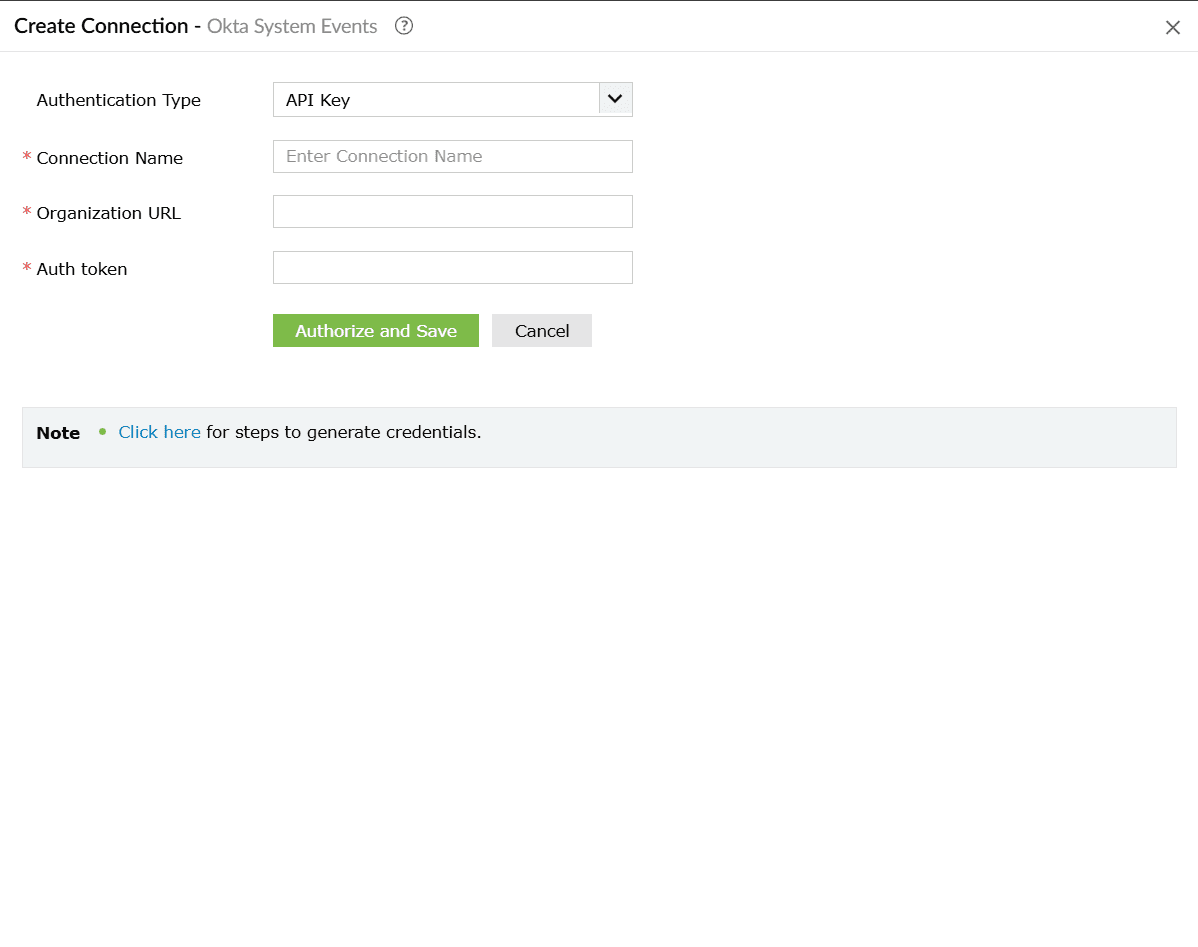
Figure 13: Configuring connection details - Click Authorize and Save to complete authentication and create the connection.
- firstName - Given name of the user
- lastName - Family name of the user
- nickName - Casual way to address the user
- displayName - Name suitable for display to end users
- email - Primary email address of the user
- secondEmail - Secondary email for account recovery
- department - Name of the user's department
- mobilePhone - Mobile phone number of the user
- primaryPhone - Primary phone number (e.g., home)
- streetAddress - Full street address
- city - City or locality
- state - State or region
- zipCode - ZIP / postal code
- countryCode - Country name component
- division - Name of the user's division
- title - User's title (e.g., Vice President)
- organization - Name of the user's organization
- manager - Display name of the user's manager
- managerId - ID of the user's manager
- status - Network Zone Status
- usage - The usage of the Network Zone
- gateways - IP addresses (range or CIDR) for an IP Network Zone. Max: 150 entries (admin-created), 1000 (IP blocklist), 5000 (default system IP Zone)
- proxies - IP addresses allowed to forward requests from gateway addresses. Max: 150 entries (admin-created), 5000 (default system IP Zone)
- status - Network Zone Status
- usage - The usage of the Network Zone
- gateways - IP addresses (range or CIDR) for an IP Network Zone. Max: 150 entries (admin-created), 1000 (IP blocklist), 5000 (default system IP Zone)
- proxies - IP addresses allowed to forward requests from gateway addresses. Max: 150 entries (admin-created), 5000 (default system IP Zone)
- access - Access decision for sign-on rules. Values: ALLOW or DENY
- factorMode - MFA requirement mode. Values: REQUIRED, OPTIONAL
- factorTypes - List of factor types required (e.g., push, token, password)
- network.connection - Network connection type. Values: ANYWHERE, ZONE, ON_NETWORK, OFF_NETWORK
- network.include - List of network zone IDs to include
- people.groups.include - List of group IDs the rule applies to
- people.groups.include - List of group IDs this policy applies to. Use to scope the policy to specific groups only
Configuring Okta log source
To begin collecting Okta system logs in Log360 Cloud, configure the Okta log source as follows:
Viewing Okta reports
To view Okta reports, navigate to the Reports tab and select Okta for Log360 Cloud in the sub-tab.
Log360 Cloud provides the following out-of-the-box reports:
Okta Events
User Audit Reports
User Management Reports
Configuration Reports
Application Events
Okta alerts
To view alerts, navigate to the Alerts tab and select Manage Alert Profiles.
In the Manage Alert Profiles page, select Custom Alert Profiles as the Alert Profile Type. Click the search icon and add Okta to filter the alert criteria.
Configuring Okta integration via Connections
To enable communication between Log360 Cloud and Okta for SOAR actions, a connection must be configured.
Supported SOAR functionalities
The Okta extension provides custom functions that enable playbooks to interact with Okta APIs. These functions can be used to manage users, groups, network zones, policies, and authentication factors.
1. okta_getUser
Retrieves detailed information about a specific Okta user account.
| Parameter | Param Type | Param Description | Mandatory |
|---|---|---|---|
| connectionName | Connection | The name of the pre-configured Okta connection used for authentication and API access. | Yes |
| userLogin | String | The user identifier. Can be the user ID (e.g., 00u1abc2def3GHI4jkl5), the full login email (e.g., user@example.com), or the login shortname if unambiguous. | Yes |
Reference Link
https://developer.okta.com/docs/api/openapi/okta-management/management/tags/user/other/getuser
2. okta_createUser
Creates a new Okta user account with basic profile information (without credentials or password).
| Parameter | Param Type | Param Description | Mandatory |
|---|---|---|---|
| connectionName | Connection | The name of the pre-configured Okta connection used for authentication and API access. | Yes |
| userEmail | String | The primary email address that will serve as both the user's email and login identifier (e.g., john.doe@company.com). | Yes |
| firstName | String | The user's first (given) name as it should appear in the user profile. | Yes |
| lastName | String | The user's last (family/surname) name as it should appear in the user profile. | Yes |
Reference Link
https://developer.okta.com/docs/api/openapi/okta-management/management/tags/user/other/createuser
3. okta_updateUser
Updates one or more fields in an existing Okta user's profile.
| Parameter | Param Type | Param Description | Mandatory | Map Parameter Structure | Description |
|---|---|---|---|---|---|
| connectionName | Connection | The name of the pre-configured Okta connection used for authentication and API access. | Yes | - | - |
| userLogin | String | The user identifier. Can be the user ID, the full login email, or the login shortname if unambiguous. | Yes | - | - |
| profile | String | A map containing the user profile attributes to update. Only specified fields will be updated. | Yes | { "firstName": String, "lastName": String, "nickName": String, "displayName": String, "email": String, "secondEmail": String, "department": String, "mobilePhone": String, "primaryPhone": String, "streetAddress": String, "city": String, "state": String, "zipCode": String, "countryCode": String, "division": String, "title": String, "organization": String, "manager": String, "managerId": String} |
|
Reference Link
https://developer.okta.com/docs/api/openapi/okta-management/management/tags/user/other/updateuser
4. okta_deactivateUser
Deactivates an Okta user account, preventing the user from signing in (user must not have DEPROVISIONED status).
| Parameter | Param Type | Param Description | Mandatory |
|---|---|---|---|
| connectionName | Connection | The name of the pre-configured Okta connection used for authentication and API access. | Yes |
| sendEmail | Bool | Determines whether to send an email notification to the user about the account status change. | Yes |
| userLogin | String | The user identifier. Can be the user ID, the full login email, or the login shortname if unambiguous. | Yes |
Reference Link
5. okta_activateUser
Activates a previously deactivated or staged Okta user account, allowing the user to sign in (user must have STAGED or DEPROVISIONED status).
| Parameter | Param Type | Param Description | Mandatory |
|---|---|---|---|
| connectionName | Connection | The name of the pre-configured Okta connection used for authentication and API access. | Yes |
| sendEmail | Bool | Determines whether to send an email notification to the user about the account status change. | Yes |
| userLogin | String | The user identifier. Can be the user ID, the full login email, or the login shortname if unambiguous. | Yes |
Reference Link
6. okta_addToGroup
Adds a user as a member to an existing Okta group.
| Parameter | Param Type | Param Description | Mandatory |
|---|---|---|---|
| connectionName | Connection | The name of the pre-configured Okta connection used for authentication and API access. | Yes |
| groupId | String | The unique identifier of the Okta group (e.g., 00g1ab2cd3ef4GH5IJ6). Group IDs can be obtained from the list groups API. | Yes |
| userLogin | String | The user identifier. Can be the user ID, the full login email, or the login shortname if unambiguous. | Yes |
Reference Link
7. okta_removeFromGroup
Removes a user's membership from an existing Okta group.
| Parameter | Param Type | Param Description | Mandatory |
|---|---|---|---|
| connectionName | Connection | The name of the pre-configured Okta connection used for authentication and API access. | Yes |
| groupId | String | The unique identifier of the Okta group. Group IDs can be obtained from the list groups API. | Yes |
| userLogin | String | The user identifier. Can be the user ID, the full login email, or the login shortname if unambiguous. | Yes |
Reference Link
8. okta_createGroup
Creates a new Okta group with a specified name and description.
| Parameter | Param Type | Param Description | Mandatory |
|---|---|---|---|
| connectionName | Connection | The name of the pre-configured Okta connection used for authentication and API access. | Yes |
| groupDescription | String | A human-readable description of the group's purpose or membership criteria (e.g., 'Engineering team members'). | Yes |
| groupName | String | A unique name for the group used to identify it in the Okta organization (e.g., 'Engineering-Team'). | Yes |
Reference Link
https://developer.okta.com/docs/api/openapi/okta-management/management/tags/group/other/addgroup
9. okta_suspendAUser
Suspends an active Okta user account, temporarily preventing sign-in while retaining user data (user must have ACTIVE status).
| Parameter | Param Type | Param Description | Mandatory |
|---|---|---|---|
| connectionName | Connection | The name of the pre-configured Okta connection used for authentication and API access. | Yes |
| userLogin | String | The user identifier. Can be the user ID, the full login email, or the login shortname if unambiguous. | Yes |
Reference Link
10. okta_unlockUser
Unlocks a locked Okta user account, allowing the user to attempt sign-in again (user must have LOCKED_OUT status).
| Parameter | Param Type | Param Description | Mandatory |
|---|---|---|---|
| connectionName | Connection | The name of the pre-configured Okta connection used for authentication and API access. | Yes |
| userLogin | String | The user identifier. Can be the user ID, the full login email, or the login shortname if unambiguous. | Yes |
Reference Link
11. okta_unsuspendUser
Removes the suspension status from a suspended Okta user account, restoring normal access (user must have SUSPENDED status).
| Parameter | Param Type | Param Description | Mandatory |
|---|---|---|---|
| connectionName | Connection | The name of the pre-configured Okta connection used for authentication and API access. | Yes |
| userLogin | String | The user identifier. Can be the user ID, the full login email, or the login shortname if unambiguous. | Yes |
Reference Link
12. okta_deleteUser
Permanently deletes an Okta user account and all associated data (user can be in any status including DEPROVISIONED).
| Parameter | Param Type | Param Description | Mandatory |
|---|---|---|---|
| connectionName | Connection | The name of the pre-configured Okta connection used for authentication and API access. | Yes |
| userLogin | String | The user identifier. Can be the user ID, the full login email, or the login shortname if unambiguous. | Yes |
Reference Link
https://developer.okta.com/docs/api/openapi/okta-management/management/tags/user/other/deleteuser
13. okta_listUsers
Retrieves a list of Okta users with optional filtering, searching, and pagination support.
| Parameter | Param Type | Param Description | Mandatory |
|---|---|---|---|
| connectionName | Connection | The name of the pre-configured Okta connection used for authentication and API access. | Yes |
| filter | String | A filter expression to narrow down results based on specific user attributes (e.g., 'status eq "ACTIVE"'). | No |
| search | String | A search query string to find users across multiple profile fields. | No |
| limit | Int | The maximum number of user records to return (default: 20, max: 100). | No |
| query | String | A simple query string to find users by matching firstName, lastName, or email fields. | No |
| after | String | Pagination cursor for the next page of results. Treat as an opaque value from the next link relationship. | No |
Reference Link
https://developer.okta.com/docs/api/openapi/okta-management/management/tags/user/other/listusers
14. okta_getZone
Retrieves detailed information about a specific Okta network zone by its ID.
| Parameter | Param Type | Param Description | Mandatory |
|---|---|---|---|
| connectionName | Connection | The name of the pre-configured Okta connection used for authentication and API access. | Yes |
| zoneId | String | The unique identifier of the network zone (e.g., nzo1ab2cd3ef4GH5IJ6). Zone IDs can be obtained from the list network zones API. | Yes |
Reference Link
15. okta_listGroupMembers
Retrieves a paginated list of all users who are members of a specific Okta group.
| Parameter | Param Type | Param Description | Mandatory |
|---|---|---|---|
| connectionName | Connection | The name of the pre-configured Okta connection used for authentication and API access. | Yes |
| groupId | String | The ID of the group. | Yes |
| limit | Int | The maximum number of records to return per page (default: 20, max: 100). | No |
| after | String | Pagination cursor for the next page of results. | No |
Reference Link
16. okta_listUsersApps
Retrieves a paginated list of all applications assigned to a specific Okta user.
| Parameter | Param Type | Param Description | Mandatory |
|---|---|---|---|
| connectionName | Connection | The name of the pre-configured Okta connection used for authentication and API access. | Yes |
| userLogin | String | The user identifier. Can be the user ID, the full login email, or the login shortname if unambiguous. | Yes |
Reference Link
17. okta_listApplication
Retrieves a paginated list of Okta applications with optional name-based filtering.
| Parameter | Param Type | Param Description | Mandatory |
|---|---|---|---|
| connectionName | Connection | The name of the pre-configured Okta connection used for authentication and API access. | Yes |
| query | String | A search string to filter applications by name (e.g., 'Salesforce', 'Office 365'). | No |
| limit | Int | The maximum number of records to return per page (default: 20, max: 100). | No |
| after | String | Pagination cursor for the next page of results. | No |
Reference Link
18. okta_verifyPushFactor
Initiates or verifies a multi-factor authentication challenge for a user's enrolled authentication factor.
| Parameter | Param Type | Param Description | Mandatory |
|---|---|---|---|
| connectionName | Connection | The name of the pre-configured Okta connection used for authentication and API access. | Yes |
| factorId | String | The unique identifier of the authentication factor to verify. Must be a push-enabled factor (e.g., Okta Verify Push). | Yes |
| userLogin | String | The user identifier. Can be the user ID, the full login email, or the login shortname if unambiguous. | Yes |
| passCode | String | One-time password (OTP) used to verify TOTP factors such as Google Authenticator or Okta Verify TOTP. | No |
| useNumberMatchingChallenge | Bool | When true, enables number matching challenge for enhanced security in Okta Verify push notifications. | No |
| answer | String | The answer to a security question factor. Used when verifying question-based authentication factors. | No |
| authenticatorData | String | Base64-encoded authenticator data returned from the WebAuthn authenticator. Required for WebAuthn factor verification. | No |
| clientData | String | Base64-encoded client data JSON with challenge and origin information. Required for WebAuthn and U2F verification. | No |
| signatureData | String | Base64-encoded cryptographic signature from the authenticator. Required for WebAuthn and U2F verification. | No |
Reference Link
19. okta_setPassword
Sets a new password for an Okta user without requiring the current password (administrative password reset).
| Parameter | Param Type | Param Description | Mandatory |
|---|---|---|---|
| connectionName | Connection | The name of the pre-configured Okta connection used for authentication and API access. | Yes |
| newPassword | String | The new password to set for the user account. Must meet the organization's password policy requirements. | Yes |
Reference Link
20. okta_listFactor
Retrieves all enrolled multi-factor authentication (MFA) factors for a specific user.
| Parameter | Param Type | Param Description | Mandatory |
|---|---|---|---|
| connectionName | Connection | The name of the pre-configured Okta connection used for authentication and API access. | Yes |
| userLogin | String | The user identifier. Can be the user ID, the full login email, or the login shortname if unambiguous. | Yes |
Reference Link
21. okta_endUserSession
Terminates all active sessions for a user, forcing re-authentication on next access and optionally revoking OAuth tokens.
| Parameter | Param Type | Param Description | Mandatory |
|---|---|---|---|
| connectionName | Connection | The name of the pre-configured Okta connection used for authentication and API access. | Yes |
| userLogin | String | The user identifier. Can be the user ID, the full login email, or the login shortname if unambiguous. | Yes |
Reference Link
22. okta_expirePassword
Expires the user's current password, forcing them to change it at next sign-in (transitions user to PASSWORD_EXPIRED status).
| Parameter | Param Type | Param Description | Mandatory |
|---|---|---|---|
| connectionName | Connection | The name of the pre-configured Okta connection used for authentication and API access. | Yes |
| userLogin | String | The user identifier. Can be the user ID, the full login email, or the login shortname if unambiguous. | Yes |
Reference Link
23. okta_resetPassword
Resets the user's password to a system-generated temporary password and expires it, requiring a password change on next sign-in.
| Parameter | Param Type | Param Description | Mandatory |
|---|---|---|---|
| connectionName | Connection | The name of the pre-configured Okta connection used for authentication and API access. | Yes |
| userLogin | String | The user identifier. Can be the user ID, the full login email, or the login shortname if unambiguous. | Yes |
Reference Link
24. okta_listNetworkZone
Retrieves a paginated list of all network zones configured in the Okta organization.
| Parameter | Param Type | Param Description | Mandatory |
|---|---|---|---|
| connectionName | Connection | The name of the pre-configured Okta connection used for authentication and API access. | Yes |
| limit | Int | The maximum number of network zone records to return. Use -1 for default limit. | No |
| after | String | Pagination cursor for the next page of results. | No |
Reference Link
25. okta_updateNetworkZone
Updates the configuration of an existing Okta network zone including IPs, locations, and access policies.
| Parameter | Param Type | Param Description | Mandatory | Map Parameter Structure | Description |
|---|---|---|---|---|---|
| connectionName | Connection | The name of the pre-configured Okta connection used for authentication and API access. | Yes | - | - |
| zoneId | String | The unique identifier of the network zone to update. | Yes | - | - |
| zoneName | String | The new display name for the network zone. Must be unique across all network zones. | Yes | - | - |
| updateType | String | The type of network zone: 'IP', 'DYNAMIC', or 'DYNAMIC_V2'. | Yes | - | - |
| bodyData | String | A JSON string containing the updated configuration for the network zone. | No | { "status": String, "usage": String, "gateways": Array, "proxies": Array} |
|
Reference Link
26. okta_createNetworkZone
Creates a new Okta network zone to define trusted or restricted IP addresses, locations, or network conditions.
| Parameter | Param Type | Param Description | Mandatory | Map Parameter Structure | Description |
|---|---|---|---|---|---|
| connectionName | Connection | The name of the pre-configured Okta connection used for authentication and API access. | Yes | - | - |
| name | String | A unique, human-readable name for the network zone. | Yes | - | - |
| type | String | The type of network zone to create: 'IP', 'DYNAMIC', or 'DYNAMIC_V2'. | Yes | - | - |
| bodyData | String | A JSON string containing the configuration details for the new network zone. | No | { "status": String, "usage": String, "gateways": Array, "proxies": Array} |
|
Reference Link
27. okta_triggerSelfServiceUnlock
Initiates a self-service account unlock process, sending a recovery token to the user via email or SMS.
| Parameter | Param Type | Param Description | Mandatory |
|---|---|---|---|
| connectionName | Connection | The name of the pre-configured Okta connection used for authentication and API access. | Yes |
| username | String | The user identifier of the locked account. Used to initiate the self-service unlock process. | Yes |
| factorType | String | The recovery factor type: EMAIL (sends unlock link via email) or SMS (sends unlock code via text). The user must have this factor enrolled. | No |
Reference Link
https://developer.okta.com/docs/reference/api/authn/
28. okta_createPolicyRule
Creates a new rule within an existing Okta policy to define specific conditions and actions for access control.
| Parameter | Param Type | Param Description | Mandatory | Map Parameter Structure | Description |
|---|---|---|---|---|---|
| connectionName | Connection | The name of the pre-configured Okta connection used for authentication and API access. | Yes | - | - |
| policyId | String | The unique identifier of the parent policy to which this rule will be added. | Yes | - | - |
| name | String | A descriptive name for the policy rule (e.g., 'Require MFA for External Users'). | No | - | - |
| priority | Int | Evaluation priority order within the policy. Lower numbers are evaluated first. | No | - | - |
| status | String | Operational status of the rule: ACTIVE (enforced) or INACTIVE (skipped). Default is ACTIVE. | No | - | - |
| system | Bool | If true, the rule cannot be deleted (only modified). Default is false. | No | - | - |
| type | String | The rule type. Common types: SIGN_ON, PASSWORD, MFA_ENROLL, ACCESS_POLICY. | No | - | - |
| actions | String | JSON string defining the actions to take when rule conditions are met. Structure varies by rule type. | No | // Sign-on rule:{ "access": "ALLOW" }// MFA rule:{ "factorMode": "REQUIRED", "factorTypes": ["push"]} |
|
| conditions | String | JSON string defining when this rule should apply. Can specify network zones, user groups, device conditions, etc. | No | { "network": { "connection": "ZONE", "include": ["zoneId1"] }, "people": { "groups": { "include": ["groupId1"] } }} |
|
Reference Link
29. okta_getUserRole
Retrieves all administrative roles assigned to a specific Okta user.
| Parameter | Param Type | Param Description | Mandatory |
|---|---|---|---|
| connectionName | Connection | The name of the pre-configured Okta connection used for authentication and API access. | Yes |
| userId | String | The unique identifier of the Okta user (e.g., 00u1abc2def3GHI4jkl5). | Yes |
Reference Link
30. okta_createPolicy
Creates a new Okta policy to control authentication, authorization, or enrollment requirements.
| Parameter | Param Type | Param Description | Mandatory | Map Parameter Structure | Description |
|---|---|---|---|---|---|
| connectionName | Connection | The name of the pre-configured Okta connection used for authentication and API access. | Yes | - | - |
| name | String | A unique, descriptive name for the policy (e.g., 'Corporate Network Sign-On Policy'). | Yes | - | - |
| type | String | The policy type. Valid values: ACCESS_POLICY, PROFILE_ENROLLMENT, PASSWORD, OKTA_SIGN_ON, MFA_ENROLL, DEVICE_SIGNAL_COLLECTION. | Yes | - | - |
| description | String | A human-readable explanation of the policy's purpose and what it controls. | No | - | - |
| priority | Int | Evaluation order relative to other policies of the same type. Lower numbers are evaluated first. | No | - | - |
| status | String | Operational status: ACTIVE (enforced) or INACTIVE (disabled). Default is ACTIVE. | No | - | - |
| system | Bool | If true, the policy cannot be deleted. Default is false. | No | - | - |
| conditions | String | JSON string specifying policy-level conditions. Most conditions are typically applied at the rule level. | No | { "people": { "groups": { "include": ["groupId1", "groupId2"] } }} |
|
Reference Link
31. okta_unenrollFactor
Removes an enrolled multi-factor authentication (MFA) factor from a user's account.
| Parameter | Param Type | Param Description | Mandatory |
|---|---|---|---|
| connectionName | Connection | The name of the pre-configured Okta connection used for authentication and API access. | Yes |
| userId | String | ID of an existing Okta user. | Yes |
| factorId | String | The unique identifier of the MFA factor to remove. Factor IDs can be obtained from the list factors API. | Yes |
Reference Link
32. okta_listGroup
Retrieves a paginated list of Okta groups with optional search filtering.
| Parameter | Param Type | Param Description | Mandatory |
|---|---|---|---|
| connectionName | Connection | The name of the pre-configured Okta connection used for authentication and API access. | Yes |
| search | String | A search expression to filter groups (e.g., 'type eq "OKTA_GROUP"', or name-based searches). | No |
| limit | Int | The maximum number of records to return per page (default: 20, max: 100). | No |
| after | String | Pagination cursor for the next page of results. | No |
Reference Link
Read also
This page explained how to configure the Okta integration, collect identity logs, and use supported SOAR actions for automated user lifecycle and access management. For more information on related integration features, refer to: