Start a fully functional 30-day free trial. No commitment required.
8 Best Mobile Device Management (MDM) Software in 2026

Karan
Last Updated: July 7, 2026
6 Min Read
- Key Takeaways
- Quick Comparison
- Why Businesses Need MDM
- How We Shortlisted
- In-Depth Reviews
- What to Look For
- Why ManageEngine MDM Plus?
- Conclusion
Mobile Device Management (MDM) software gives IT teams a single console to enroll, secure, and manage every endpoint across an organization. Here is a breakdown of top-rated MDM tools in 2026, their core capabilities, pros and cons, pricing structures, and real user feedback to help you choose the right fit for your fleet.
Key Takeaways
- Best overall, ManageEngine MDM Plus: Manage iOS, Android, Windows, macOS, ChromeOS, and tvOS from a single console, deploy the same feature set on cloud or on-premises, and start free for up to 25 devices. You get full multi-OS control without paying more to unlock core platforms or being locked into one deployment model.
- Specialist tools for narrow environments: Jamf Pro for Apple-only fleets, Scalefusion and 42Gears SureMDM for rugged devices and kiosks, IBM MaaS360 for security-first AI threat protection, and Hexnode or Miradore for lean, budget-conscious teams. Match the tool to your device mix rather than the longest feature list.
- Deployment model narrows the field fast: Most platforms here are cloud-only. ManageEngine MDM Plus and 42Gears SureMDM offer both cloud and on-premises with the same feature set, which matters for healthcare, government, and financial teams bound by data-residency rules.
- Pricing favors free tiers and per-device transparency: Paid plans start from around $1 per device per month, with Apple-specialist and security-first tools priced higher and several vendors quote-only. ManageEngine MDM Plus is free for up to 25 devices and Miradore includes a free basic tier, so you can validate before you pay.
- How to choose: Map your OS mix and ownership models first, filter by deployment and budget next, and compare features last. Shortlist two or three tools and trial them against your hardest enrollment and policy scenarios, not the guided demo path.
Mobile Device Management (MDM) software is a centralized administration solution that enables IT departments to remotely provision, monitor, secure, and manage mobile devices, laptops, and workstations across an enterprise network. It allows administrators to enforce security baselines, push applications, separate corporate and personal data, and remotely wipe missing hardware to protect corporate assets.
Quick Comparison of the Top MDM Software in 2026
| Tool | Best For | Deployment | OS Supported | Starting Price (Approx.) |
|---|---|---|---|---|
| ManageEngine MDM Plus | Best overall for mid-sized & enterprise fleets | Cloud & On-Premises | iOS, Android, Windows, macOS, ChromeOS, tvOS | Free tier (25 devices); Paid from ~$1.50 to $3/device/mo |
| Jamf Pro | Dedicated Apple-only enterprises | Cloud | macOS, iOS, iPadOS, tvOS, watchOS | Starts at ~$3.67 to $7.89/device/mo |
| Hexnode UEM | Budget-friendly multi-OS management | Cloud | iOS, Android, Windows, macOS, Fire OS, tvOS | Starts at ~$1.08/device/mo |
| Scalefusion | Rugged devices, kiosks, and BYOD fleets | Cloud | Android, iOS, macOS, Windows, Linux | Starts at ~$2/device/mo |
| 42Gears SureMDM | IoT, rugged handhelds, and kiosk management | Cloud & On-Premises | Android, iOS, Windows, Linux, Wear OS, VR | Starts at ~$3.99/device/mo |
| IBM Security MaaS360 | Security-first AI threat protection | Cloud | iOS, Android, Windows, macOS | Starts at ~$5.00/device/mo |
| Iru (formerly Kandji) | Apple-first teams adding Windows/Android | Cloud | macOS, iOS, iPadOS, Windows, Android | Quote-based (~100 device min.) |
| Miradore (by GoTo) | Small IT teams with low fleet complexity | Cloud | Android, iOS, macOS, Windows | Free basic tier; Paid from ~$2.00/device/mo |
Note: Pricing, feature sets, and terms fluctuate over time. Always confirm current options directly on vendor websites before procurement.
Why Businesses Need MDM Software
As hybrid workforces grow and employee reliance on mobile endpoints increases, unmanaged devices introduce significant operational risks and security vulnerabilities. Organizations rely on MDM solutions to tackle four major business challenges:
- Data Breach Prevention & Incident Speed: Unmanaged or lost devices represent a top vector for unauthorized network access. MDM tools allow instant remote locking, geo-tracking, or selective data wiping, significantly cutting down containment time during a security incident.
- BYOD & Privacy Separation: Bring Your Own Device (BYOD) policies boost employee satisfaction but create privacy concerns. MDM enforces encrypted containerization, protecting corporate emails and documents while keeping personal photos, messaging apps, and personal profiles untouched.
- Zero-Touch Onboarding at Scale: Shipping pre-configured hardware straight to remote employees via Apple Business Manager, Windows Autopilot, Android Zero-Touch, or Samsung Knox eliminates manual IT setup, cutting provisioning times from hours to minutes.
- Regulatory Compliance & Auditing: Standardized encryption, passcode rules, patch mandates, and automated audit logging ensure compliance with major frameworks such as SOC 2, HIPAA, GDPR, and NIS2.
How We Shortlisted the best MDM Software to Test & Review
To identify the top MDM solutions available in 2026, we evaluated dozens of platforms based on real-world IT administrator demands, verified user feedback, and standard industry benchmarks. Our evaluation methodology analyzed information gathered from peer review platforms (such as G2 and Capterra), official vendor documentations, independent testing reports, and analyst evaluations. We prioritized six core criteria:
- Multi-OS Capability: Range of supported operating systems (Windows, macOS, iOS, Android, ChromeOS, tvOS, Linux).
- Core MDM & Security Controls: Containerization, zero-touch enrollment, remote lock/wipe, kiosk modes, MTD capabilities.
- Ecosystem Integrations: Compatibility with Identity Providers (Active Directory, Entra ID, Okta) and ITSM platforms (ServiceNow, ServiceDesk Plus).
- Deployment Flexibility: Cloud-native availability alongside on-premises options for regulated compliance.
- Pricing & Transparency: Predictable licensing models without hidden fees or prohibitive minimum commitments.
- Verified Customer Sentiment: Review ratings, customer support satisfaction, and ease of deployment reported by active IT teams.
In-Depth Reviews of the 8 Best MDM Software in 2026
1. ManageEngine Mobile Device Manager Plus
Overview: ManageEngine Mobile Device Manager Plus is a robust enterprise MDM/UEM solution designed for managing heterogeneous device fleets across cloud and on-premises infrastructure. Backed by over a decade of continuous development, it provides comprehensive coverage for mobile devices, laptops, rugged endpoints, and digital display hardware.
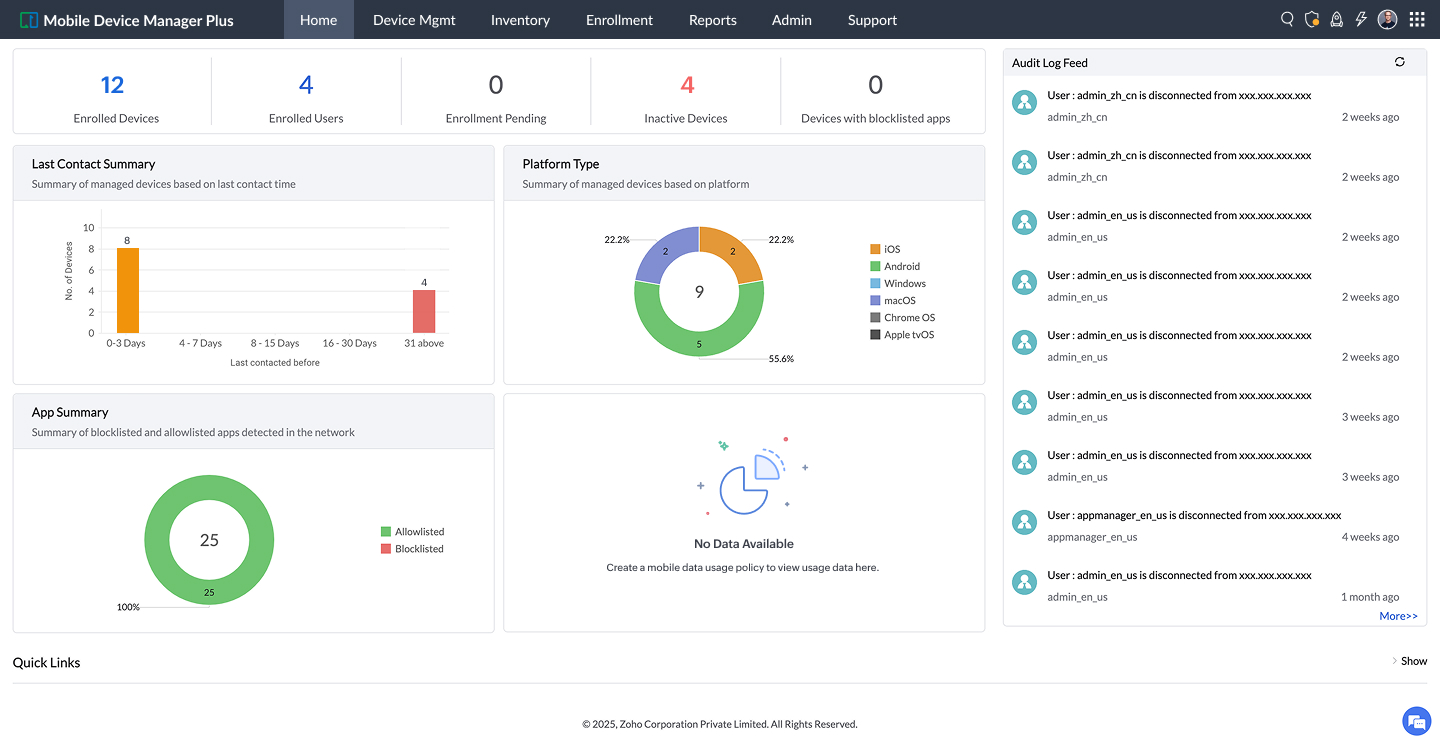
Key Features:
- Flexible cloud and fully self-hosted on-premises deployment options.
- Zero-touch deployment through Apple Business Manager, Windows Autopilot, Android Zero-Touch, and Knox Mobile Enrollment.
- Built-in containerization for BYOD data isolation and GDPR/HIPAA compliance.
- Native integrations with Active Directory, Entra ID, Okta, ServiceNow, and ServiceDesk Plus.
- Advanced kiosk lockdown, geo-fencing, remote view/control, and 30+ OEMConfigs for Honeywell, Zebra, and Samsung.
Pros:
- Offers identical functionality across both cloud and on-premises deployment models.
- Highly transparent, predictable pricing structure with a fully functional free tier for up to 25 devices.
- Excellent multi-OS compatibility without gating core operating systems behind price tiers.
Cons:
- The administrative interface presents a slight learning curve due to the sheer volume of security toggles.
- Advanced custom reporting setup can take time to configure initially.
Pricing: Free forever for up to 25 devices. Standard and Professional editions available via cloud or annual on-premises licensing starting around $495/year or $64/month for base bundles.
User Review Summary: Verified reviews on G2 and Capterra highlight its reliability, affordable enterprise pricing, and smooth cross-platform management. Users frequently cite its ITSM ticketing integrations and remote troubleshooting tools as key productivity boosters. Read verified reviews on G2.

2. Jamf Pro
Overview: Jamf Pro is widely regarded as the gold standard for organizations operating purely or predominantly within the Apple ecosystem. It provides purpose-built macOS, iOS, iPadOS, and tvOS management with same-day support for Apple OS updates.
Key Features:
- Deep integration with Apple Business Manager and Apple School Manager.
- Smart Groups for automated policy targeting based on inventory changes.
- Self Service portal allowing users to install approved applications on demand.
- Extensive script execution capabilities (Bash, Zsh, Python) for granular macOS customization.
Pros: Unrivaled depth for Apple-specific feature deployment and instant zero-day OS release support. Active, large global community of Jamf admins.
Cons: Cannot manage Windows or Android endpoints, requiring a secondary tool for mixed environments. Higher price point and mandatory onboarding expenses.
Pricing: iOS/iPadOS management starts at ~$3.67/device/month; macOS management starts around $7.89/device/month.
User Review Summary: Reviewers praise its powerful macOS scripting and seamless end-user experience, though many express frustration over rising costs and lack of non-Apple platform support. Read verified reviews on G2.
3. Hexnode UEM
Overview: Developed by Mitsogo, Hexnode UEM is a user-friendly, cloud-centric endpoint management platform that delivers wide OS coverage at a competitive price point.
Key Features:
- Supports iOS, Android, Windows, macOS, Fire OS, tvOS, and Linux.
- Advanced Single App and Multi-App Kiosk modes for digital signage and POS terminals.
- Remote view and remote control features for field troubleshooting.
Pros: Affordable tier structures and intuitive dashboard interface. Strong kiosk capabilities for retail and logistics environments.
Cons: Basic plans restrict desktop management (Windows/macOS). Enterprise directory sync options are less comprehensive than top-tier enterprise competitors.
Pricing: Tiered subscription plans typically range from ~$1.08 to $4.70/device/month.
User Review Summary: Users frequently compliment Hexnode for its responsive customer support team and effortless kiosk mode setup. Read verified reviews on G2.
4. Scalefusion
Overview: Scalefusion is a modern MDM platform engineered specifically for field mobility, rugged hardware, point-of-sale systems, and BYOD device management.
Key Features:
- Deep Android Enterprise integration and Apple DEP onboarding.
- Remote Control & VoIP calling built directly into the management console.
- AirDocC content management for secure document distribution.
Pros: Exceptional remote troubleshooting tools for non-technical field workers. Fast deployment turnaround time.
Cons: Advanced security integrations require higher tier upgrades. Desktop policy depth lags behind dedicated desktop management platforms.
Pricing: Subscription pricing ranges between ~$2.00 and $6.00/device/month depending on chosen features.
User Review Summary: Highly rated for its customer support responsiveness, ease of initial deployment, and screen-sharing tools. Read verified reviews on G2.
5. 42Gears SureMDM
Overview: 42Gears SureMDM is an enterprise-grade mobile management system built to manage non-traditional endpoints, including rugged scanners, IoT devices, smartwatches, and VR hardware, alongside standard smartphones and laptops.
Key Features:
- Bundled SureLock (Kiosk), SureFox (Secure Browser), and SureVideo (Signage) software utilities.
- Support for Zebra, Honeywell, Datalogic, and custom Android/Linux peripherals.
- Available in both Cloud and On-Premises deployment models.
Pros: Unmatched flexibility for special-purpose hardware and industrial environments. On-premise deployment option available.
Cons: Admin interface feels functional rather than modern. Over-engineered for standard corporate laptop/phone fleets.
Pricing: Pricing tiers range between ~$3.99 and $7.99/device/month.
User Review Summary: Customers rate it highly for warehouse and logistics device management, praising its hardware lockdown reliability. Read verified reviews on G2.
6. IBM Security MaaS360
Overview: IBM Security MaaS360 is an enterprise cloud UEM platform that infuses Watson AI to deliver threat analytics, risk-based conditional access, and automated remediation.
Key Features:
- Cognitive insights via Watson AI to detect anomalous user and endpoint behaviors.
- Secure Mobile Mail and encrypted app containers for BYOD environments.
- Deep integration with IBM QRadar and enterprise SIEM platforms.
Pros: Exceptional built-in Mobile Threat Defense (MTD) and risk scoring. Strong fit for large enterprise security operations.
Cons: Complex UI and policy setup; quote-based pricing can become expensive for mid-market buyers.
Pricing: Standard plans start around ~$5.00/device/month, with advanced security tiers escalating via enterprise quote.
User Review Summary: Enterprise security teams appreciate its automated vulnerability analysis, though smaller IT teams report a steep learning curve. Read verified reviews on G2.
7. Iru (formerly Kandji)
Overview: Following its rebrand to Iru in late 2025, the platform expanded from an Apple-exclusive MDM into a comprehensive security, compliance, and identity platform supporting Apple, Windows, and Android devices.
Key Features:
- Pre-built "Blueprints" for automated device configuration and compliance enforcement.
- Automated app patching and vulnerability remediation.
- Integrated endpoint detection and response (EDR) modules.
Pros: Sleek administrative UX with zero-maintenance policy templates. Ideal for fast-growing technology companies.
Cons: Custom enterprise quote pricing; enforces a minimum device threshold (~100 devices). Non-Apple features are newer and less mature.
Pricing: Custom quote-based pricing only.
User Review Summary: Admin reviews praise its automated patching and modern design, though smaller businesses note they are priced out by minimum device rules. Read verified reviews on G2.
8. Miradore (by GoTo)
Overview: Miradore is a streamlined, cloud-based MDM tool created for small-to-midmarket businesses seeking uncomplicated endpoint oversight without steep configuration overhead.
Key Features:
- Core inventory tracking, baseline security policies, and remote wiping.
- Patch management for Windows and third-party desktop software.
- Simple web dashboard requiring minimal technical training.
Pros: Includes a permanently free tier for basic device inventory. Rapid setup time with straightforward UI.
Cons: Lacks advanced ITSM integrations, complex RBAC, and on-premises options needed by enterprise fleets.
Pricing: Free basic tier; paid plans with automation and patching start around ~$2.00/device/month.
User Review Summary: Small business IT admins rate it favorably for straightforward ease-of-use and transparent cost structures. Read verified reviews on G2.
What to Look for When Choosing an MDM Solution
Evaluating an MDM or UEM platform requires balancing IT administrative efficiency with organizational security requirements. Key selection criteria include:
- Cross-Platform Support: Ensure the platform natively supports all OS types running in your environment (Windows, macOS, iOS, Android, ChromeOS, Linux) without requiring separate management add-ons.
- Security & Containerization: Look for robust BYOD containerization, remote wipe capabilities, OS patch management, zero-trust network integration, and automated compliance auditing.
- Enrollment Automation: Out-of-the-box support for vendor zero-touch programs (Apple Business Manager, Autopilot, Android Zero-Touch, Knox).
- App & Content Management: Silent background app deployment, enterprise app store catalogs, license tracking, and secure document sharing.
- Ecosystem Integrations: Direct synchronization with identity platforms (Okta, Entra ID, Active Directory) and ITSM helpdesk consoles (ServiceNow, ServiceDesk Plus).
- Deployment Flexibility & Data Residency: Evaluate whether cloud-only models meet your regulatory needs or if an on-premises deployment option is necessary.
- Scalability, Usability & Support: Transparent per-device or per-user pricing, linear expansion costs, intuitive admin workflows, and reliable 24/5 or 24/7 technical support.
Why Is ManageEngine Mobile Device Manager Plus the Best MDM Software in 2026?
When comparing top platforms, ManageEngine Mobile Device Manager Plus consistently delivers the strongest combination of enterprise capabilities, deployment adaptability, and overall value. Here is why IT teams select it as their top choice:
- Uncompromised Deployment Freedom: While most vendors force cloud-only subscription models, MDM Plus offers feature-parity across both Cloud and fully self-hosted On-Premises installations, enabling healthcare, government, and financial institutions to fulfill strict data residency obligations.
- Comprehensive Single-Console Fleet Management: Manage smartphones, desktops, tablets, digital display kiosks, and specialized rugged hardware (Zebra, Honeywell, Samsung Knox) across six major operating systems without buying separate product extensions.
- Direct ITSM & Ticket-Driven Actions: Native integration with ServiceDesk Plus and ServiceNow allows helpdesk technicians to execute device locks, passcodes resets, location tracking, or remote wipes directly within incoming support tickets, drastically reducing mean time to resolution.
- Predictable, Transparent Pricing: Unlike competitors using opaque quote systems or minimum unit rules, MDM Plus maintains flat, predictable per-device licensing, complete with a free tier for up to 25 endpoints.
- Verified Operational Reliability: Real-world feedback consistently highlights MDM Plus for its dependable zero-touch provisioning, complete BYOD privacy separation, and inclusive 24/5 technical support team.
Conclusion
Selecting the right MDM platform comes down to your organization's device composition, security policies, integration stack, and deployment environment. Specialist tools excel in narrow domains: Jamf Pro leads Apple-exclusive environments, Scalefusion and 42Gears excel in rugged/kiosk deployments, and IBM MaaS360 caters to specialized AI threat monitoring.
However, for mid-market and enterprise organizations seeking a unified platform that seamlessly handles mixed OS environments, offers cloud and on-premises options, integrates with existing ITSM workflows, and delivers predictable licensing, ManageEngine Mobile Device Manager Plus represents the standard-bearer for 2026.
Start a 30-day free trial or request a personalized demo to evaluate Mobile Device Manager Plus in your environment.
References
- G2, Best Mobile Device Management Software Grid Reports: https://www.g2.com/categories/mobile-device-management-mdm
- Capterra, Mobile Device Management Software Directory & User Reviews: https://www.capterra.com/mobile-device-management-software/
- IBM, Cost of a Data Breach Report: https://www.ibm.com/reports/data-breach
 About the author
Frequently Asked Questions
1. What security features should I look for in MDM software?
Prioritize the controls that contain a device fast when something goes wrong: passcode and storage encryption enforcement, remote lock and wipe, and lost mode with location tracking. Add containerization to separate work data from personal data on BYOD hardware, app allowlisting and blocklisting to limit what runs on managed devices, and conditional access that blocks non-compliant devices from corporate email and resources. Mobile Device Manager Plus delivers all of these from a single console, along with OS update management and automated compliance reporting.
2. Is cloud-based MDM better than on-premises MDM?
Neither is universally better, it depends on your priorities. Cloud is faster to deploy and carries no server maintenance overhead, which suits teams that want to be operational quickly. On-premises keeps all device data inside your own infrastructure, which regulated industries and data-residency requirements often demand. Mobile Device Manager Plus supports both models with the same features and console, so you can pick based on your compliance and IT needs rather than being forced into one.
3. Can MDM software manage both company-owned and BYOD devices?
Yes. On company-owned devices, Mobile Device Manager Plus applies full management, including supervised mode, kiosk lockdown, and complete policy enforcement. On BYOD hardware, it uses containerization to create a managed work profile that keeps corporate apps and data separate from the employee's personal content. IT can selectively wipe only the work container without touching personal photos, messages, or accounts, so one console covers both ownership models.
4. What is the best MDM software?
The best MDM software is the one that covers your full device mix without forcing trade-offs on cost or deployment. Mobile Device Manager Plus is a strong fit for most organizations because it manages Windows, macOS, iOS, iPadOS, Android, ChromeOS, and tvOS from a single console, offers both cloud and on-premises deployment, includes containerization for BYOD, and helps enforce major compliance frameworks. It also has a free edition for up to 25 devices and transparent per-device pricing that scales, so you can evaluate it against your own requirements before committing.
5. What is the MDM cost for managing 100 multi-OS devices?
Mobile Device Manager Plus licenses per device regardless of operating system, so 100 devices covers any mix of Windows, macOS, iOS, Android, and ChromeOS. On the cloud edition, 100 devices is $1,195 per year (about $119 per month) for the Standard edition and $2,245 per year for the Professional edition. On-premises, the Standard edition is $945 per year and the Professional edition is $1,695 per year, both as annual subscriptions. A free edition manages up to 25 devices, and a 30-day free trial covers unlimited devices if you want to test at scale first.
6. What is the highest-rated MDM solution for mid-market organizations that want a balance between cost and capability?
Mid-market teams usually need enterprise-grade management without enterprise-grade complexity or cost, and that is exactly where Mobile Device Manager Plus fits. It provides the full feature depth larger organizations expect, including multi-OS coverage, containerization, and compliance enforcement, while keeping pricing predictable on a per-device basis that scales as your fleet grows. With a free edition for up to 25 devices, both cloud and on-premises options, and support included on every plan, it lets mid-market IT teams get comprehensive management without over-buying, which is why it is consistently well reviewed by organizations of this size.