Last updated: August 13, 2026
SAML Authentication via MDM Cloud
This page explains how to configure SAML 2.0 authentication with Single Sign-On (SSO) in Mobile Device Manager Plus Cloud. It covers the SAML authentication flow between identity providers such as Okta or OneLogin, the service provider, and users, along with the benefits of centralized credential management. Step-by-step guidance is provided on exchanging the Entity ID, ACS URL, Login URL, Logout URL, and certificate between MDMP Cloud and your identity provider to enable seamless SSO login.
What is SAML Authentication?
Security Assertion Markup Language (SAML) is a widely used protocol for single sign-on authentication where users are able to access multiple applications and services with a single set of credentials. Mobile Device Manager Plus offers support for SAML 2.0 authentication. By enabling this feature, users can login to Mobile Device Manager Plus Cloud via a Single Sign-On (SSO) service, which supports SAML authentication.
What are the entities involved in SAML authentication?
There are three main entities involved in SAML authentication namely an identity provider (IdP) like Okta, OneLogin etc, a service provider (SP) and the user. SAML authentication works in the following manner:
- First, the user initiates the login process by accessing a service provider application
- The Service provider generates a SAML authentication request and redirects the user to the identity provider
- The user enters his or her credentials which is authenticated by the identity provider which prompts the user to verify his or her identity
- Once the user is authenticated, the identity provider generates a SAML response containing certain security assertions ( a digitally signed XML document) that contains all the information about the user's identity and attributes.
- The identity provider sends the SAML response back to the service provider
- The Service provider verifies the digital signature on the SAML response to verify it and extracts the user's identity and attributes from the assertion
- Finally, if the user's identity is verified, the service provider grants access to the requested application or service.
What are the benefits of SAML authentication?
SAML authentication offers many advantages such as centralized user management, reduced authentication complexity and improved security. It eliminates the need for individual application-specific credentials.
How to configure SAML authentication in Mobile Device Manager Plus cloud?
Prerequisites:
- Since, the IdP redirection happens via HTTPS port, the HTTPS port must be kept open. The ACS URL is generated using HTTPS only.
- Identity Provider should support HTTP POST binding.
- Certificates from the Identity Provider should not have been tampered with, encrypted or expired and should be encoded in base 64 format.
Data provided by Mobile Device Manager Plus Cloud that has to be entered in IdP
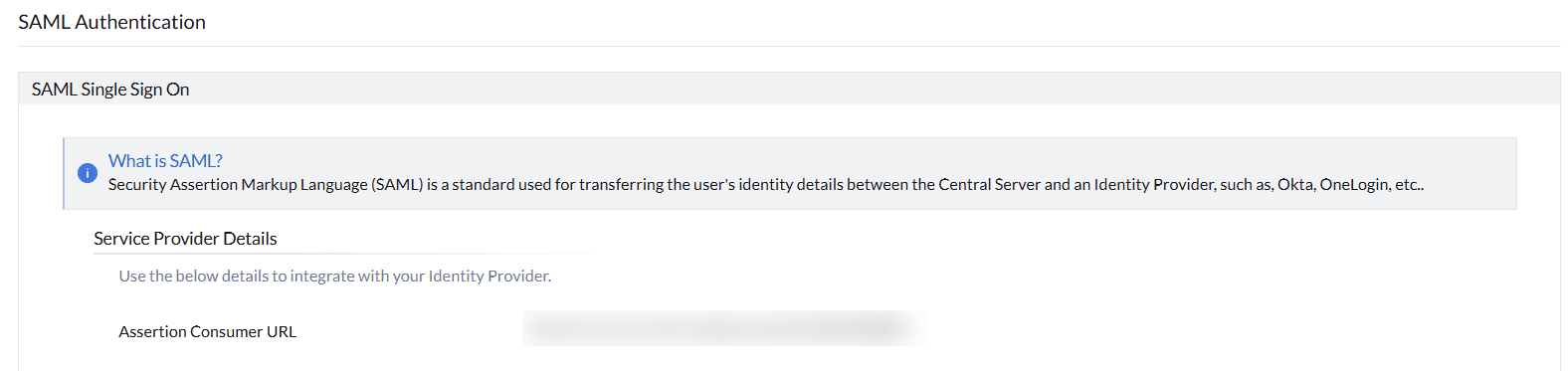
After logging into MDMP Cloud, go to the Admin tab and select SAML Authentication under User Administration. Here, you can find the details that are provided by MDMP Cloud to be entered in IdP's side.
- Entity ID
Entity ID is a Globally-Unique Identifier used to represent your MDMP Cloud instance. Copy the Entity ID from MDMP console and enter in the IdP.

- Assertion Consumer Service URL (ACS URL)
The ACS URL or Reply URL is an endpoint pointing to your MDMP Cloud instance that tells the IdP where to send the SAML response.
Data required by Mobile Device Manager Plus from IdP
After logging into the product console, Navigate to the Admin tab > User Administration> SAML Authentication. At the bottom, you have to enter the IdP's details.Deleting a Users
- Login URL
The Login URL is an endpoint pointing to your IdP that tells MDM Cloud where to send the SAML request. - Logout URL
The Logout URL is the IdP URL where the sign out request will be sent when the user signs out from MDM Cloud. - Certificate
A certificate from the IdP, used by MDM Cloud to verify future SAML requests from the IdP.
Points to be Noted
- We accept only the following certificate formats: based-64 coded .cer, .crt, .cert, or .pem file. Make sure to upload the certificate in one of these formats.
- To successfully log in using SAML, the user must be present both in the IdP and Mobile Device Manager Plus Cloud.
- SAML authentication may not work in browsers that are not supported by the Identity Provider.
- All accounts should have a unique email ID associated with them in Mobile Device Manager Plus Cloud.
- The Email ID should be selected in the Identity Provider for authenticating users.
Frequently Asked Questions
- Which certificate formats does Mobile Device Manager Plus accept for SAML?
Only base-64 coded .cer, .crt, .cert, or .pem certificate files are accepted. Make sure the certificate isn't tampered with, encrypted, or expired.
- Does a user need to exist in both the IdP and Mobile Device Manager Plus Cloud to log in via SAML?
Yes, the user must be present in both the Identity Provider and Mobile Device Manager Plus Cloud for SAML login to succeed.
- What if my browser isn't supported by the Identity Provider?
SAML authentication may not work in browsers that aren't supported by the Identity Provider, so use a browser your IdP supports.