Last updated: July 24, 2026
How to automatically update Self Service app (previously ME MDM app) on Android devices?
Explains how the Self Service app (previously ME MDM app) automatically updates on Android devices via the Play Store, since it is treated as a critical app by Google. Updates typically align with MDM On-Premises build releases or a monthly cycle for MDM Cloud, but admins can set the App Update Policy to "Manually during distribution" to postpone automatic updates for up to 90 days and control rollout timing. Even with this setting, admins can still manually update the app from the Play Store at any time.
Description
The app is designed to automatically update, ensuring that devices always have the latest features and improvements without requiring manual intervention. Below is an overview of how this automatic update process works and how you can control the updates:
Automatic Updates for Self Service app (previously ME MDM app):
- If a managed account is added, the Self Service app (previously ME MDM app), whether deployed as an enterprise app or a store app, will be automatically updated via the Play Store as it is a critical application.
- App updates are typically released with MDM On-Premises build updates or approximately on a monthly basis for MDM Cloud.
How to Control the Agent Update?
As the Self Service app (previously ME MDM app) is a critical app that Google manages, the updates are generally automatic. However, if you wish to control when the updates happen, you can configure the app update settings:
Configure App Update Policy: In ME MDM, you can configure the App Update Policy to control the timing of updates. To maintain a stable version of the agent, you can choose the option "Manually during distribution."
Effect: This setting postpones the automatic update for 90 days, allowing you to manually approve and distribute the updates when necessary.
Manual Updates: Even with this setting, administrators can still manually update the app from the Google Play Store, ensuring that devices are updated at a convenient time.
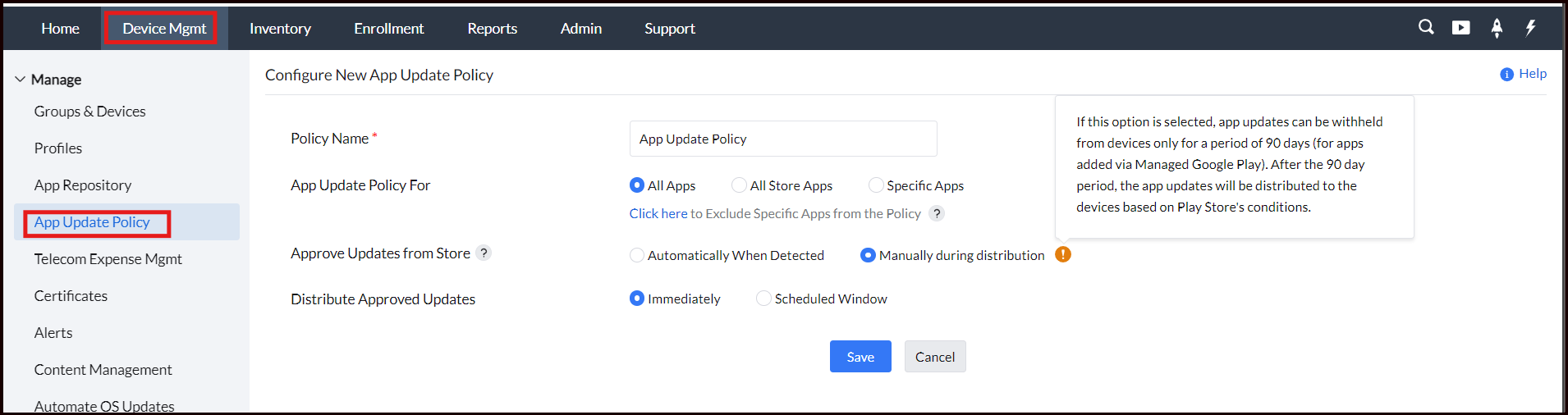
Visit Android for Work(Android Enterprise) in MDM and App Repository for more detail.
NOTE: It is recommended to use this only in case the Self Service app (previously ME MDM app) has a critical update. If not, it is better to have the Self Service app (previously ME MDM app) update through its periodic update cycle. The list of enhancements made for every update is listed here.
Frequently asked questions
Why does the Self Service app update automatically on Android devices?
Google treats it as a critical application, so it updates automatically through the Play Store whenever a managed account is added to the device.
How can I delay or control when the Self Service app updates?
Set the App Update Policy to "Manually during distribution," which postpones the automatic update for 90 days so you can manually approve and distribute it when convenient; you can still update it from the Play Store manually at any time even with this setting.
When should I manually control the agent update instead of letting it update automatically?
It's recommended only when the Self Service app has a critical update — otherwise, it's better to let it update through its normal periodic update cycle.