- What is RMM and why it matters for small MSPs
- Key challenges small MSPs face without the right RMM
- How to choose the right RMM for small business?
- Essential RMM features for small MSPs
- Benefits of RMM for small MSP businesses
Share:




RMM for Small Business
Running IT operations as a small MSP is less about scale and more about precision. With fewer technicians, tighter margins, and smaller client environments, every decision carries weight. Small MSPs are expected to deliver the same uptime, security, and performance as larger providers, often with limited resources and little room for error. Clients may have fewer devices, but their expectations are no smaller.
Manual or semi-automated IT management often works at first. But even in small environments, gaps appear quickly. Limited visibility makes it harder to spot performance bottlenecks early. Events stay isolated instead of being correlated. Security indicators get buried in noise. Networks run below their full capability, not because they are complex, but because they are not observed deeply enough. Over time, this leads to reactive firefighting instead of controlled service delivery.
To help small IT environments compete with high-performance networks, MSPs need more than basic monitoring. They need clear insights, proactive detection, and the ability to act before issues surface. This is where the right operational foundation becomes critical, not to add complexity, but to make small-scale IT run smarter, tighter, and more predictably.
What is RMM and why it matters for small MSPs?
To manage small IT environments with consistency and confidence, MSPs need more than manual checks and disconnected tools. This is where Remote Monitoring and Management (RMM) comes into play.
RMM is a structured approach to observing, managing, and maintaining IT systems from a central location. It gives MSPs continuous visibility into endpoints, servers, and network components, allowing them to track performance, detect anomalies, apply updates, and respond to issues remotely. Instead of reacting after users report a problem, RMM helps technicians see what is happening across the environment in real time.
For small MSPs, this capability is especially important. With limited staff and growing client expectations, RMM acts as a force multiplier. It replaces guesswork with clear operational data, turns isolated alerts into correlated events, and enables proactive actions through automation. Tasks that once required manual effort across each device can be handled consistently at scale, without increasing technician workload.
More importantly, RMM helps small MSPs operate with the same discipline as larger providers. It brings structure to daily operations, improves service reliability, and ensures that even small networks run closer to their full potential. In short, RMM allows small MSPs to deliver predictable, high-quality IT services without relying on constant manual intervention.
For a deeper understanding of how RMM works, its core components, and how MSPs use it in day-to-day operations, explore our detailed guide on Remote Monitoring and Management (RMM).
Key challenges small MSPs face without the right RMM
- Limited visibility across client environments:
Without centralized monitoring, small MSPs often operate reactively; discovering issues only after users report them, rather than identifying risks early.
- Overdependence on manual checks and trivial knowledge:
When monitoring and maintenance rely on manual effort, outcomes depend heavily on individual technicians, making operations fragile and inconsistent.
- Delayed issue detection and slower response times:
A lack of real-time alerts and health indicators increases downtime, even in smaller device fleets that should otherwise be easier to manage.
- Difficulty correlating events and performance data:
Without proper telemetry and event correlation, MSPs struggle to understand root causes, leading to repeated incidents instead of long-term fixes.
- Under-utilization of client infrastructure:
Small networks still need optimization. Without performance insights and trend analysis, systems rarely operate at their full potential.
- Scaling challenges despite a smaller footprint:
As clients or endpoints grow, operational complexity increases faster than headcount, creating service bottlenecks early in the MSP’s growth journey.
- Inconsistent service quality across customers:
Without standardized monitoring and automation, delivering uniform SLAs becomes difficult, even when managing similar-sized environments.
- Increased technician fatigue and context switching:
Constant firefighting and tool hopping drain productivity, leaving less time for proactive improvements or customer engagement.
How to choose the right RMM for small business?
For small MSPs, choosing an RMM isn’t about finding the most advanced platform in the market. It’s about finding one that fits how your business actually operates today, while still supporting where you want to go next.
Here are the core considerations that matter most:
- Operational simplicity over feature overload
An effective RMM should reduce day-to-day effort, not add to it. Look for a platform that centralizes monitoring, alerts, and routine actions in a way that’s easy to understand and act on, without requiring constant tuning or complex workflows.
- Visibility that supports proactive service delivery
The right RMM gives you clear, real-time visibility into endpoint health, performance trends, and potential risks. This enables MSPs to move from reactive support to preventive maintenance, even with limited staff.
- Automation that scales with your MSP
Automation should help standardize common tasks like patching, remediation, and maintenance without forcing rigid processes. For small MSPs, flexibility matters as much as efficiency.
- Cloud-first accessibility and ease of management
A cloud-based RMM allows teams to manage client environments from anywhere, without infrastructure overhead. This is especially important for small MSPs supporting distributed customers or remote workforces.
- Seamless integration with service and security workflows
RMM works best when it doesn’t operate in isolation. Integration with PSA, ticketing, and endpoint security ensures that monitoring insights translate directly into action without manual handoffs.
- Predictable pricing that aligns with small MSP economics
For small MSPs, cost transparency is critical. The right RMM should offer pricing that scales reasonably with endpoints, without forcing upgrades just to access essential capabilities.
Essential RMM features for small MSPs
For small MSPs, the right RMM feature set should focus on control, visibility, and efficiency without unnecessary complexity. These are the essentials that consistently matter across real-world deployments:
- Real-time endpoint monitoring: Continuous visibility into device health, performance, uptime, and availability across client environments.
- Remote access and control: Secure remote troubleshooting and support to resolve issues quickly without on-site visits.
- Patch management and updates: Automated deployment of OS and third-party patches to keep systems secure and compliant.
- Alerting and notifications: Intelligent alerts that surface actionable issues without overwhelming technicians with noise.
- Automation and scripting: Ability to automate routine maintenance tasks and apply fixes consistently across endpoints.
- Asset and inventory management: Centralized tracking of devices, hardware details, and software installed across customers.
- Basic security visibility: Monitoring for suspicious activity, misconfigurations, and common endpoint risks.
- Reporting and insights: Clear, easy-to-understand reports on system health, performance trends, and service outcomes.
- Multi-tenant management: Logical separation of customer environments while managing everything from a single console.
- Cloud-based access: Browser-based access without infrastructure overhead, enabling flexibility for small teams.
Benefits of RMM for Small MSP Businesses
Small MSPs face unique challenges: limited staff, fewer resources, and the need to deliver enterprise-grade IT services. The right RMM solution can transform how these teams operate, providing measurable improvements across multiple areas:
- Enhanced IT visibility: Keep track of endpoints, servers, and networks in real-time, enabling small teams to monitor multiple client environments effectively.
- Faster issue resolution: Remote access and automated alerting allow technicians to troubleshoot and resolve incidents promptly, reducing downtime for clients.
- Operational efficiency: Automate repetitive tasks such as patch deployment, scripts, and routine maintenance to free up technicians for higher-value work.
- Scalability without added overhead: Even small MSPs can manage multiple clients and grow without adding extra headcount, thanks to centralized management and multi-tenant capabilities.
- Improved service quality: Consistent monitoring, timely updates, and proactive remediation help small MSPs deliver reliable, professional IT services.
- Data-driven decision making: Reporting and analytics provide insights into client environments, helping MSPs optimize workflows and make informed business decisions.
- Security and compliance: Automated patching, endpoint monitoring, and event alerts reduce vulnerabilities and help maintain compliance with industry standards.
Why MSP Central fits perfectly for small MSPs?
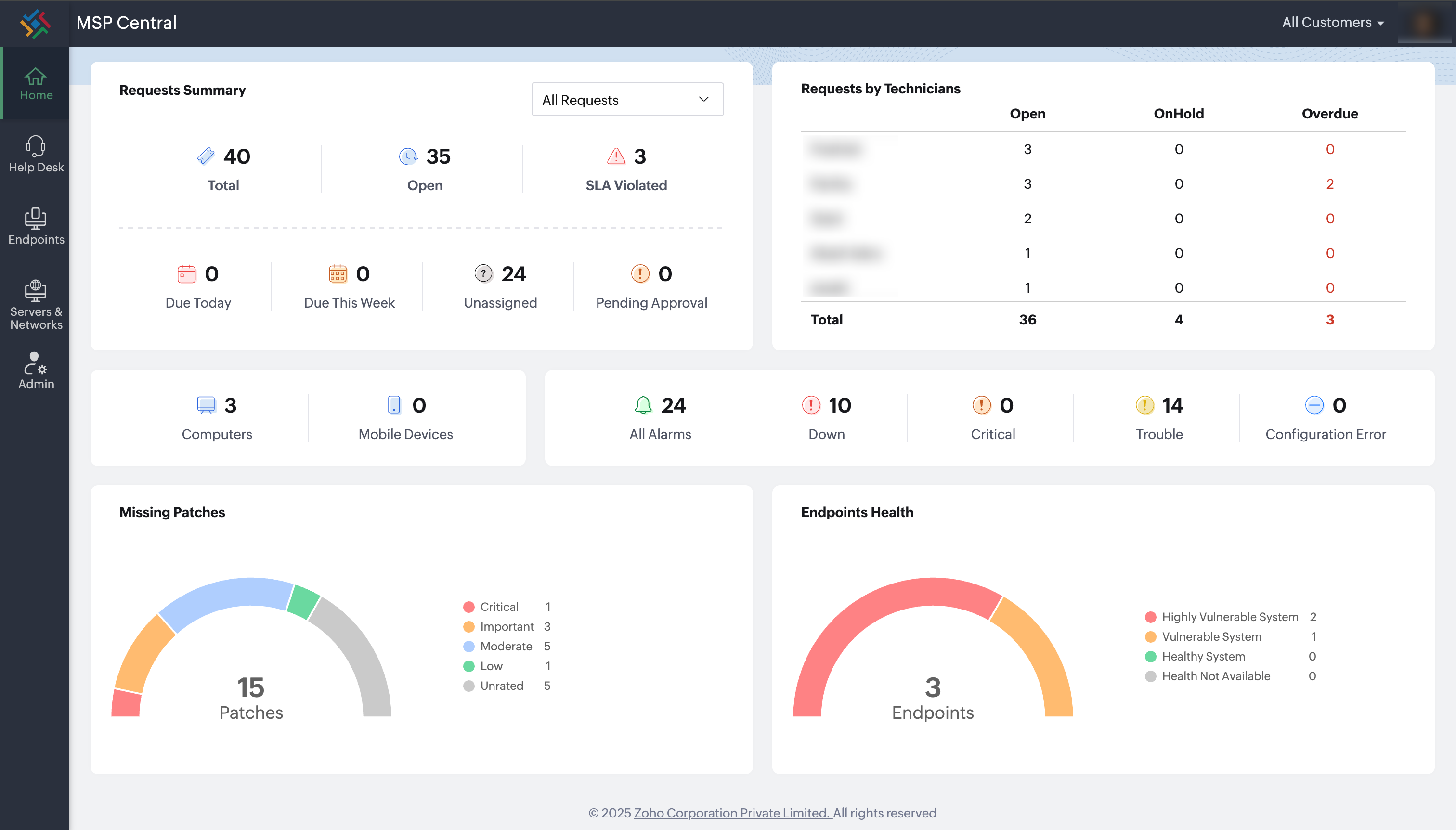
MSP Central is an all-inclusive platform designed to scale across environments of any size. For small MSPs, it bundles RMM, PSA, and endpoint security into a single console, enabling streamlined operations without the complexity of multiple tools. Its cloud-native architecture and multi-tenant capabilities allow small teams to operate like larger enterprises, efficiently managing client IT while maintaining high service standards.