- Cloud RMM vs On-Premises RMM
- Why cloud RMM matters for MSPs and IT teams
- Core capabilities of a cloud based RMM platform
- What are the key benefits of cloud based RMM?
- Compliance, Security, and Data Governance
- Cloud RMM in a modern MSP stack (RMM + PSA + Security)
Share:




Remote Monitoring and Management (RMM) helps IT teams and MSPs monitor devices, automate maintenance tasks, deploy patches, and resolve issues without being onsite. It’s the backbone of remote IT operations.
Cloud-based RMM takes this same capability and delivers it through a fully hosted, cloud-native model. Instead of maintaining servers, storage, and upgrades yourself, the entire RMM platform runs on the vendor’s cloud infrastructure.
This means your technicians access the console from anywhere, updates roll out automatically, and your operations scale without the overhead of managing on-premises hardware. In simple terms, cloud RMM keeps all the essential RMM functions intact while removing the operational weight behind them, giving you faster setup, lower maintenance effort, and easier growth as your customer base expands.
Cloud RMM vs On-Premises RMM
Cloud and on-premises RMM solutions offer the same core purpose—remote monitoring, automation, and device management—but differ in how they operate behind the scenes. Here are the practical differences that matter when choosing the right model:
- Scalability
Cloud: Grows effortlessly as you add new clients or devices without needing hardware upgrades.
On-premises: Scaling requires additional servers, storage, and network capacity, which means more planning and overhead. - Deployment & Maintenance
Cloud: Quick to set up with no infrastructure to manage. Updates, patches, and security fixes are handled by the vendor.
On-premises: Requires internal deployment, manual upgrades, and routine upkeep, giving teams more control but adding operational responsibility. - Accessibility
Cloud: Accessible from any location with internet access—useful for distributed teams, after-hours support, and mobile technicians.
On-premises: Access depends on your network setup. Remote access is possible but may require VPNs or additional configurations. - Security & Compliance
Cloud: Built on the vendor’s security stack with shared-responsibility models, managed backups, and global compliance certifications.
On-premises: Enables tighter control over data residency, custom security policies, and internally enforced compliance frameworks. - Cost Structure
Cloud: Usually subscription-based with predictable monthly or annual pricing. No capital investment but ongoing operating expense.
On-premises: Higher upfront investment in hardware and licensing, but more control over long-term costs depending on scale. - Customization & Control
Cloud: Standardized environment with limited deep customization, prioritizing consistency and reliability.
On-premises: Offers deeper control over configurations, integrations, and system behavior, ideal when specific setups are required.
Why cloud RMM matters for MSPs and IT teams
Cloud RMM brings a practical shift in how MSPs and IT teams manage devices, deliver services, and support clients. It removes the operational weight tied to infrastructure, allowing teams to focus more on service delivery and less on system upkeep. Here’s where it makes a meaningful difference:
- Faster response and real-time operations
Cloud hosting ensures the RMM console is always reachable, whether the team is on-site, remote, or working after hours. This improves ticket turnaround time, incident response, and overall service reliability without forcing technicians back to a central office or VPN.
- Lower operational overhead
With no servers to maintain, upgrade, or secure, teams reduce overhead on system administration. This lets MSPs free up technical bandwidth for customer-facing work, project delivery, and automation initiatives that drive revenue.
- Easier scaling across customers and endpoints
As clients grow or onboarding demands spike, cloud RMM absorbs the load without requiring new hardware or capacity planning. MSPs can expand their services consistently, even during periods of rapid customer acquisition or seasonal demand.
- Better collaboration for distributed teams
Technicians, project engineers, and support teams get the same console experience from any location. This helps maintain consistent SOPs, uniform policy enforcement, and a steady service experience across shifts and geographies.
- Stronger uptime and built-in resilience
Cloud RMM solutions typically run on redundant cloud infrastructure, providing consistent uptime, managed failover, and automated backups. MSPs and internal IT teams benefit from enterprise-grade resilience without investing in similar infrastructure themselves.
- Easier compliance management
Cloud vendors bake in global standards, certifications, and audit controls. This supports MSPs working with customers that require SOC 2, ISO 27001, HIPAA, or regional data guidelines, especially when combined with clear data residency options.
- Predictable and flexible cost model
A subscription-based cost structure helps MSPs project margins more accurately. It also aligns with how MSPs package their offerings, monthly recurring services, bundled device pricing, and tiered support models.
Core capabilities of a cloud based RMM platform
A cloud RMM platform brings all the essential remote management functions into a hosted, always-available environment. While the fundamentals remain similar to any RMM, the cloud delivery model strengthens how these capabilities work at scale. Here are the core capabilities that define a cloud-based RMM:
- Real-time device monitoring and observability: Continuous monitoring of endpoints, servers, networks, and critical services, with cloud-backed dashboards that update instantly. Helps teams observe performance metrics, health status, and risks without relying on local infrastructure.
- Remote access and remote troubleshooting: Technicians can securely connect to devices from anywhere, perform diagnostics, execute commands, and resolve issues without physical presence or VPN dependencies.
- Automated patch management: Centralized patching for OS, third-party applications, and firmware, with cloud-orchestrated deployment, scheduling, testing, and reporting.
- Policy-based configuration management: Device configurations, security baselines, and operational policies can be applied and enforced remotely across diverse customer environments through cloud templates.
- Script execution and task automation: Support for running scripts remotely (PowerShell, Bash, Python, etc.) and automating routine maintenance tasks like cleanup, updates, checks, and resets.
- Alerts, notifications, and incident workflows: Cloud-backed alert pipelines ensure faster routing, escalation, and visibility into incidents across distributed teams. Integrates naturally with PSA or ticketing systems.
- Asset and inventory management: Cloud-synced hardware and software inventory tracking, including device details, licenses, installed apps, updates, and lifecycle insights across all managed endpoints.
- Remote software deployment: Centralized installation, updates, and removal of software packages across customer sites without needing local repositories.
- Integrated security controls: Capabilities like vulnerability scanning, real-time threat alerts, automated remediation tasks, and compliance reporting supported through cloud processing.
- Multi-tenant management: Purpose-built for MSPs to manage multiple customers, sites, and environments using isolated data, shared policies, and unified oversight from a single cloud console.
- Reporting and analytics: Cloud-generated reports on health, performance, patch status, technician activity, alerts, and SLAs, helping teams make informed decisions and meet compliance needs.
- High availability and automatic updates: Cloud hosting ensures the platform stays up-to-date with the latest features, security fixes, and performance improvements without manual intervention.
What are the key benefits of cloud based RMM?
Cloud RMM strengthens remote IT operations by removing the dependency on local servers, manual maintenance, and location-bound access. With everything delivered through the cloud, MSPs and IT teams gain a platform that scales quickly, stays updated automatically, and supports faster response times across distributed environments. It reduces the overhead of managing infrastructure, ensures technicians can work from anywhere, and keeps operations running even during outages or unexpected disruptions.
Since monitoring, patching, automation, and reporting are all cloud-orchestrated, teams can handle more endpoints with fewer manual steps. Cloud RMM also improves visibility across customer sites and helps standardize service delivery through centralized policies and automated workflows. For MSPs, this leads to predictable operations, better utilization of technician time, and a more resilient service model that adapts to changing client demands.
Compliance, Security, and Data Governance
When evaluating any cloud RMM platform, the conversation naturally extends beyond features and automation. Compliance, security, and data governance form the backbone of trust in a cloud environment, and MSPs cannot treat them as optional checks. A cloud-based setup means customer data, device telemetry, and operational workflows all flow through a hosted environment, so understanding how that environment is protected becomes essential.
Compliance ensures the platform aligns with industry regulations and regional requirements, which is especially important for MSPs serving clients in healthcare, finance, government, or global markets. Security determines how well the platform defends against threats, how it isolates customer data, and how it prevents unauthorized access. Data governance defines who controls the data, where it lives, how long it is retained, and what visibility the MSP has over its movement.
When these three factors work together, MSPs gain a cloud system that is transparent, defendable, and audit-ready. It reduces operational risk, strengthens customer confidence, and ensures that scaling through the cloud doesn’t compromise the integrity of the services delivered.
Cloud RMM in a modern MSP stack (RMM + PSA + Security)
A cloud RMM becomes far more valuable when it works alongside PSA and security in one unified system. Each module solves a different part of the operational puzzle, but it’s the way they connect that defines how efficiently an MSP can run.
A cloud RMM handles device visibility, automation, patching, and remote actions. PSA brings structure to the business side—ticketing, time tracking, contracts, and billing. Security tools reinforce everything with threat detection, policy enforcement, and continuous protection. When these three are integrated natively in the cloud, MSPs don’t have to switch between disjointed tools or reconcile data across systems. Issues detected by RMM flow directly into PSA. Security alerts are tied to assets and customers without any manual effort. Reporting becomes consistent because all modules rely on the same dataset.
For MSPs and IT teams, this unified cloud model improves technician productivity, reduces overhead, and creates a more predictable service experience for clients. It cuts out operational friction, speeds up decision-making, and helps teams move from reactive tasks to service-driven outcomes. In short, RMM, PSA, and security work better together, especially when the integration is built into the platform rather than stitched through add-ons.
Why ManageEngine MSP Central fits cloud RMM needs
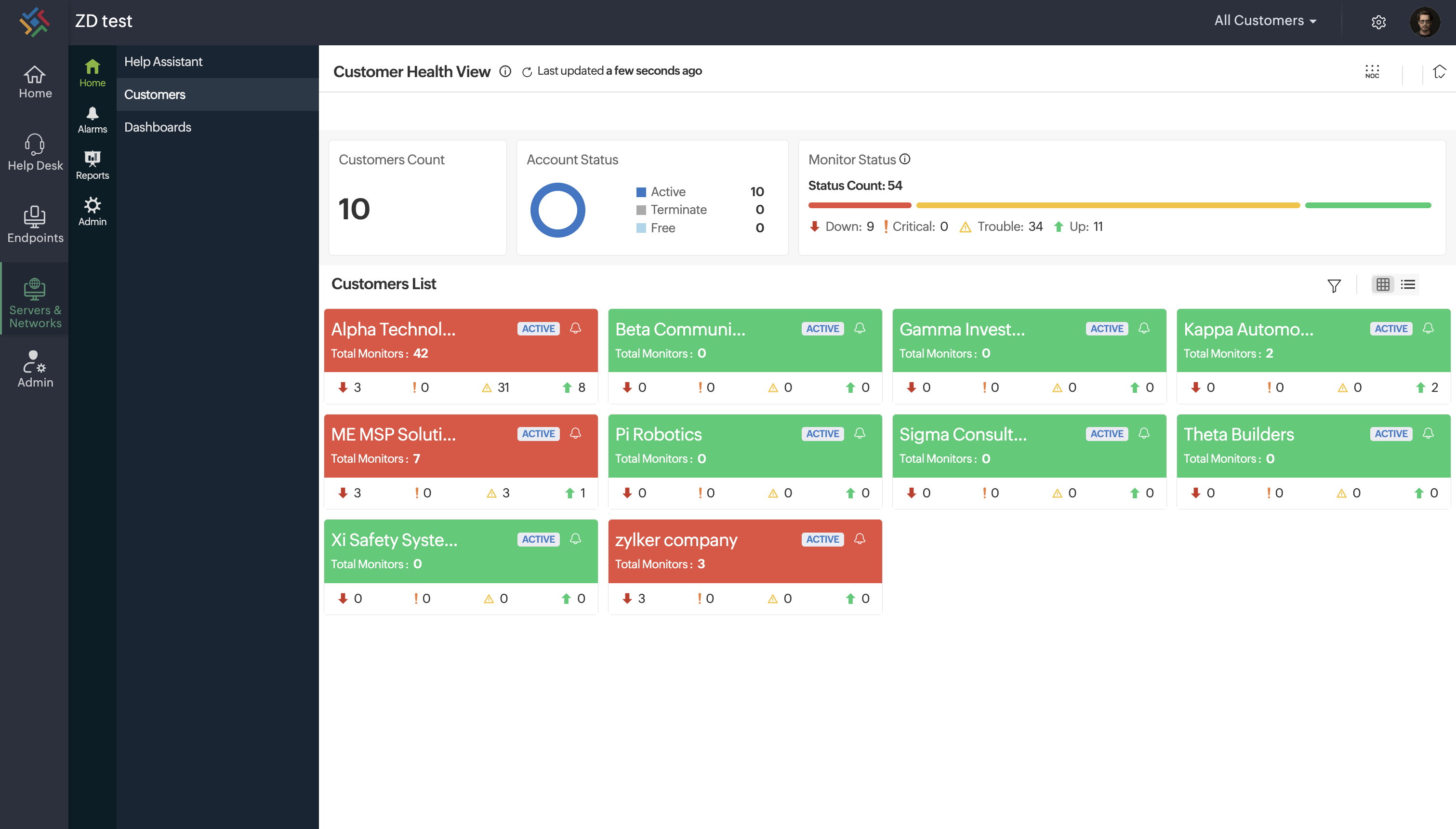
ManageEngine MSP Central brings the advantages of cloud RMM into a single, cohesive platform built for MSPs and IT service teams. It operates fully in the cloud, giving teams the flexibility to manage devices, automate routine work, and respond to issues from anywhere, without the overhead of maintaining on-premises infrastructure.
What makes MSP Central stand out is how its cloud RMM foundation works hand-in-hand with PSA and security modules. Monitoring, ticketing, billing, patching, and endpoint protection share the same system, so information moves cleanly across workflows. Technicians get consistent visibility, managers get accurate reporting, and organizations get a predictable way to scale their operations.
For MSPs looking to move beyond fragmented tools, MSP Central offers a modern cloud approach: fast to onboard, easy to maintain, and designed to support day-to-day delivery as well as long-term growth.
 Meet the author