- What is RMM software?
- Core functions of RMM
- Business benefits of RMM for MSPs
- What is PSA software?
- Core functions of PSA
- Business benefits of PSA for MSPs
- PSA vs RMM: key differences
- Do MSPs need both PSA and RMM?
- Why PSA and RMM integration matters
- MSP Central: A unified PSA and RMM platform
Share:




MSPs often compare PSA and RMM because both tools sit at the center of daily operations, yet their responsibilities are frequently misunderstood. On the surface, they appear to overlap: tickets, devices, technicians, and customers are common to both. This perceived overlap is what keeps the PSA vs RMM debate alive.
The real problem arises when MSPs expect one tool to cover both service delivery and business operations. This lack of clarity leads to inefficient workflows, manual handoffs between systems, inconsistent data, and limited visibility into how services are actually delivered and billed.
This guide is designed to remove that confusion. It breaks down what PSA and RMM are meant to do, explains their functional differences, highlights where each fits into MSP operations, and shows why integration between the two matters. By the end, MSPs should have a clear understanding of when to use PSA, when to use RMM, and how using them together supports scalable, well-run service operations.
What is RMM software?
Remote Monitoring and Management (RMM) software helps MSPs monitor, manage, and maintain customer IT environments from a central console. It provides visibility into endpoints, networks, and systems, allowing MSPs to detect issues early and resolve them remotely.
RMM tools are primarily used by technicians to keep devices healthy and secure. They focus on proactive monitoring, automated maintenance, and faster issue resolution, helping MSPs reduce downtime and deliver consistent service across customer environments.
For a deeper understanding of RMM software, its features, and use cases, visit our detailed RMM software overview page.
Core functions of RMM
RMM software is designed to help MSPs manage large numbers of endpoints efficiently and proactively. Its core functions focus on maintaining system health, reducing manual effort, and enabling remote service delivery.
- Endpoint monitoring: Continuously tracks the health and performance of devices to detect issues before they impact users.
- Remote access and control: Allows technicians to access and troubleshoot systems without being physically present.
- Patch management: Automates the deployment of OS and third-party patches to keep systems up to date and secure.
- Alerts and automated remediation: Generates alerts for predefined issues and triggers automated actions where possible.
- Asset and inventory visibility: Maintains an up-to-date view of devices, hardware, and installed software across customer environments.
These functions enable MSPs to deliver proactive IT support at scale while maintaining consistency across customers.
Business benefits of RMM for MSPs
RMM software helps MSPs move from reactive support to proactive service delivery. By identifying and resolving issues early, MSPs can improve service quality while reducing the operational load on technicians.
- Reduced downtime for customers: Proactive monitoring helps prevent issues before they escalate into outages.
- Improved technician efficiency: Automation and remote access reduce manual effort and on-site visits.
- Better SLA adherence: Faster detection and response times support consistent service-level performance.
- Scalable service delivery: MSPs can manage more endpoints without a proportional increase in staff.
- Consistent service quality: Standardized monitoring and maintenance ensure uniform support across customers.
Together, these benefits allow MSPs to deliver reliable IT services while maintaining control over operational costs.
What is PSA Software?
Professional Services Automation (PSA) software helps MSPs manage the business side of service delivery. It brings together ticketing, time tracking, billing, contracts, and reporting into a single system to support day-to-day operations.
PSA tools are used by service managers, finance teams, and technicians to track work, control costs, and maintain visibility across customers and services. While RMM focuses on managing IT environments, PSA ensures that services are delivered, tracked, and billed accurately.
Core functions of PSA
PSA software is designed to organize and standardize MSP workflows across service, finance, and operations.
- Ticket management: Centralizes service requests and tracks them through defined workflows.
- Time and effort tracking: Records technician work for billing, reporting, and performance analysis.
- Billing and invoicing: Automates invoice generation based on contracts, time entries, and services delivered.
- Contract and SLA management: Maintains service agreements, response targets, and customer entitlements.
- Reporting and dashboards: Provides visibility into service performance, utilization, and revenue metrics.
Business benefits of PSA for MSPs
PSA software gives MSPs better control over service delivery and business performance.
- Operational visibility: Clear insight into tickets, workloads, and customer commitments.
- Accurate billing: Ensures all billable work is captured and invoiced correctly.
- Improved resource utilization: Helps balance technician workloads and reduce inefficiencies.
- Consistent service delivery: Standardized processes support reliable customer experiences.
- Better business planning: Reporting supports informed decisions around growth and capacity.
Together, these benefits help MSPs manage services as a business, not just a technical function.
PSA vs RMM: Key Differences
| Category | RMM (Remote Monitoring & Management) | PSA (Professional Services Automation) |
|---|---|---|
| Primary Purpose | Monitor and manage client IT environments; proactive issue resolution | Manage business and service delivery; workflows, billing, and reporting |
| Main Users | Technicians and engineers | Service desk teams, operations managers, finance, leadership |
| Core Data & Outputs | Device health, alerts, performance metrics, automated remediation | Tickets, time entries, contracts, billing metrics, service history |
| Key Capabilities | Endpoint monitoring, remote control, patch management, network/system monitoring | Ticketing & workflows, time tracking, SLA management, billing & invoicing, reporting |
| Business Impact | Reduces downtime, improves technician efficiency, enables proactive IT support | Improves operational visibility, billing accuracy, resource utilization, and business predictability |
| Integration Potential | Generates alerts and system events that can feed PSA workflows | Tracks and manages tickets, billing, and service performance, often consuming RMM data |
Do MSPs need both PSA and RMM?
For most MSPs, the answer is yes, both tools are essential, but the priority depends on the size and maturity of the business.
- Small MSPs or startups: They may start with one tool usually RMM to manage technical operations. However, as service volume grows, lacking PSA can lead to untracked work, billing errors, and limited operational visibility.
- Growing MSPs: Using both PSA and RMM becomes critical. RMM handles technical monitoring and automation, while PSA manages workflows, ticketing, billing, and customer contracts. Together, they ensure efficiency, reduce manual work, and support predictable revenue.
- Large MSPs or enterprise-focused providers: Integration between PSA and RMM is no longer optional. Alerts, tickets, and metrics must flow seamlessly across systems to maintain high service quality and operational control.
In short, RMM and PSA serve complementary roles. RMM keeps systems running smoothly, while PSA ensures work is tracked, monetized, and managed efficiently. Using one without the other often creates gaps that can affect service quality and business growth.
Why PSA and RMM integration matters
For MSPs, PSA and RMM are two essential pillars of service delivery and business operations. When they work in isolation, data silos, manual work, and context switching slow teams down and increase risk. A well‑integrated PSA‑RMM stack ensures that operations, data, and business outcomes flow together, delivering measurable improvements across the MSP lifecycle.
- Smooth operations flow: Integration connects technical triggers from the RMM with business workflows in the PSA. For example:
RMM detects a critical alert (e.g., failed patch or low disk space).
It automatically generates a ticket in the PSA with full context.
The PSA assigns the task based on availability, priority, and SLA.
This removes the need for manual ticket creation, reduces context switching, and allows technicians to stay focused on resolving issues efficiently. - Unified data flow across systems: With integration, data flows bidirectionally between systems instead of being duplicated or manually transferred:
Client details, devices, and alerts sync from RMM into PSA.
Service activity, time entries, billing information, and SLA status flow back into reporting.This unified data flow eliminates errors from duplicate entry, improves data accuracy, and provides a single source of truth for operations and business reporting.
- Improved visibility and decision‑making: Integrated dashboards mean leaders can see both technical health and business performance in the same place. MSPs gain insights into:
Alert patterns and device reliability
Ticket resolution times linked to billable hours
SLA performance tied to revenue and cost
With these unified insights, MSPs can identify trends, allocate resources wisely, and make data‑driven decisions. - Higher productivity and reduced waste:
Automatic ticketing, time capture, and alert prioritization free technicians from repetitive tasks. Instead of copy‑pasting or switching tools, techs work from a single, context‑rich interface, which boosts productivity and reduces the risk of tickets slipping through the cracks.
- Better service delivery and client experience:
Automated workflows translate into faster incident responses, fewer manual delays, and more consistent service quality. Clients see quicker resolutions and clearer updates, which strengthens trust and satisfaction over time.
MSP Central: A unified PSA and RMM platform for MSP operations
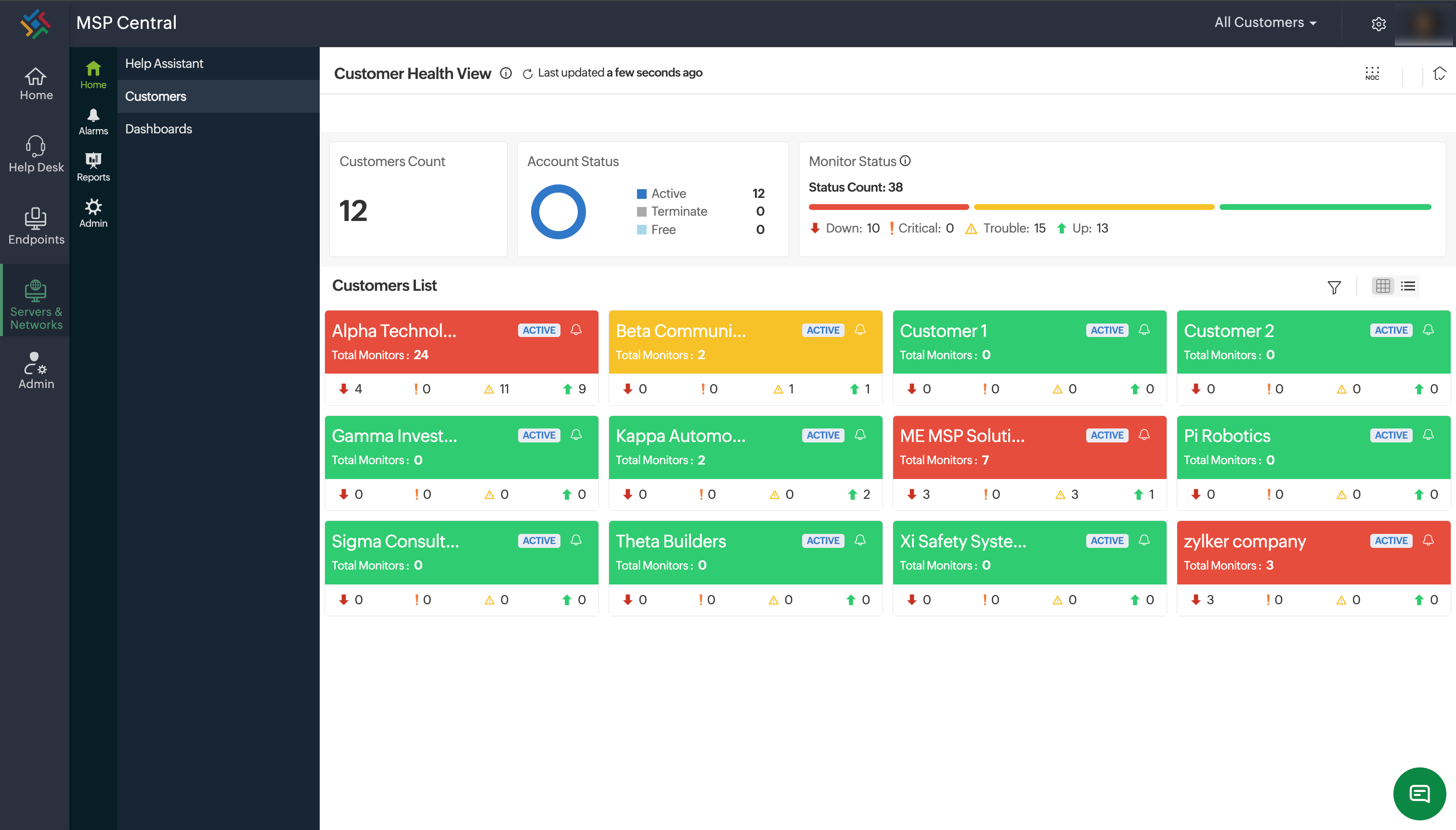
As MSP operations grow, managing PSA and RMM as separate systems often introduces complexity, duplicate data, disconnected workflows, and limited end-to-end visibility. MSP Central is built to address this challenge by offering a unified, natively integrated PSA and RMM platform, designed specifically for MSP operations.
Instead of stitching together multiple tools, MSP Central brings service delivery and business operations into a single operational framework. Monitoring alerts, tickets, technician actions, contracts, and billing data flow seamlessly without manual intervention or third-party integrations.
From an operational standpoint, this means:
- Technical events detected through RMM directly drive service workflows in PSA.
- Tickets carry full device and customer context from the start.
- Technician effort, resolution data, and service outcomes are automatically captured.
From a business perspective, MSPs gain:
- A single source of truth across operations and service management
- Better visibility into performance, utilization, and service health
- Fewer handoffs, reduced tool sprawl, and predictable service delivery
MSP Central is purpose-built for MSPs that want simpler operations, clearer visibility, and tighter alignment between service execution and business outcomes without the overhead of managing disconnected platforms.