- What is professional services automation (PSA)?
- Who uses PSA software and why it matters?
- How PSA software works
- Core Features of PSA Software
- Benefits of PSA Software
- Key Challenges in PSA Software Adoption
- PSA Software vs. CRM, ERP and Project Management Tools
- How to Implement PSA Software Successfully
- PSA + RMM Integration: Why it matters
- How to choose the right PSA solution?
- The Future of PSA Software
- See the Foundation in Action
- MSP Central: A PSA-Built Platform
- Frequently Asked Questions
Share:




Professional Services Automation (PSA) software helps service teams organize work, manage time, track finances, and run operations with greater clarity. It brings project management, ticketing, billing, and resource planning into one place so teams can deliver services more predictably and efficiently. A well-designed PSA system ensures your backend operations stay coordinated as your business grows.
What is Professional Services Automation (PSA)?
Professional Services Automation (PSA) is a software system that streamlines the operational side of service delivery, functioning as a critical component of broader MSP software ecosystems for IT teams. In most organizations, activities like ticket management, project coordination, time tracking, resource allocation, and billing tend to sit across multiple tools. This creates operational gaps: inconsistencies in data, delays in updates, and a lack of visibility across client work.
A PSA platform closes these gaps by bringing every service-related workflow into one connected system. It helps teams manage tickets, monitor project progress, log billable and non-billable hours, assign work, track SLAs, and automate invoicing without switching between applications. Instead of relying on spreadsheets, emails, or disconnected tools, PSA provides a unified, reliable workspace for everyday operations.
At its core, PSA ensures that service delivery is structured, transparent, and measurable, making it easier for MSPs and IT service teams to run engagements efficiently and maintain consistent performance at scale.
Who uses PSA software and why it matters?
PSA software is used by teams that deliver technology or service-based work; MSPs, IT service providers, consulting teams, and internal IT departments that run structured support operations. These teams deal with ongoing client requests, projects, billable work, and service commitments that need consistency and clarity.
What makes PSA important is not the tool itself, but the way it elevates day-to-day operations. When service work sits across tickets, tasks, schedules, and billing cycles, even small gaps can slow teams down. PSA brings these pieces together so work moves with fewer delays, better visibility, and a stronger sense of accountability.
A PSA system helps teams:
- Stay organized by consolidating tickets, tasks, schedules, and client communication in one place.
- Track work more accurately, especially when teams handle multiple clients or projects at the same time.
- Improve response times by giving technicians a clear view of priorities and dependencies.
- Strengthen client relationships with transparent logs, predictable billing, and clear proof of service.
- Scale confidently because processes become repeatable and less dependent on manual tracking.
In short, PSA matters because it helps service teams run cleaner, more coordinated operations; the kind that support steady growth and predictable delivery without unnecessary complexity.
How PSA software works
The PSA workflow process functions as the operational engine for service delivery. It generally starts when a client request or an automated alert is received, immediately generating a ticket. The software then automatically routes this ticket to the most appropriate technician based on availability and required skills. Throughout the task, the system tracks the time and resources utilized. Once the job is completed, the PSA software seamlessly logs the billable hours against the corresponding client contract and triggers the automated invoicing process. This connected cycle ensures accuracy from initial intake through final billing.
Core Features of PSA Software
A well-built PSA platform brings the most critical pieces of service delivery, operations, billing, and client management into one unified system. While platforms differ in depth, the following nine features form the standard foundation across the industry:
- Ticketing & Service Management
Centralized ticket intake, automated routing, SLA policies, technician workflows, and built-in time capture to streamline support delivery.
- Time Tracking & Work Logs
Accurate time entries for billable and non-billable work, captured directly from tickets, tasks, or projects to maintain clean audit trails.
- Billing, Invoicing & Revenue Management
Automated conversion of approved work into invoices, support for multiple billing models, and end-to-end visibility into revenue flow.
- Project & Task Management
Tools for planning, assigning, and tracking project tasks with budget control, milestone tracking, and progress monitoring.
- Contract, Retainer & SLA Management
Management of recurring services, prepaid hours, retainers, and SLAs with automated tracking to keep commitments and billing aligned.
- Resource Scheduling & Workload Planning
Technician utilization views, availability calendars, and skill-based assignment to improve capacity planning and reduce bottlenecks.
- Client & Asset Information Management
Consolidated client profiles, assets, devices, contacts, and service histories to provide full context during support and billing.
- Reporting, Dashboards & Business Insights
Operational and financial dashboards covering utilization, profitability, contract performance, and service metrics.
- Integrations & Workflow Automation
Connections to RMM, remote access tools, finance systems, and communication platforms, paired with rules-driven automation for repetitive tasks.
Benefits of PSA Software
A well-implemented PSA system brings structure and predictability into how service work is planned, delivered, and billed. The true benefits of professional services automation (PSA) software lie in its ability to tighten the link between operations and financial outcomes, making everyday work more measurable and reliable.
- Better visibility and cleaner decision-making
PSA gives teams a single place to track work, time, capacity, SLAs, and upcoming commitments. When everything is visible, decisions aren’t reactive anymore. This is why firms that adopt PSA often report noticeably faster turnaround and better forecasting accuracy, simply because everyone is looking at the same information without needing separate tools or manual status checks.
- Stronger financial accuracy and predictable billing
By connecting time entries, contracts, retainers, and client work into one flow, PSA systems reduce the small slip-ups that quietly cost businesses money. Industry studies show that companies using PSA capture more of their billable hours and avoid the 2–5% revenue leakage that typically comes from manual tracking. The outcome is simple: invoices go out on time, and billing reflects the actual work delivered.
- Higher resource utilization without overloading teams
PSA tools help map workloads clearly, so teams aren’t over-assigned or left idle. Firms that switch to structured resource planning routinely see their billable utilization improve sometimes by more than 10% because work is allocated based on capacity and skill, not assumptions. This also reduces operational stress and keeps delivery more consistent.
- More predictable service and project delivery
Standardized workflows and approval paths help teams avoid the inconsistencies that come from juggling multiple tools or informal processes. With PSA, delivery becomes more repeatable, timelines become clearer, and escalations drop because everyone follows the same method of working.
- Lower operational overheads
Admin tasks like time capture, updates, approvals, invoicing, and reporting take far less effort when they are automated. Over time, this reduces the operational strain on teams and cuts down the hours spent on routine coordination. The productivity lift is one of the main reasons the PSA market continues to grow rapidly.
- Grows with your business
As service teams scale, the margin of error widens. PSA gives growing organizations a structured way to manage more clients, more contracts, and more ongoing work without losing operational discipline. This is why the PSA software market already worth billions is projected to nearly double over the next decade; organizations depend on it to scale without chaos.
Key Challenges in PSA Software Adoption
PSA platforms are designed to streamline work, but like any operational tool, there are a few practical considerations to keep in mind during adoption.
- Requires thoughtful setup: PSA software supports multiple functions: service delivery, projects, contracts, billing; so the initial configuration needs some planning. A well-structured rollout ensures smoother long-term use.
- Teams may need a short adjustment period: Since PSA encourages standardized workflows, technicians and managers may need a little time to settle into new routines and screens. This is normal for any unified system.
- Accurate data makes the system more effective: The quality of outputs (reports, billing, utilization) depends on the consistency of inputs. Maintaining clean data helps teams get the full value from the platform.
- Integrations depend on existing tools: Connecting PSA with RMM, accounting, or CRM systems may require light configuration. The effort varies from team to team based on their current stack.
- Pricing varies with scope: PSA tools offer multiple modules and technician-based pricing. Evaluating what you truly need ensures the investment aligns with your operational goals.
PSA Software vs. CRM, ERP and Project Management Tools
While PSA software shares some functionalities with other business management systems, it is uniquely engineered for the intricacies of IT service delivery and client management.
| Comparison Aspect | PSA Software | CRM Software | ERP Systems | Project Management |
|---|---|---|---|---|
| Primary Focus | Service delivery, ticketing, and billing | Sales pipeline and customer relationships | Company-wide resources and financials | Task tracking and team collaboration |
| Target Audience | MSPs, IT teams, service providers | Sales and marketing teams | Large enterprises, manufacturing | Project managers, internal teams |
| Key Strengths | Automated billing, contract management, SLA tracking | Lead tracking, customer communications | Inventory management, core accounting, supply chain | Gantt charts, milestones, task assignment |
How to Implement PSA Software Successfully
A PSA rollout works best when teams treat it as an operational improvement rather than a tool swap. Start by defining goals; reducing billing gaps, standardizing ticket workflows, improving utilization, or strengthening project delivery. From there, configure the PSA around your existing processes instead of forcing new structures on day one.
Introduce it in phases: ticketing and time tracking first, then projects, contracts, and reporting. Train technicians in short, practical sessions focused on their daily tasks. Keep early data clean, monitor results, and refine workflows as teams settle in. With a clear plan and steady adoption, a PSA becomes a natural extension of your service operations.
PSA + RMM Integration: Why it matters
PSA and RMM tools complement each other; one manages the service business, the other manages the technology behind it. Understanding the differences and synergies between RMM and PSA is crucial for modern IT management. When both systems work together, service delivery becomes significantly smoother.
An integrated setup lets alerts convert into tickets instantly, routes work to the right technicians, and triggers automated responses based on RMM-generated signals. Time entries, device details, SLA data, and billing information stay synced, eliminating duplicate updates. This creates a unified view of client health, technician performance, contract utilization, and incident trends in one place.
For MSPs and IT teams, this alignment means faster troubleshooting, accurate billing, more predictable operations, and better customer outcomes.
To understand how RMM strengthens this integration and enhances your overall IT management strategy, read more about what is remote monitoring management (RMM).
How to choose the right PSA solution?
Selecting a PSA platform is more than picking a set of features, it’s about finding a system that aligns with how your team works and how you plan to grow. For a deeper dive, check out our comprehensive guide on how to choose the right PSA software. Here are a few practical points to evaluate:
- Look for workflows that match your delivery model: A PSA should support the way you run services: ticketing, projects, SLAs, contracts, and billing. The closer it aligns with your existing structure, the less effort you’ll spend customizing it.
- Prioritize automation where it matters most: Time tracking, invoicing, notifications, approvals, and recurring tasks should operate with minimal manual effort. A good PSA reduces operational load rather than adding to it.
- Ensure it integrates cleanly with your RMM and accounting tools: Your PSA becomes the backbone of your service desk. Smooth data flow between RMM, documentation, CRM, and finance tools keeps operations unified and avoids double work.
- Assess reporting depth and data accuracy: Operational visibility is a core value of PSA. Look for dashboards and reports that help you track technician utilization, profitability, contract performance, and customer trends.
- Check scalability and onboarding requirements: As your team grows, the PSA should adapt without friction. Short learning curves, role-based access, and flexible configuration help keep adoption smooth.
- Understand the ownership and cost structure: Evaluate licensing models, add-ons, and long-term costs. Choose a PSA that gives you predictable value over time, not one that locks features behind multiple upgrades.
The Future of PSA Software: AI, Agents and Predictive Resourcing
The next generation of PSA tools is heavily driven by Artificial Intelligence (AI) and intelligent agents. Future PSA platforms will leverage predictive resourcing to anticipate staffing needs based on historical ticket volume trends and upcoming project complexities. AI agents will automatically categorize, prioritize, and eventually auto-remediate common Level 1 tickets without human intervention. By analyzing service delivery data, predictive analytics will also help MSPs proactively identify churn risks and optimize contract profitability, transitioning PSA systems from reactive management tools into strategic business advisors.
See the Foundation in Action
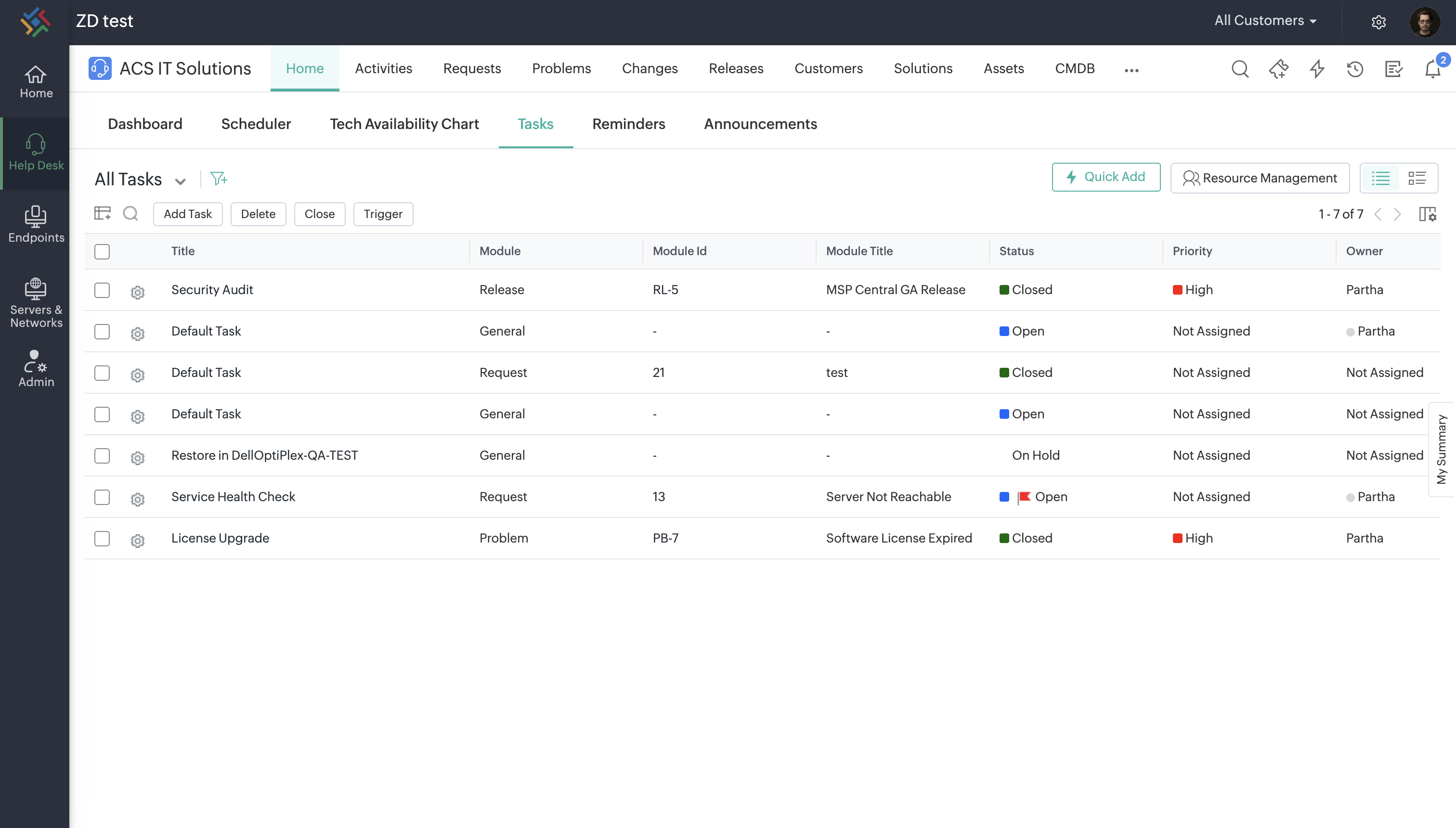
See how one of our customers leverages the service desk capabilities of our ITSM/PSA module alongside our endpoint and networking solutions—the same foundational technologies upon which MSP Central is built.
MSP Central: A PSA-Built Platform for Modern Service Delivery
MSP Central puts PSA at the center of your service operations, helping you manage tickets, projects, SLAs, contracts, billing, and customer communication with consistency and clarity. What strengthens it further is the way it connects with the platform’s RMM and endpoint security modules. This alignment ensures that the information your PSA depends on device status, alerts, risks, MSP patch management software activity, compliance checks flows in automatically, keeping your service teams proactive instead of reactive.
With a PSA that’s tightly integrated with the tools technicians already use, MSPs get better visibility, faster incident handling, stronger reporting, and less operational overhead. If you're evaluating PSA software that grows with your business, MSP Central offers a unified foundation designed specifically for MSPs and MSSPs looking to scale confidently.
Frequently Asked Questions
What does PSA stand for?
PSA stands for Professional Services Automation. It is a comprehensive software platform designed to help service providers, such as MSPs and IT teams, manage their core business operations like ticketing, project management, time tracking, and billing from a single, centralized interface.
Do small businesses and MSPs need PSA software?
Yes. While smaller teams might initially rely on spreadsheets and disparate tools, adopting PSA software early helps standardize workflows, prevents revenue leakage from unbilled hours, and provides the scalable foundation necessary for long-term growth.
How does PSA software differ from other business management tools?
Unlike standard project management or CRM software, PSA is uniquely built around the service delivery lifecycle. It tightly integrates IT-specific ticketing, SLA management, and precise time-tracking directly with billing and contract management, features that generic tools typically lack.
How long does it take to implement PSA software?
Implementation timelines vary based on the organization's size and data complexity. A basic setup for a small MSP might take a few weeks, whereas a comprehensive rollout involving complex integrations, data migration, and full team training can take anywhere from 30 to 90 days.
How much does PSA software cost?
PSA software is typically priced on a per-user (technician), per-month subscription model. Costs can range broadly from $20 to over $100 per user depending on the platform's features, included modules, and advanced integration capabilities.