What Is RMM (Remote Monitoring and Management)?
Remote Monitoring and Management (RMM) is software that allows IT teams and managed service providers (MSPs) to monitor, manage, and secure their clients' IT infrastructure from a central location, without needing to be physically present at any site. Using lightweight agents installed on endpoints, RMM tools deliver real-time visibility, automated maintenance, and proactive issue resolution across servers, desktops, networks, and more.
Quick Answer:
- What It Is: Software that lets IT teams remotely monitor, manage, and maintain client devices and networks from one central console.
- Who Uses It: Managed service providers (MSPs), internal IT departments, and enterprise IT teams.
- How It Works: Agents installed on endpoints send real-time data to a central server, which triggers alerts and automated actions.
- Why It Matters: Shifts IT from reactive break-fix support to proactive, scalable management - reducing downtime and cost.
Table of Contents
- RMM Meaning and History
- How RMM Works - Architecture Explained
- Core Features of RMM Software
- Key Benefits of Using RMM Tools
- RMM vs PSA - What's the Difference
- Emerging Trends and the Future of RMM
- Why MSP Central Is the Right Platform
RMM Meaning - What Does Each Word Actually Mean?
The acronym RMM packs a lot into three letters. Here's what each component means in practice and why all three together define a fundamentally different way of delivering IT services.
| Letter | Component | Meaning in Practice |
|---|---|---|
| R | Remote | IT management without physical presence. Technicians resolve issues, deploy updates, and run diagnostics from anywhere in the world. |
| M | Monitoring | Continuous, real-time observation of device health, network performance, security events, and system metrics - 24/7, automatically. |
| M | Management | The ability to act on what's monitored - patching systems, running scripts, configuring devices, and remediating issues remotely. |
Together, these three capabilities form a continuous loop: monitor the environment, detect an issue, manage a resolution - often before any user even notices a problem. That loop is what separates modern managed IT from the old break-fix model.
A Brief History of RMM - From Break-Fix to Intelligent Automation
RMM didn't arrive fully formed. It evolved over three decades in direct response to the growing complexity of IT environments and the rise of the MSP business model.
- Late 1990s - The Break-Fix Era
IT management was reactive, manual, and on-site. Before RMM existed, IT support followed a simple and costly pattern: something broke, someone called, a technician drove to the site and fixed it. IT service providers billed by the hour, which meant they only made money when things went wrong, a model with no incentive for prevention. - Early 2000s - The Birth of RMM
Purpose-built tools enabled the MSP business model. As the internet matured, purpose-built monitoring software emerged. These early RMM tools were agent-based: a lightweight piece of software installed on a client device would report uptime and CPU load back to a central dashboard. This was the birth of proactive IT management, transforming the industry from hourly billing to subscription-based managed services. - 2005 - 2015 - Automation, Scale and the Cloud Shift
RMM grew to include patch management, scripting, and automated remediation. MSPs used RMM to scale, managing thousands of endpoints across dozens of clients from a single console. RMM platforms adapted to cloud infrastructure like Office 365, AWS, and Azure, integrating with PSA tools to create end-to-end service delivery workflows. - 2016 - 2022 - Security Becomes the Dominant Priority
The explosion of ransomware reshaped RMM into a security platform. MSPs shifted focus to security as standard core requirements. Real-time threat detection, endpoint protection, vulnerability scanning, and multi-factor authentication became standard. The pandemic in 2020 further accelerated adoption as remote work became an urgent priority for IT teams worldwide. - 2023 - Present - AI, Consolidation and Unified Platforms
Today's landscape is defined by intelligent automation and consolidation. AI and machine learning are moving RMM toward predictive issue resolution flagging anomalies before they become incidents. The market is projected to exceed USD 12 billion by 2033, driven by cloud adoption and the need for unified platforms that combine RMM with security and helpdesk operations for MSPs.
The Fundamental Shift RMM Enabled
| Before RMM | After RMM |
|---|---|
| Wait for something to break, then fix it | Detect issues before they impact users. |
| Hourly billing, reactive support | Subscription contracts, predictable revenue |
| On-site visit for every issue | Remote resolution in minutes |
| Headcount grows with every new client | Scale without proportional hiring |
How Remote Monitoring and Management Works
At its core, RMM operates on a central server - agent model. Lightweight software agents are installed on every managed device. These agents continuously collect performance data and system health metrics, sending them back to a central RMM server which triggers alerts and automated actions.
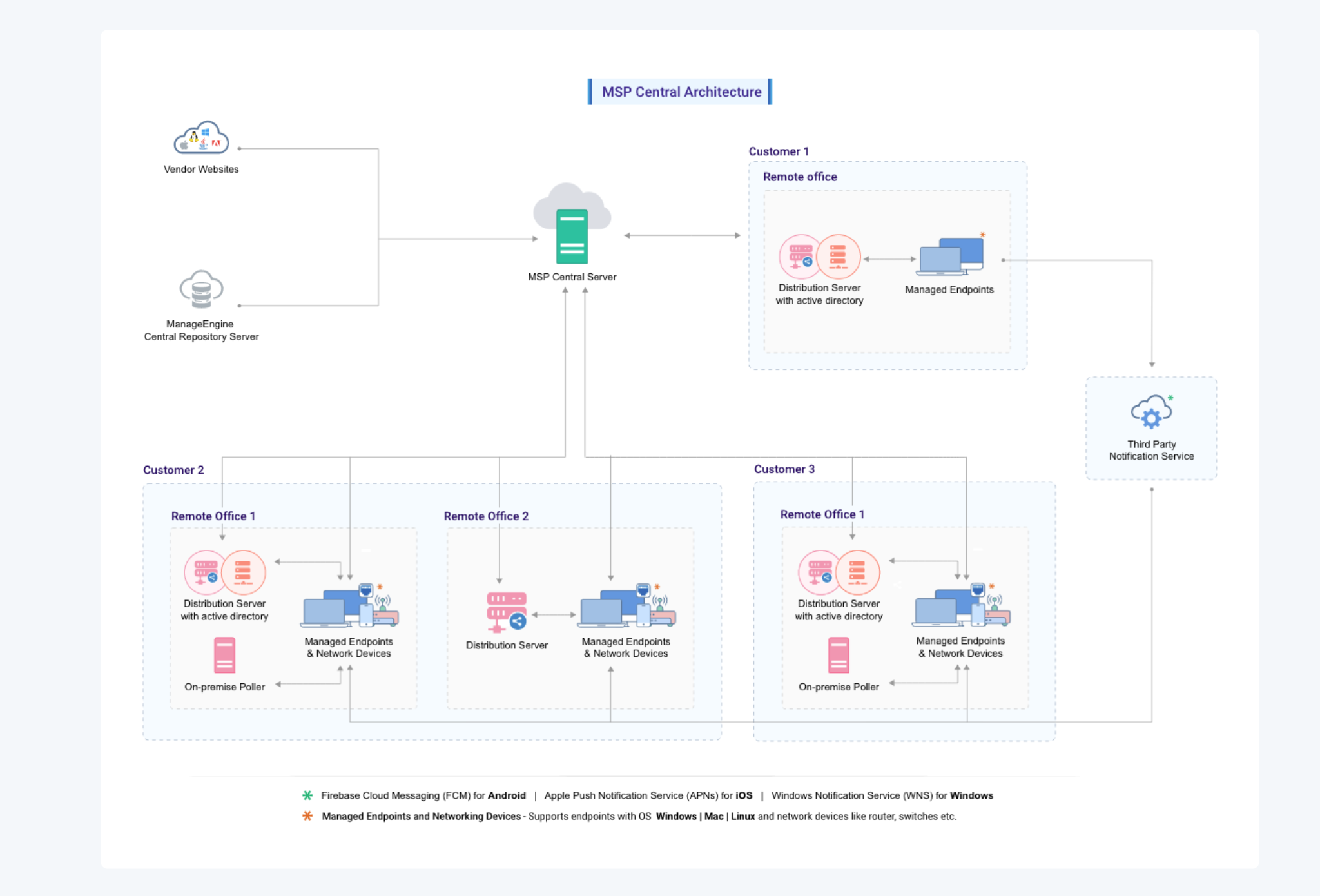
A Real-World MSP Deployment Involves Several Key Components:
- RMM Server: The central control hub. Processes all incoming data and hosts the web console for technicians.
- RMM Agent: Software installed on endpoints that carries out tasks like collecting data and deploying patches.
- Distribution Server: Installed at client branch offices to act as a local relay and reduce WAN bandwidth.
- Probe: Deployed at remote sites to monitor network devices (routers, switches) that can't have agents installed.
Core Features to Look for in a RMM Software
- Server Management: Monitoring for physical and virtual servers across Windows, Linux, VMware, and Hyper-V.
- Service and Process Monitoring: Early detection of anomalies to maintain system stability.
- Performance Metrics Tracking: Monitoring CPU usage, memory, and disk activity for resource allocation.
- Runbook Automation: Automating routine IT tasks through predefined workflows.
- Network Device Monitoring: Using SNMP, WMI, and SSH for routers, switches, and firewalls.
- Network Configuration Management: Managing configurations to simplify troubleshooting and compliance.
- NetFlow Analyzer: Analyzing traffic patterns to optimize bandwidth usage.
- Firewall Analyzer: Reviewing logs to detect unauthorized access attempts.
- Patch Management: Automating updates for operating systems and third-party applications.
- Endpoint Automation & Analytics: Analyzing device health and usage patterns.
- Remote Troubleshooting: Secure remote access to resolve issues without being physically present.
- IT Scripting: Executing custom scripts to automate complex tasks across multiple devices.
- IT Asset Management: Tracking hardware and software for inventory and license compliance.
How MSPs Make Use of RMM
For MSPs, RMM is the operational backbone. An MSP might manage 30 clients, each with 50-500 endpoints spread across multiple locations. With RMM, a small MSP team can monitor thousands of endpoints from a single console, catch issues proactively, and resolve them remotely before the client notices. This enables a subscription-based model where efficiency directly increases business margins.
Key Benefits of Using RMM Tools
- Proactive Issue Detection: Alerts technicians to problems before they escalate, reducing downtime.
- Reduced Manual Workload: Automates repetitive tasks, freeing staff for strategic projects.
- Centralized Visibility: A single dashboard view across all client networks and IT stacks for MSPs.
- Better Security: Enforces policies and ensures endpoints are up to date with patches.
- Faster Response Times: Instant remote remediation improves customer satisfaction and trust.
- Scalability: Scales operations without proportionally increasing staff headcount.
- Data-Driven Insights: Provides analytics to optimize IT strategies and maintenance planning.
- Multi-Tenancy Support: MSPs can securely manage multiple client environments with complete data isolation.
RMM vs PSA - What's the Difference
RMM manages your clients' technology. PSA manages your business. Integration between these platforms is essential in any MSP's technology stack. The real power comes when they are integrated, allowing alerts to flow directly into the PSA as tickets.
| Dimension | RMM | PSA |
|---|---|---|
| Primary focus | Client IT infrastructure - devices, networks, endpoints | MSP business operations - tickets, billing, contracts |
| Core function | Monitor, manage, and remediate IT issues remotely | Track work, manage time, invoice clients, report on performance |
| Alert source | Automated - from device agents and monitors | Human - from client submissions and technician input |
| Key outputs | Resolved incidents, patched systems, healthy endpoints | Invoices, SLA reports, resource utilisation data |
| Without it, you face | Reactive IT, missed issues, manual patching, blind spots | Untracked billable time, manual invoicing, billing errors |
The Future of RMM - Where Technology Is Heading
RMM is reshaped by converging forces: AI, ML, and platform consolidation. Modern MSPs are moving toward unified platforms to reduce tool sprawl.
- AI-Powered Management: 60% of MSPs are projected to adopt AI by 2026. AI identifies anomalies before thresholds are breached and automates remediation.
- Platform Consolidation: The industry is moving toward unified RMM + PSA + EDR + backup platforms under a single interface.
- Security Convergence: The boundary between RMM and security is dissolving, with native integration of EDR and threat intelligence.
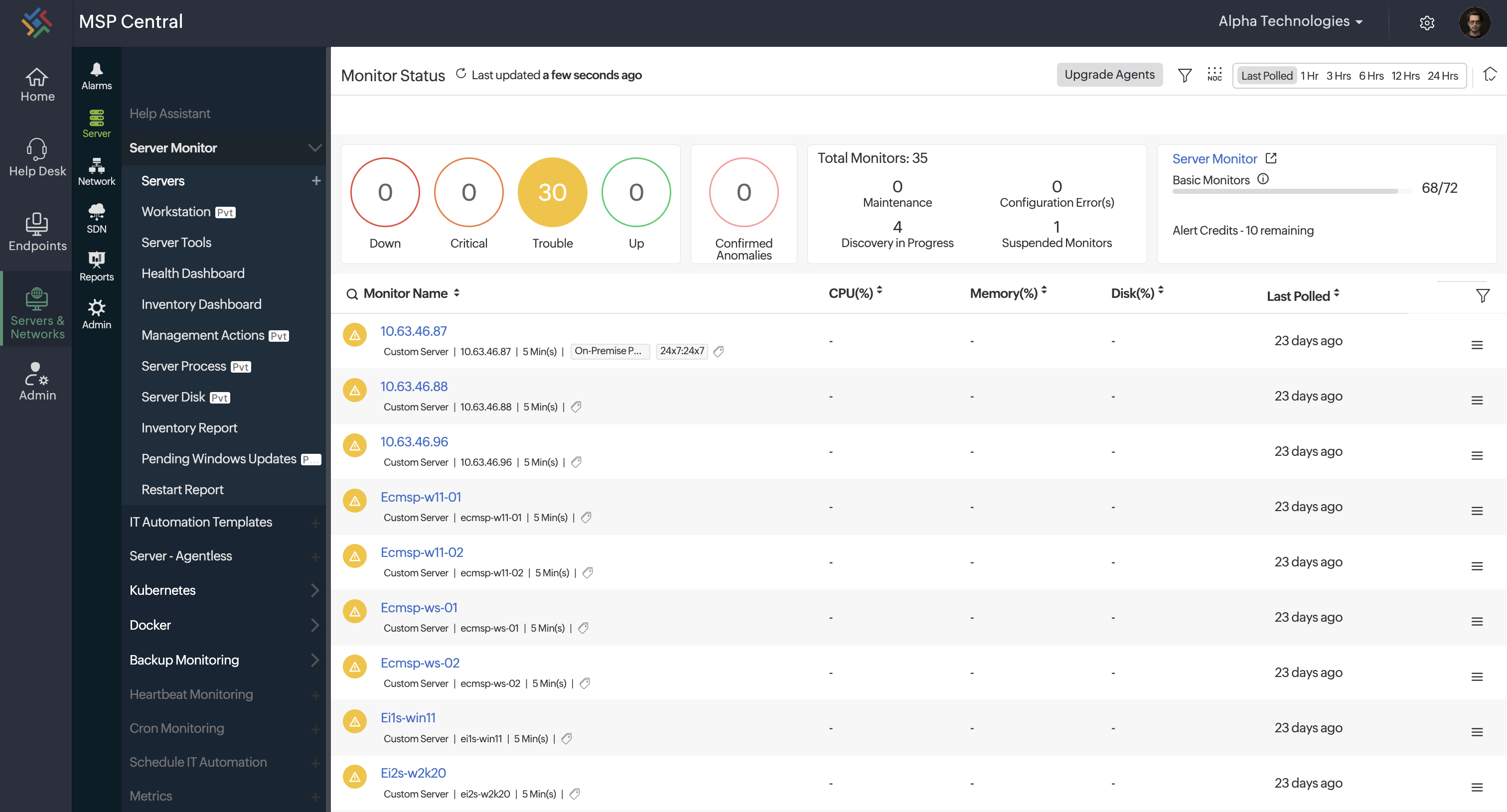
Why ManageEngine MSP Central Is the RMM Platform Built for How MSPs Actually Operate
MSP Central is a unified platform designed for every team within an MSP, helping you provide reliable IT services while scaling your business.
| Feature | Standalone RMM | ManageEngine MSP Central |
|---|---|---|
| Integration | Monitoring and patching - then separate tools for ticketing, billing, and security. | RMM, ITSM, server monitoring, endpoint security, and analytics - one platform. |
| Architecture | Multi-tenancy bolted on as an afterthought requiring workarounds. | Native multi-tenant architecture with complete client data isolation from day one. |
| Workflow | Alert fires → technician manually creates ticket → logs time separately. | Alert fires → ticket auto-created with context → billing entry generated automatically. |
| AI Features | AI as a paid add-on or roadmap promise - not live in the core today. | AI-driven anomaly detection and predictive analysis built-in. |
Frequently Asked Questions (FAQs)
- Does RMM software help with network stability?
Yes. RMM software continuously monitors devices and network components, proactively detecting issues. - What are the security features of typical RMM tools?
Most RMM tools include features like endpoint protection, threat detection, patch management, and MFA. - Does ManageEngine RMM solution support scheduling and running scripts remotely?
Yes. You can create, schedule, and execute scripts remotely across devices. - How scalable is an RMM solution?
RMM solutions are highly scalable, allowing you to manage environments from a few endpoints to thousands. - Does the RMM solution support role-based access control (RBAC)?
Yes. RMM tools often include RBAC to define user permissions and restrict access based on roles. - Can it monitor both on-premise and cloud infrastructure?
Yes. Modern RMM platforms provide unified visibility across on-premise, cloud, and hybrid environments.
Strengthen Your Service Delivery With MSP Central.