# Compliance | v12 | Network Configuration Manager Help
## Compliance
### Contents
- [Overview](https://www.manageengine.com/network-configuration-manager/help/compliance-v12.html#Overview)
- [How does compliance check work?](https://www.manageengine.com/network-configuration-manager/help/compliance-v12.html#How_compliance_works)
- [How does compliance check benefit me?](https://www.manageengine.com/network-configuration-manager/help/compliance-v12.html#Benefits)
- [How do I enable compliance check?](https://www.manageengine.com/network-configuration-manager/help/compliance-v12.html#Enable_compliance)
- [Running compliance check](https://www.manageengine.com/network-configuration-manager/help/compliance-v12.html#Running_comp_check)
- [Running adhoc tests](https://www.manageengine.com/network-configuration-manager/help/compliance-v12.html#Adhoc_tests)
## Overview
Government and industry regulations require IT organizations conform to some standard practices. To become compliant with the regulations such as CIS, SOX, HIPAA, and others, device configurations should conform to the standards specified. The standards could be anything - ensuring the presence or absence of certain strings, commands or values. Network Configuration Manager helps in automatically checking for compliance to the rules defined. Also, detailed reports on policy compliance and violations are generated.
## How does compliance check work?
Users can define a set of rules specifying the mandatory requirements - what the configuration should contain and/or what it should not contain. The rules can be grouped and defined as "Compliance Policy". Each device or a group of devices can be associated with the required policy or policies. Upon backing up configurations, Network Configuration Manager will automatically scan the configuration for compliance to the policy defined and report violations. Users can also run manual compliance checks at any given instance. Additionally, compliance checks can be scheduled to run on a hourly, daily weekly and monthly basis.
## How does compliance check benefit me?
Compliance check enables network administrators save a lot of time by automating the standards checking process. Besides it helps in:
- automating the process of ensuring that every device configuration in the network adheres to important security policies and best practices
- ensuring that the configuration confirms to standard practices to satisfy Government and industry regulations
- simplifying the requirements for standards compliance audit through comprehensive and intuitive reports
## How do I enable compliance check?
Enabling compliance check starts with compliance policy creation, which is a three-step process:
### 1. Add a Rule
Define the line or lines that are to be either compulsorily present or should not be present in the configuration file. A typical example for a rule is checking the access list configuration or checking the community string. Decide what amounts to violation - presence or absence of a particular line or a set of lines in the configuration file.
**To add a rule:**
1. Click on Compliance tab >> Rule >> "+" icon
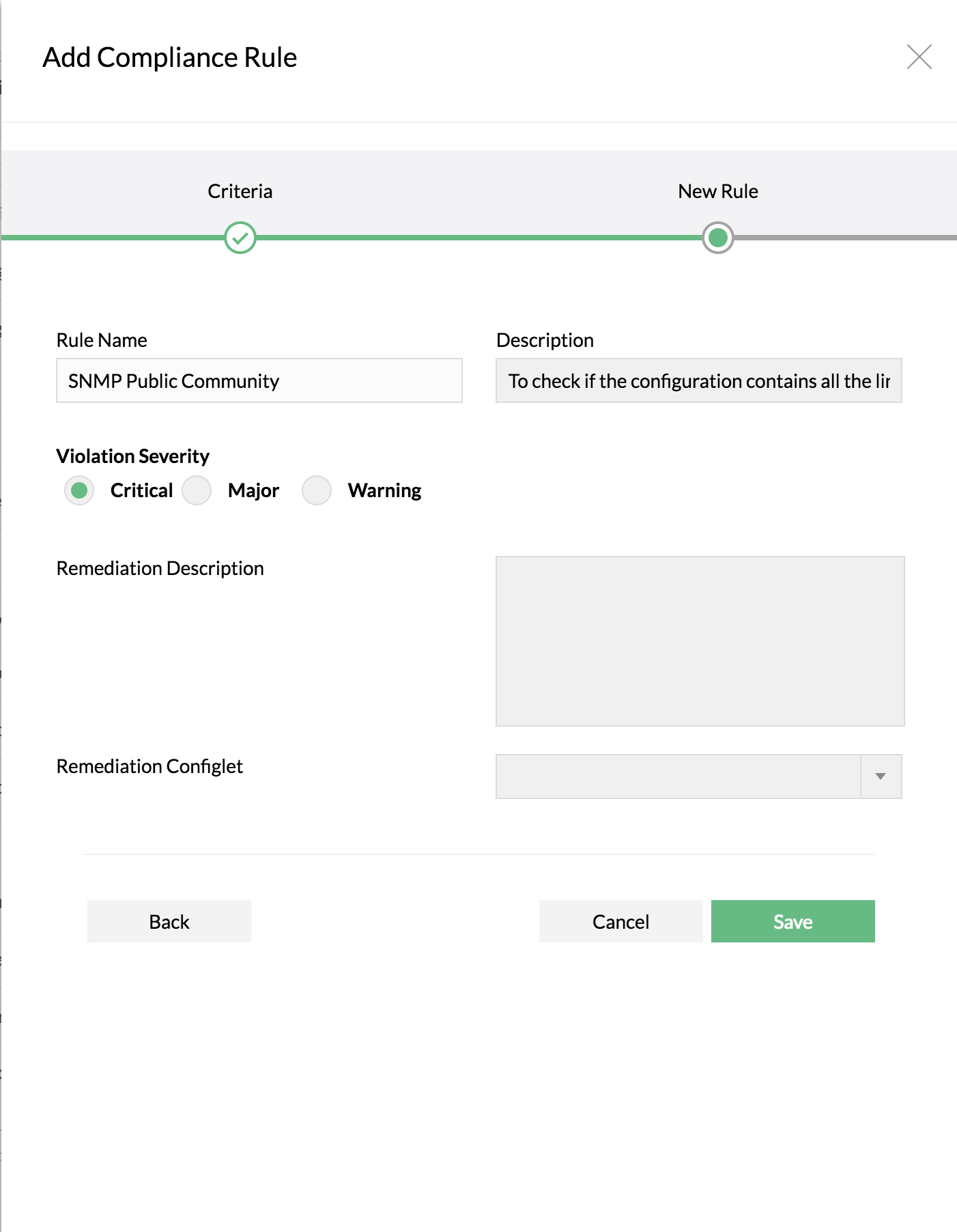
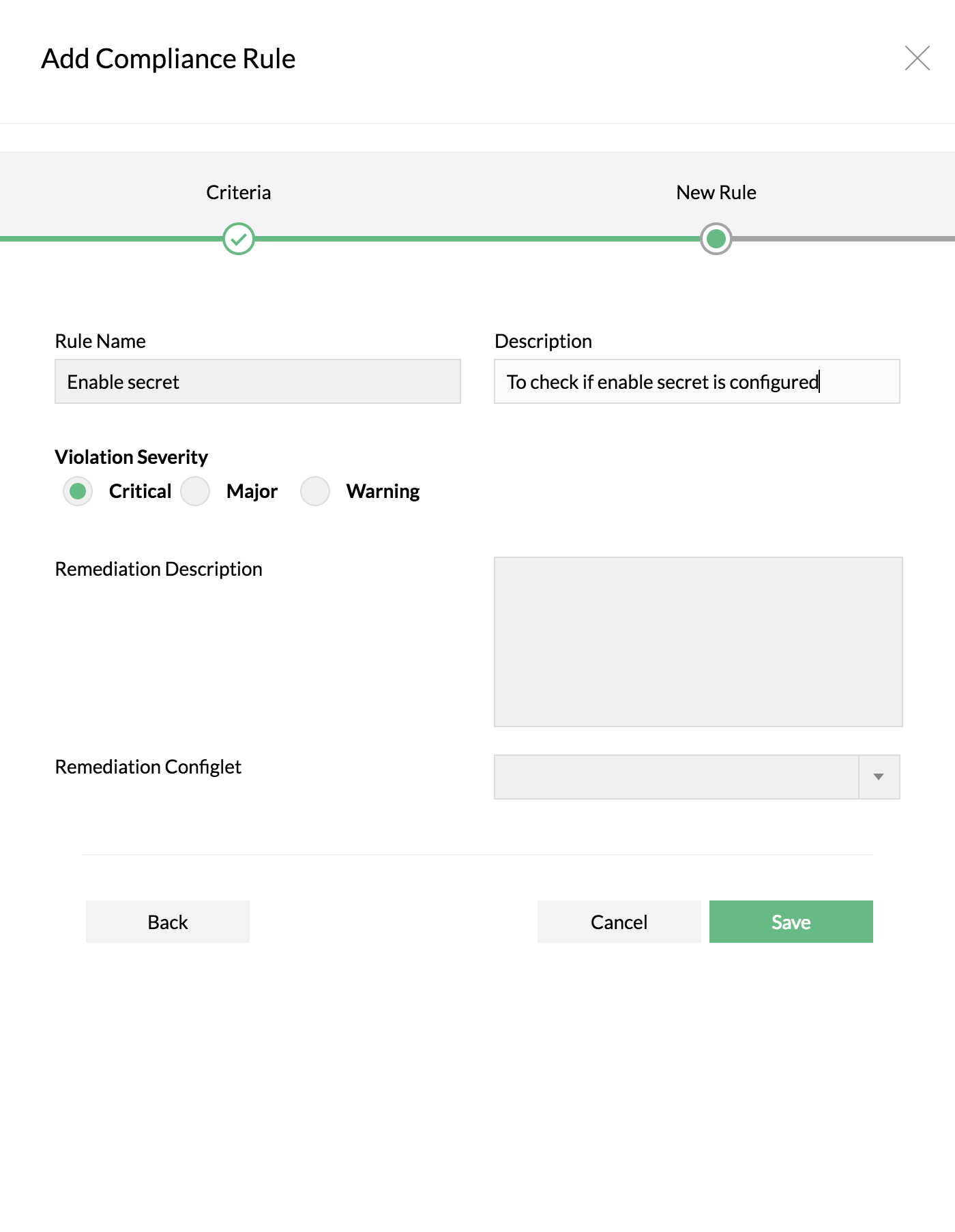
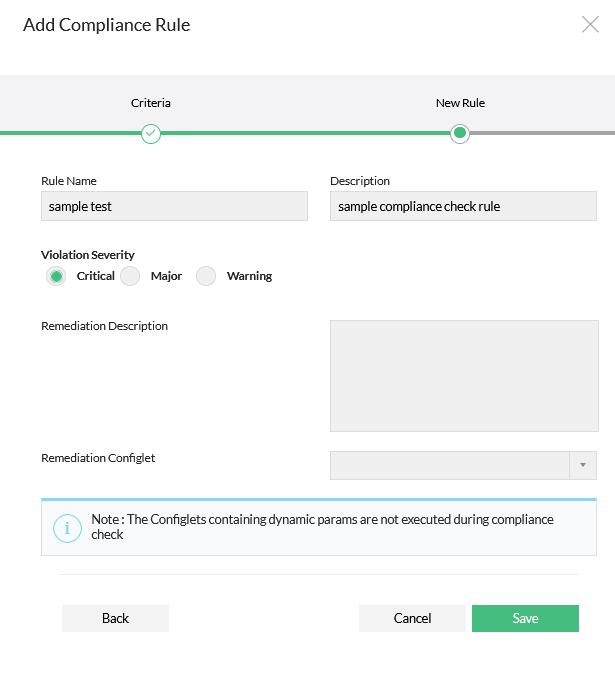
2. Enter Rule Name, Description and other details
3. Select "Simple Criteria" if your requirement is just to check for the presence or absence of a single line or a group of lines in the configuration file
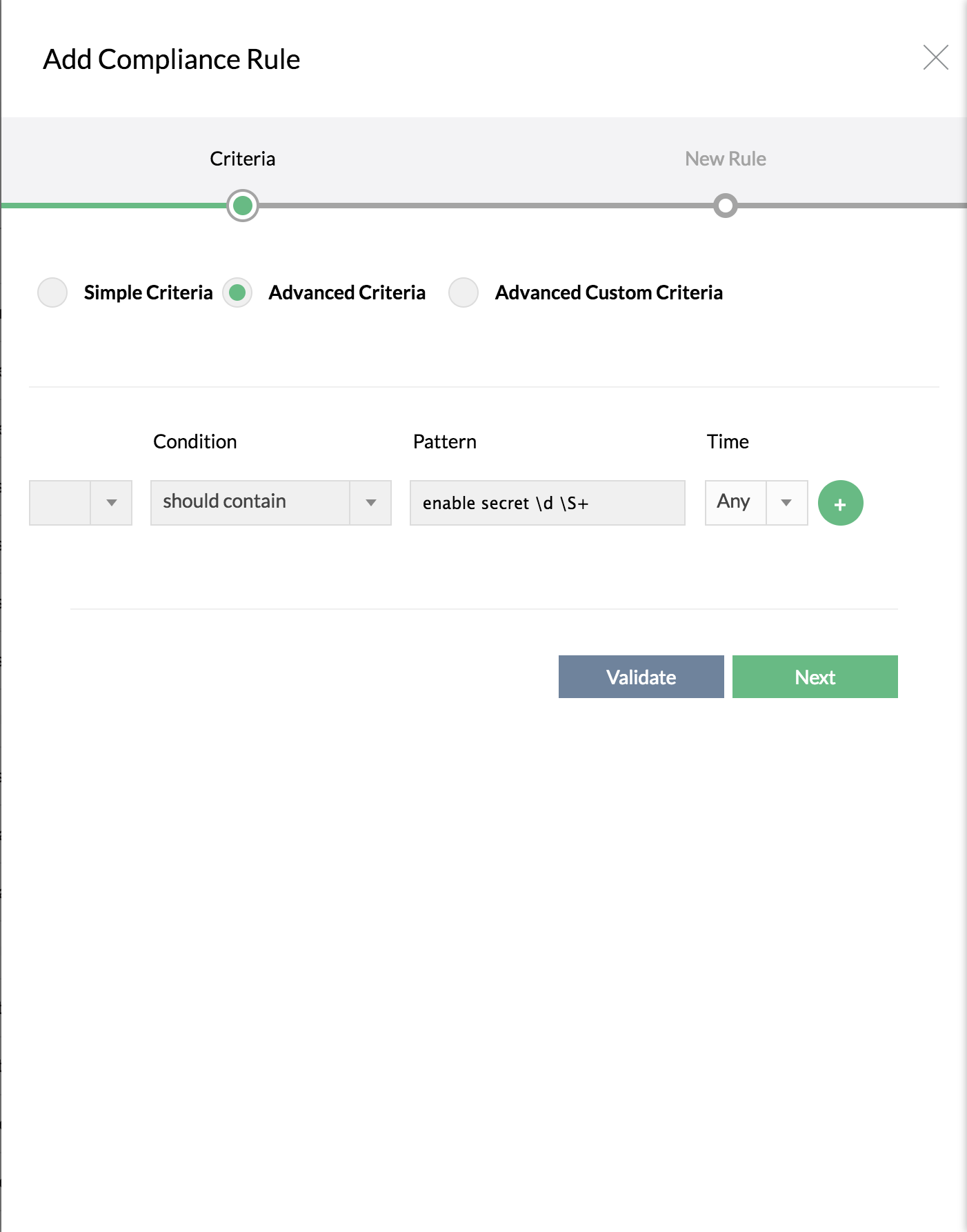
4. If you want to specify more complex criteria using Regular Expression, select "Advanced Criteria" and then enter the line in the text field
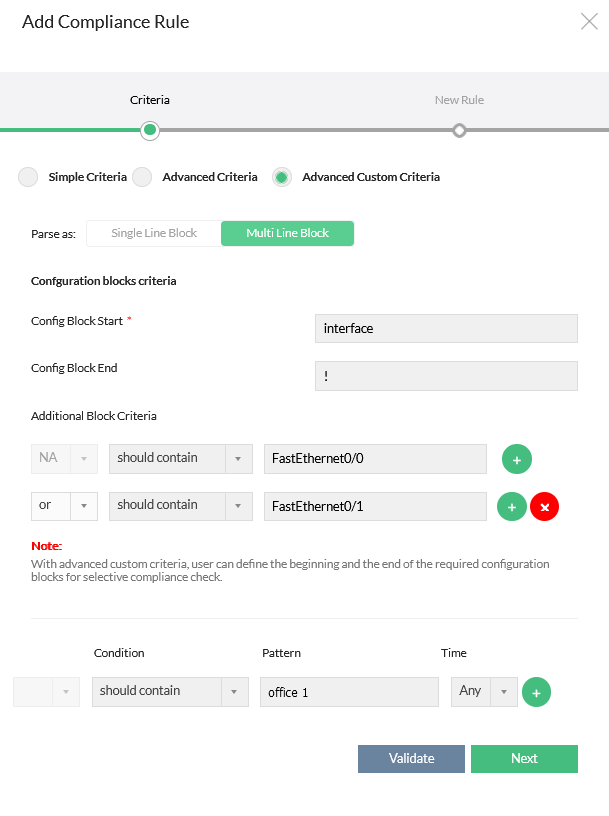
5. If you want to define the beginning and the end of the required configuration blocks for selective compliance check, select "Advanced custom Criteria". This is just an extension of "Advanced Criteria"
### How to choose the required criteria?
| Simple Criteria | Advanced Criteria | Advanced Custom Criteria |
|---|---|---|
| To check for the presence or absence of a single line or a group of lines in the configuration file along with certain conditions. | To specify more complex criteria using regular expression along with certain conditions. You can also add any number of lines which can be separated by and / or. | To check for the presence or absence of single line block in the configuration file or to define the beginning and the end (optional) of the required configuration blocks (multi line block) along with multiple additional criteria for selective compliance check. This also includes Advanced Criteria options as well. |
### Simple Criteria
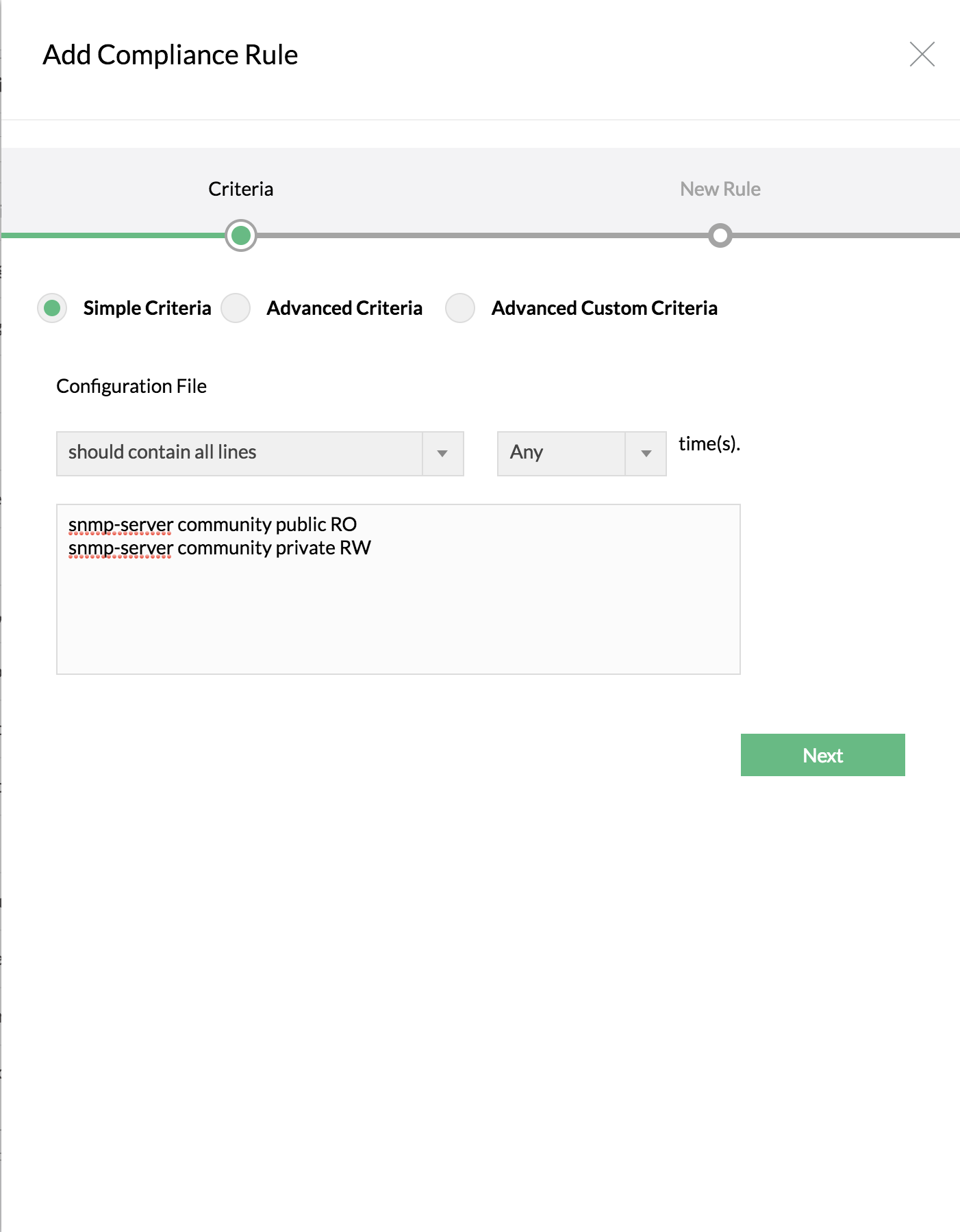
To check for the presence or absence of configuration lines (single or group of lines) with certain conditions.
| Criteria | Description | Example |
|---|---|---|
| Should contain all lines | The configuration to be checked for compliance should contain all the lines specified by you. Even if a single line is not found, it will be pronounced as "violation". The lines need not appear in the same order. | **Criteria:** Should contain all lines
**Configuration lines:**
snmp-server community public RO
snmp-server community private RW
**Violation:** If any or all lines are not present |
| Should not contain any line | The configuration should NOT contain any of the lines specified. Even if a single line is found, it will be pronounced as "violation". Order does not matter. | **Criteria:** Should not contain any line
**Configuration lines:**
snmp-server community public RO
snmp-server community private RW
**Violation:** If any or all lines are present |
| Should contain exact set | Similar to "Should contain all lines", but the order of the lines is taken into consideration. | **Criteria:** Should contain exact set
snmp-server enable traps hsrp
snmp-server enable traps config
snmp-server enable traps entity
**Violation:** If lines are not present in the same order |
| Should not contain exact set | Opposite of the above. If lines are present exactly as specified in the same order, it will be pronounced as rule violation. | **Criteria:** Should not contain exact set
snmp-server enable traps hsrp
snmp-server enable traps config
snmp-server enable traps entity
**Violation:** If lines are present in the same order |
### Advanced Criteria
You can make use of regular expressions in providing the criteria for checking the configuration for compliance along with certain conditions. Multiple lines can be separated by and/or.
| Criteria | Description | Example |
|---|---|---|
| Should contain | The configuration should contain the line matching the RegEx pattern specified. | snmp-server community public RO\|RW
Violation: If not present |
| Should not contain | The configuration should not contain the line matching the RegEx pattern specified. | snmp-server community public RO\|RW
Violation: If present |
| Usage of AND/OR condition | Two or more RegEx patterns could be combined through AND/OR conditions. | -- |
### Advanced Custom Criteria
To check for the presence or absence of single line block in the configuration file or to define the beginning and the end (optional) of required configuration blocks (multi line block) along with additional criteria.
**Single Line Block**
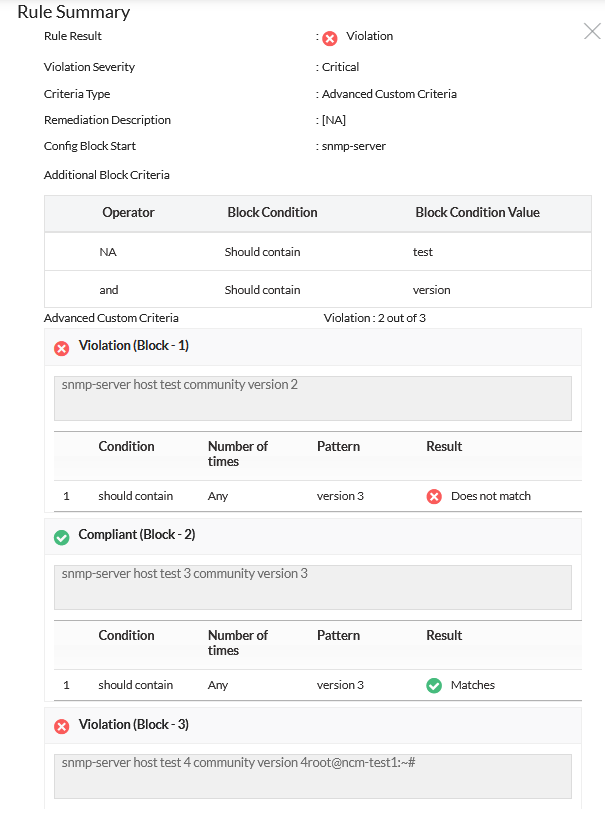
Network Configuration Manager supports Single Line Block where you can provide the start block of single line configuration along with additional block criteria.
**Multi Line Block**
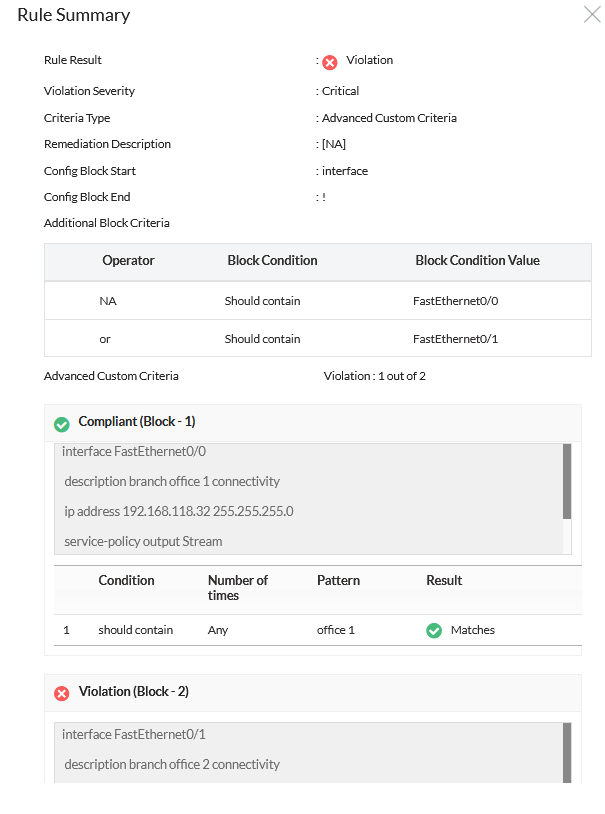
Define the starting and ending of interface blocks (end block optional). The configuration will be split into blocks and checked individually.
### Regular expression in compliance rule with examples
#### Regular Expression Patterns & Description
Matching specific characters
Characters inside square brackets can be used to match any of the characters mentioned therein.
Example: `[abc]`
Matching a range of characters or numbers
Examples:
`[a-zA-Z]`
`[0-9]`
Other specific matches:
- `.` match any single character
- `d` match any digit from 0 to 9
- `D` match any non-digit
- `s` match a space
- `S` match non-space
- `X?` appear once or not at all
- `X*` appear zero or more times
- `X+` appear at least once
- `X|Y` match either X or Y
For more details, refer to the [Regular Expression Tutorials](http://java.sun.com/docs/books/tutorial/essential/regex/index.html).
#### More Examples
| Description | RegEx Pattern |
|---|---|
| To check if enable secret is configured | enable secret d S+ |
| To check if there is a "public" community present | snmp-server community public RO\|RW |
| To check if logging to a syslog server has been configured | logging S+ |
### How Network Configuration Manager checks compliance?
When you specify blocks starting with a keyword like "interface" and ending with "!", all such blocks will be tested individually. Overall result will be based on AND of all individual results. Even if one block shows violation, overall result will be violation.
- Finally specify the severity for violation. Select the remediation configlet and provide remediation description if any.
- Click "Save"
### 2. Group the Rules
A "Rule Group" refers to a collection of rules.
**To create a rule group:**
1. Click on Compliance tab >> Rule Group >> "+"
2. Enter Rule Group Name, Description and other details
3. Select the required rules and click "Save"
### 3. Create Policy
Once a rule group is created, create a compliance policy by selecting required Rule Groups.
**To create a policy:**
1. Click on Compliance tab >> Policies >> "+"
2. Enter Policy Name, Description and other details
3. Specify configuration file type (running/startup)
4. Select Policy Violation Criteria:
- if any rule is violated
- only critical or major rules are violated
5. Select required rule groups and click "Save"
### 4. Associate Devices with Compliance Policy
**To associate a policy:**
1. Click on Compliance >> Policies
2. Click "Associate devices" against the policy
3. Select devices/device groups and click "Save"
## Running Compliance Check
After associating a policy with a device or group:
### To run compliance check for a single device:
1. Go to "Device Details" page
2. Click "Run Compliance Check" under "More Actions"
### To run compliance check for a device group:
1. Go to "Inventory" >> "Device Group"
2. Click the required group
3. Click "Run Compliance Check" under "More Actions"
## Running Adhoc Tests
During rule, rule group, or policy creation, you can perform adhoc tests to validate configurations immediately.
- After adding a rule: Compliance tab >> Rule >> "Adhoc Test"
- For rule group: Compliance tab >> Rule Group
- For policy: Compliance >> Policy
Adhoc tests depict the results instantly.