OpManager offers REST APIs for adding and fetching data from OpManager. Using these APIs, you can integrate OpManager with 3rd party IT management/service desk software.
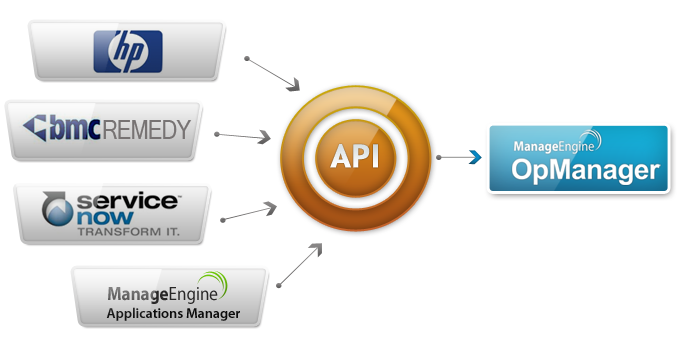
How OpManager REST APIs work?
The APIs work with an API key. The API key is unique for each OpManager account and has to passed as a parameter in every API request made. First, generate an API key.
Generate API Key
To generate an API key, go to Settings > Basic Settings > REST API in OpManager web client and click on Regenerate Key.
API List
| API Name | API Format | Method | Description |
| List Credentials | listCredentials | get | Gives the list of credentials created in OpManager. |
| List Notification Profiles | listNotificationProfiles | get | Lists all the notification profiles created in OpManager. |
| List Url monitors | listURLMonitors | get | Lists all the URL monitors created. |
| Trap Processors | listTrapProcessors | get | Lists all the trap processor created. |
| Script Monitors | listScriptMonitors | get | Lists all the script monitors created. |
| List Probes | listProbes | get | Lists all the probes available in OpManager. |
| List Perfomance Monitors | listPerformanceMonitors | get | Lists all the performance monitors added. |
| Add device | addDevice | post | Add a device. |
| Get Down devices | getDownDevices | get | Provides the details of devices that are down. |
| Add Event | addEvent | post | Adds an event. |
| List Alarms | listAlarms | get | List all the alarms available. |
| Acknowledge Alarm | acknowledgeAlarm | post | Allows to acknowledge an alarm. |
| Un Acknowledge Alarm | unAcknowledgeAlarm | post | Allows to unacknowledge an alarm. |
| Clear an Alarm | clearAlarm | post | Clears an alarm. |
| Delete Alarm | deleteAlarm | post | Deletes an alarm. |
| Add Notes to Alarm | addNotes | post | Adds notes to an alarm. |
| Get Notes | getAnnotation | get | Provides the notes available for an alarm. |
| Get Alarm Details | alarmProperties | get | Provides the details of an alarm eg: status, acknowledgement |
| Trace device | getTraceResponse | get | Allows you to get the traceroute to a device. |
| List devices | listDevices | get | Lists all the devices added in OpManager. |
| Device Summary | getDeviceSummary | get | Provides the summary details of a device. |
| Associated Workflows | getWorkFlows | get | Provides the list of workflows associated to a device. |
| Associated Monitors | getAssociatedMonitors | get | Provides the list of monitors associated to a device. |
| List Interfaces | listInterfaces | get | Lists all the interfaces in OpManager. |
| Probe URL | getProbeURL | get | Provides the URL of the probe. |
| Interface Summary | getInterfaceSummary | get | Provides the summary details of an interface. |
| Workflow List for Device | getWorkflowList | get | Lists all the workflows associated to a device. |
| Trigger Workflow for Device | triggerWorkflow | post | Allows to trigger a workflow on a device. |
| Business view Details | getBusinessDetailsView | get | Lists all the devices available in a business view. |
| Business views | getBusinessView | get | Lists all the business views created. |
| Associate Notification Profile | associateNotificationProfiles | post | Allows to associate multiple Notification Profiles to Multiple devices |
|
Criteria |
Criteria ID |
|
Status Poll (Device misses 1/3/5 polls) |
#0000000000000000000000000000000 (# represents the number of polls, it can be replaced by 1 or 3 or 5 or a ; 1 to select 1 polls or 3 to select 3 polls or 5 to select 5 polls or a to select 1,3,5 polls) |
| Trap › received | 01000000000000000000000000000000 |
| Interface -› problems | 00100000000000000000000000000000 |
| Service › down | 00010000000000000000000000000000 |
| Windows Service › down | 00001000000000000000000000000000 |
| Event Log › generates alarm | 00000100000000000000000000000000 |
| SysLog › generated alarm | 00000010000000000000000000000000 |
| AdMonitor › down | 00000001000000000000000000000000 |
| Exchange Monitor › down | 00000000100000000000000000000000 |
| MSSQL Monitor › violated | 00000000010000000000000000000000 |
| AdService › down | 00000000001000000000000000000000 |
| Exchange Service › down | 00000000000100000000000000000000 |
| MSSQL Service › down | 00000000000010000000000000000000 |
| Threshold › violated | 00000000000001000000000000000000 |
| Process Monitor › violated | 00000000000000100000000000000000 |
| IPSLA Monitor › violated | 00000000000000010000000000000000 |
| File Monitor › violated | 00000000000000001000000000000000 |
| Folder Monitor › violated | 00000000000000000100000000000000 |
| Printer Monitor › violated | 00000000000000000010000000000000 |
| UPS Monitor › down | 00000000000000000001000000000000 |
| URL › down | 00000000000000000000100000000000 |
| Virtual Device Monitor › down | 00000000000000000000010000000000 |
| Script Monitor › down | 00000000000000000000001000000000 |
| Probe › down | 00000000000000000000000100000000 |
| Agent › down | 00000000000000000000000010000000 |
| Hardware monitor › down | 00000000000000000000000001000000 |
| NCM Backup › Failed | 00000000000000000000000000100000 |
| NCM Config › changes | 00000000000000000000000000010000 |
| NFA Alarm › generates alarm | 00000000000000000000000000001000 |
| UCS Fault received | 00000000000000000000000000000100 |
| Storage Alarm | 00000000000000000000000000000010 |
| Alarm › cleared | 00000000000000000000000000000001 |
| OpManager REST API Documentation | ||||
| REST API | Method | Description | Parameters | Sample URL |
| Admin Module | ||||
| deleteCredential | POST | Delete Credentials | apiKey* - API Key to access your OpManager server. credentialName* - Name of the credential. isSNMPV3 – true or false. |
http://localhost:8060/api/json/admin/deleteCredential?apiKey=081c9ac51ba16ab061d5efee583dcd2f&credentialName=Public |
| listPluginEvents | GET | Get events raised by the installed plugin application | apiKey* - API Key to access your OpManager server. pluginName* - Name of the plugin whose event is needed. eventTime* - Period in which event generated (for all events, say All). |
http://localhost:8060/api/json/alarm/listPluginEvents?apiKey=6d36ff8426cff396b81b248e5c458604&pluginName=All&eventTime=All |
| getPluginDetails | GET | Fetches information of the installed plugins | apiKey* - API Key to access your OpManager server. |
http://localhost:8060/api/json/admin/getPluginDetails?apiKey=081c9ac51ba16ab061d5efee583dcd2f |
| triggerWorkflow | POST | Allows to trigger a workflow on a device. | apiKey* - API Key to access your OpManager server. workflowName* - Name of the workflow that has to be executed. deviceName* - Name of the device on which the workflow has to be executed. |
http://localhost:8060/api/json/workflow/triggerWorkflow?apiKey=081c9ac51ba16ab061d5efee583dcd2f&deviceName=opman-k8r2s-64-3.testdomain.com&workflowName=Instant Device Check |
| licenseDetails | GET | Fetches license details | apiKey* - API Key to access your OpManager server. |
http://localhost:8060/api/json/admin/licenseDetails?apiKey=081c9ac51ba16ab061d5efee583dcd2f |
| generateHeapDump | POST | Generates Heap dump file.. | apiKey* - API Key to access your OpManager server. |
http://localhost:8060/api/json/admin/generateHeapDump?apiKey=081c9ac51ba16ab061d5efee583dcd2f |
| getActualScheduleRate | GET | Gets actual schedule rate | apiKey* - API Key to access your OpManager server. fromTime* - Data collection From time ToTime* – Data collected To time. |
http://localhost:8060/api/json/diagnostics/getActualScheduleRate?apiKey=081c9ac51ba16ab061d5efee583dcd2f&fromTime=2013-12-21 00:01:15&toTime=2013-12-21 23:59:15 |
| Alerts | ||||
| acknowledgeAlarm | POST | Allows to acknowledge an alarm. | apiKey* - API Key to access your OpManager server. entity - Entity of the alarm. |
http://localhost:8060/api/json/alarm/acknowledgeAlarm?apiKey=081c9ac51ba16ab061d5efee583dcd2f&entity=222222222 |
| addEvent | POST | Adds an event. | apiKey* - API Key to access your OpManager server. source* - Name of the source device of the event. severity* - The severity of the event. Following are the severity levels and its ID: Critical - 1 Trouble - 2 Attention - 3 Service Down - 4 message* - The message that is displayed when the event is generated. alarmCode - Unique string used to trigger the event. Eg:-Threshold-DOWN entity - Uniquely identifies the failure object within the source.Events will be correlated into alarms according to the entity field. Multiple events with the same entity will be grouped as a single alarm. eventType - Description of the event type |
http://localhost:80/api/json/events/addEvent?apiKey=3d4d1f45e4c445eb52b9f1c51bc7c1ca&source=Cisco2081_router&severity=1&message=DownStatus&alarmCode=Threshold-DOWN&entity=Cisco2081_router |
| addNotes | POST | Adds notes to an alarm. | apiKey* - API Key to access your OpManager server. entity* -Entity of the alarm. notes* – Text that has to be added as notes to the alarm. |
http://localhost:8060/api/json/alarm/addNotes?apiKey=081c9ac51ba16ab061d5efee583dcd2f¬es=test&entity=222222222 |
| alarmProperties | GET | Provides the details of an alarm eg: status, acknowledgement | apiKey* - API Key to access your OpManager server. entity* - Entity of the alarm. |
http://localhost:8060/api/json/alarm/alarmProperties?apiKey=081c9ac51ba16ab061d5efee583dcd2f&entity=222222222 |
| clearAlarm | POST | Clears an alarm. | apiKey* - API Key to access your OpManager server. entity* - Entity of the alarm. |
http://localhost:8060/api/json/alarm/clearAlarm?apiKey=081c9ac51ba16ab061d5efee583dcd2f&entity=222222222 |
| deleteAlarm | POST | Deletes an alarm. | apiKey* - API Key to access your OpManager server. entity* - Entity of the alarm. |
http://localhost:8060/api/json/alarm/deleteAlarm?apiKey=081c9ac51ba16ab061d5efee583dcd2f&entity=222222222 |
| getAnnotation | GET | Provides the notes available for an alarm. | apiKey* - API Key to access your OpManager server. entity* - Entity of the alarm. |
http://localhost:8060/api/json/alarm/getAnnotation?apiKey=081c9ac51ba16ab061d5efee583dcd2f&entity=222222222 |
| listAlarms | GET | List all the alarms available. | apiKey* - API Key to access your OpManager server. deviceName - Name of the device whose alarms alone has to be filtered severity - The severity of the alarm. Following are the severity levels and its ID: Critical - 1 Trouble - 2 Attention - 3 Service Down - 4 Category - The category to which the device belongs to. Eg. Router fromTime - The beginning time for the filter. It should be in yyyy-mm-dd hh:mm:ss format. toTime - The end time for the filter. It should also be in yyyy-mm-dd hh:mm:ss format. |
http://localhost:8060/api/json/alarm/listAlarms?apiKey=081c9ac51ba16ab061d5efee583dcd2f&Category=Server&deviceName=opman-k8r2s-64-3..testdomain.com&severity=1&toTime=2014-02-12 23:59:00&fromTime=2014-02-12 00:01:01 |
| listNotificationProfiles | GET | Lists all the notification profiles created in OpManager. | apiKey* - API Key to access your OpManager server. profileFilter- All - For Global profiles and for other type of profiles(Send+Email, Send+SMS, Send+Modem+SMS, Run+System+Command,etc..) isGlobal- false - for Device Specific Profiles Filter. |
http://localhost:8060/api/json/admin/listNotificationProfiles?apiKey=641dc197c94dcabb6af38c64352e5954&isFluidic=true&profileFilter=All |
| associateNotificationProfiles | POST | Associate Notification Profiles | apiKey* - API Key to access your OpManager server. profiles* - ProfileID of the profiles to be associated. deviceName* - Name of the devices to be associated |
http://localhost:80/api/json/admin/associateNotificationProfiles?apiKey=9c6f010cad72bc32abc984143cc5d505&profiles=301,302&deviceName=opman-k8r2s-64-3.testdomain.com,opman-k8r2s-64-4.testdomain.com |
| unAcknowledgeAlarm | POST | Allows to unacknowledge an alarm. | apiKey* - API Key to access your OpManager server. entity - Entity of the alarm. |
http://localhost:8060/api/json/alarm/unAcknowledgeAlarm?apiKey=081c9ac51ba16ab061d5efee583dcd2f&entity= 222222222 |
| alarmProperties | GET | Obtains information of the given alarm | apiKey* - API Key to access your OpManager server. entity* - Entity (alarm ID) |
http://localhost:8060/api/json/alarm/alarmProperties?apiKey=081c9ac51ba16ab061d5efee583dcd2f&entity=222222222 |
| getAlarmList | GET | Lists all the alarms irrespective of the device/category | apiKey* - API Key to access your OpManager server. |
http://localhost:8060/api/json/alarm/getAlarmList?apiKey=081c9ac51ba16ab061d5efee583dcd2f |
| listEvents | GET | Lists all generated events | apiKey* - API Key to access your OpManager server. |
http://localhost:8060/api/json/events/listEvents?apiKey=6d36ff8426cff396b81b248e5c458604 |
| Device discovery | ||||
| addDevice | POST | Add a device. | apiKey* - API Key to access your OpManager server. deviceName* - Name of the device to be added. netmask - Enter the netmask for discovering the device. credentialName - Enter the appropriate credential. type - Type of the device. Eg. Windows 2008 R2. displayName - Name of the device that has to be displayed in OpManager. |
http://localhost:8060/api/json/discovery/addDevice?apiKey=081c9ac51ba16ab061d5efee583dcd2f&deviceName=opman-k8r2s-64-2.testdomain.com&displayName=opman-k8r2s-64-2.testdomain.com&credentialName=win&netmask=255.255.255.0&type=Windows 2008 R2 |
| listCredentials | GET | Gives the list of credentials created in OpManager. | apiKey* - API Key to access your OpManager server. | http://localhost:8060/api/json/admin/listCredentials?apiKey=081c9ac51ba16ab061d5efee583dcd2f |
| doSearch | GET | Search a device/interface | apiKey* - API Key to access your OpManager server. type* - Type of the device (DEVICE,INTERFACE, etc). searchString* - Search string (device name, interface name etc). |
http://localhost:8060/api/json/discovery/doSearch?apiKey=081c9ac51ba16ab061d5efee583dcd2f&type=DEVICE,INTERFACE&searchString=opman-k8r2s-64-3.testdomain.com |
| Device Snapshot | ||||
| associateServiceMonitor | POST | Associate Service monitors to the specified device | apiKey* - API Key to access your OpManager server. deviceName* - Name of the device for which the service to be associated. Give the names by comma separated for bulk association serviceName* - Name of the service in comma-separated format. |
http://localhost:8060/api/json/admin/associateServiceMonitor?deviceName=ctestlab-w2012.testdomain.com&apiKey=6d36ff8426cff396b81b248e5c458604&serviceName=WebLogic,Web,Telnet,SMTP |
| getAssociatedMonitors | GET | Provides the list of monitors associated to a device. | apiKey* - API Key to access your OpManager server. name - name of the device. |
http://localhost:8060/api/json/device/getAssociatedMonitors?apiKey=081c9ac51ba16ab061d5efee583dcd2f&name=opman-k8r2s-64-3.testdomain.com |
| getAssociatedServiceMonitors | GET | Provides the service monitors associated with the specified device | apiKey* - API Key to access your OpManager server. name* - Name of the device. |
http://localhost:8060/api/json/device/getAssociatedServiceMonitors?apiKey=081c9ac51ba16ab061d5efee583dcd2f&name=opman-k8r2s-64-3.testdomain.com |
| getDeviceSummary | GET | Provides the summary details of a device. | apiKey* - API Key to access your OpManager server. name* - name of the device. |
http://localhost:8060/api/json/device/getDeviceSummary?apiKey=081c9ac51ba16ab061d5efee583dcd2f&name=opman-k8r2s-64-3.testdomain.com |
| getWorkFlows | GET | Provides the list of workflows associated to a device. | apiKey* - API Key to access your OpManager server. name* - name of the device. |
http://localhost:8060/api/json/device/getWorkFlows?apiKey=83155f195334a19df5e58a8a33a6f804&name=opman-k8r2s-64-3.testdomain.com |
| getAssociatedCredentials | GET | Obtains information on the credentials associated to a device | apiKey* - API Key to access your OpManager server. name* – Name of the device whose credentials need to be fetched. |
http://localhost:8060/api/json/device/getAssociatedCredentials?apiKey=081c9ac51ba16ab061d5efee583dcd2f&name=opman-k8r2s-64-3.testdomain.com |
| getPerfomanceMonitorDetails | GET | Obtains information of the performance monitors for a device | apiKey* - API Key to access your OpManager server. policyName* - Name of the performance monitor. graphName* - Graph name of the performance monitor. name* - Name of the device. checkNumeric* - true or false. |
http://localhost:8060/api/json/device/getPerfomanceMonitorDetails?apiKey=6d36ff8426cff396b81b248e5c458604&policyName=WMI-CPUUtilization&graphName=WMI-CPUUtilization&name=172.18.100.130&checkNumeric=true |
| EditPerfomanceMonitor | POST | Enables editing the configuration of a performance monitor | TroubleThresholdType* - Type of threshold. TroubleThresholdValue* - Trouble threshold value. RearmValue* - Trouble threshold rearm value. Interval – monitoring Interval in mins. TimeAvg – Average time. ThresholdEnabled – true or false. GraphName – Name of the performance monitor graph. WarningThresholdValue – Warning threshold value. Type – threshold type. OidType – OID Type. TroubleMessage – Message to be populated on violating threshold. TroubleThresholdTextValue – Trouble threshold value. TroubleThresholdTextualType – Trouble threshold textual type (equals, contains etc) Oid – OID of the performance monitor. SendClear – True or false. ClrMessage – Message to be displayed when the threshold is cleared. Name – Device name. CriticalThresholdTextValue – Critical threshold text value. CriticalMessage – Message to be displayed on violating critical threshold. CriticalThresholdType – Type of critical threshold (max, min) RearmTextValue – Rearm value of critical threshold. CriticalThresholdValue – Threshold value of the critical alarm. WarningMessage – Warning message. YaxisText – Text representing the values in y-axis. WarningThresholdTextualType – warning threshold text type. FailureThreshold – Failure threshold value. Vendor – Vendor of the device. CriticalThresholdTextualType – Critical threshold textual type. ThresholdName – name of the threshold. WarningThresholdType – Type of the warning threshold. CheckNumeric – True or False. FirstTime – True or False. PolicyName – Name of the performance monitor. InstanceName – Name of the monitor instance. RearmTextualType – Rearm Textual type. ClearThresholdType – Clear threshold type. DisplayName – Displayname of the performance monitor. WarningThresholdTextValue – Warning threshold text value. |
http://localhost:8060/api/json/device/EditPerfomanceMonitor?troubleThresholdType=max&troubleThresholdValue=25&rearmValue=23&interval=5&timeAvg=&thresholdEnabled=true&graphName=WMI-CPUUtilization&warningThresholdValue=&type=multiple&oidType=&apiKey=6d36ff8426cff396b81b248e5c458604&troubleMessage=$MONITOR is $CURRENTVALUE%, threshold value for this monitor is $THRESHOLDVALUE%&troubleThresholdTextValue=25&troubleThresholdTextualType=Contains&oid=CPU Utilization&sendClear=true&clrMessage=$MONITOR is now back to normal, current value is $CURRENTVALUE%&name=172.18.100.130&criticalThresholdTextValue=&criticalMessage=$MONITOR is $CURRENTVALUE%, threshold value for this monitor is $THRESHOLDVALUE%&criticalThresholdType=max&rearmTextValue=23&criticalThresholdValue=&warningMessage=$MONITOR is $CURRENTVALUE%, threshold value for this monitor is $THRESHOLDVALUE%&yaxisText=Percentage&warningThresholdTextualType=Contains&failureThreshold=1&vendor=&criticalThresholdTextualType=Contains&thresholdName=&warningThresholdType=max&checkNumeric=true&firstTime=false&policyName=WMI-CPUUtilization&instanceName=&rearmTextualType=Not Contains&clearThresholdType=min&displayName=CPU Utilization&warningThresholdTextValue= |
| addPerfomanceMonitors | POST | Adds a new performance monitor for the given device | apiKey* - API Key to access your OpManager server. name* - Name of the device. selectedMonitors* - Name of the performance monitors. |
http://localhost:8060/api/json/device/addPerfomanceMonitors?apiKey=6d36ff8426cff396b81b248e5c458604&name=172.18.100.130&selectedMonitors=693,692,203,204,205,304 |
| getPerformanceMonitors | GET | Lists the performance monitors for the given device | apiKey* - API Key to access your OpManager server. deviceName* - Name of the device. category* - Name of the performance monitors. type* - Type of the device |
http://localhost:8060/api/json/device/getPerformanceMonitors?apiKey=081c9ac51ba16ab061d5efee583dcd2f&category=Server&deviceName=opman-k8r2s-64-3.testdomain.com&type=Windows 2008 R2 |
| GetCredentialsForDevice | GET | Obtains the credentials mapped to a device | apiKey* - API Key to access your OpManager server. name* - Name of the device. |
http://localhost:8060/api/json/device/GetCredentialsForDevice?apiKey=081c9ac51ba16ab061d5efee583dcd2f&name=opman-k8r2s-64-3.testdomain.com |
| GetMonitoringInterval | GET | Obtains the configured monitoring interval | apiKey* - API Key to access your OpManager server. name* - Name of the device. |
http://localhost:8060/api/json/device/GetMonitoringInterval?apiKey=081c9ac51ba16ab061d5efee583dcd2f&name=opman-k8r2s-64-3.testdomain.com |
| ConfigureMonitoringInterval | POST | Enables configuration of the monitoring interval | apiKey* - API Key to access your OpManager server. pollenabled* - on or off. protocol* - protocol of the device. name* - Device name. interval* - Monitoring interval. |
http://localhost:8060/api/json/device/ConfigureMonitoringInterval?apiKey=081c9ac51ba16ab061d5efee583dcd2f&pollenabled=on&protocol=SNMP&name=opman-k8r2s-64-3.testdomain.com&interval=15 |
| GetSuppressAlarmDetails | GET | Obtains the suppress alarm details of a device | apiKey* - API Key to access your OpManager server. name* - Name of the device. |
http://localhost:8060/api/json/device/GetSuppressAlarmDetails?apiKey=081c9ac51ba16ab061d5efee583dcd2f&name=opman-k8r2s-64-3.testdomain.com |
| ConfigureSuppressAlarm | POST | Configures suppress alarm for a device | apiKey* - API Key to access your OpManager server. name* - Name of the device. suppressInterval* - Alarm suppress interval. |
http://localhost:8060/api/json/device/ConfigureSuppressAlarm?apiKey=081c9ac51ba16ab061d5efee583dcd2f&name=opman-k8r2s-64-3.testdomain.com&suppressInterval=3600000 |
| setManaged | POST | Enables the device to be in managed state | apiKey* - API Key to access your OpManager server. name* - Name of the device. manage* - Set device in managed statue (true or false). |
http://localhost:8060/api/json/device/setManaged?apiKey=081c9ac51ba16ab061d5efee583dcd2f&manage=false&name=opman-k8r2s-64-3.testdomain.com |
| deletePerfomanceMonitors | POST | Deletes the performance monitor from the given device | apiKey* - API Key to access your OpManager server. name* – Name of the device whose credentials need to be fetched. policyName* - Name of the performance monitor. |
http://localhost:8060/api/json/device/deletePerfomanceMonitors?apiKey=081c9ac51ba16ab061d5efee583dcd2f&policyName=Win-CPUUtilization&name=opman-k8r2s-64-2.testdomain.com |
| fetchMonitorsList | POST | Fetches all configured monitors of a device | apiKey* - API Key to access your OpManager server. username* - Username. category* - Device category. deviceList* - List of devices. |
http://localhost:8060/api/json/device/fetchMonitorsList?apiKey=081c9ac51ba16ab061d5efee583dcd2f&username=admin&category=Server&deviceList=opman-k8r2s-64-3.testdomain.com |
| getGraphData | GET | Fetches graph value for the given monitors | apiKey* - API Key to access your OpManager server. index* - Name of the performance monitor. name* - Name of the device. policyName* - Name of the performance monitor. |
http://localhost:8060/api/json/device/getGraphData?index=WMI-CPUUtilization&policyName=WMI-CPUUtilization&name=172.18.99.60&apiKey=6d36ff8426cff396b81b248e5c458604 |
| getGraphNames | GET | Obtains the name of all available graphs for the given device | apiKey* - API Key to access your OpManager server. name* - Name of the device. |
http://localhost:8060/api/json/device/getGraphNames?apiKey=081c9ac51ba16ab061d5efee583dcd2f&name=opman-k8r2s-64-3.testdomain.com |
| associateServiceMonitor | POST | Associate service monitor to the device. | apiKey* - API Key to access your OpManager server. deviceName* - Type of the device. serviceName* - Name of the service monitors. |
http://localhost:8060/api/json/admin/associateServiceMonitor?apiKey=6d36ff8426cff396b81b248e5c458604&deviceName=msp-k8r2e-64-1.testdomain.com&serviceName=SMTP(25),Web(80),DNS(53),LDAP(389),WebLogic(7001),Telnet(23) |
| Interface discovery | ||||
| getInterfaceSummary | GET | Provides the summary details of an interface. | apiKey* - API Key to access your OpManager server. interfaceName - name of the interface |
http://localhost:8060/api/json/device/getInterfaceSummary?apiKey=83155f195334a19df5e58a8a33a6f804&interfaceName=IF-opman-k8r2s-64-3.testdomain.com-4505 |
| Inventory | ||||
| getProbeURL | GET | Provides the URL of the probe. | apiKey* - API Key to access your OpManager server. name - name of the device. |
http://localhost/api/json/device/addNotesToDevice?apiKey=ac130763a309fcb1613e0b8a551950a2&name=localhost.testdomain.com |
| listVirtualDevices | GET | Lists all the available virtual devices | apiKey* - API Key to access your OpManager server. virtualDeviceType* - Type of the virtual device. |
http://localhost:8060/api/json/device/listVirtualDevices?virtualDeviceType=VM&apiKey=1d626117b2ac31145ce6bca49bb0458b |
| listDevices | GET | Lists all the devices added in OpManager. | apiKey* - API Key to access your OpManager server. deviceName - Name of the device that has to be filtered type - The device type which has to be filtered. Eg.Windows 7 Category - The category to which the device belongs to. Eg. Router |
http://localhost:8060/api/json/device/listDevices?apiKey=081c9ac51ba16ab061d5efee583dcd2f&Category=Server&deviceName=opman-k8r2s-64-3.testdomain.com&type=Windows 2008 R2 |
| listInterfaces | GET | Lists all the interfaces in OpManager. | apiKey* - API Key to access your OpManager server. | http://localhost:8060/api/json/device/listInterfaces?apiKey=83155f195334a19df5e58a8a33a6f804 |
| getCategoryList | GET | Lists all the available device categories | apiKey* - API Key to access your OpManager server. |
http://localhost:8060/api/json/device/getCategoryList?apiKey=081c9ac51ba16ab061d5efee583dcd2f |
| Maps | ||||
| getBusinessDetailsView | GET | Lists all the devices available in a business view. | apiKey* - API Key to access your OpManager server. bvName* - Name of the business view. viewLength - Length of the data. If not provided, default length 250 will be used. startPoint - data from startPoint Example 1 means, fetch data from 1 - optional parameter |
http://localhost:8060/api/json/businessview/getBusinessDetailsView?apiKey=081c9ac51ba16ab061d5efee583dcd2f&viewLength=250&startPoint=1&bvName=test |
| getBusinessView | GET | Lists all the business views created. | apiKey* - API Key to access your OpManager server. | http://localhost:8060/api/json/businessview/getBusinessView?apiKey=081c9ac51ba16ab061d5efee583dcd2f |
| Monitoring | ||||
| getDownDevices | GET | Provides the details of devices that are down. | apiKey* - API Key to access your OpManager server. | http://localhost:8060/api/json/discovery/getDownDevices?apiKey=83155f195334a19df5e58a8a33a6f804 |
| getTraceResponse | GET | Allows you to get the traceroute to a device. | apiKey* - API Key to access your OpManager server. deviceName* - Name of the device which has to be pinged. |
http://localhost:8060/api/json/device/getTraceResponse?apiKey=081c9ac51ba16ab061d5efee583dcd2f&deviceName=opman-k8r2s-64-3.testdomain.com |
| listPerformanceMonitors | GET | Lists all the performance monitors added. | apiKey* - API Key to access your OpManager server. | http://localhost:8060/api/json/admin/listPerformanceMonitors?apiKey=081c9ac51ba16ab061d5efee583dcd2f |
| listScriptMonitors | GET | Lists all the script monitors created. | apiKey* - API Key to access your OpManager server. | http://localhost:8060/api/json/admin/listScriptMonitors?apiKey=081c9ac51ba16ab061d5efee583dcd2f |
| listTrapProcessors | GET | Lists all the trap processor created. | apiKey* - API Key to access your OpManager server. | http://localhost:8060/api/json/admin/listTrapProcessors?apiKey=081c9ac51ba16ab061d5efee583dcd2f |
| listURLMonitors | GET | Lists all the URL monitors created. | apiKey* - API Key to access your OpManager server. | http://localhost:8060/api/json/admin/listURLMonitors?apiKey=5070623c57db770f93ca914dc7b598f8 |
| TestMonitor | GET | Test Monitor action | apiKey* - API Key to access your OpManager server. name* - Name of the device. policyName* - Policy name of the monitor. graphName - Graph name. instanceName – Instance name. |
http://localhost:8060/api/json/device/TestMonitor?apiKey=081c9ac51ba16ab061d5efee583dcd2f&policyName=Win-CPUUtilization&graphName=Win-CPUUtilization&name=opman-k8r2s-64-3.testdomain.com |
| Templates | ||||
| deleteSysoid | POST | Enables deletion of SysOID | apiKey* - API Key to access your OpManager server. typeName* - Template type name. |
http://localhost:8060/api/json/admin/deleteSysoid?apiKey=081c9ac51ba16ab061d5efee583dcd2f&typeName=3com 3500G-EI |
| getAssociatedCredentials | GET | Obtains information on the credentials associated to a device | apiKey* - API Key to access your OpManager server. name* – Name of the device whose credentials need to be fetched. |
http://localhost:8060/api/json/device/getAssociatedCredentials?apiKey=081c9ac51ba16ab061d5efee583dcd2f&name=opman-k8r2s-64-3.testdomain.com |
| deletePerfomanceMonitors | POST | Deletes the performance monitor from the given device | apiKey* - API Key to access your OpManager server. name* – Name of the device whose credentials need to be fetched. policyName* - Name of the performance monitor. |
http://localhost:8060/api/json/device/deletePerfomanceMonitors?apiKey=081c9ac51ba16ab061d5efee583dcd2f&policyName=Win-CPUUtilization&name=opman-k8r2s-64-2.testdomain.com |
| Dashboard | ||||
| listCCTVView | GET | Lists all the CCTV views | apiKey* - API Key to access your OpManager server. |
http://localhost:8060/api/json/dashboard/listCCTVView?apiKey=081c9ac51ba16ab061d5efee583dcd2f |
| getCCTVView | GET | Gets CCTV view widgets/dashboards | apiKey* - API Key to access your OpManager server. cctvID* - cctv ID. |
http://localhost:8060/api/json/dashboard/getCCTVView?apiKey=081c9ac51ba16ab061d5efee583dcd2f&cctvID=1 |
| getWidgetData | GET | Displays the data present in the given widget | apiKey* - API Key to access your OpManager server. widgetID* - Widget ID |
http://localhost:8060/api/json/dashboard/getWidgetData?apiKey=83155f195334a19df5e58a8a33a6f804&widgetID=255 |
| getWidgetsList | GET | Fetches all widgets available in the given dashboard | apiKey* - API Key to access your OpManager server. dashboardName* - dashboard ID. |
http://localhost:8060/api/json/dashboard/getWidgetsList?apiKey=081c9ac51ba16ab061d5efee583dcd2f&dashboardName=dashboardoverview |
| getDashboardList | GET | Fetches all available dashboards | apiKey* - API Key to access your OpManager server. |
http://localhost:8060/api/json/dashboard/getDashboardList?apiKey=081c9ac51ba16ab061d5efee583dcd2f |
| Credential Manager | ||||
| addLinuxCredential | POST | Adds a Linux credential | apiKey* - API Key to access your OpManager server. update* - true or false. pwpmt* - Prompt for password (true or false). credentialName* - Credential name. cmdpmt* - Command prompt (credentials). protocol* - Protocol name. username* - Username. portno* - Port number. logpmt* - Log prompt. password* - Credential password. cliTimeout* - CLI credential timeout. |
http://localhost:8060/api/json/admin/addLinuxCredential?update=false&pwpmt=:&credentialName=LinuxTelnet&cmdpmt=$&protocol=telnet&username=test&portno=23&logpmt=:&password=test123&apiKey=83155f195334a19df5e58a8a33a6f804&cliTimeout=10 |
| addWindowsCredential | POST | Add new windows credential. | apiKey* - API Key to access your OpManager server. credentialName* - Credential name. username* - Username (domainname\username). password* - Password. |
http://localhost:8060/api/json/admin/addWindowsCredential?apiKey=081c9ac51ba16ab061d5efee583dcd2f &credentialName=win&username=workgroup\administrator&password=Vembu123 |
| WorkFlow | ||||
| getWorkflowList | GET | Lists all the workflows associated to a device. | apiKey* - API Key to access your OpManager server. | http://localhost:8060/api/json/workflow/getWorkflowList?apiKey=081c9ac51ba16ab061d5efee583dcd2f |
| * Mandatory parameters ** Mandatory if Auto-login is enabled. |
||||
| REST API | Method | Description | Parameters | Sample URL |
|---|---|---|---|---|
| getCIList | GET | List all configuration item | TECHNICIAN_KEY* - API Key to access server. | http://172.18.10.195:8080/sdplus/CMDB/getCIList?TECHNICIAN_KEY=979ED357-447B-405E-AD74-F9B3EF4B1A97 |
| getAllChanges | GET | List all Changes | TECHNICIAN_KEY* - API Key to access server. | http://172.18.10.195:8080/sdplus/Change/getAllChanges?TECHNICIAN_KEY=979ED357-447B-405E-AD74-F9B3EF4B1A97 |
| getAllContracts | GET | List all Contract | TECHNICIAN_KEY* - API Key to access server. | http://172.18.10.195:8080/sdplus/Contract/getAllContracts?TECHNICIAN_KEY=979ED357-447B-405E-AD74-F9B3EF4B1A97 |
| getAllPurchase | GET | List all Purchases | TECHNICIAN_KEY* - API Key to access server. | http://172.18.10.195:8080/sdplus/Purchase/getAllPurchase?TECHNICIAN_KEY=979ED357-447B-405E-AD74-F9B3EF4B1A97 |
| getAllProblems | GET | List all Problems | TECHNICIAN_KEY* - API Key to access server. | http://172.18.10.195:8080/sdplus/Problem/getAllProblems?TECHNICIAN_KEY=979ED357-447B-405E-AD74-F9B3EF4B1A97 |
| getCIInfo | GET | Get details of configuration items | TECHNICIAN_KEY* - API Key to access server. | http://172.18.10.195:8080/sdplus/CMDB/getCIInfo?TECHNICIAN_KEY=979ED357-447B-405E-AD74-F9B3EF4B1A97&ciID=603 |
| getAssetRelationShips | GET | Get Map details of Relationship | TECHNICIAN_KEY* - API Key to access server. | http://172.18.10.195:8080/sdplus/CMDB/getAssetRelationShips?TECHNICIAN_KEY=979ED357-447B-405E-AD74-F9B3EF4B1A97&ciID=603 |
| getHardwareDetails | GET | Get details of CI Hardware |
TECHNICIAN_KEY* - API Key to access server. ciID* - Configuration Item ID |
http://172.18.10.195:8080/sdplus/CMDB/getHardwareDetails?TECHNICIAN_KEY=979ED357-447B-405E-AD74-F9B3EF4B1A97&ciID=603 |
| getSoftwareDetails | GET | get details of asset - software |
TECHNICIAN_KEY* - API Key to access server. ciID* - Configuration Item ID |
http://172.18.10.195:8080/sdplus/CMDB/getSoftwareDetails?TECHNICIAN_KEY=979ED357-447B-405E-AD74-F9B3EF4B1A97&format=json&ciID=603 |
| getSystemDetails | GET | Get details of asset - system |
TECHNICIAN_KEY* - API Key to access server. ciID* - Configuration Item ID |
http://172.18.10.195:8080/sdplus/CMDB/getSystemDetails?TECHNICIAN_KEY=979ED357-447B-405E-AD74-F9B3EF4B1A97&ciID=603 |
| getRPCDetails | GET | Get details of asset associated - Request,change,problem |
TECHNICIAN_KEY* - API Key to access server. ciID* - Configuration Item ID |
http://172.18.10.195:8080/sdplus/CMDB/getRPCDetails?TECHNICIAN_KEY=979ED357-447B-405E-AD74-F9B3EF4B1A97&ciID=603 |
| getScanDetails | GET | Get details of asset - Scan |
TECHNICIAN_KEY* - API Key to access server. ciID* - Configuration Item ID |
http://172.18.10.195:8080/sdplus/CMDB/getScanDetails?TECHNICIAN_KEY=979ED357-447B-405E-AD74-F9B3EF4B1A97&ciID=603 |
| getContractsForAsset | GET | Get details of asset associated contracts |
TECHNICIAN_KEY* - API Key to access server. ciID* - Configuration Item ID |
http://172.18.10.195:8080/sdplus/CMDB/getContractsForAsset?TECHNICIAN_KEY=979ED357-447B-405E-AD74-F9B3EF4B1A97&ciID=603 |
| getCostDetails | GET | Get cost details of asset |
TECHNICIAN_KEY* - API Key to access server. ciID* - Configuration Item ID |
http://172.18.10.195:8080/sdplus/CMDB/getCostDetails?TECHNICIAN_KEY=979ED357-447B-405E-AD74-F9B3EF4B1A97&ciID=603 |
| getProblemsInfo | GET | Get problem details |
TECHNICIAN_KEY* - API Key to access server. ProblemID* - Problem ID |
http://172.18.10.195:8080/sdplus/Problem/getProblemsInfo?TECHNICIAN_KEY=979ED357-447B-405E-AD74-F9B3EF4B1A97&ProblemID=1 |
| getProblemAnalysis | GET | Get problem analysis details |
TECHNICIAN_KEY* - API Key to access server. ProblemID* - Problem ID |
http://172.18.10.195:8080/sdplus/Problem/getProblemAnalysis?TECHNICIAN_KEY=979ED357-447B-405E-AD74-F9B3EF4B1A97&ProblemID=1 |
| getProblemSolution | GET | Get solution details for problem |
TECHNICIAN_KEY* - API Key to access server. ProblemID* - Problem ID |
http://172.18.10.195:8080/sdplus/Problem/getProblemSolution?TECHNICIAN_KEY=979ED357-447B-405E-AD74-F9B3EF4B1A97&ProblemID=1 |
| getProblemTask | GET | Get task to be performed for problem |
TECHNICIAN_KEY* - API Key to access server. ProblemID* - Problem ID |
http://172.18.10.195:8080/sdplus/Problem/getProblemTask?TECHNICIAN_KEY=979ED357-447B-405E-AD74-F9B3EF4B1A97&ProblemID=1 |
| getProblemIncidents | GET | Get associated incident/request for problem |
TECHNICIAN_KEY* - API Key to access server. ProblemID* - Problem ID |
http://172.18.10.195:8080/sdplus/Problem/getProblemIncidents?TECHNICIAN_KEY=979ED357-447B-405E-AD74-F9B3EF4B1A97&ProblemID=1 |
| getProblemHistory | GET | Get problem history |
TECHNICIAN_KEY* - API Key to access server. ProblemID* - Problem ID |
http://172.18.10.195:8080/sdplus/Problem/getProblemHistory?TECHNICIAN_KEY=979ED357-447B-405E-AD74-F9B3EF4B1A97&ProblemID=1 |
| getChangeInfo | GET | Get change details |
TECHNICIAN_KEY* - API Key to access server. ChangeID* - Change ID |
http://172.18.10.195:8080/sdplus/Change/getChangeInfo?TECHNICIAN_KEY=979ED357-447B-405E-AD74-F9B3EF4B1A97&ChangeID=2 |
| getContractDetails | GET | Get Contract details |
TECHNICIAN_KEY* - API Key to access server. contractID* - Contract ID |
http://172.18.10.195:8080/sdplus/Contract/getContractDetails?TECHNICIAN_KEY=979ED357-447B-405E-AD74-F9B3EF4B1A97&contractID=303 |
| getContractedAssets | GET | Get asset associated with the contract |
TECHNICIAN_KEY* - API Key to access server. contractID* - Contract ID |
http://172.18.10.195:8080/sdplus/Contract/getContractedAssets?TECHNICIAN_KEY=979ED357-447B-405E-AD74-F9B3EF4B1A97&format=json&contractID=303 |
| getContractRenewal | GET | Get contract renewal details |
TECHNICIAN_KEY* - API Key to access server. contractID* - Contract ID |
http://172.18.10.195:8080/sdplus/Contract/getContractRenewal?TECHNICIAN_KEY=979ED357-447B-405E-AD74-F9B3EF4B1A97&contractID=303 |
| getChildContract | GET | Get child contract details |
TECHNICIAN_KEY* - API Key to access server. contractID* - Contract ID |
http://172.18.10.195:8080/sdplus/Contract/getChildContract?TECHNICIAN_KEY=979ED357-447B-405E-AD74-F9B3EF4B1A97&contractID=303 |
| getPoDetails | GET | Get purchase order details |
TECHNICIAN_KEY* - API Key to access server. PoID* - Purchase order ID |
http://172.18.10.195:8080/sdplus/Purchase/getPoDetails?TECHNICIAN_KEY=979ED357-447B-405E-AD74-F9B3EF4B1A97&PoID=1 |
| getInvoiceAndPayment | GET | Get invoice and payments details of PO |
TECHNICIAN_KEY* - API Key to access server. PoID* - Purchase order ID |
http://172.18.10.195:8080/sdplus/Purchase/getInvoiceAndPayment?TECHNICIAN_KEY=979ED357-447B-405E-AD74-F9B3EF4B1A97&PoID=1 |
| getPoRequest | GET | Get Request associated with PO |
TECHNICIAN_KEY* - API Key to access server. PoID* - Purchase order ID |
http://172.18.10.195:8080/sdplus/Purchase/getPoRequest?TECHNICIAN_KEY=979ED357-447B-405E-AD74-F9B3EF4B1A97&PoID=1 |
Thank you for your feedback!
