Deploy Microsoft Visual Studio Online Installer Patch
What are Microsoft Visual Studio Online Installer Patches?
These patches are updates for Visual Studio software that are downloaded directly from Microsoft and deployed to endpoints with internet connectivity. Users can initiate the installation process through an online installer, which retrieves the required files from the Microsoft. To install these online installer patches, upgrade to the latest version of Patch Manager Plus.
Online Installer supported applications and editions
- Visual Studio 2017 Professional
- Visual Studio 2017 Community
- Visual Studio 2017 Enterprise
- Visual Studio 2019 Professional
- Visual Studio 2019 Community
- Visual Studio 2019 Enterprise
- Visual Studio 2022 Professional
- Visual Studio 2022 Community
- Visual Studio 2022 Enterprise
- Visual Studio 2026 Professional
- Visual Studio 2026 Community
- Visual Studio 2026 Enterprise
Online patch installation steps
Refer to this article to find out the list of URLs to be whitelisted for downloading and installing the Visual Studio updates.
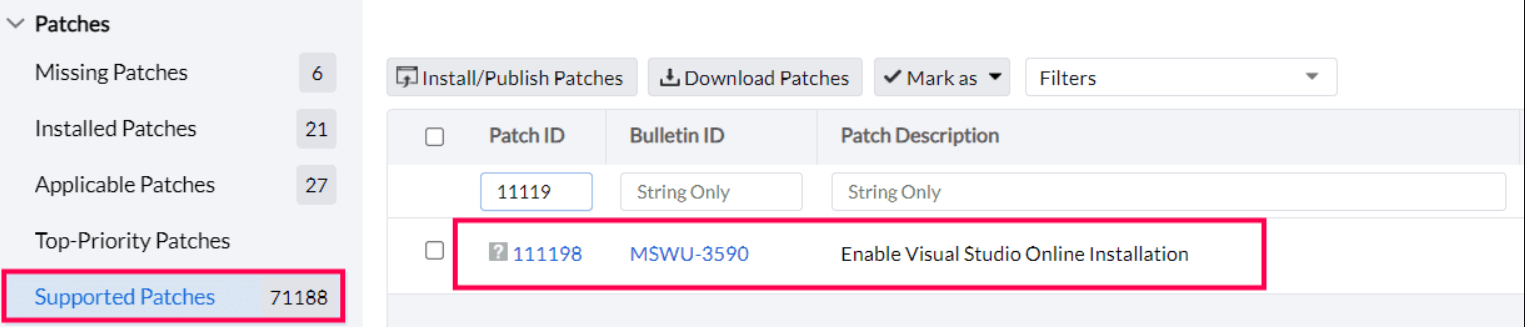
- To enable Visual Studio Online installation, deploy the dependency patch provided below by navigating to the Supported Patches view.
- You can choose and deploy the patch to the endpoints with Visual Studio installed and enable the use of the online installer patch.
- Once the patch has been successfully deployed, proceed to rescan the system.
- The Visual Studio latest version patch will then be detected as applicable for the system.
Kindly contact support for any queries.