Kindly note that this is applicable only for agents under a Distribution Server and is not supported for Roaming Agents in Cloud version.
How to install patches of qBittorrent using upload patches option?
Description
Sometimes, patches can't be downloaded due to some issue in the session keys and hash keys of the download link. In such cases, you can manually download the patch and upload it to the patch store directly from console using upload patches option.
Steps
Follow the steps given below to resolve this issue:
- Download the updates of the qBittorrent application manually.
- Rename the downloaded file in the format:<PatchID>-<PatchName>
For example: 329348-qbittorrent_4.5.2_x64_setup.exe - Navigate to <DS_INSTALL_DIR> -> Replication -> Store and place the renamed files.
- Then go to Missing Patches -> Search for the Bulletin ID TU-1407 which has the same Patch Name and click on Install Patch.
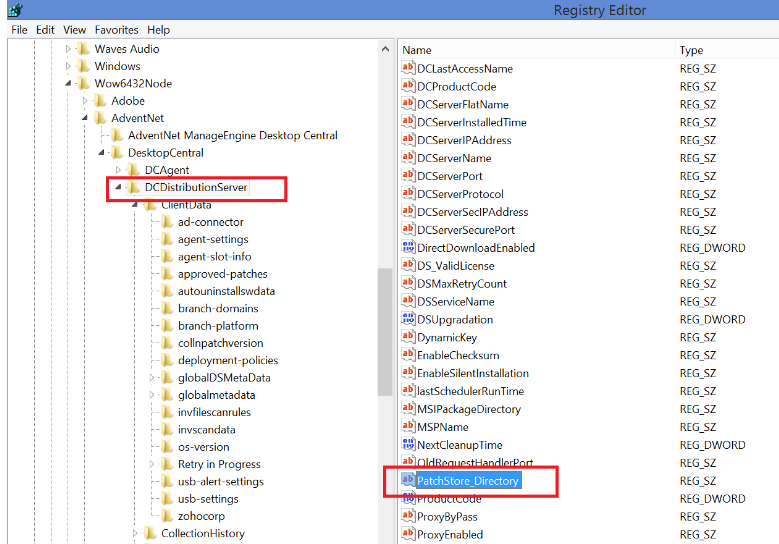
If you have changed the location of the patch store, then navigate to the path mentioned in the registry value which has been highlighted in the screenshot below:
DesktopCentral -> DCDistributionServer -> PatchStore_Directory
If the issue persists even after following the above-mentioned resolutions, please feel free to contact support.