×![]()
×
×![]()
×
×
Vulnerability DB Update Failed
Problem
The Vulnerability DB update fails due to insufficient disk space on the server.
Identify the failure
Go to Threats & Patches > Update Now and retry Update Vulnerability DB once. If the update fails again, use the error shown in the console to select the appropriate troubleshooting guidance.
- For an untrusted or invalid certificate error, see Vulnerability Database update fails due to an invalid certificate.
- For a proxy or network connectivity error, verify the Proxy Settings and retry the update.
Cause
- Inadequate disk space on the server where the desktopcentral database is located, preventing the allocation of additional storage for data.
- The Autogrowth settings may be disabled or set to a small increment, hindering automatic expansion for new data.
- Failure to routinely monitor and maintain the database's storage can lead to unexpected errors. This includes regularly checking disk space, managing database growth, and reviewing file group settings.
Resolution
Follow the steps given below to resolve this issue:
- Free up disk space by deleting unnecessary files, adding additional files to the primary file group or adjusting Autogrowth settings for existing files.
- You can enable the Autogrowth checkbox from the SQL Server Management Studio. To learn more about this, refer to Microsoft's troubleshooting guidance.
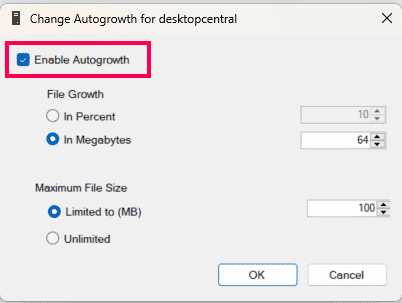
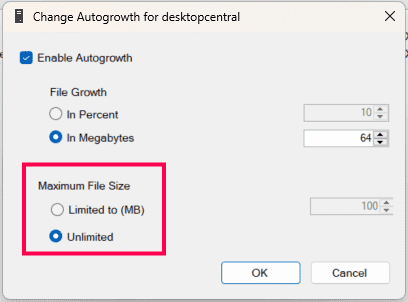
- In the Autogrowth settings, the Maximum File Size limit might have exceeded the previously set threshold. To resolve this issue, you can choose Unlimited.
If the issue persists after following these resolutions, contact support.