PAM360 Architecture, Components, Ports and Protocols
PAM360 is a unified privileged access management solution designed to manage and monitor privileged accounts in IT environments. Now that you have a grasp of the fundamental modules of PAM360, it is time to explore its architecture, functionality, and process flow. This document provides a detailed overview of the PAM360 architecture.
1. Architecture Overview
The diagram illustrates the various components, their interactions, and the flow of data within the system.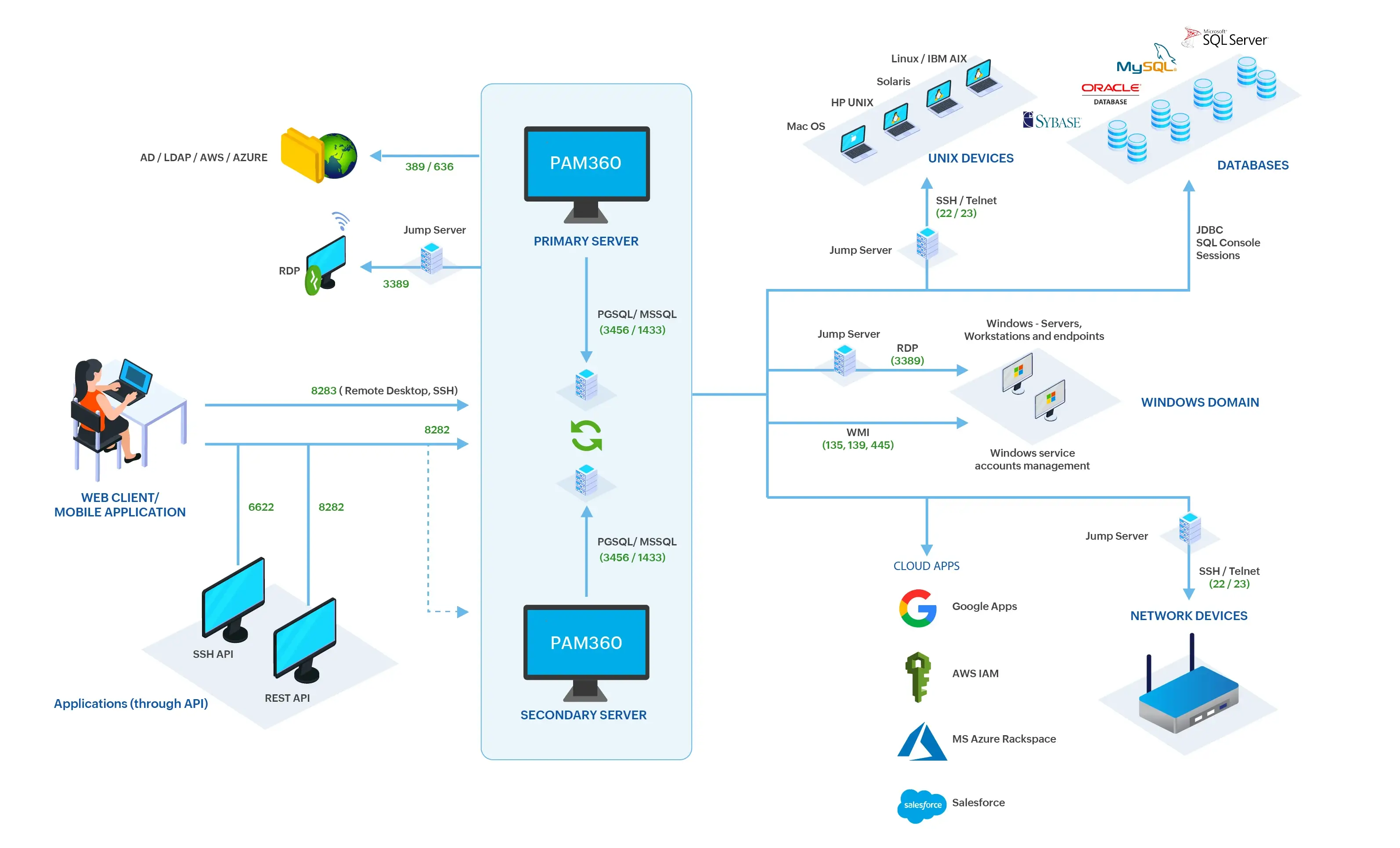
Additional Detail
If you are managing multiple isolated networks and DMZ regions in your environment, explore the Application Gateway-based deployment model for PAM360.
2. PAM360 Components
PAM360 comprises multiple components that work in hand with each other to protect your privileged accounts and strengthen security in your environment.
2.1 Interface and Access
PAM360 can be installed on Windows and Unix-based machines as a web application configurable according to user requirements. It is accessible via web clients and mobile applications, providing a web-based or mobile interface for users to interact with PAM360. It also supports remote desktop and SSH sessions via the web-based interface. Additionally, PAM360 communicates with applications through REST APIs and SSH APIs.
2.2 Databases
PAM360 supports several databases, including PostgreSQL, MS SQL, Amazon RDS MS SQL, Amazon RDS PgSQL, and MS Azure SQL as the backend database. By default, it comes bundled with PostgreSQL but allows migration between databases for flexibility and convenience. This database is integral to the storage and retrieval of data within the PAM360 ecosystem.
2.3 Users
Users in PAM360 are identified by their user ID or username and gain access to the application through a network service, either on a computer or mobile device. Users can be imported using Active Directory, Microsoft Entra ID, and LDAP or added manually via API or file imports. Once added, users can be assigned appropriate access roles and password policies. Custom user roles with specific permissions can also be created to meet organizational needs.
2.4 Supported Resource Types
Resources in PAM360 encompass any server, application, network device, or appliance with authentication credentials that need securing. PAM360 supports various resource types including:
- Operating System - Windows, Windows Domain, Linux, Mac, Solaris, HP UNIX, IBM AIX, HPUX, JunOS
- Cisco Devices - Cisco IOS, Cisco PIX, Cisco Cat OS, Cisco Management Integration Center, Cisco Catalyst, Cisco sg300, Cisco UCS, Cisco Wireless LAN Controller, Cisco Nexus OS
- Database Servers - MS SQL Server, MySQL Server, Sybase ASE, Oracle DB Server, PostgreSQL
- Network Devices - HP ProCurve, Juniper NetScreen ScreenOS, HP iLO, ASA Firewall, Audiocode, Brocade, Brocade VDX, Brocade SAN Switch, Checkpoint Firewall, Extreme Networks, F5, Fortinet, FortiGate Firewall, Fortimail, Fujitsu Switch, Gigamon, H3C, HMC, HP Printer, HP Onboard Administrator, HP Virtual Connect, Huawei, Juniper, Mikrotik, OpenGear, Orange Firewall, Palo Alto Networks, Pfsense, Routerboard, Ruijie, Sonicwall, TPLINK, VMWare VCenter
- Cloud Devices - AWS IAM, Google Workspace, Microsoft Entra ID, Rackspace, Salesforce, Azure App, Citrix Netscaler SDX, Citrix Netscaler VPX, Magento, Netapp 7Mode, Netapp CDot
- File Stores - File Store, Key Store, License Store
- MQ Applications - RabbitMQ
- Others - Web Site Accounts, LDAP Server, VMware ESXi, IBM AS400, Oracle XSCF, Oracle ALOM, Oracle ILOM, WebLogic, Aruba ATP, AVAYA-GW, FortiManager-FortiAnalyzer, HPE StoreOnce, Nimble Storage, Nortel, OS Type, Microsoft Azure
2.5 Primary and Secondary Servers
The primary server/central server is responsible for executing the core operations of PAM360. The secondary or configured servers act as backup nodes that ensure service continuity and high availability in case of a failure. These secondary servers stay synchronized with the primary server, depending on the chosen high-availability architecture.
PAM360 supports the following high-availability architectures:
- Application Scaling : Optimizes performance by dynamically allocating requests based on workload demand.
- Secondary Server Architecture : Maintains continuous availability by automatically switching operations to the secondary server during downtime or maintenance.
- Failover Service : Ensures uninterrupted access by allowing a standby system to seamlessly take over when the primary server becomes unavailable.
- Read-Only Server : Provides a replicated data instance that can be promoted to a primary server during outages, ensuring operational continuity without compromising data integrity.
3. Ports and Protocols Used
| Port Name | Port Number | Protocol | Purpose | Source (Outbound) | Destination (Inbound) |
|---|---|---|---|---|---|
Application Gateway | 8288 | TCP | For communication between the PAM360 Application Gateway server and the PAM360 server to execute password management operations | Application Gateway Server | PAM360 Server |
Application Gateway | 8289 | TCP | For communication between the PAM360 Application Gateway server and the PAM360 server to facilitate remote sessions | Application Gateway Server | PAM360 Server |
Web Client | 8282 | TCP | For PAM360 web application | User Machine | PAM360 Server |
HTTPS Gateway Server | 8285 | TCP | For establishing HTTPS gateway connections to web-based resources through PAM360 | User Machine | PAM360 Server |
SMTP | 25 | TCP | For sending emails between mail servers | PAM360 Server | SMTP Server |
SSH | 22 | TCP | For Unix and network device management | PAM360 Server | Target Resource |
Telnet | 23 | TCP | For Unix and network device management | PAM360 Server | Target Resource |
RDP | 3389 | TCP | For remote desktop connections to Windows devices | PAM360 Server | Target Resource |
WMI, RPC | 135, 139, 445 | TCP | For managing Windows services and devices | PAM360 Server | Target Resource |
LDAP, LDAPS | 389, 636 | TCP | For standard and secure directory communication and for managing LDAP passwords | PAM360 Server | LDAP / LDAPS Server |
REST API | 8282 | TCP | For application interactions through RESTful services | User Machine | PAM360 Server |
SSH API | 6622 | TCP | For secure shell API interactions | User Machine | PAM360 Server |
Session Gateway | 8283 | TCP | For remote desktop and SSH sessions through the web client or mobile application | User Machine | PAM360 Server |
PostgreSQL | 3456 | TCP | For communication between the PAM360 service and the bundled PostgreSQL database and for database replication between the primary and read-only servers | PAM360 Server | PAM360 Server |
PostgreSQL | 5432 | TCP | To rotate passwords and launch secure remote connections to the managed PostgreSQL databases | PAM360 Server | PosgreSQL Server |
MS SQL | 1433 | TCP | To rotate passwords and launch secure remote connections to the managed MS SQL databases | PAM360 Server | MS SQL Server |
Private CA-OCSP Respoder Server port | 8080 | TCP | OCSP responder endpoint for certificate status checking | Website | PAM360 Server |
Oracle | 1521 | TCP | To rotate passwords and launch secure remote connections to the managed Oracle databases | PAM360 Server | Oracle Database Server |
Sybase ASE | 5000 | TCP | To rotate passwords and launch secure remote connections to the managed Sybase ASE databases | PAM360 Server | Sybase ASE Server |
Additional Detail
The port numbers shown in the above table represent the default ports for the respective services. If custom ports are configured for any of these services in your environment, corresponding port numbers should be considered.