Database Selection and Setup
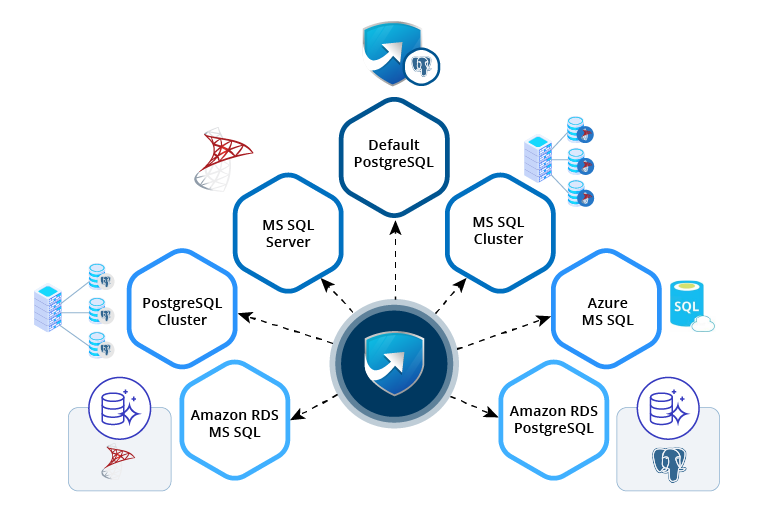
After installing the PAM360 application, the next key step is choosing and configuring your database infrastructure. PAM360 includes PostgreSQL as the default backend database, along with a bundled self-signed SSL certificate for quick, out-of-the-box deployment. At the same time, its flexible architecture supports multiple database options, allowing you to select the one that best fits your organization’s requirements and existing environment.
1. Supported Database Platforms
PAM360 provides comprehensive support for the following database systems:
- Microsoft SQL Server
- Microsoft SQL Server Cluster
- PostgreSQL Cluster
- Azure SQL Database
- Amazon RDS for SQL Server
- Amazon RDS for PostgreSQL
2. Strategic Database Selection
Choosing the optimal database platform is fundamental to your PAM360 deployment success, as each option offers distinct capabilities and advantages. Consider the following comprehensive overview to guide your decision-making process:
Caution
Database support and capabilities may vary based on the PAM360 deployment model. Contact our support team for expert guidance.
- Built-in PostgreSQL: PostgreSQL serves as PAM360's default database solution, recognized globally for its enterprise-grade features, exceptional reliability, and strict adherence to SQL standards. This open-source powerhouse excels in managing complex queries and processing large-scale datasets efficiently. PAM360 harnesses PostgreSQL's robust architecture to deliver streamlined data management and quick retrieval operations, making it an excellent choice for small to medium-sized businesses seeking powerful functionality without operational complexity.
- Microsoft SQL Server: As Microsoft's flagship enterprise database management platform, SQL Server delivers exceptional performance for data warehousing and business intelligence applications. This solution is particularly advantageous for organizations already invested in the Microsoft ecosystem. The integration between PAM360 and MS SQL Server creates a cohesive security environment, streamlining user management and access controls across your infrastructure.
- Microsoft SQL Server Cluster: SQL Server Cluster extends the capabilities of standard SQL Server by providing enterprise-grade high availability and comprehensive disaster recovery solutions. This configuration is essential for mission-critical environments where downtime is not acceptable. With SQL Server Cluster, PAM360 maintains uninterrupted service availability, ensuring your critical privileged access management operations continue seamlessly even during infrastructure challenges.
- PostgreSQL Cluster: PostgreSQL Cluster combines the robust features of PostgreSQL with advanced clustering capabilities, delivering high availability and superior load distribution. This configuration is recommended for large-scale deployments requiring exceptional performance and fault tolerance. This setup enables PAM360 to handle enterprise-level workloads while maintaining optimal performance and ensuring continuous data availability for your privileged access management needs.
- Azure SQL Database: Microsoft's fully managed cloud database service offers scalable, secure, and maintenance-free database operations, making it ideal for cloud-first organizational strategies. Azure SQL Database integrates seamlessly with the broader Azure ecosystem. PAM360's integration with Azure SQL Database enables rapid deployment and dynamic resource scaling, allowing your database infrastructure to adapt automatically to changing organizational requirements.
- Amazon RDS for SQL Server: Amazon's managed database service for SQL Server eliminates the complexity of database administration while providing enterprise-grade performance and reliability. This solution is optimal for organizations leveraging AWS infrastructure. With Amazon RDS for SQL Server, PAM360 can accommodate growing data volumes and user bases without requiring additional database administration resources or expertise.
- Amazon RDS for PostgreSQL: This managed service combines PostgreSQL's powerful capabilities with AWS's reliable cloud infrastructure, offering automated management features while maintaining the flexibility and performance characteristics of PostgreSQL. PAM360 leverages the robust performance and flexibility of PostgreSQL while benefiting from AWS's proven reliability and simplified management, creating an optimal database experience for cloud-native deployments.
3. Database Configuration
Once you have identified the database platform that best aligns with your organizational requirements, technical infrastructure, and strategic objectives, proceed with the detailed configuration process. Access the comprehensive setup guides through the following resources:
- Configuring Microsoft SQL Server
- Configuring Microsoft SQL Cluster
- Configuring PostgreSQL Cluster
- Configuring Azure SQL Database
- Configuring Amazon RDS for SQL
- Configuring Amazon RDS for PostgreSQL
Each configuration guide provides detailed step-by-step instructions, annotated screenshots, and comprehensive troubleshooting resources to ensure a smooth and successful database integration process. Select the guide corresponding to your chosen database platform and follow the provided instructions carefully to complete your PAM360 database setup.