Just-in-Time Privilege Access with Ephemeral Accounts
In today’s security-conscious IT environments, administrators are increasingly adopting Just-in-Time (JIT) privileged access practices to minimize the risks associated with standing privileges. This document explains how PAM360’s Privileged Task Automation (PTA) facilitates JIT privileged access by leveraging automated creation and deletion of ephemeral accounts for temporary access.
The following scenario illustrates how an incident pertaining to a Windows resource, such as database server down, application down, backup failures, etc., is resolved by dynamically provisioning an ephemeral account, providing controlled, time-bound access to the assigned IT technician, and deleting the account once the incident is resolved.
1. Real-Time Scenario
An incident occurred on a critical Windows resource, and a ticket was raised for the IT team through the organization’s ITSM tool. This resource hosts sensitive business applications, and immediate intervention is required to resolve the issue.
The IT operations team decides to provide Just-in-Time (JIT) privileged access to a technician assigned to handle the incident. To maintain security and adhere to the principle of least privilege, the IT team opts to create an ephemeral privileged account exclusively for this incident rather than sharing permanent privileged account credentials.
Based on the ticket state, the ITSM workflow triggers an API call to PAM360 with the resource details, initiating the automation workflow for ephemeral account creation through Privileged Task Automation (PTA) processes.
2. Organization Requirements
The organization requires a secure and automated way to:
- Provide time-bound privileged access to an ephemeral account for the technician to resolve the incident.
- Avoid sharing permanent privileged account credentials.
- Automatically create and delete privileged accounts on demand.
- Maintain audit-ready logs for compliance purposes.
- Align with the Zero Trust framework.
3. How PAM360 Addresses This Challenge
PAM360 leverages PTA to automatically create ephemeral privileged accounts for JIT access, ensuring secure, time-bound privileges for incident resolution. The following steps outline how ephemeral accounts are automatically created and deleted through an ITSM-triggered workflow:
- A workflow in the ITSM tool (e.g., ServiceDesk Plus) triggers an API call to PAM360 with the resource details based on the ticket state.
- PAM360 initiates a privileged process that creates an ephemeral account.
Additional Detail
The prerequisites for PAM360's Privileged Task Automation should be completed on the endpoint to execute the workflow orchestration. Refer to this documentation for PTA configuration.
- The privileged process in PTA includes the following tasks:
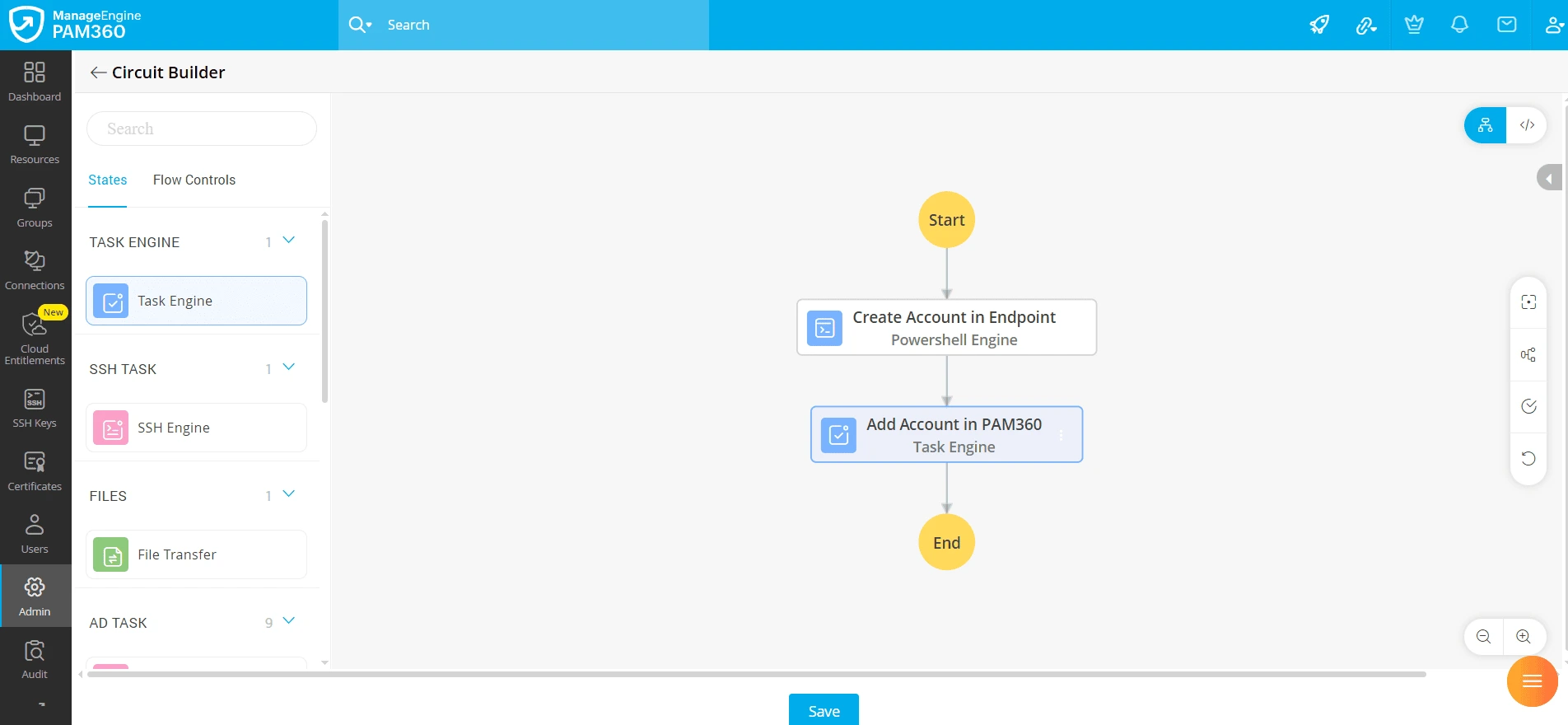
- Create Account in Endpoint: A PowerShell script creates a privileged ephemeral account on the Windows resource.
- Add Account in PAM360: An API triggers the addition of the account to PAM360.
Caution
Resource-level configurations, such as access control and sharing, are automatically inherited by the ephemeral account.
- Upon completing the above process, the IT technician logs in to PAM360 and accesses the endpoint with the ephemeral account. After resolving the incident, the IT technician checks in the password of the privileged account in PAM360. The check-in triggers the following privileged process and executes the deletion workflow:
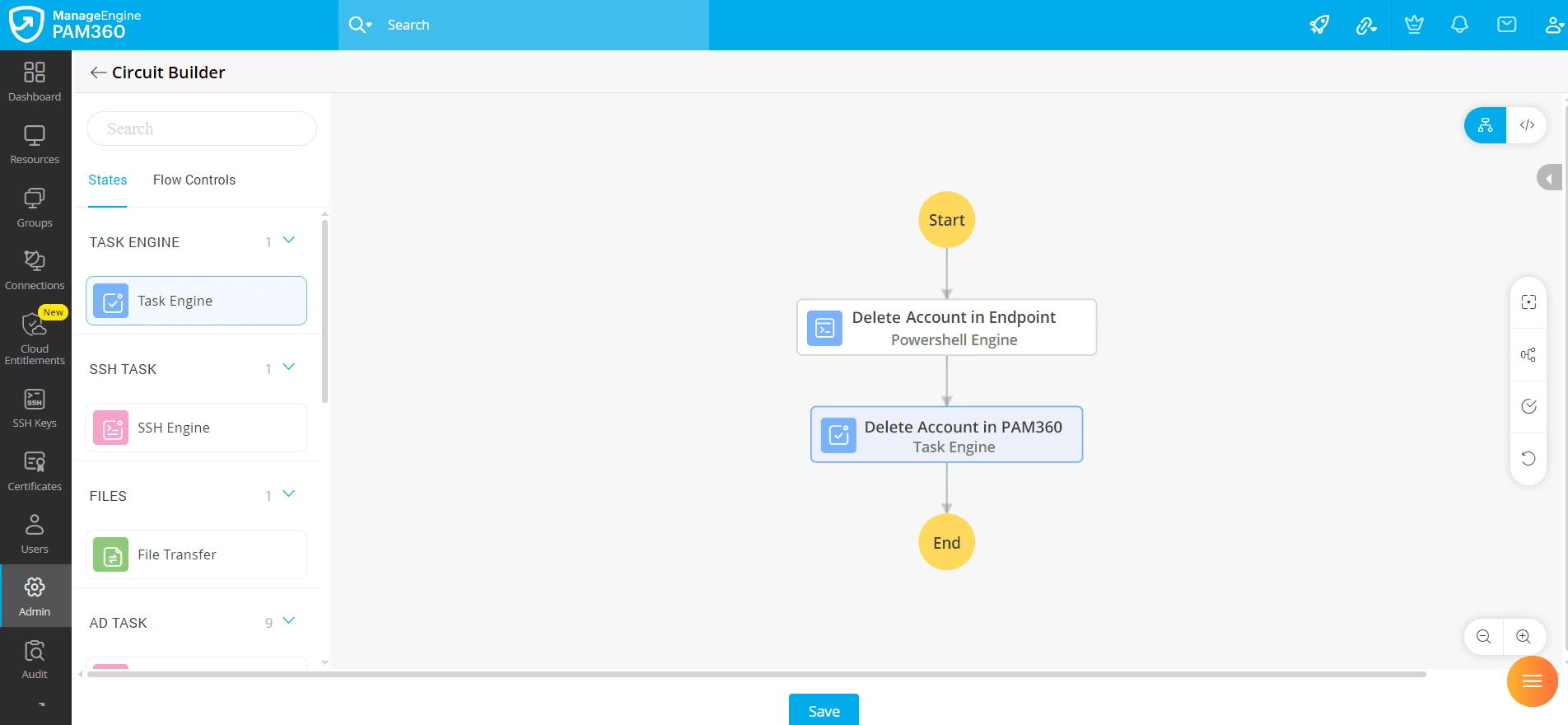
- Delete Account in Endpoint: The PowerShell script deletes the ephemeral account at the target endpoint.
- Delete Account in PAM360: An API triggers the deletion of the account in PAM360.
At the end of this workflow, the incident is resolved securely using a time-bound, ephemeral privileged account. The endpoint is securely accessed through PAM360 using an account that is dynamically created on demand and automatically deleted once the task is complete.
Similar to the ephemeral accounts, ephemeral credentials such as certificates or keys can also be created and used with the existing accounts to achieve JIT access through PAM360's task automation module. In the PAM360 access control workflow, privileged processes can be linked to check-out and check-in actions. With this setup, whenever the account is accessed, a new SSH key pair is generated and deployed to the target endpoint using PAM360’s built-in SSH key management module, allowing the user to authenticate with the SSH key and perform required actions. Once the session ends, the key is automatically removed from the endpoint by orchestration workflows.
This ensures that no privileged credentials remain active after use, strictly enforcing the principle of least privilege. The entire process is automated, auditable, and eliminates the need for manual intervention, thereby reducing security risks, minimizing administrative workload, and enabling faster incident resolution.