Resource Types in PAM360
In today’s digital landscape, where data breaches and cyberattacks increasingly target privileged accounts, securing privileged resources and their associated accounts has become critical. This begins with an understanding of what privileged resources are, their attributes, and how to manage them securely.
ManageEngine PAM360 is a comprehensive privileged access management solution designed to regulate and monitor access to sensitive accounts across various organizational resources. In PAM360, privileged endpoints can be added as resources and managed securely. The type of resource depends on the underlying endpoint, and PAM360 supports a wide range, including databases, servers, applications, network devices, and cloud services. Each resource type comes with its own set of parameters that govern access, authentication, and usage. If your organization’s endpoint is not available as a predefined resource type, PAM360 allows you to configure and manage it as a custom resource type, thereby ensuring consistent protection against unauthorized access and potential security threats.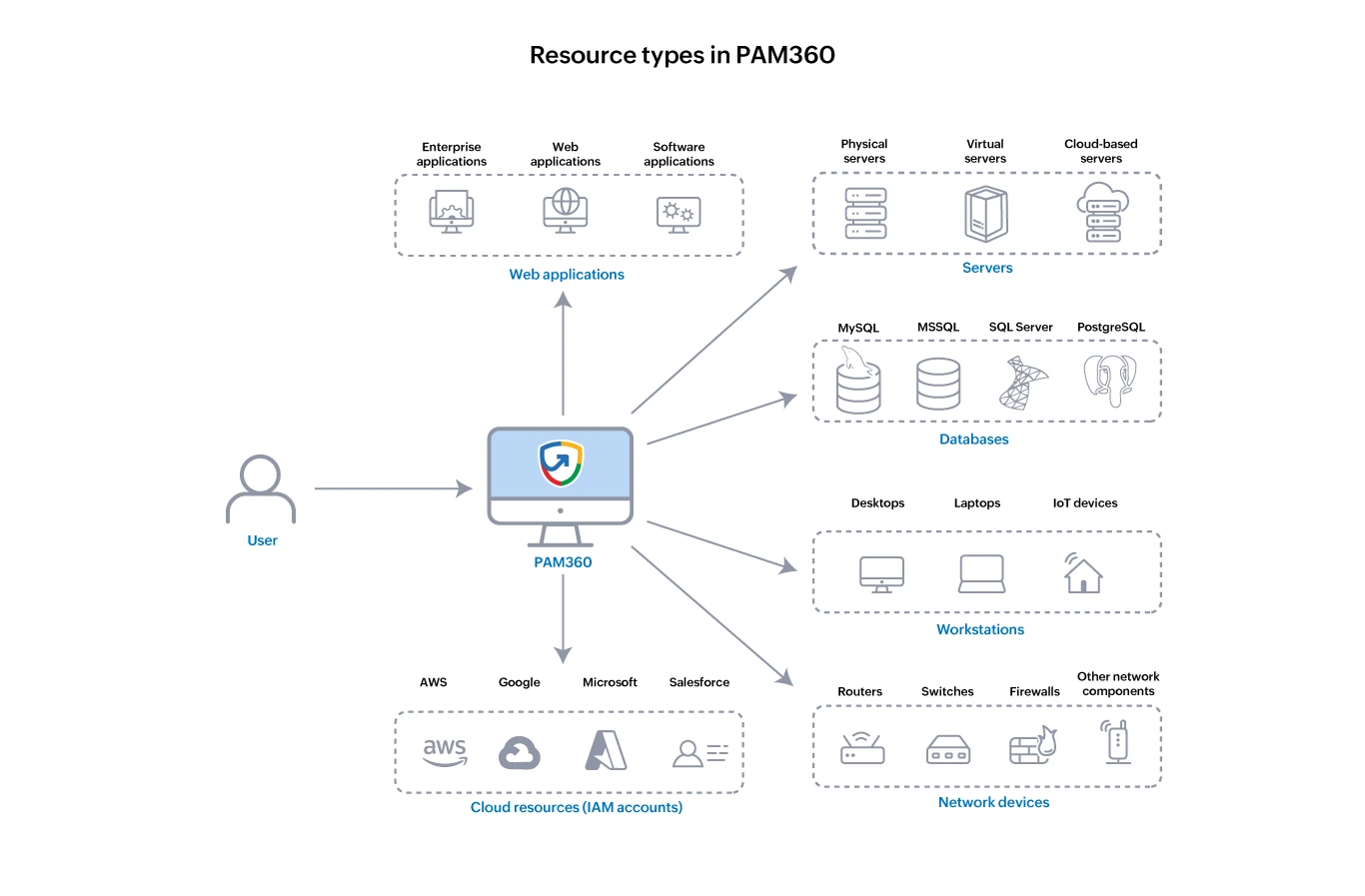
This document provides an overview of the resource types (i.e., privileged endpoints) supported in PAM360, along with the key attributes that PAM360 requires to access, authenticate, and manage the resource.
1. Supported Resource Types
Currently PAM360 supports 85+ distinct resource types, each serving specific functions within an organization's infrastructure. These resource types are categorized based on their functionality, making identification and management easier. However, PAM360 does not restrict users to these predefined types. You can create and manage custom resource types from the Resources tab. This flexibility allows you to tailor PAM360’s resource management capabilities to meet your organizational requirements. Out of the box, PAM360 supports various resource types as shown below:
Operating System
Cisco Devices
Cloud Devices
| Network Devices
| Database Servers
File Stores
MQ Applications
Enterprise Applications
Others
|
2. Resource Attributes
Attributes are key parameters that define and distinguish a resource within a network. In PAM360, these attributes form the foundation for identifying and managing these devices and endpoints within your network. Each resource type, such as servers, applications, or cloud services, features its own set of attributes that enable PAM360 to securely connect to the resource and perform the resource and password management operations. The following sample image shows the list of attributes associated with the Windows resource type.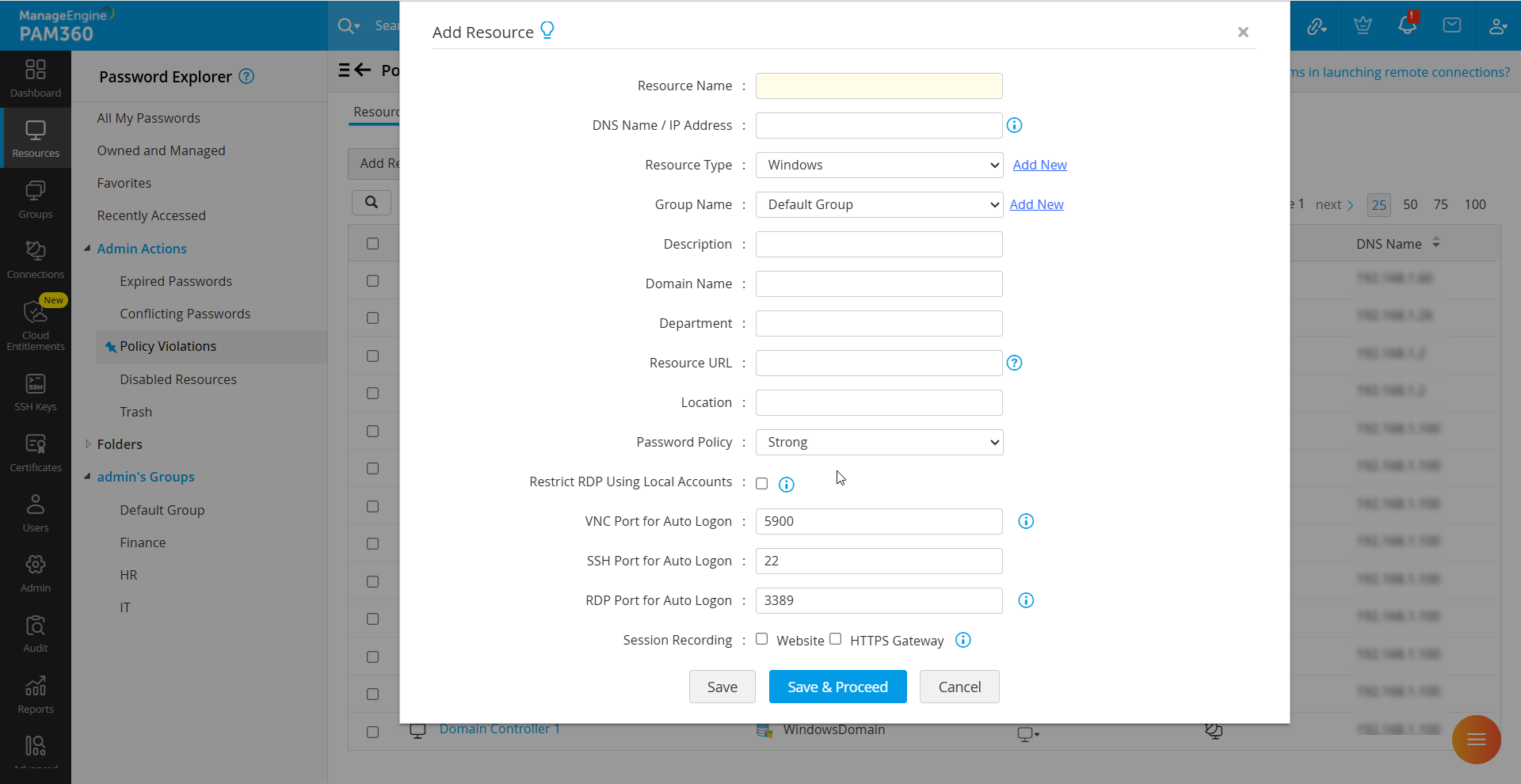
Similarly, each resource type features its own set of attributes. While some resource types may share identical attributes, others may feature unique or additional attributes specific to them. This section provides a comprehensive understanding of attributes associated with each resource type and details their significance in resource management. The following list defines each attribute, describing its purpose, usage, and relevance in the context of resource configuration and management within PAM360.
- Resource Name - The resource name is a unique label or identifier assigned to each resource. This is typically the machine name or hostname of that resource.
- DNS Name/IP Address - It serves as the unique identifier to locate and identify the resources within the network. The DNS name is a human-readable label, whereas an IP address is a unique numerical label. A valid DNS name or IP address is essential to perform operations such as password reset and account discovery.
Additional Details
The DNS name for all resources, except cloud services, is specified as a tree of domain names. However, for cloud services, it is specified as a URL. Example., abc.manageengine.com for resources and https://identity.api.rackspacecloud.com/v2.0 for cloud services.
- Domain Name - The unique identifier that refers to the organization's network to which the resources are associated.
- Resource URL - PAM360 provides the option to specify HTTPS-based web links for resource types that support URLs. This enables the auto logon functionality for accessing website applications and services directly through PAM360 without manually entering passwords.
Caution
When adding a resource, ensure that you enter the complete resource URL in this field to enable proper access to the web application. For example, https://sso.godaddy.com can be entered to access the GoDaddy Single Sign-On portal. Alternatively, to establish an HTTPS Gateway Connection to the resource, you can also specify the appropriate HTTPS-based web link in this field.
- Password Policy - The set of rules and guidelines designed specifically for creating and managing passwords. Typically, this policy includes criteria such as minimum length, complexity, expiration period, restrictions on password reuse, etc.
- VNC Port for Auto Logon - It denotes the port number on which the VNC server is operating on the remote host. By default, PAM360 initiates VNC sessions through the default port 5900.
- SSH Port for Auto Logon - It refers to the SSH port used for launching remote sessions and performing SFTP-based file transfers to the remote devices. By default, PAM360 launches SSH sessions through port 22.
- RDP Port for Auto Logon - It denotes the port on which the Remote Desktop Service is operational on the remote host. By default, PAM360 initiates Remote Desktop Protocol (RDP) sessions through the default port 3389.
- Group Name - It refers to the name of the resource group to which the resources are associated. Grouping resources into logical categories allows you to manage them in bulk, streamline administrative tasks, and enable seamless resource management. By default, all resources are added to the Default Group.
- Description - PAM360 allows you to add a brief description about the resource, which will appear beside the resource name within the Resources tab. This helps administrators and users quickly identify and differentiate the resources within their environment.
- Department - It denotes the functional group to which the resource belongs within the organization. This parameter is displayed under the resource attributes tab.
- Location - The geographical position or site where the resource is physically located or primarily utilized within the organization's infrastructure.
The Windows resources feature all twelve attributes listed above. The Windows Domain resources feature an additional attribute in addition to the above-mentioned list: Secondary DC DNS Name. This attribute denotes the DNS name or IP address of the secondary domain controller to which the resource is associated. It ensures uninterrupted access to the resource in the event of a failure of the primary domain controller. Other resource types within the Operating Systems category, and those in the Cisco Devices and Network Devices categories, feature ten of the above-listed attributes. Similarly, the resource types in the Database Servers, File Stores, and MQ Applications categories feature nine of the above-listed attributes. Certain resource types feature specific attributes that are unique to them. The Azure App resource type features two such attributes that are crucial identifiers used for authentication and authorization purposes. These attributes are:
- Directory (Tenant) ID - This is the unique identifier assigned to the Azure Active Directory (AAD) tenant linked to your Azure subscription. It represents the directory where your Azure resources are hosted and managed.
- Client ID - This is the unique identifier assigned to an Azure Active Directory (AAD) application registered within your Azure tenant. It is also known as Application ID.
Caution
All resource types do not share the same set of attributes. The inherent attributes vary depending on the resource type and their management requirements.