
Imagine a large financial institution which relies on Active Directory Federation Services (ADFS) to authenticate users for accessing critical banking applications. Lately, there have been multiple instances of failed logins and unusual login activity during non-business hours.
It is important to effectively audit AD FS logs, so that any suspicious activity can be identified well before time and help prevent a potential security breach before it’s too late.
In most organizations, users require access to third-party or cloud applications to perform their daily tasks. With Microsoft Active Directory Federation Services (AD FS), this is easy as the authentication process between the user’s Active Directory (AD) and third-party applications can be seamlessly integrated. Optimizing this integration is achieved through a “trust” established between the user’s organization and the other organization. This enables users to sign on to multiple applications with their own AD credentials.
However, AD FS also creates room for adversaries; they just need to obtain a single set of credentials to compromise the data that resides in third-party networks. Once they exploit the AD FS infrastructure, they often try to escalate their privileges to gain administrative control. They might also attempt to establish a strong foothold by moving laterally within the network where they can exfiltrate sensitive data, or carry out other malicious activities. It is crucial for enterprises to audit their AD FS environment. ManageEngine ADAudit Plus can help with this.

In this whitepaper, we’ll cover:
Active Directory Federation Services (AD FS) is a capability developed by Microsoft that provides users with claim-based single sign-on (SSO), allowing them to logon to several applications across organizational boundaries. This is a mechanism for identifying and authenticating a user by a set of claims which are related to their identity.
The identity provider, in the context of this whitepaper, assumes an important role of storing and managing the user’s digital identities. This ensures it can perform critical functions, like authentication and authorization, based on these identities.
Since AD FS eliminates the need for multiple credentials to access various resources, it also makes the job of adversaries easier as they just need to obtain a single set of credentials to compromise the entire network and third-party applications. They might resort to credential theft attacks, password spray campaigns, or password cracking to bring down the complete network and gain access to more resources by decoding a single identity.
It’s crucial for organizations to regularly monitor and audit the health of their AD FS environment. However, most administrators find this task cumbersome and complicated to perform by using native AD tools as it requires going through a plethora of logs to detect an suspicious log entry.
In this whitepaper, we’ll discuss how a solution like ManageEngine ADAudit Plus can help administrators address this challenge efficiently and streamline the auditing process in just a few clicks.
Let’s consider a user, Harvey, from ABC Corp., who wants to access an application or resource in another network.
Harvey belongs to account organization (network A), and the organization in which the target application or resource resides is the resource organization (network B).
Here’s how Harvey will be authenticated using AD FS to access the application (refer to Figure 1):
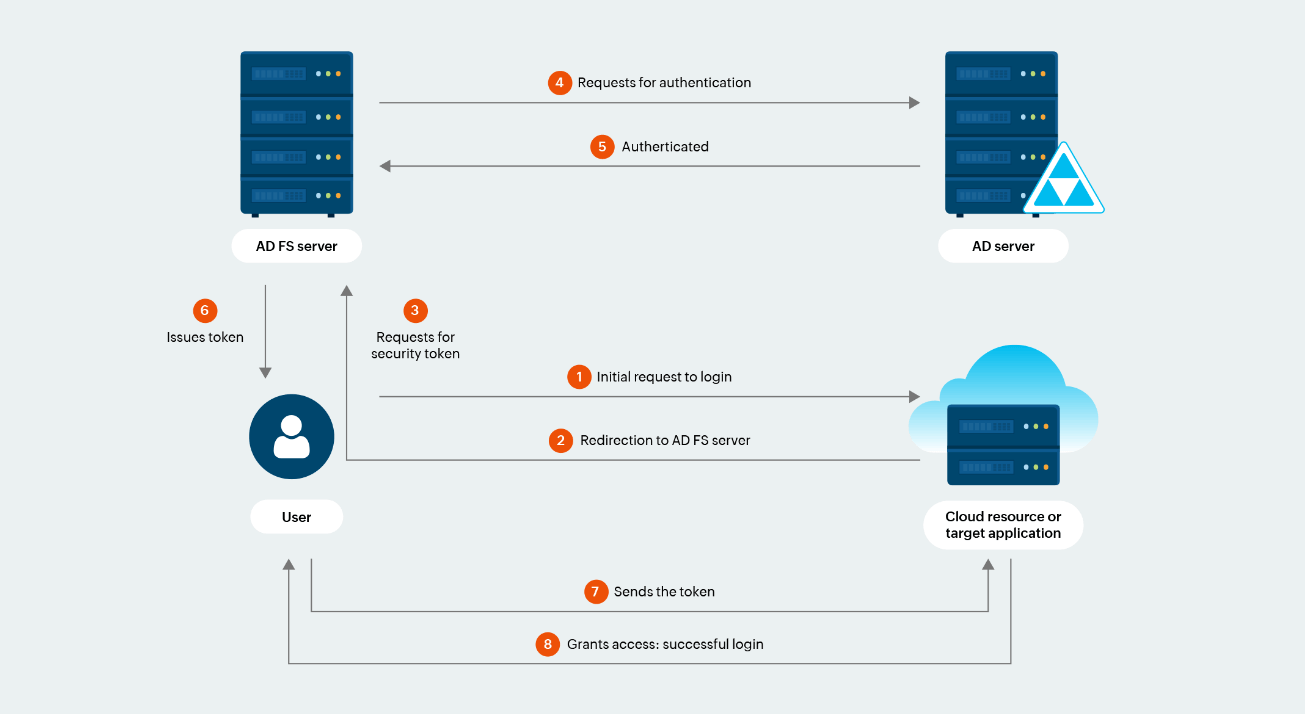
Figure 1. AD FS authentication process
ADAudit Plus helps administrators audit AD FS successful logons, AD FS failed logons, and extranet lockouts. With insightful and granular details, admins can get a comprehensive understanding of what’s happening in their AD FS environment and can also be notified with real-time alerts in case anything malicious is detected. The following are three reports available for AD FS auditing in ADAudit Plus:
A successful authentication event where the user has been verified to access the requested resource or application. This helps admins in ensuring only authorized users are accessing resources.
A unsuccessful authentication and authorization event where the user has not been verified to access the requested resource or application. This report helps analysts identify the nature of unauthorized access to resources including the source IP address, the user account involved relying party, and time of the attempt.
A security feature introduced by Microsoft in Windows Server 2012 R2 to prevent the authentication of malicious user accounts from outside the organization’s network, that is, the extranet for a specified time interval. This makes it easier for admins to understand the reasons for repeated extranet lockouts and take prompt investigative actions.
To understand more about the benefits of auditing AD FS, let’s take a look at three real-world scenarios where these reports help administrators obtain the granular information.
Regina from ABC Corp. works in the Finance department and recently created an account on Microsoft 365 enabling her to use Excel and PowerPoint. Since Regina is trying to access an application outside her traditional organizational boundary, it is important for administrators to audit her logon action.
Regina’s logon activities can be easily audited with the Logon Success report of the AD FS Auditing module in ADAudit Plus. The report provides key insights (refer to Figure 2) such as the federation server which authenticated her request, the name of the relying party (resource or application), and the claims issued.

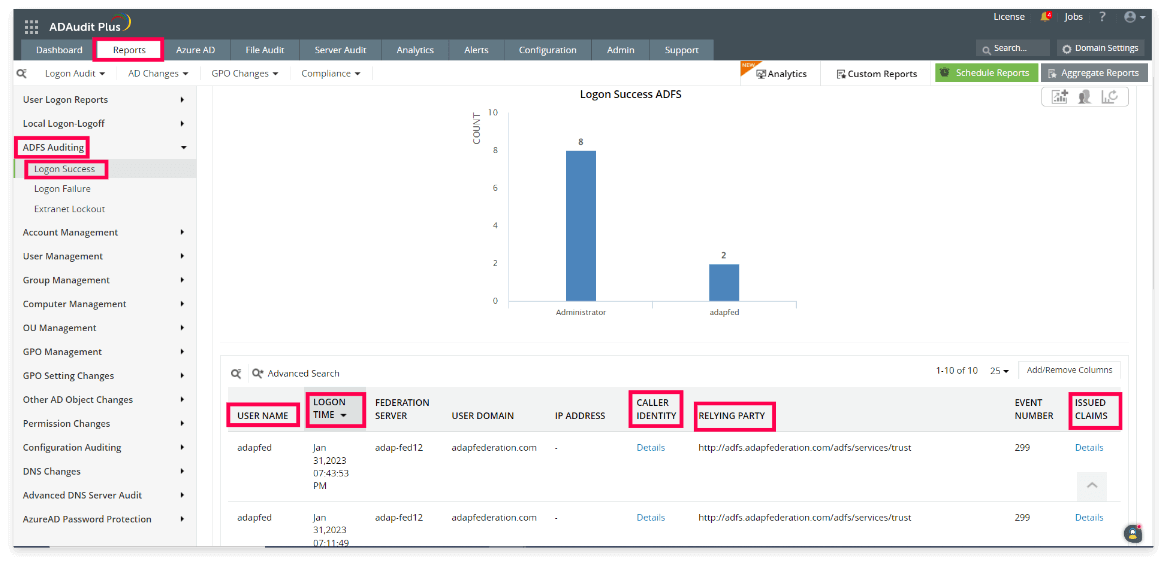
Figure 2. Monitoring successful AD FS logons
The information provided in the report above also includes these details:
Moreover, the Caller Identity column of the Logon Success report, gives the following details of the user such as User Principal Name, Security Identifier, and more, as shown in Figure 3.
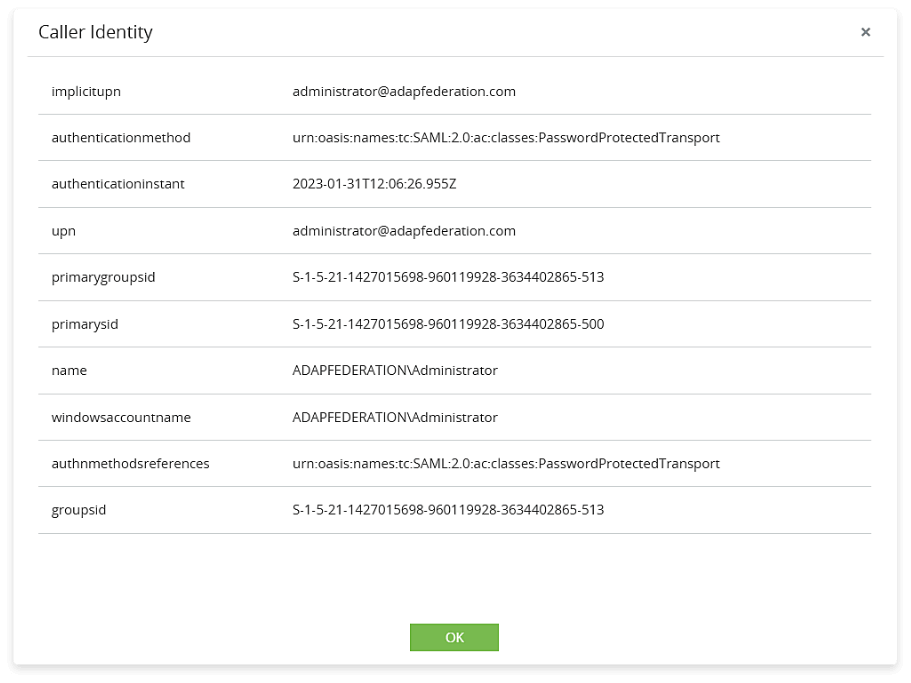
Figure 3. Details on Caller Identity
From this report, admins can also identify details regarding the issued claims (including user principal name, email address, and more) which were used to authenticate the user as shown in Figure 4. Since, AD FS leverages claims to prove the identity of the user, it’s important for admins to understand the granular details associated with them. Viewing the claim details can be instrumental to admins in multiple ways, such as:
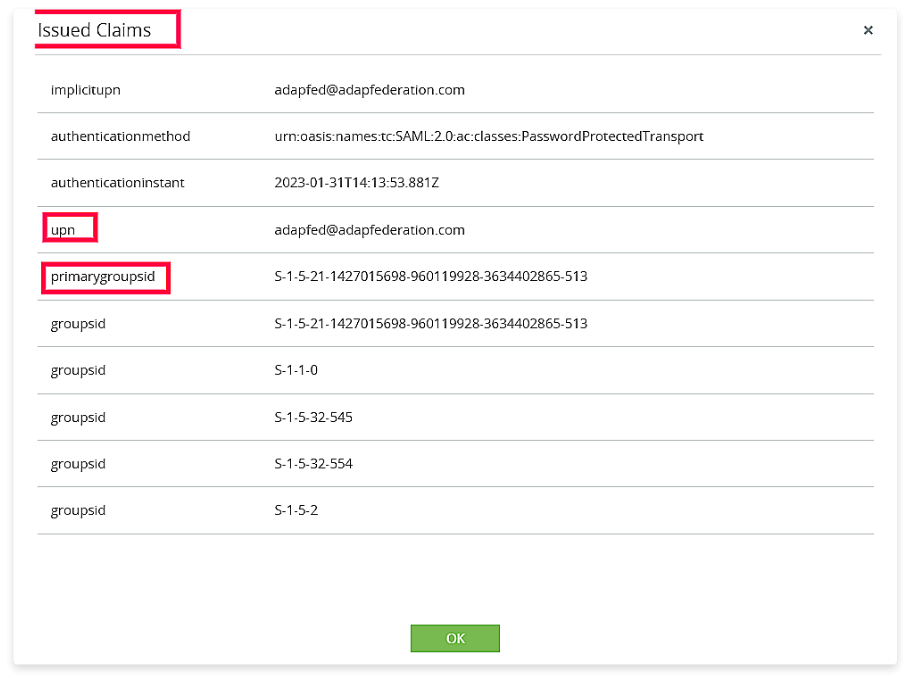
Figure 4. Details on Issued Claims
Max is a data analyst at MNC Corp., and he uses Power BI for creating data models and reports. Recently, there have been multiple failed logon attempts from Max’s account to access Power BI. Since Power BI is an external application for Max’s organization, it’s important for the admin team to audit any logon failure event. Should the admin team focus on investigating multiple failed logon attempts here?
This failed user logon action can be easily audited using the Logon Failure report of the AD FS Auditing module in ADAudit Plus.
Admins can obtain crucial information such as the who, when, and where behind every unsuccessful federation server logon. The report also helps the admins understand the reason behind the failed authentication (as shown in the “Remarks” section in Figure 5), and enable them to take necessary steps to rectify the underlying issue. This includes blocking the concerned IP address, reviewing user permissions, and revoking unnecessary privileges.

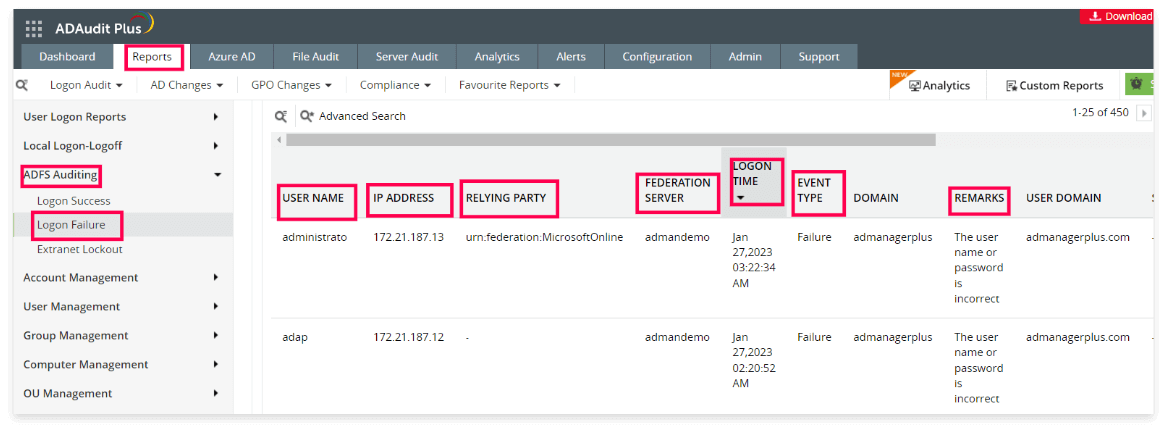
Figure 5. Monitoring failed AD FS logons
Phil is an accounts executive at XYZ Pvt. Ltd. who oversees the European market for his organization. As a part of his job, Phil accesses a third-party website on a regular basis to get information on their competitors’ pricing model.
Recently, there has been a huge volume of authentication requests sent from his account with different passwords.
This activity is anomalous and could indicate a brute-force attack. Perhaps an attacker is attempting to gain access to Phil’s account by continuously sending authentication request with multiple passwords. It’s crucial for admins to audit these suspicious activities and suspend Phil’s extranet access as necessary. These proactive actions are vital for protecting the network.

We’ll now discuss the Extranet Lockouts report of AD FS Auditing module in ADAudit Plus. This report helps admins gain these detailed insights: (See Figure 6).
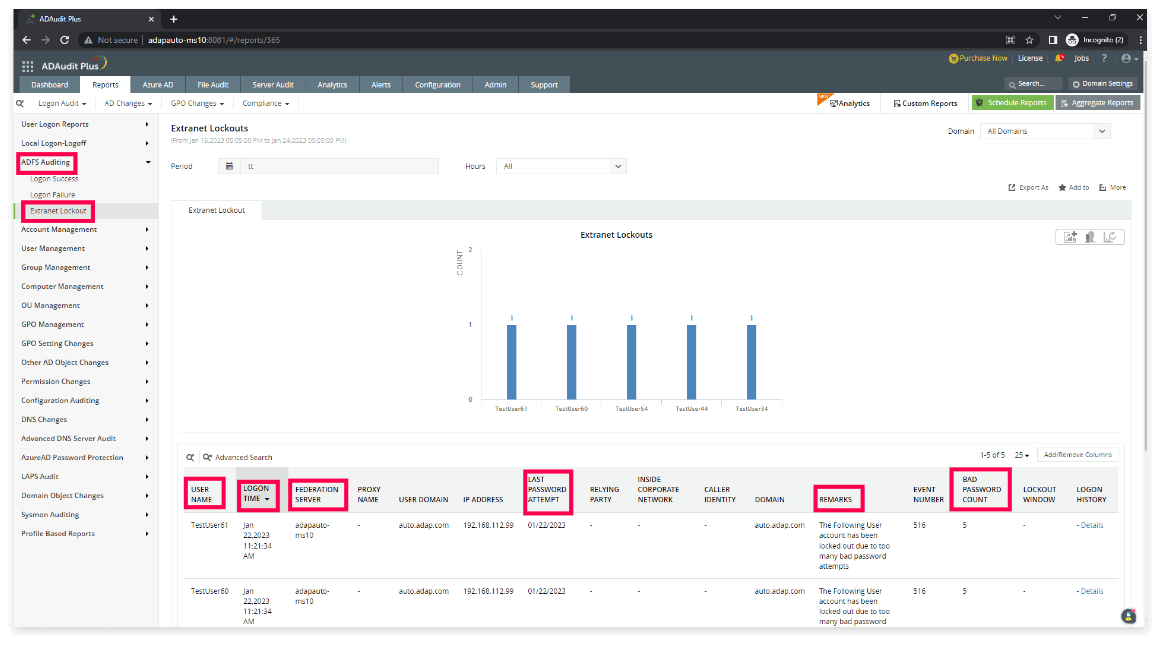
Figure 6. Monitoring Extranet Lockouts
ADAudit Plus supports administrators by providing them with real-time alerts and automated scripts to address activities such as unauthorized logon attempts via federation servers.
In these cases, admins can easily create and manage alert profiles, and be immediately notified via email and SMS in case the alert is triggered. They can also execute a customized response to a triggered alert by writing suitable scripts. (See Figure 7).
The supported scripts are PowerShell (.ps1), batch (.bat), and VBScript (.vbs). The script file should be located in
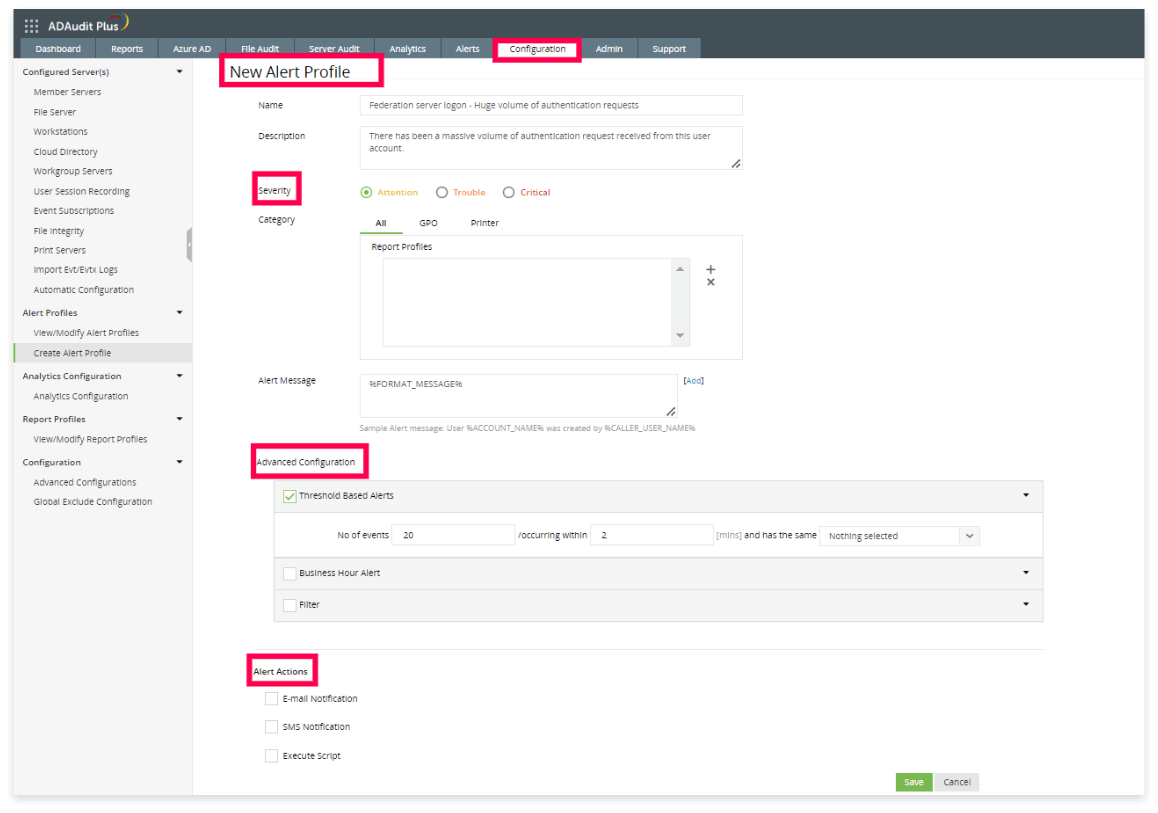
Figure 7. New alert profile created
These alerts can also be displayed on a dashboard and all historical alerts can be viewed as a report.

Kritika is a cybersecurity evangelist at ManageEngine, a division of Zoho. As an enthusiast in the cybersecurity arena, she loves to keep herself up-to-date with advancements in IT security and technology. Some of her key research interests are Active Directory management and security, and Zero Trust network and threat detection tools. She loves to interact with customers to understand their business challenges and share with them how to bolster their cybersecurity infrastructure.
ADAudit Plus is a UBA-driven auditor that helps keep your AD, Azure AD, file systems (including Windows, NetApp, EMC, Synology, Hitachi, Huawei, Amazon FSx for Windows, and QNAP), Windows servers, and workstations secure and compliant. ADAudit Plus transforms raw and noisy event log data into real-time reports and alerts, enabling you to get full visibility into activities happening across your Windows Server ecosystem in just a few clicks. For more information about ADAudit Plus, visit us today.
To discover the security benefits of ManageEngine ADAudit Plus,
Schedule a personalized demo!Zoho Corporation Pvt. Ltd. All Rights Reserved.