
Active Directory Auditing
ADAudit Plus provides a clear picture of all changes made to your AD resources including AD objects and their attributes, group policy, and more. AD auditing helps detect and respond to insider threat, privilege misuse, and other indicators of compromise, and in short, strengthens your organization's security posture.
Thanks!
Your download is in progress and it will be completed in just a few seconds!
If you face any issues, download manually here

Boost security with AD change intelligence
- Track AD changes
- Monitor user login
- Analyze account lockouts
- Audit GPO changes
- Enable hybrid auditing
- Start proactive threat hunting
Track AD changes in real-time
- Gain granular visibility into everything that resides in AD, including objects such as users, computers, groups, OUs, GPOs, schema, and sites, along with their attributes.
- Audit user management actions including creation, deletion, password resets, and permission changes, along with details on who did what, when, and from where.
- Keep track of when users are added or removed from security and distribution groups to ensure that users have the bare minimum privileges.
- Oversee all changes to Group Policy settings including modifications to domain-level policies such as account lockout and password policy, along with the policy’s old and new values.
- Get notified about permission changes at various levels in AD, including domain, OU, group, container, and user, to curtail unnecessary access.
- Quickly spot unwarranted configuration changes such as custom attributes added to schema, FSMO role changes, and site changes.
Monitor user login behavior
- Get a complete login audit trail for any user, along with instant details on who is logged in, from where, since when, and more.
- Gain security insights by monitoring all types of user login behavior including interactive, remote, local, and network logins.
- Monitor and analyze your employees' productivity every day by keeping a close eye on their logon duration, idle time, and more.
- Notify admins about sudden atypical user login behavior, such as an unusual login time, by tracking deviations in the baseline created using machine learning.
- Track and scrutinize failed login attempts based on username, IP address, login time, and other factors to spot and mitigate what could be signs of indiscretion.
- Use our extensive reports to track computer startup time, shutdown time, active hours, shutdown type, and so on.
Analyze and troubleshoot account lockouts
- Audit and report on every single account lockout, along with critical details such as the lockout time, machine, and the user’s logon history.
- Quickly diagnose and resolve repeated account lockouts by analyzing multiple Windows components including services, applications, and scheduled tasks.
- Analyze and resolve account lockouts faster by checking for stale credentials or faulty network drive mappings.
- Reduce crippling user downtime by quickly notifying sysadmins when critical administrative user accounts get locked out.
- Accelerate the detection of brute-force attacks and use an automated threat response to disconnect the user session or shut down the infected system.
- Keep track of the frequently locked-out user accounts over time to identify the employees most affected, and view details on the cause of their lockout for further analysis.
Audit changes to GPO settings
- Provide clear, concise information on the recently created, deleted, and modified GPOs. Pull up the complete history of GPO changes as and when required.
- Regulate the end-user experience by keeping track of the changes made to Windows settings in real time.
- Pay special attention to sudden changes on high-value GPO settings such as user configuration, account lockout, and password policy, along with their old and new values.
- Send instant notifications on unwarranted changes to Group Policy settings that could signal the prelude to further attacks.
- Schedule periodic reports on who linked GPOs at various levels, including at the domain and OU, to meet the necessary compliance standards.
- Enable forensic investigations with a complete audit trail of every single setting change made to Group Policy across your domain.
Enable hybrid auditing with Azure
- Easily audit and analyze authentication attempts and user login patterns across on-premises and cloud environments from a single console.
- Track password set and reset attempts to highly privileged user accounts in Azure tenants, and reduce the risk of malicious actors accessing your resources.
- Practice role-based access control in Azure by making sure that members are appropriately assigned and removed from roles.
- Control access to critical resources in Azure by notifying group owners or admins every time a new user is added or removed from a group.
- Improve visibility into your bring your own device (BYOD) environment by auditing when new users or owners are added or removed from devices.
- Secure multiple cloud applications, including Office 365, by verifying every time a new OAuth permission is added or removed.
Start proactively hunting threats with UBA
- Choose the right response strategy using ADAudit Plus' automated threat response system that can disconnect rogue users' sessions, shut down infected systems, and more.
- Use machine learning to detect anomalous user login behavior including a sudden spike in logon failures, an unusual login time, and a user using remote access for the first time.
- Find hidden threats by monitoring sudden deviations in typical user behavior, such as a new process running on a server or an unusual volume of account lockouts.
- Improve your threat intelligence by updating users’ baseline behavior every day, and reduce instances of false positives and true negatives.
- Notify sysadmins of the early signs of privilege abuse, such as an unusual time or volume of user management activities.
- Gain a complete picture of all anomalous activities carried out by users in your organization daily.
Enhance visibility and security with Active Directory
- Active Directory auditor
- Monitor user logins
- Track account lockouts
- GPO audit tool
- Azure auditing
- UBA driven AD audit tool
Get the big picture
Generate a cumulative report on Active Directory changes across all configured entities.
Drill down deeper
Selectively monitor AD changes made by specific users or a group of users for in-depth analysis.
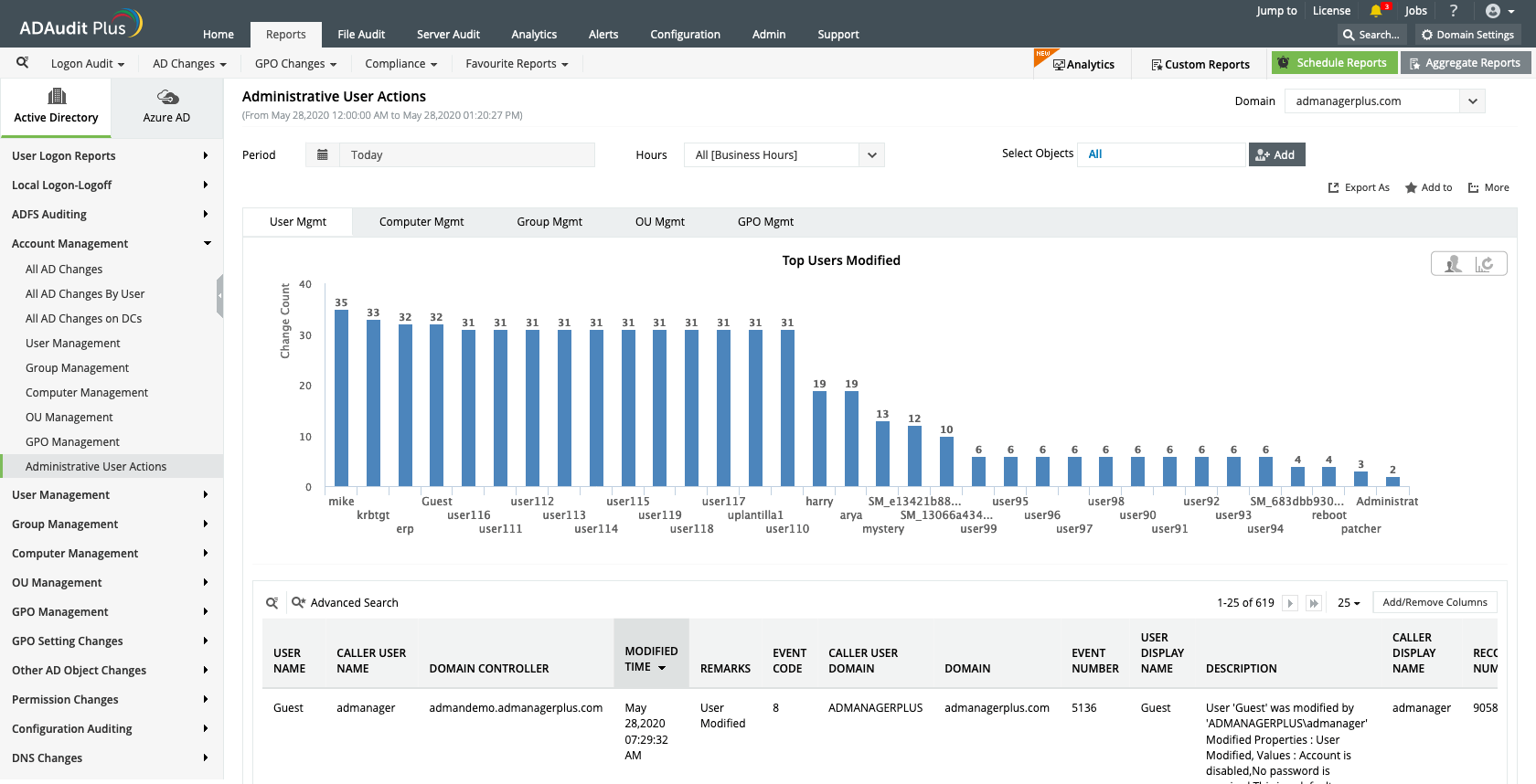
Get the big picture:Generate a cumulative report on Active Directory changes across all configured entities.
Drill down deeper:Selectively monitor AD changes made by specific users or a group of users for in-depth analysis.
Perform failure analysis
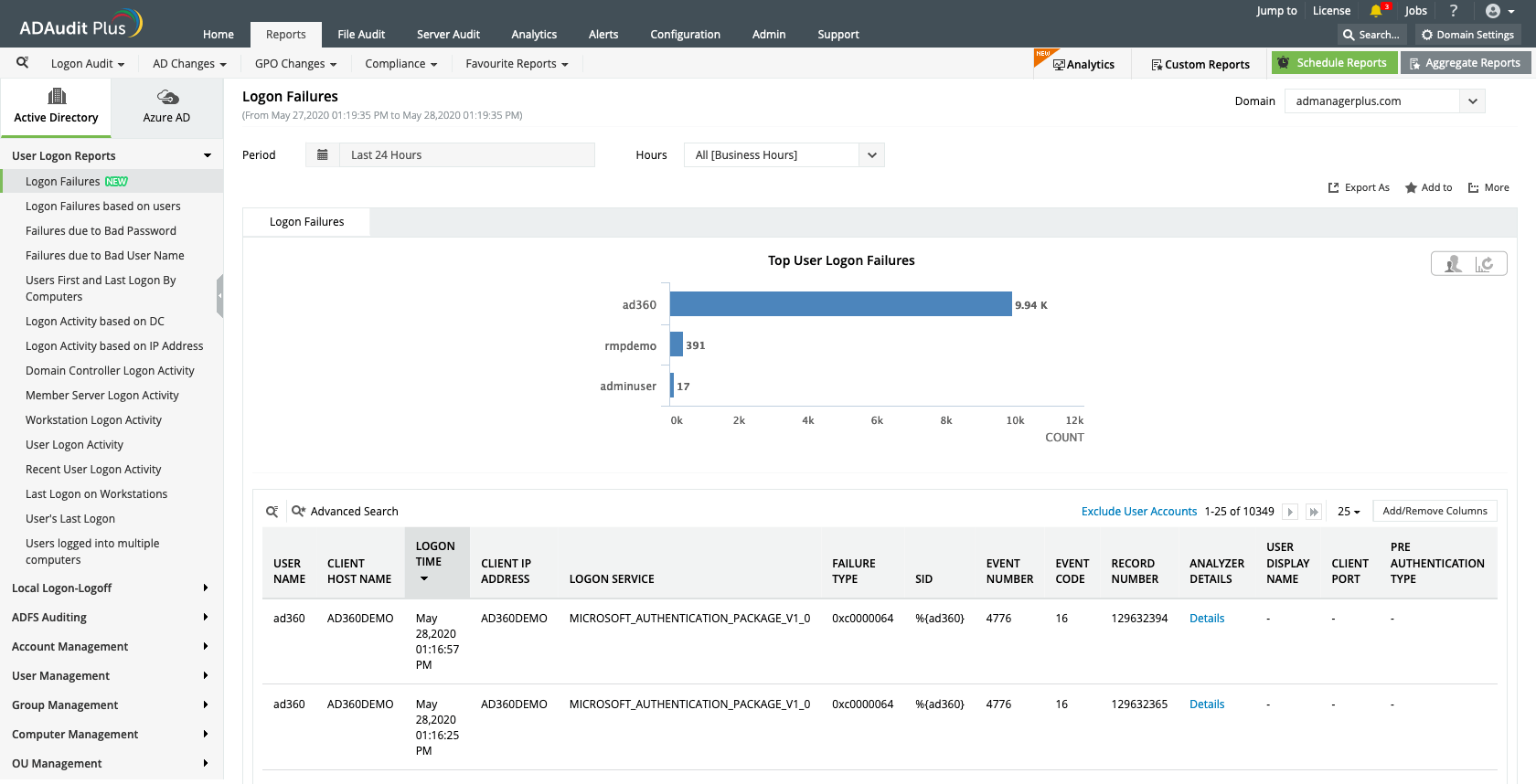
Keep track of users with the most failed authentication attempts to prevent security threats.
See what's happening
Quickly track the number of users currently logged in with details on who logged in from where.
See what's happening:Quickly track the number of users currently logged in with details on who logged in from where.
Perform failure analysis:Keep track of users with the most failed authentication attempts to prevent security threats.
Find the most recent data
Keep track of recently locked-out user accounts and view relevant details for further analysis.
Analyze and troubleshoot
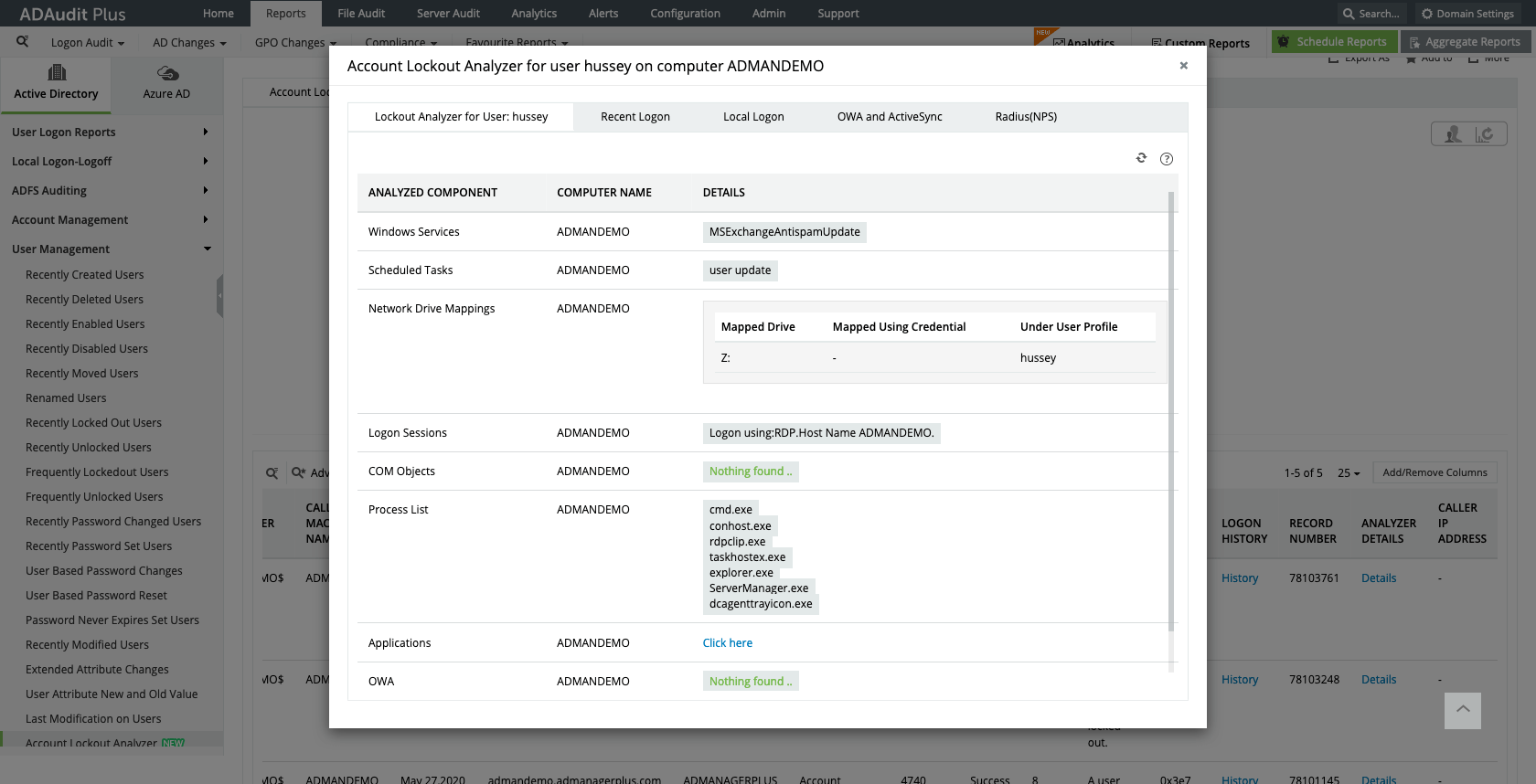
Identify the source of the most repeated account lockouts by checking multiple Windows components.
Find the most recent data: Keep track of recently locked-out user accounts and view relevant details for further analysis.
Analyze and troubleshoot: Identify the source of the most repeated account lockouts by checking multiple Windows components.
Get granular
Use the multiple predefined report categories available to track different types of GPO setting changes for in-depth analysis.
Gain contextual information
Quickly identify the old and new values of a modified GPO, and view information about who modified it and when.
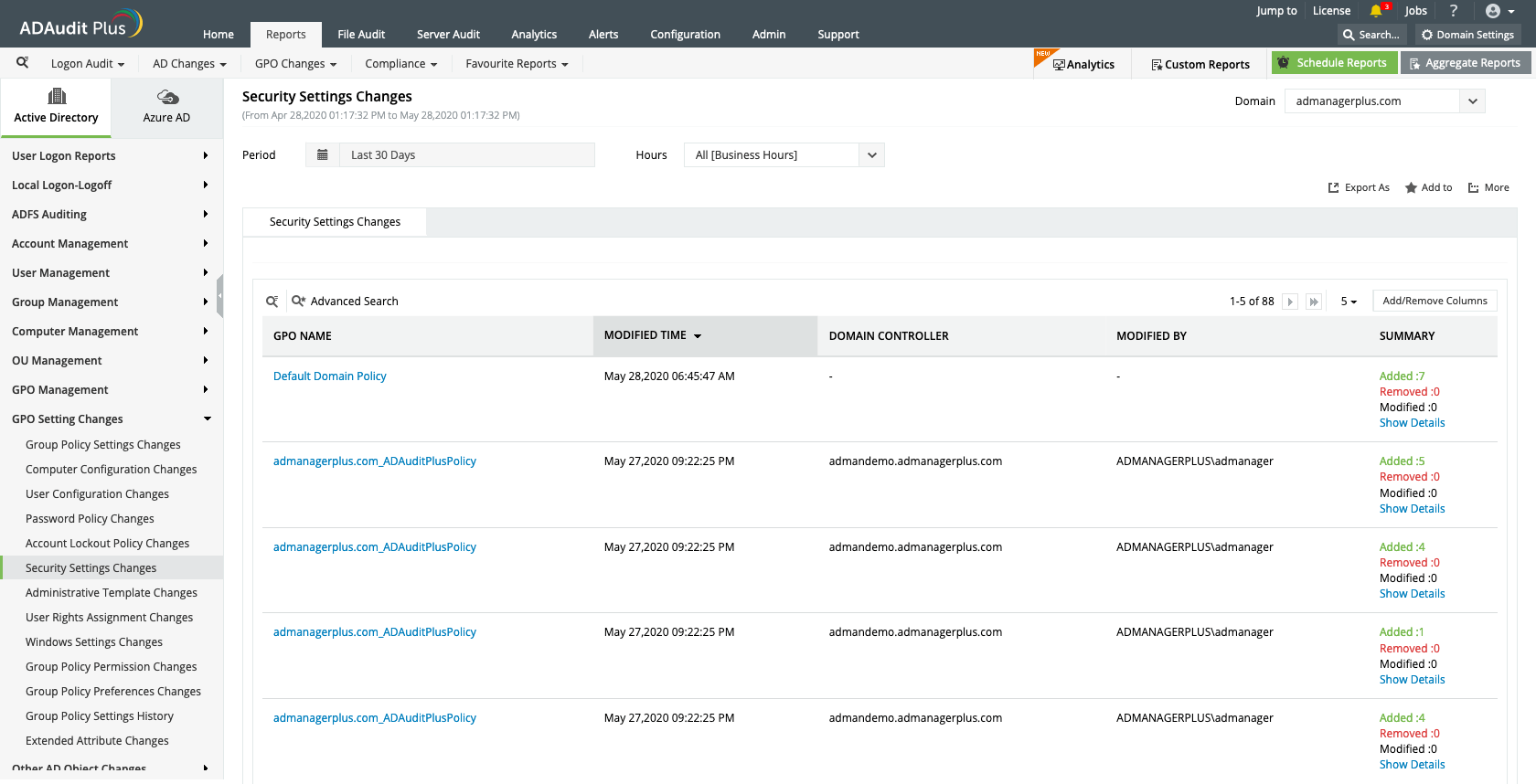
Get granular: Use the multiple predefined report categories available to track different types of GPO setting changes for in-depth analysis.
Gain contextual information: Quickly identify the old and new values of a modified GPO, and view information about who modified it and when.
See everything at a glance
Track user login activities across on-premises and cloud environments from one console.
Audit-ready reporting
Schedule periodic reports on critical user actions to generate clear, concise audit records as legal evidence for external mandates such as HIPAA, PCI DSS, and the GDPR.
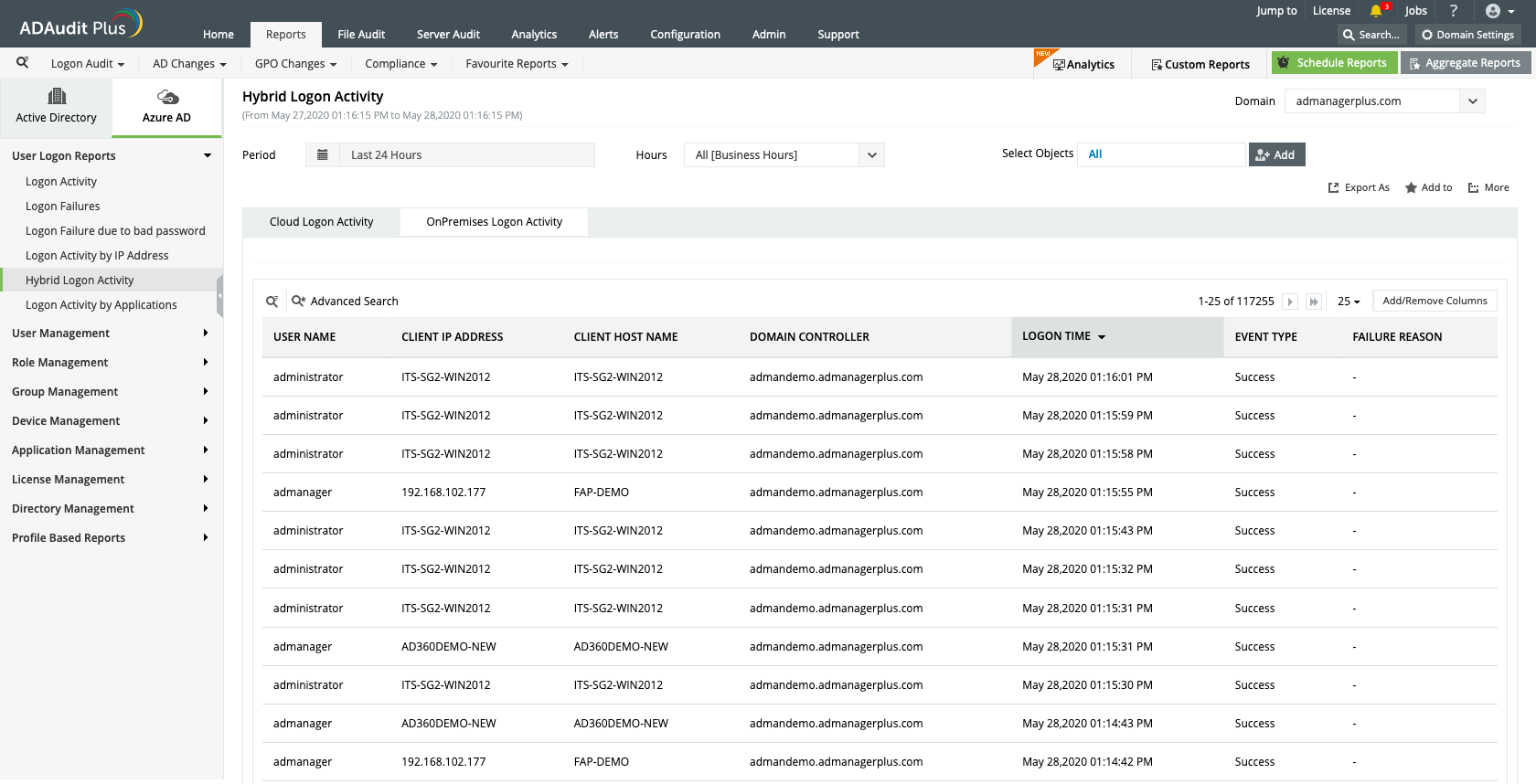
See everything at a glance: Track user login activities across on-premises and cloud environments from one console.
Audit-ready reporting: Schedule periodic reports on critical user actions to generate clear, concise audit records as legal evidence for external mandates such as HIPAA, PCI DSS, and the GDPR.
Simplify anomaly detection
Detect anomalies across various types of user activities, including logins, using machine learning.
Learn the specifics
Analyze the particulars for each and every unusual activity that’s detected.
Know what's normal
Browse through the baseline, or typical behavior, of every user in your organization.
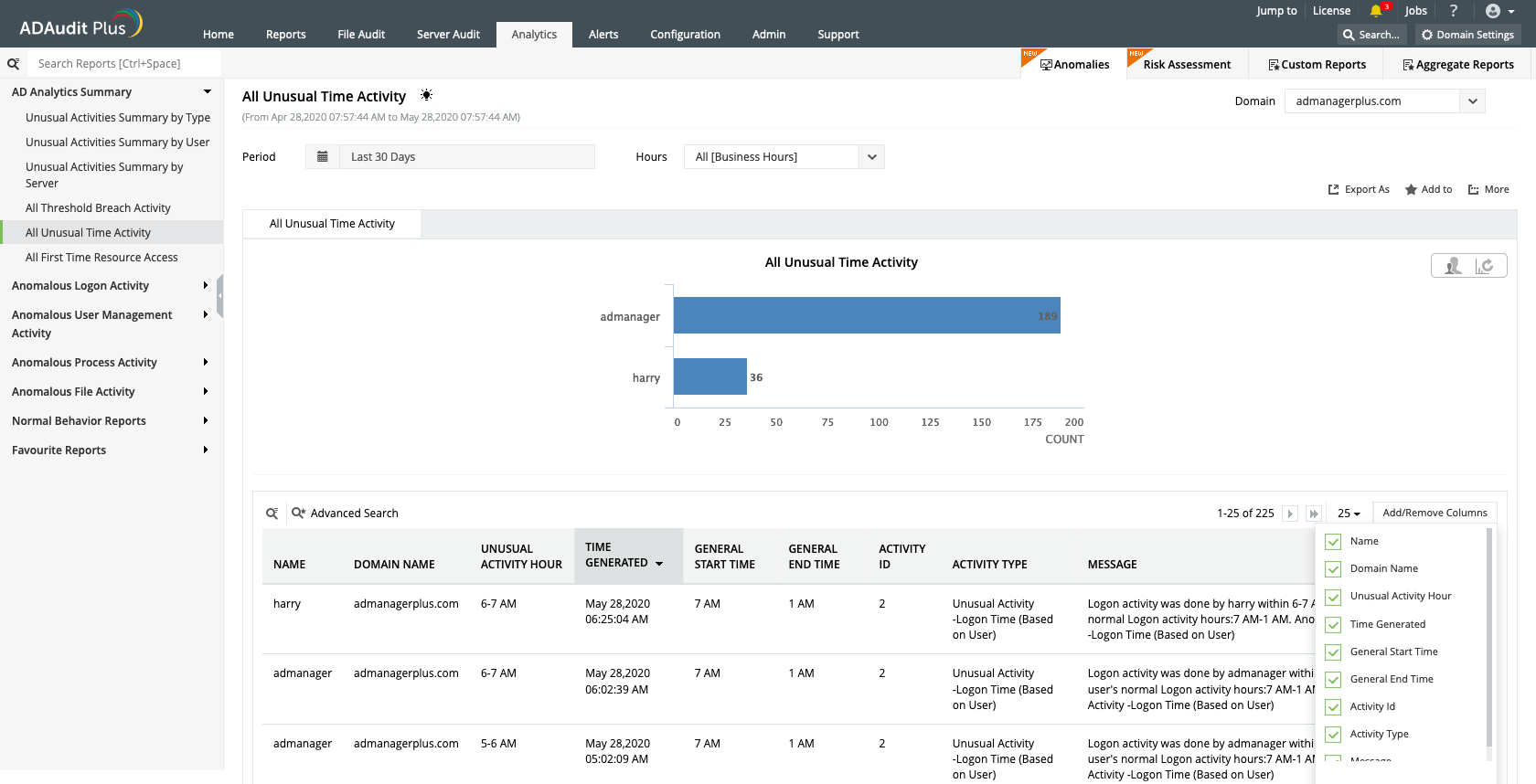
Simplify anomaly detection: Detect anomalies across various types of user activities, including logins, using machine learning.
Learn the specifics: Analyze the particulars for each and every unusual activity that’s detected.
Know what's normal: Browse through the baseline, or typical behavior, of every user in your organization.
Annual price starts at
$595To assist your evaluation we offer:
- 30-day fully functional free trial.
- No user limits.
- Free 24*5 tech support.
Thanks
Thank you for your interest in ManageEngine ADAudit Plus. We have received your request for a price quote and will contact you shortly.
Ensure data security and get compliant
Our Active Directory auditing software offers extensive out-of-the-box compliance reports that helps streamline and meet multiple compliance requirements.
Customers Review
-
Auditors and regulators frequently ask for reports that show Active Directory activities such as user lockouts, access removal for terminated users, users created, etc. AD Audit Plus has helped us do that easily and with minimal overhead.
Chris Schum
Information Security Officer
-
AD Audit has given us the ability to see who does what in our admin group thus giving the security office more efficiency and control over our domain.
Shawn W.

-
Deployment was very easy and very cost-effective. After we received our license, we immediately started deployment of software and was active in less then 1 hour.
Nikola Mugosa
-
This product allowed me to report on user login information and determine who made what changes to AD when necessary.
Steffenson, Shannon L
Network Systems Manager
-
Auditors and regulators frequently ask for reports that show Active Directory activities such as user lockouts, access removal for terminated users, users created, etc. AD Audit Plus has helped us do that easily and with minimal overhead.
Chris Schum
Information Security Officer -
AD Audit has given us the ability to see who does what in our admin group thus giving the security office more efficiency and control over our domain.
Shawn W.
To assist your evaluation we offer
- 30-day fully functional free trial.
- No user limits.
- Free 24*5 tech support.