-
ADAudit Plus has helped us meet certain SOX and PCI compliance requirements. Liking the automated monthly reports for SOX, ease of use, implementation and very cost effective solution.Jeffrey O'DonnellDirector of IT,Uncle Bob’s Self Storage
-
We finalized on ManageEngine ADAudit Plus, primarily for our SOX Audit reports and I think the tool, with its easy to comprehend output is very cool and the highly competitive pricing helped grab our attention.Andreas EdererCosma International
-
We are an emergency healthcare provider. We see the software as good risk avoidance with some good risk management practices and help us meet HIPAA compliance. We chose ADAudit Plus, which works 24/7/365 like us.JT MasonDirector of ITCalifornia Transplant Donor Network (CTDN)
-
We evaluated different software; ADAudit Plus is extremely easy to deploy and a cost-effective solution that helped us pass several industry related security audits, in-depth PEN audit test and meet HIPAA security guidelines.Renee DavisCIOLife Management Center
-
We are a not for profit organization and had to satisfy HIPAA requirements, we chose ADAudit Plus which helped us to see what changes were made and who made them in our AD.CMenendezManager of Network OperationsKendal
-
ADAudit Plus was the simplest and most relevant from the several products we trialed to monitor user logon failures, account cleaning, to keep a check on malicious activities and meet PCI-DSS compliance.Bernie CamusIT ManagerIglu.com
FISMA Compliance Auditing & Reporting
Segment: Federal Agencies
 |
 |
 |
 |
 |
 |
The Federal Information Security and Management Act (FISMA) requires federal agencies to provide security for information collected or maintained by or on behalf of the agency; and information systems used or operated by an agency or by a contractor of an agency or other organization on behalf of an agency.
Start your free trial
30-day free trial. No credit card required.
Thanks!
Your download is in progress and it will be completed in just a few seconds!
If you face any issues, download manually here
×
Start your 30-day free trial
The IT-FISMA Connect
Using ADAudit Plus to ensure Federal Data security is a very thorough and a cost-effective solution. The annual report to congress on the implementation of the Federal Information Security Management Act for the fiscal year 2012 reveals that while the cost of securing information systems increased by one billion dollars, the federal government was less compliant with security standards than they were in 2011.
So how can ADAudit Plus help secure the Nations Security Houses? Being Windows network secure and meeting FISMA compliance is not a big deal, but it is an ongoing process that involves the federal agency to have ADAudit Plus do its job of monitoring the entire Windows Server environment and reporting with email alerts the changes along with periodic reports. Also, there is the FISMA compliance kit within ADAudit Plus to ease the the entire compliance process.
Note: Click the section numbers in the following table to view the various ADAudit Plus audit reports that will help satisfy a particular clause.
| Section Number | Requirements | Reports |
|
Audit & Accountability AU-3 (A.10.10.1) / AU-5 (A.10.10.1, A.10.3.1) |
|
|
|
Access Control AC-2 (A.8.3.3, A.11.2.1, A.11.2.2, A.11.2.4, A.15.2.1) |
Account Management |
All AD object changes:
|
| AC-7 (A.11.5.1) |
Unsuccessful Login Attempts |
Unsuccessful Login failures via Interactive / Remote Sessions |
| AC-11 (A.11.3.2, A.11.3.3, A.11.5.5) | Session Lock | Session Lock / Unlock |
| AC-17 (A.10.6.1, A.10.8.1, A.11.1.1, A.11.4.1, A.11.4.2, A.11.4.4, A.11.4.6, A.11.4.7, A.11.7.1, A.11.7.2) |
Remote Access |
Terminal Service Activity |
|
Identification & Authentication |
IA-2: Identification & Authentication (Organizational users) IA-4: Identifier Management IA-5: Authenticator Management IA-8: Identification & Authentication (Non-organizational users) |
|
Real-Time Audit Reports from ADAudit Plus
A broader look at various audit reports in ADAudit Plus, which satisfy the requirements under a particular category. The reports ensure thorough monitoring and reporting / alerting, besides custom reporting and profile-based reporting.
Real-Time Sample Compliance Audit Reports
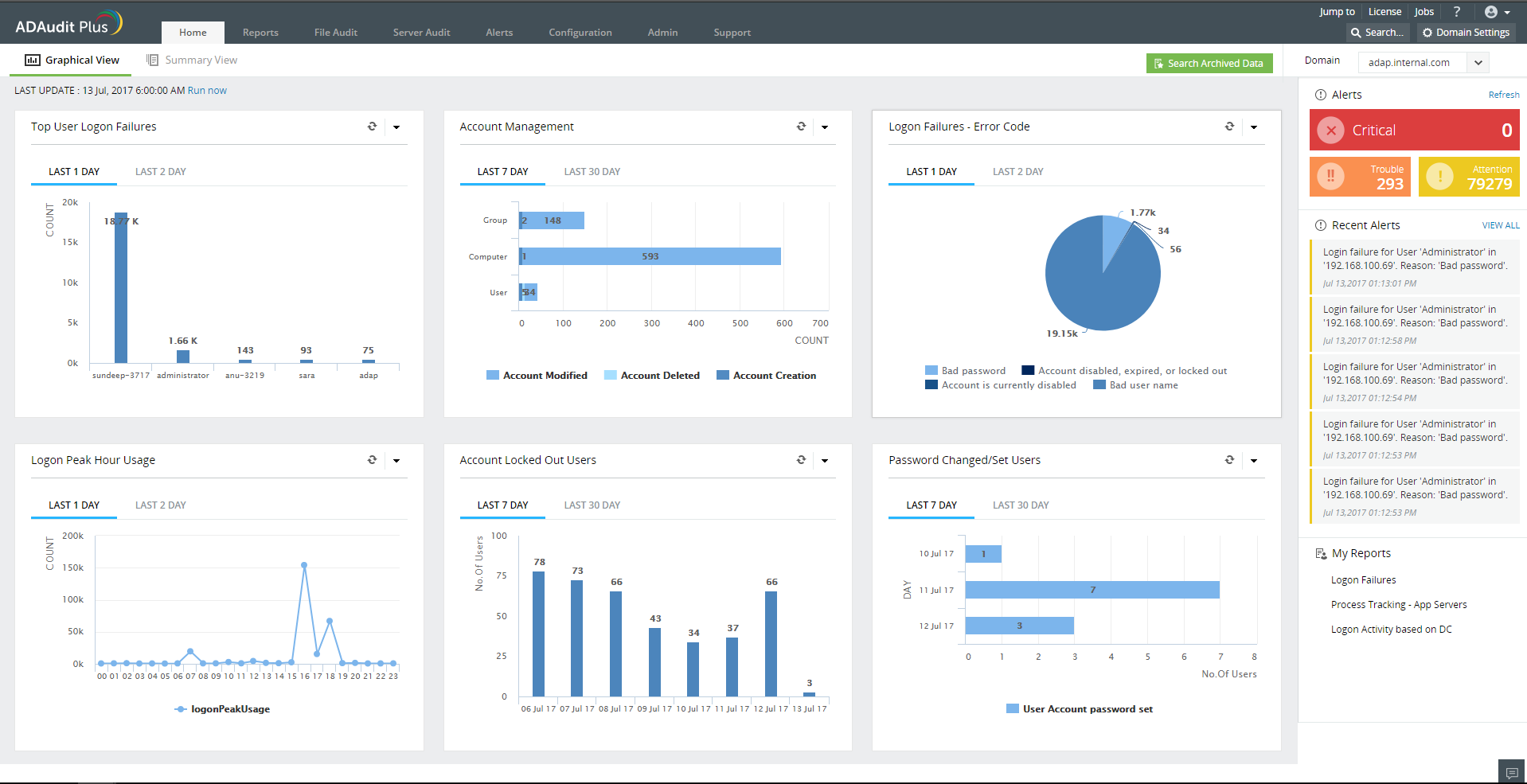
Dashboard View
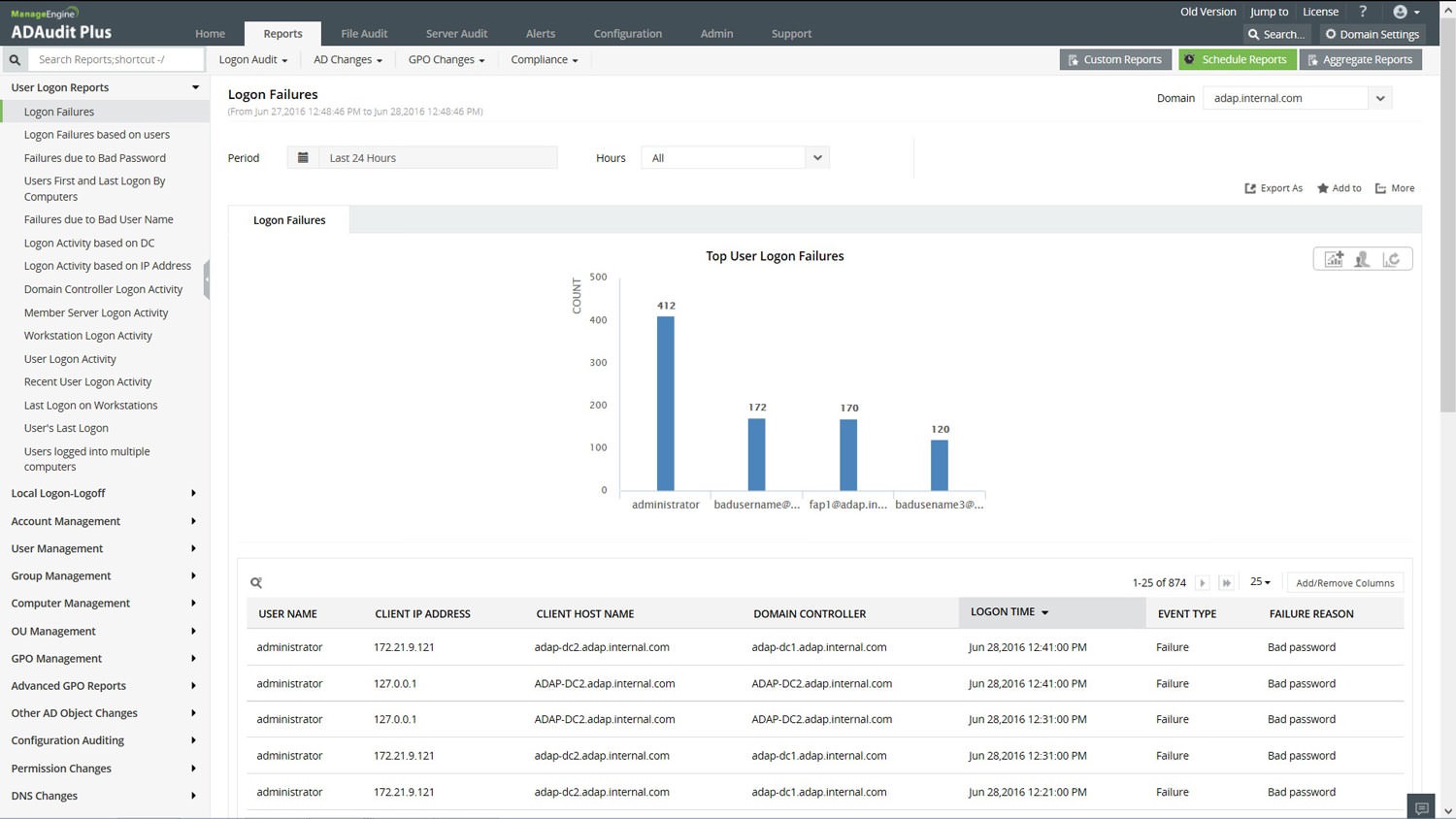
Audit Reports
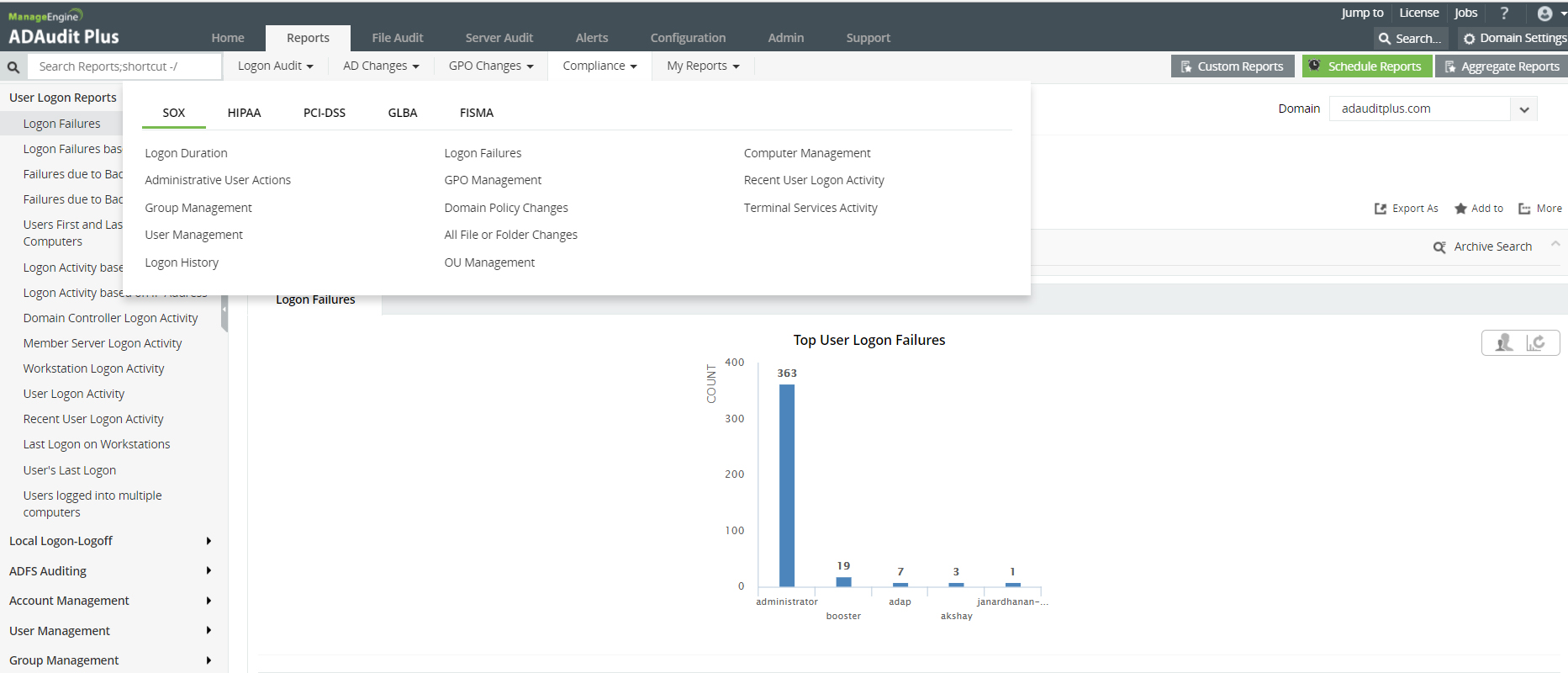
Compliance Reports
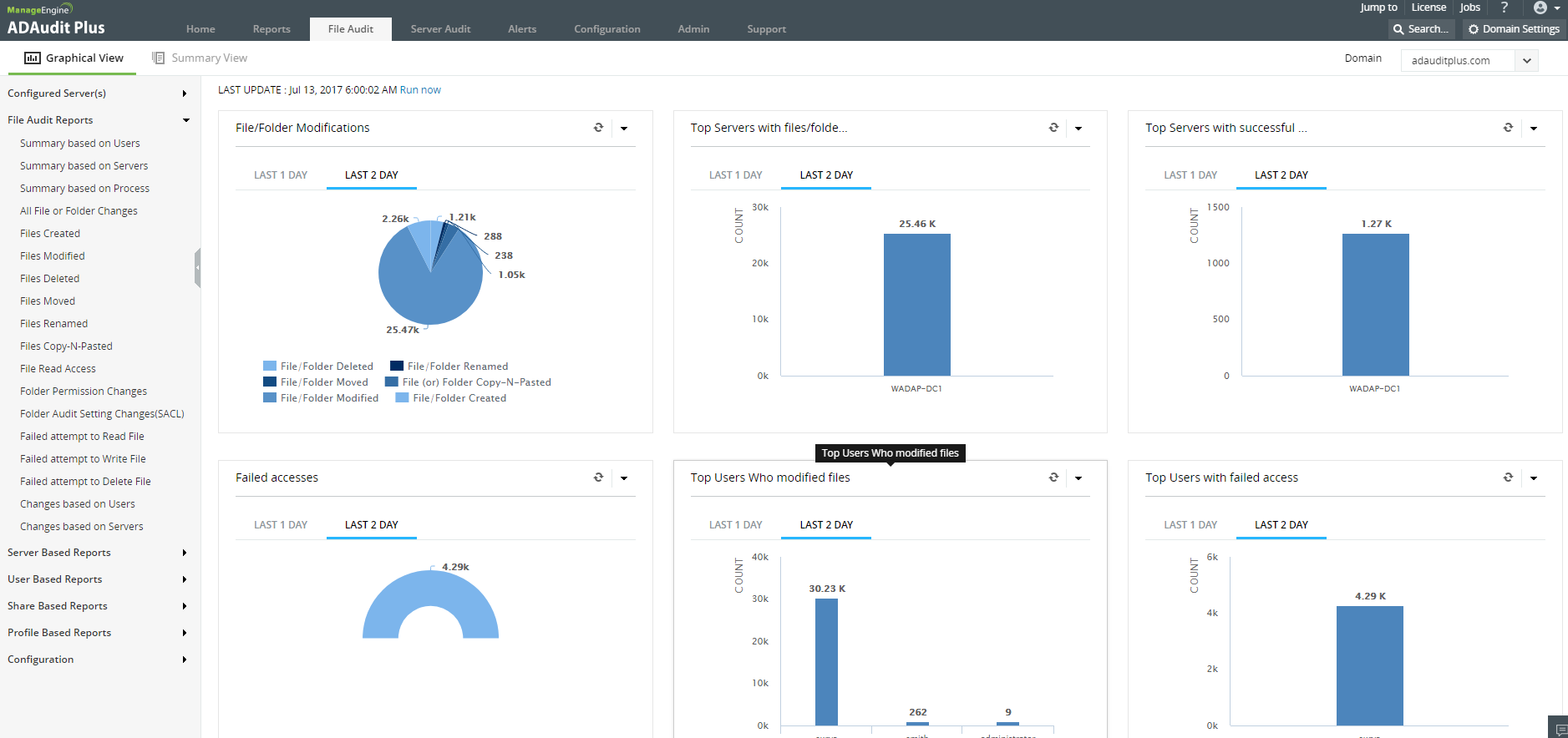
File Audit Reports
AU-3 (A.10.10.1) / AU-5 (A.10.10.1, A.10.3.1)
File Creation | File Deletion | File Modification | Access with Failure & Success
All File or Folder Changes | Files Created | Files Modified | Files Deleted | Successful File Read Access | Failed attempt to Read File | Failed attempt to Write File | Failed attempt to Delete File | Folder Permission Changes | Folder Audit Setting Changes (SACL) | Files Moved (or) Renamed | Changes based on Users | Changes based on Servers | Files Copy-N-Pasted
AC-2 (A.8.3.3, A.11.2.1, A.11.2.2, A.11.2.4, A.15.2.1)
All AD Objects changes in real-time:
User Management Reports
Recently Created Users | Recently Deleted Users | Recently Enabled Users | Recently Disabled Users | Recently Locked Out Users | Recently Unlocked Users | Frequently Lockedout Users | Recently Password Changed Users | Frequently Unlocked Users | Recently Password Set Users | User Based Password Changes | User Based Password Reset | Recently Modified Users | Password Never Expires Set Users | Extended Attribute Changes | User Attribute New and Old Value | Last Modification on Users | Account Lockout Analyzer | User Object History
Group Management Reports
Recently Created Security Groups | Recently Created Distribution Groups | Recently Deleted Security Groups | Recently Deleted Distribution Groups | Recently Modified Groups | Recently Added Members to Security Groups | Recently Added Members to Distribution Groups | Recently Removed Members from Security Groups | Recently Removed Members from Distribution Groups | Extended Attribute Changes | Group Attribute New and Old Value | Group Object History
Computer Management Reports
Recently Created Computers | Recently Deleted Computers | Recently Modified Computers | Recently Enabled Computers | Recently Disabled Computers | Extended Attribute Changes | Computer Attribute New and Old Value | Computer Object History
OU Management Reports
Recently Created OUs | Recently Deleted OUs | Recently Modified OUs | Extended Attribute Changes | OU History
GPO Management Reports
Recently Created GPOs | Recently Deleted GPOs | Recently Modified GPOs | GPO Link changes | GPO History | Advanced GPO Reports: Group Policy Settings Changes | Computer Configuration Changes | User Configuration Changes | Password Policy Changes | Account Lockout Policy Changes | Security Settings Changes | Administrative Template Changes | User Rights Assignment Changes | Windows Settings Changes | Group Policy Permission Changes | Group Policy Preferences Changes | Group Policy Settings History | Extended Attribute Changes
AC-7 (A.11.5.1)
Unsuccessful Login failures via Interactive / Remote Sessions
Currently Logged On Users | Logon Duration | Local Logon Failures | Logon History | Terminal Services Activity | Users Logon Duration on Computers | Interactive Logon Failure | Terminated Users Session | RADIUS Logon Failures (NPS) | RADIUS Logon History (NPS)
AC-11 (A.11.3.2, A.11.3.3, A.11.5.5)
Session Lock / Unlock
Currently Logged On Users | Logon Duration | Local Logon Failures | Logon History | Terminal Services Activity | Users Logon Duration on Computers | Interactive Logon Failure | Terminated Users Session | RADIUS Logon Failures (NPS) | RADIUS Logon History (NPS)
AC-17 (A.10.6.1, A.10.8.1, A.11.1.1, A.11.4.1, A.11.4.2, A.11.4.4, A.11.4.6, A.11.4.7, A.11.7.1, A.11.7.2)
Terminal Service Activity
Currently Logged On Users | Logon Duration | Local Logon Failures | Logon History | Terminal Services Activity | Users Logon Duration on Computers | Interactive Logon Failure | Terminated Users Session | RADIUS Logon Failures (NPS) | RADIUS Logon History (NPS)
IA-2 (A.11.3.2, A.11.5.1, A.11.5.2, A.11.5.3)
IA-4 (A.11.5.2)
IA-5 (A.11.2.1, A.11.2.3)
IA-8 (A.10.9.1, A.11.4.2, A.11.5.1, A.11.5.2)
All changes made by individuals | All changes made by admin privileged users
All AD Changes | All AD Changes By User | All AD Changes on DCs | User Management | Group Management | Computer Management | OU Management | GPO Management | Administrative User Actions
Few of the Other Pre-Configured Real-Time Compliance Reports
SOX Compliance Reports
Recent User Logon Activity | Logon Failures | Terminal Services Activity | Logon Duration | Domain Policy Changes | Logon History | User Management | Group Management | Computer Management | OU Management | GPO Management | Administrative User Actions | All File or Folder Changes
HIPAA Compliance Reports
All File or Folder Changes | OU Management | Computer Management | Group Management | User Management | Logon Duration | Terminal Services Activity | Logon Failures | Recent User Logon Activity
GLBA Compliance Reports
Folder Audit Setting Changes | Folder Permission Changes | Successful File Read Access | All File or Folder Changes | GPO Management | User Management | Group Management | Domain Policy Changes | Logon Duration | Local Logon Failures | Terminal Services Activity
PCI-DSS Compliance Reports
Recent User Logon Activity | Logon Failures | Terminal Services Activity | Logon History | Administrative User Actions | All File or Folder Changes | RADIUS Logon History (NPS) | Successful File Read Access | Folder Permission Changes | Folder Audit Setting Changes
Other solutions offered by ADAudit Plus
Active directoryFile serverWindows serverWorkstation