Free Trial


Over 180,000 organizations across 190 countries
trust ManageEngine to manage their IT.

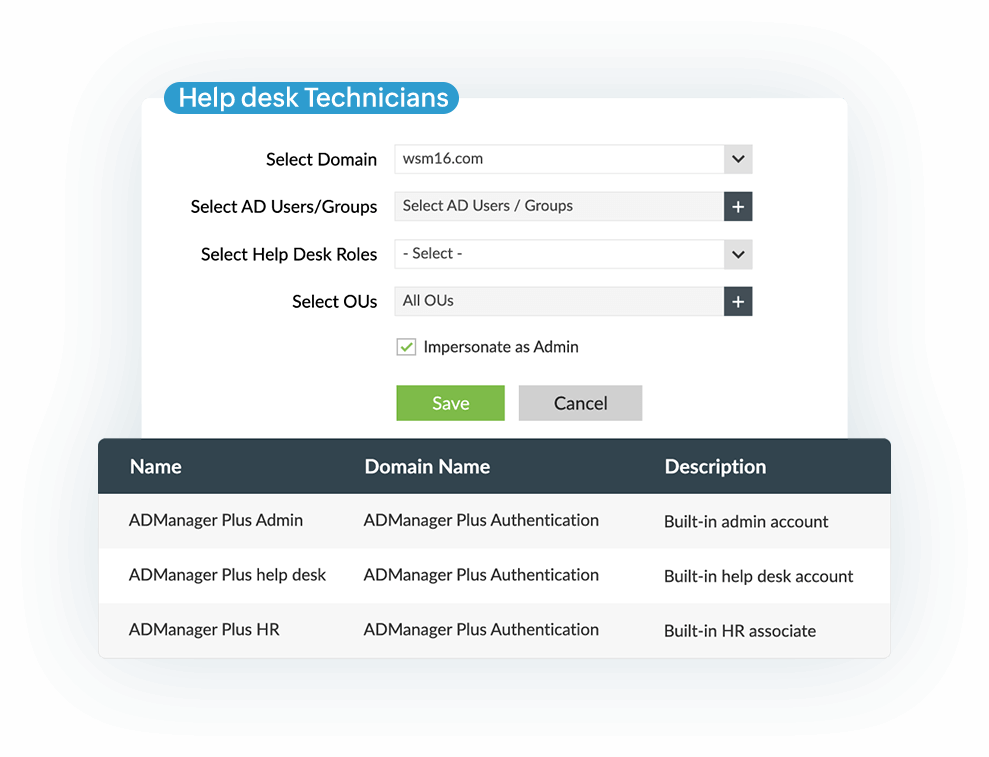
ADManager Plus' powerful delegation module enables you to securely delegate AD operations
to help desk technicians using GUI-based actions.

Simplify AD delegation and save costs with ADManager Plus

  • OU-based delegation

    Limit the scope of delegation to specific OUs. You can also delegate different roles for different OUs to multiple technicians.

  • Group-based delegation

    Delegate the desired operations to a group instead of individual users. All the group members will inherit the permissions to perform the tasks defined for that role.

  • Microsoft 365 delegation

    Delegate Microsoft 365 management and reporting to help desk technicians with the option to manage specific Microsoft 365 domains and licenses.

  • Backup and recovery delegation

    Delegate backup and recovery operations to protect against undesired and accidental AD changes.

Start your free trial

Use cases for delegation of permissions
in ADManager Plus

 
Scenario 1

Delegate permissions for creating new user accounts to HR managers or executives

The AD help desk delegation feature could be especially useful during the hiring season when a company sees a sudden influx of new employees. Provisioning new user accounts is a major priority, yet time-consuming. Administrators can reduce the time the process takes and their involvement in it by delegating the task of creating new user accounts in AD to HR personnel. The AD help desk delegation module provides HR staff with permissions to view and perform only the tasks that are delegated to them.

 
Scenario 2

Delegate permissions for resetting passwords and unlocking user accounts to help desk technicians

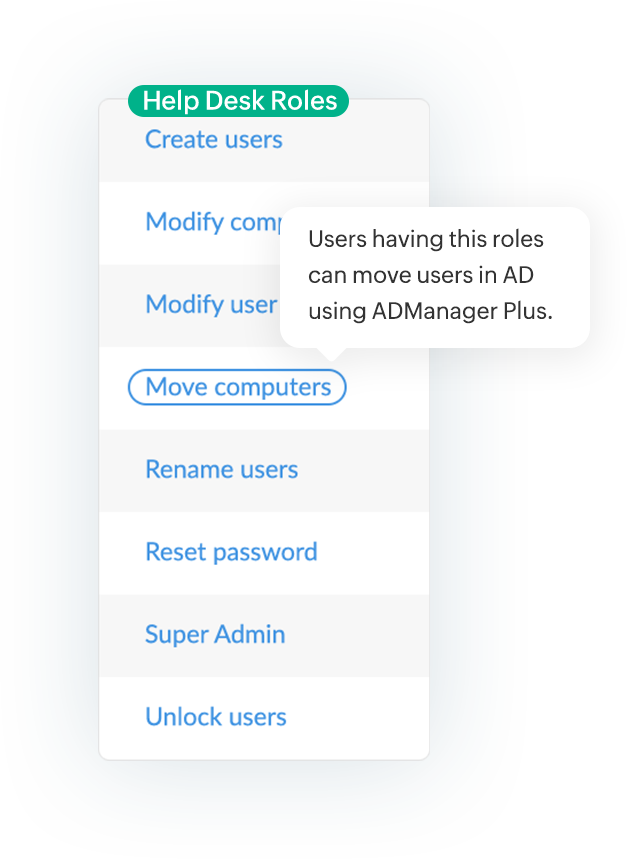
Requests for password resets and user account unlocks make up a major portion of help desk calls. Rather than spending their time on these tasks, IT administrators can delegate them to technicians and focus on the other critical tasks at hand. ADManager Plus' role-based, OU-specific delegation feature is the ideal solution for this problem.

 
Scenario 3

Delegate Microsoft 365, Exchange, and Google Workspace capabilities to help desk technicians

Administrators can securely delegate AD, Microsoft 365, and Google Workspace management and reporting capabilities to technicians or non-IT users from a single console. You can entrust help desk technicians with permissions for performing tasks like creating and managing mailboxes in Exchange and creating and managing users in Microsoft 365 and Google Workspace. With defined administrative boundaries, technicians can perform specific actions, such as create users and manage licenses, only in specific domains.


 
Scenario 4

Delegate permissions for managing group memberships of AD user accounts to help desk technicians

A user account's group memberships undergo changes every time the user gets promoted, changes teams, or moves to a different branch. A major challenge is constantly updating group memberships as it is critical to granting permissions and access to resources. ADManager Plus' delegation feature allows you to entrust help desk technicians with granular permissions for moving users from one group to another.

Start your free trial

Track help desk delegation actions

  • Audit report

    This report tracks what AD objects were created, deleted, or modified, which help desk technicians made the changes, and when the changes were made.

  • Admin audit report

    This report lists all the changes that administrators made to help desk technicians' accounts and roles.

  • Technicians report

    This report lists all available help desk technicians and their delegated roles, domains, and OUs in AD, Microsoft 365, and Google Workspace.

  • Technician logon report

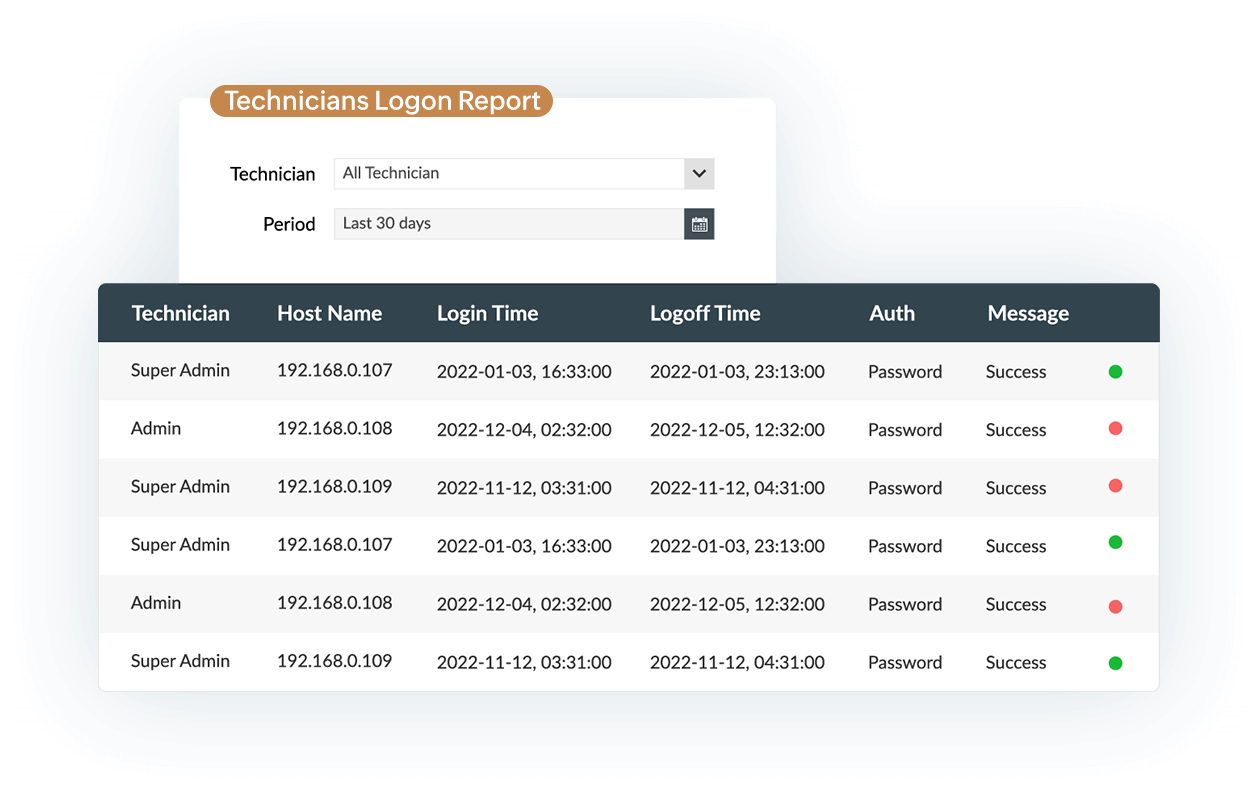
    This report generates the logon details for all help desk technicians, such as the logon and logoff times, the duration of sessions, and the authentication methods used.

What makes
ADManager Plus an
industry-leading
AD delegation tool?

With ADManager Plus, you can:

  • Delegate AD, Exchange, and Google Workspace tasks with simple, GUI-based actions.
  • Restrict technicians to managing specific AD domains across different forests.
  • Monitor the available technicians and their delegated tasks in real time.

Frequently asked questions

Why is the Microsoft 365 last logon report needed?

As a security measure, organizations often need to keep track of the logon activities of Microsoft 365 mailbox users. Aside from security, logon information is collected for various reasons such as adhering to compliance standards, detecting policy violations, and identifying licenses assigned to inactive users so you can reassign them to active users.

What are the AD attributes related to the user logon time?

The attributes related to the user logon time are lastLogon and lastLogonTimeStamp. The former is a non-replicating attribute and is updated only in the domain controller that authenticates the user during logon. The latter is the replicated version and its value gets updated whenever the difference between the previous timestamp and the current timestamp exceeds a certain threshold value.
ADManager Plus retrieves the lastLogon value from all DCs and the latest values will be updated for the lastLogon and lastLogonTimeStamp fields.

What are the limitations of generating this report with native AD tools and scripts?

With the Microsoft 365 Admin Center, you can only view the most recent logon information of users individually. If admins wish to obtain the last logon time of multiple Microsoft 365 mailbox users at once, the only alternative is using complex PowerShell scripts. Furthermore, with PowerShell, only limited filtering options are available, which makes it difficult to narrow down and find any suspicious logon activities.

How does ADManager Plus simplify Microsoft 365 last logon reporting?

ADManager Plus provides detailed M365 user logon information such as last logon times, last logoff times, details of M365 licenses, and more without using any scripts. Besides listing logon information about users with specific licenses, it displays the AD attributes of users such as logon time, account status, and more.

9 out of 10 Fortune 100 companies trust
ManageEngine to manage their IT.

 
4.6/5
 
4.1/5
 
4.5/5
 
4.47/5
 
4.6/5
 
4.6/5
Start your free trial

Over 100,000 technicians
trust ADManager Plus to manage their
Windows environment.

  • ADManager Plus provides us a single point for our Active Directory Reports. For a small IT department this is crucial for saving time and being able to apply our energy to keeping things running smooth. I foresee this being in our arsenal of network tools for a long time to come.

    Mark Anderson

    IT Support, ET Investments

  • ADManager Plus - The Swiss Army Knife for AD Administrator
    It has made managing and administrating Active Directory easy, fast and efficient. Everyday tasks which earlier required us to write Powershell scripts are now easily achievable using an workflow like interface.

    Deputy Chief IT Engineer

    Company Size: 1B - 3B, Energy and Utilities

Other features

ADManager Plus is not just about Windows AD delegation.
Here are a few other popular product features:

AD Management

Leverage customizable templates to manage all AD objects with simple, GUI-based actions.

Microsoft 365 Reporting

Gain in-depth visibility into your Microsoft 365 environment with over 90 out-of-the-box reports and without any PowerShell scripts.

Integrations

Expand the capabilities of ADManager Plus by integrating with other leading IT products.

×

Start your 30-day free trial

  •  
  • *
     
  •  
  •  
  • By clicking 'Submit' you agree to processing of personal data according to the Privacy Policy.