Risk management in ADManager Plus
ADManager Plus helps you assess identity risks, understand exposure, and take action across AD and Microsoft 365 to reduce the likelihood of identity-based attacks.
-
End-to-end identity risk visibility
Gain a centralized view of identity risks across AD and Microsoft 365, including misconfigurations, excessive privileges, and insecure permissions that can lead to breaches, ransomware, and domain compromise, resulting in financial losses.
-
Standards-aligned risk scoring and trends
Quantify your identity risk posture using severity-based scoring aligned with NIST SP 800-30 and track risk score changes over time using the risk score trend graph.
-
Attack path and exposure analysis
Visualize how attackers can move through group memberships, delegation chains, and permission inheritance to escalate privileges and compromise critical assets.
-
Privileged entity intelligence
Identify and analyze exposure around privileged groups, including nested and custom groups, not just default admin roles.
-
Risk-based prioritization
Prioritize risks based on their likelihood, impact, and exposure context, helping teams focus on issues that materially increase the attack risk.
-
Actionable remediation and assessment control
Apply targeted remediation measures to proactively secure exposed identities. Customize data synchronization schedules to keep risk assessments aligned with reporting and operational needs.
Assess and improve your AD risk posture
with ADManager Plus
-
The lower the score,
the safer you are -
Stay aware of
the risks -
Dig into how your
identities are exposed -
Understand hidden exposure
and fix it right away
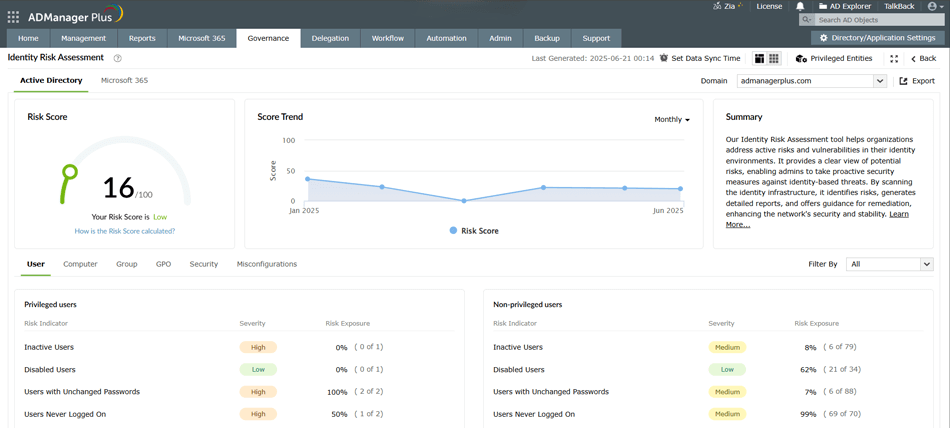
See how secure your identity environment is based on current risk indicators.
Filter and prioritize risk indicators based on their severity to focus on the most critical issues first.
View how each risk indicator contributes to your overall risk score.
Track changes in your risk score over time to understand whether your security posture is improving or worsening.
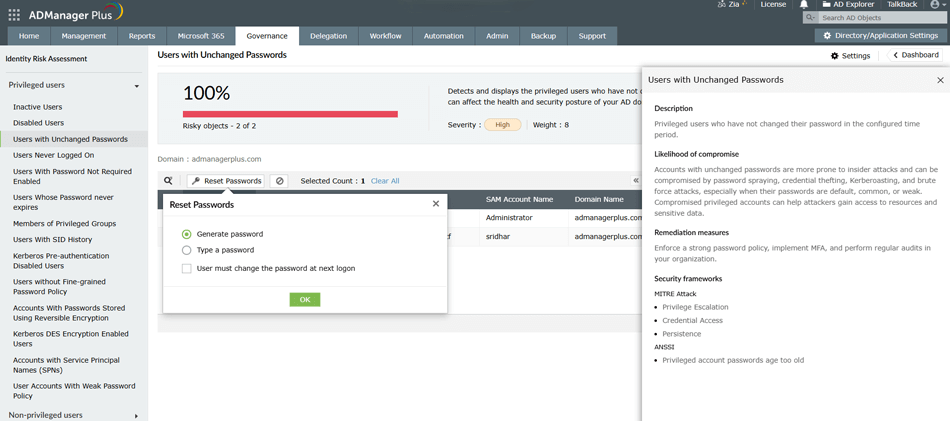
Stay aware of the status of affected AD objects.
Understand:
- How attackers can exploit this condition.
- How it maps to MITRE ATT&CK® and ANSSI categories.
- Practical steps to eliminate the risk.
Apply fixes directly from the screen.
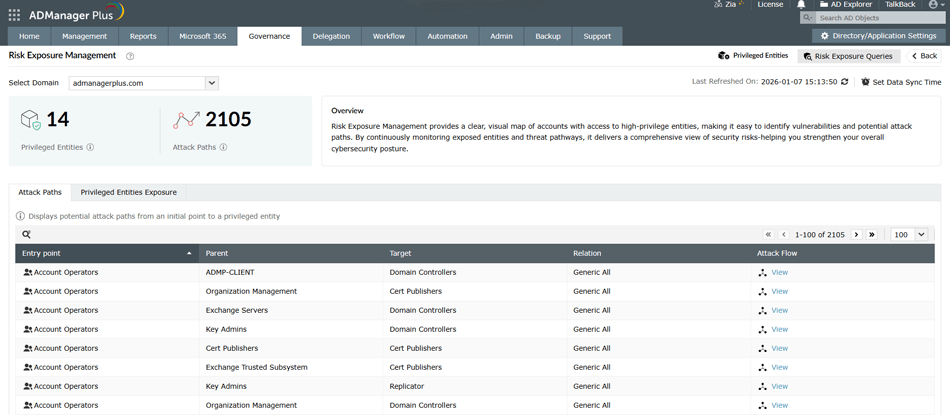
Get a quick snapshot of how many privileged entities exist and how many possible paths attackers could use to reach them.
Switch between Attack Paths (which shows how attackers could move through your environment) and Privileged Entities Exposure (which shows what’s at risk).
See where an attack could start, which groups are involved, and how access flows. Click View to see the full attack path step by step.
Quickly surface common identity risks using prebuilt, expert-crafted queries.
Schedule automatic data refreshes so exposure insights stay up to date.
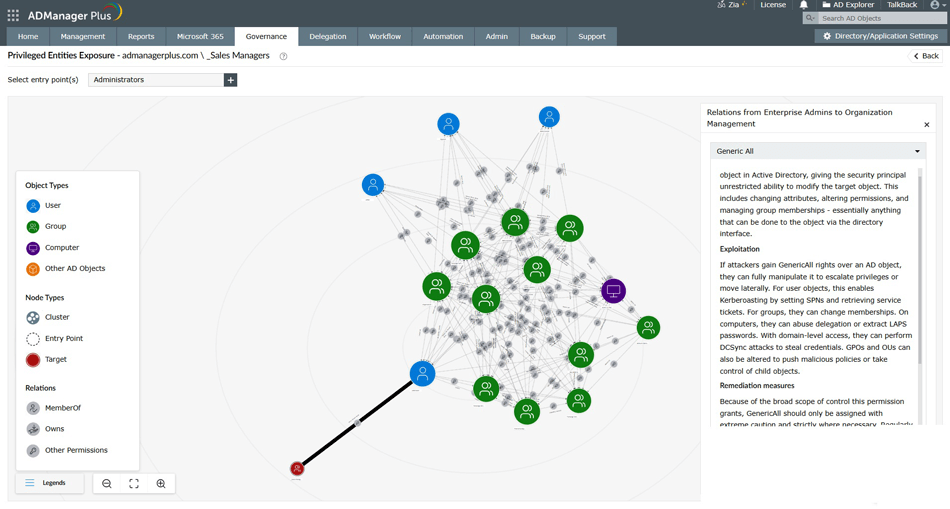
See how attackers could potentially reach your privileged entities. Use Select entry point(s) to narrow the view and focus on the paths that matter most.
Click any user or group to view its permissions, scope, and role within potential attack paths.
Click a connection to see the exact permissions and relationships enabling the attack path along with recommended actions to reduce the risk.

