9/10 Fortune 100 companies trust ManageEngine to manage their IT

Trusted by Disney, HP, SpaceX, Intel, Canon, FedEx, IBM, and Cisco

Top-rated by our valued customers

4.5
4.6
4.5

What makes ADManager Plus your all-in-one user management tool?

From new hire provisioning to exit deprovisioning, ADManager Plus automates every step of the user life cycle — with the controls and visibility your team needs.

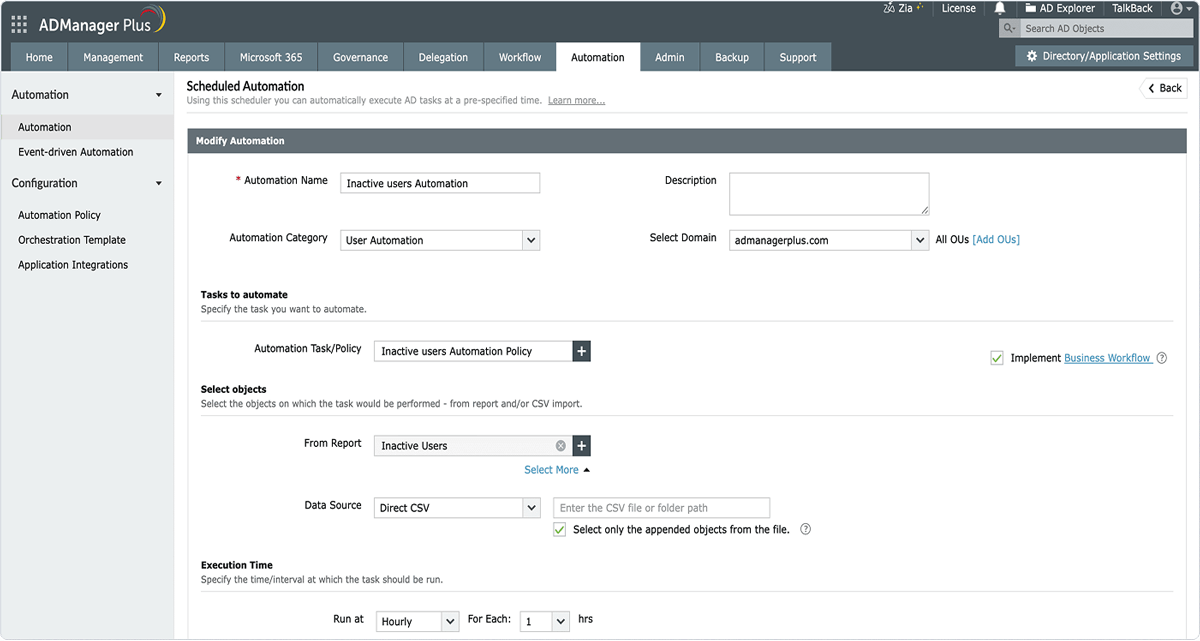
Automated user provisioning and deprovisioning

  • Automatically create users across AD, Microsoft 365, Exchange, and business apps from one console.
  • Sync user data from HCM applications and databases to streamline onboarding and offboarding.
  • Auto-assign licenses, groups, permissions, and mailboxes using dynamic rules.
  • Enforce naming conventions and attribute standards using templates.
  • Securely deprovision users and revoke access instantly across all applications.
Start your free trial
Automated user provisioning and deprovisioning

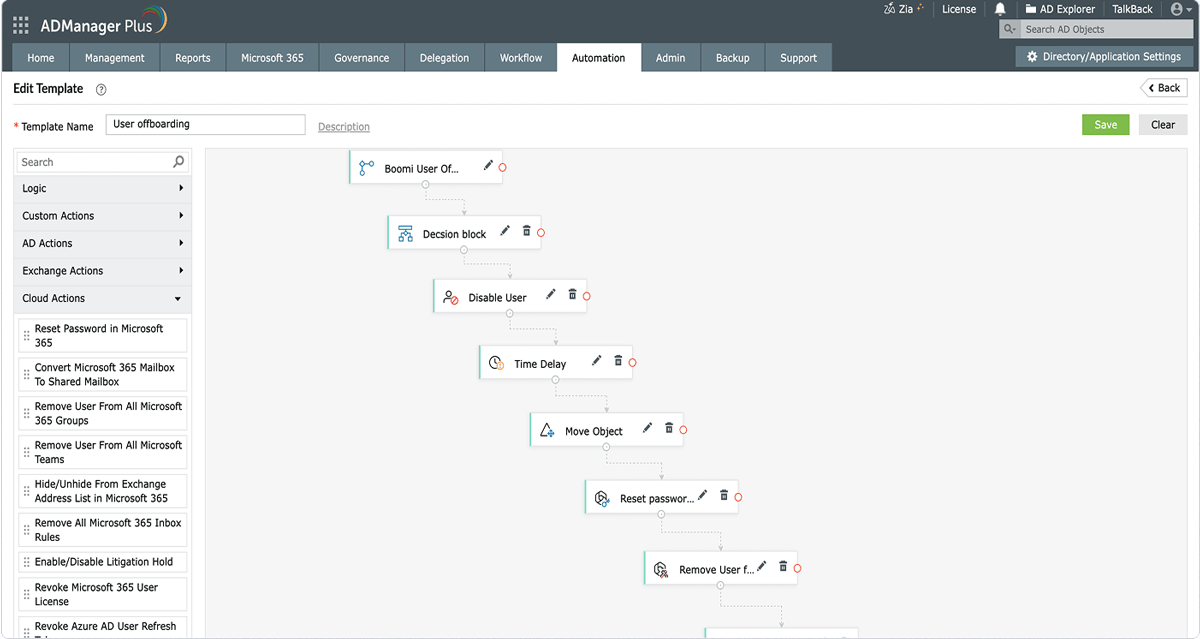
Orchestration

  • Execute sequential, cross-platform user life cycle management tasks using orchestration templates.
  • Create advanced workflows easily using a code-free, drag-and-drop builder.
  • Trigger orchestration based on events like user creation, modification, or deletion.
  • Include logic, delays, and decision blocks to control the task order and conditional execution.
  • Integrate with external applications via webhooks to perform identity actions beyond AD.
Start your free trial
Orchestration

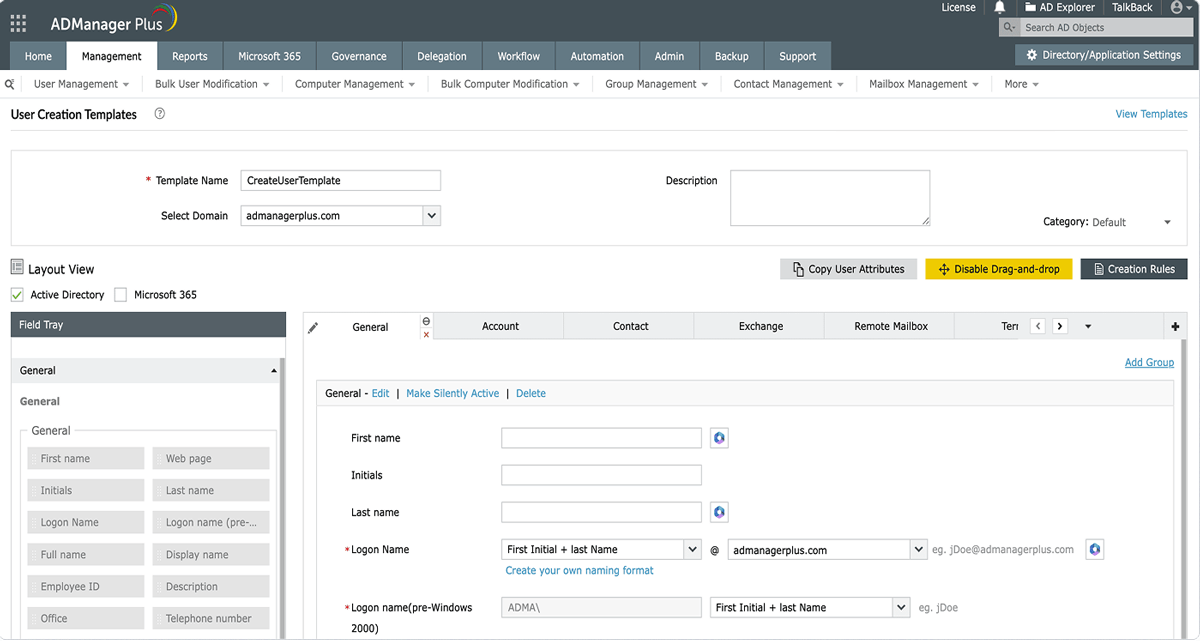
Template-based user management

  • Streamline user creation and management with customizable templates.
  • Standardize user attributes and naming conventions to ensure data uniformity.
  • Auto-fill attributes, groups, licenses, and permissions based on the user's role or department.
  • Build templates effortlessly with a simple drag-and-drop attribute builder.
  • Use rule-based logic to dynamically update attributes at scale.
  • Securely delegate template-driven user management tasks without granting admin rights.
Start your free trial
Template-based user management

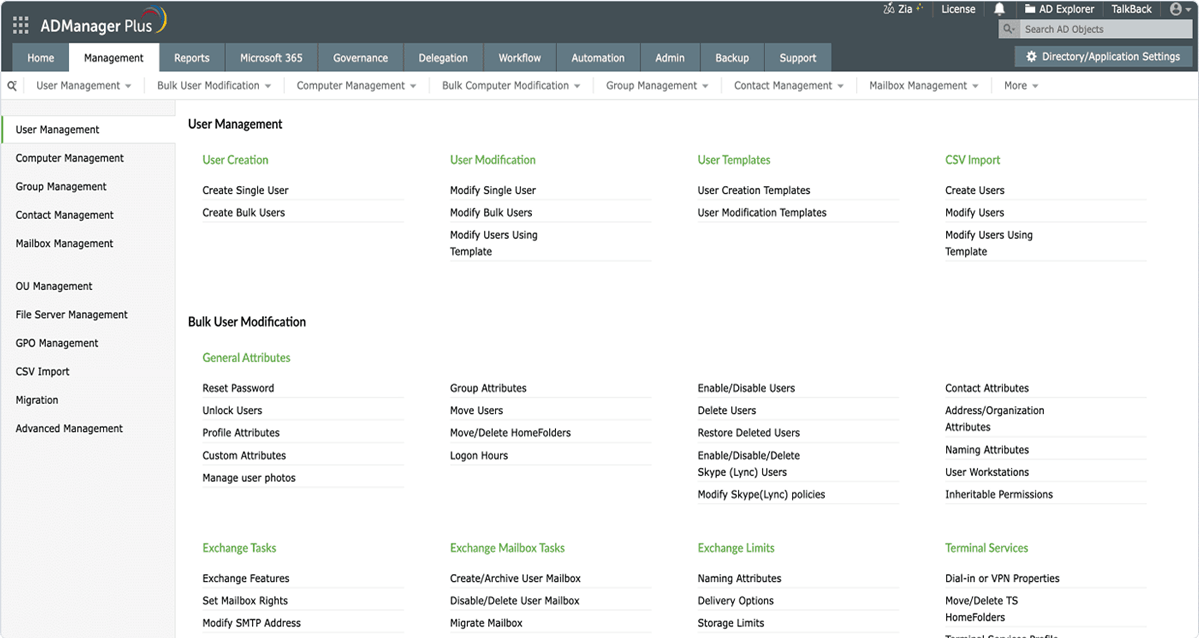
Bulk user management

  • Perform bulk operations without PowerShell scripting—all from a single intuitive GUI.
  • Create or modify multiple user accounts at once using CSV imports or templates.
  • Reset passwords, enable and disable accounts, and unlock users in bulk with a few clicks.
  • Move users between OUs or update attributes for multiple users at once.
  • Automate routine bulk AD tasks like cleaning up inactive accounts and resetting passwords.
Start your free trial
Bulk user management

Delegation and workflows

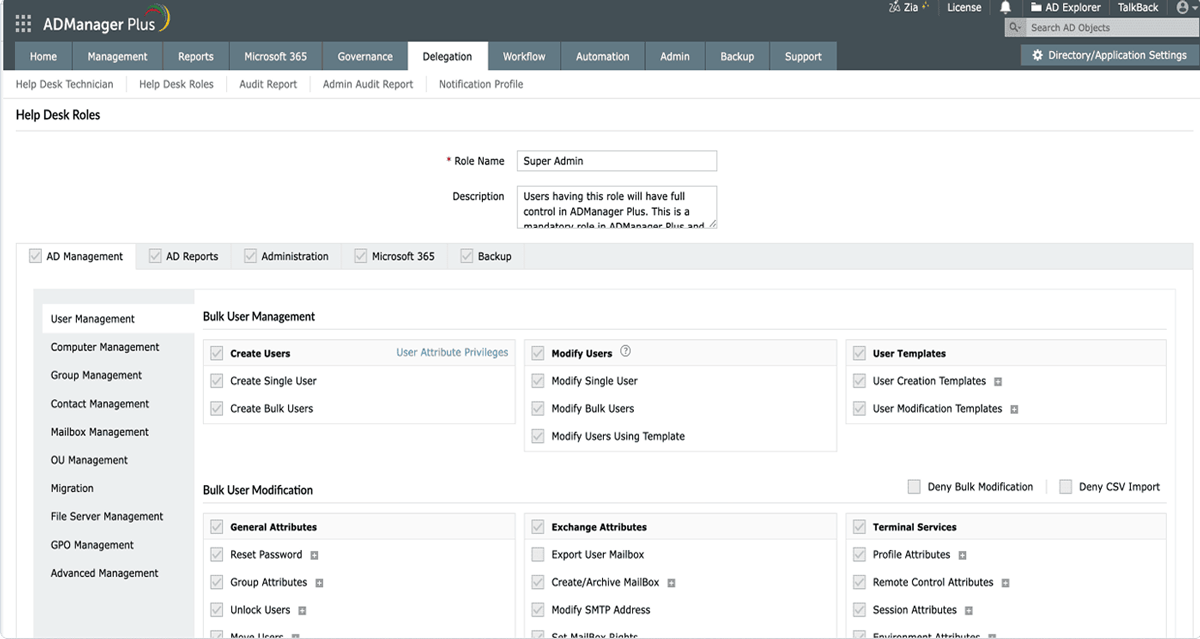
  • Delegate user management tasks using predefined roles, ensuring technicians can only perform what their role permits.
  • Limit delegation to specific OUs or groups, maintaining granular control over who manages which resources.
  • Grant delegated access without elevating native AD permissions, keeping your AD structure clean and intact.
  • Enable multi-level approval workflows by routing delegated tasks through reviewers and approvers before execution.
  • Implement SLAs and workflow tracking to prioritize sensitive requests and ensure timely task completion.
  • Track and review every action performed by delegate users for accountability and compliance.
Start your free trial
Delegation and workflows

Integrations and cross-system connectivity

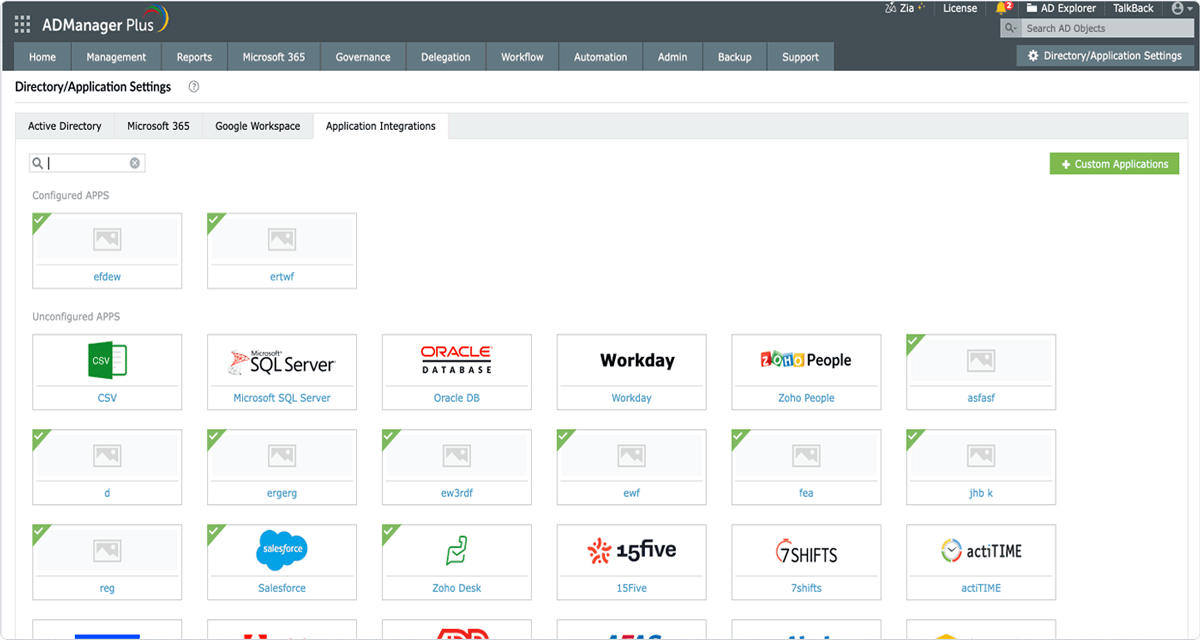
  • Integrate with HCM applications to automate user onboarding, modifications, and offboarding.
  • Connect with ITSM tools to trigger identity management actions from service requests.
  • Sync data across AD, Microsoft 365, Exchange, and Google Workspace in real time.
  • Link with SIEM and security tools for enriched audit trails and threat context.
  • Trigger workflows and approvals directly from business applications via APIs.
  • Maintain identity consistency across systems without custom scripting or manual updates.
Start your free trial
Integrations and cross-system connectivity

Automate the full user life cycle — from day one to exit

See how ADManager Plus connects your HR systems, approval workflows, and AD environment into a seamless, automated identity pipeline.

User onboarding

1

Trigger Event

The HCM app triggers a new hire event.

2

Workflow Request

An approval workflow validates the request based on role, department, and policy.

3

Automated Actions

A user account is created in AD using standardized templates.

4

Attribute & Permission Assignment

A mailbox, licenses, group memberships, and permissions are automatically assigned.

5

Integrations & Syncing

Identity is provisioned across Microsoft 365 and connected business applications.

6

Reporting & Compliance

Detailed reports and audit logs are generated to meet compliance requirements.

User offboarding

1

Disabling an AD account

A user account is disabled in AD.

2

Trigger event

The HR or ITSM app detects an employee exit or ended contract.

3

Access revocation

Licenses are reclaimed, and group memberships are removed.

4

Integrations and syncing

Access to Microsoft 365, Exchange, and business applications is revoked.

5

Reporting and compliance

Audit-ready reports are generated to ensure compliance and zero lingering access.

Use cases

Built for the identity challenges IT teams face every day

Whether you're managing a merger, enforcing least privilege, or automating role-change workflows, ADManager Plus has you covered.

JML management

Automate the entire user life cycle management process by provisioning new accounts, updating access during role changes, and revoking rights during exits across AD and connected systems.

Event-driven automation

Automatically execute a sequence of identity management tasks across enterprise applications when a user or group management action is performed in ADManager Plus.

Attack path analysis

Visualize and analyze potential attack paths in your AD environment. Identify excessive permissions and privilege escalation opportunities, prioritize high-risk paths, and get actionable remediation steps to close those gaps.

ManageEngine is recognized

by industry experts!

Market Leader in KuppingerCole Leadership Compass: IGA 2024.

A notable vendor in Forresters' The Workforce Identity Platforms, Q4 2023

2024 Gartner® Market Guide for Identity Governance and Administration

Reviews

What our customers say

I showed (ADManager Plus') dashboards and the reports and everyone was like, 'Oh, this looks quite handy. Maybe we can get in that.'

We had over a thousand users in the Active Directory system, and we only had 300 employees. Now, we’ve got that down to under 500.

Group head

Using AD360, we have been able to move AD management out of the servers into a more controlled environment where we can control what tasks technicians can perform

We find the reporting to be quite good—much more capable than Microsoft's reports.

Senior IT manager

I love the built-in reporting. Being able to look at both user reports and group reports has saved me a lot of time.

Overall, the process has been very smooth, and whenever we faced issues, the support team was fast and prompt.

IT administrator

With ADManager Plus, we're going through and finishing user management tasks within like five minutes. So it's increasing our performance from that end.

I am thoroughly impressed with the product, just from the simplicity side of how everything integrates.

Senior systems administrator

ADManager Plus acts as an elixir to streamline and enhance the performance of Active Directory. The tool is user friendly and makes IT support easier.

Our help desk technicians are now able to automate mundane tasks, including user provisioning and de-provisioning, with just a few clicks.

Senior systems engineer

Before automation, user creation was a completely manual process. It took hours and wasted a lot of time.

Now, ADManager Plus handles everything automatically, and it just works. The whole process has been seamless.

IT specialist

Simplify AD user management with ADManager Plus—automate, orchestrate, and manage identities across multiple applications

Request a Demo
×

Start your 30-day free trial

  •  
  •  
  •  
  •  
  • By clicking 'Submit', you agree to processing of personal data according to the Privacy Policy.

Thank you for downloading!

Your download is in progress and it will be completed in just a few seconds!
If you face any issues, download manually here

Thank you for downloading!

Our Support team will contact you to assist with the download and evaluation.