Free Trial


Over 280,000 organizations across 190 countries
trust ManageEngine to manage their IT.

Analyze NTFS folder permissions easily
with ADManager Plus

  • 1
     

    List the folders and files that are restricted to inherit the permissions from their parent objects. The directory path of the folders and files is referenced here.

    1
     

    Schedule this report to be delivered at the specified times so that the recipients can keep track of folders or directories, and ensure that security is not compromised due to inheritance.

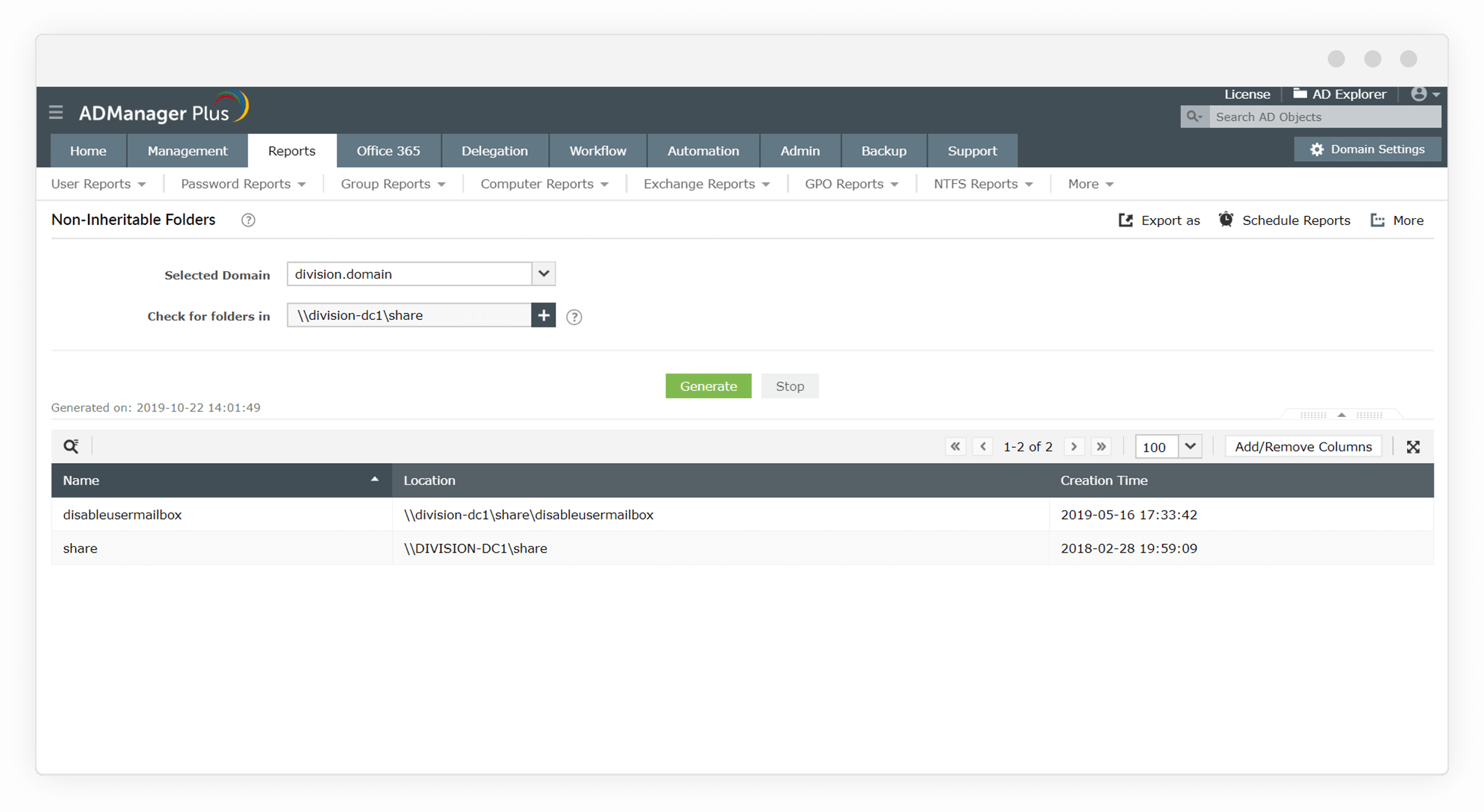
    Non-inheritable Folders report

    List the folders and files that are restricted to inherit the permissions from their parent objects. The directory path of the folders and files is referenced here.

    Schedule this report to be delivered at the specified times so that the recipients can keep track of folders or directories, and ensure that security is not compromised due to inheritance.

  • 1
     

    Fetch the list of folder permissions of all the users and groups for the folder entered here.

    1
     

    List users' folder access permissions up to the level of access specified here. Any inheritable permissions are also covered in this report.

    1
     

    Export in various formats, such as CSV, PDF, XLSX, and HTML.

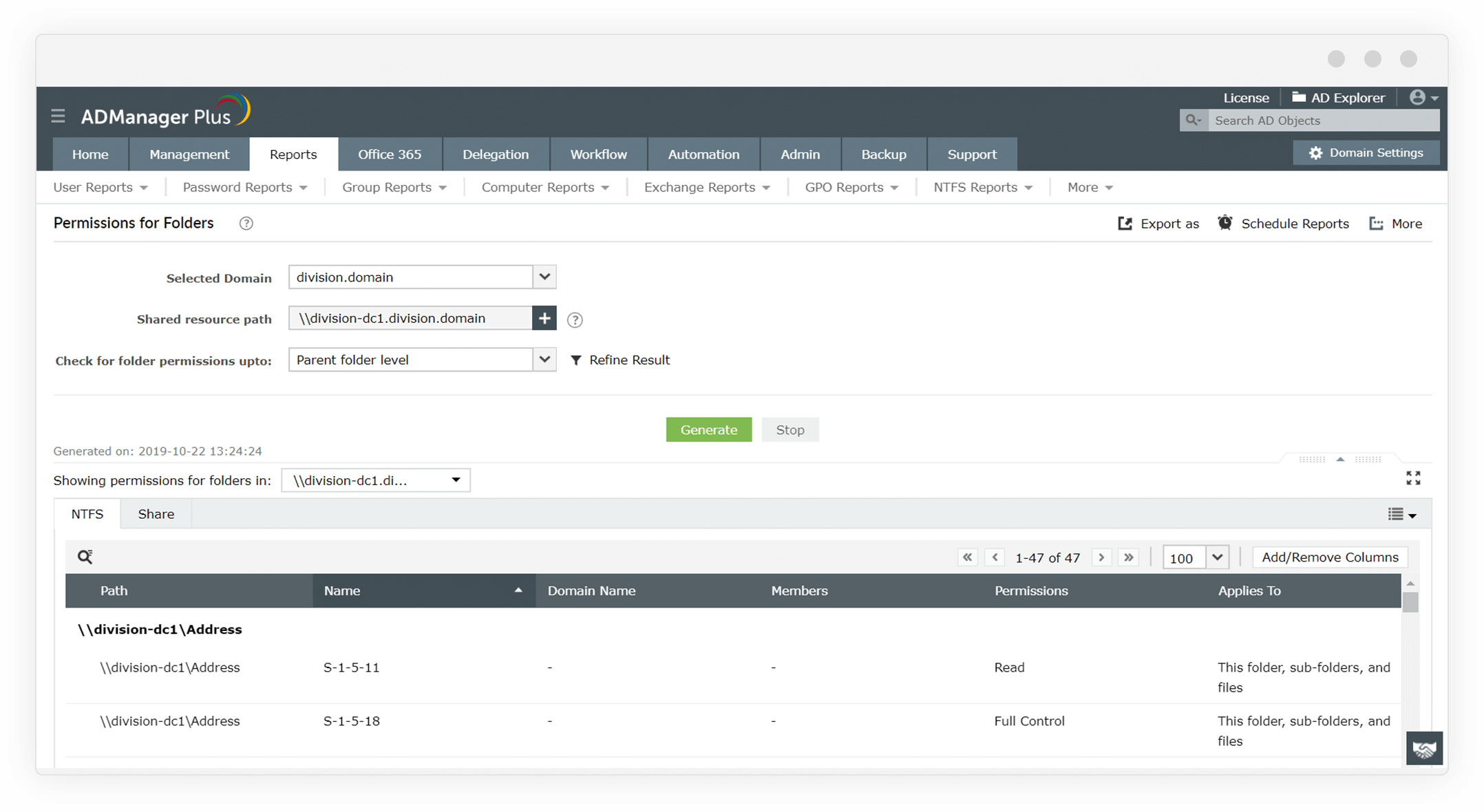
    Folder permissions report

    Fetch the list of folder permissions of all the users and groups for the folder entered here.

    List users' folder access permissions up to the level of access specified here. Any inheritable permissions are also covered in this report.

    Export in various formats, such as CSV, PDF, XLSX, and HTML.

Why ADManager Plus is the
#1 NTFS folder permissions tool:

 
  • Analyzes NTFS folder permissions with a few mouse clicks.
  • Modifies and removes NTFS and Share permissions with the click of a button.
  • Exports permissions reports in multiple formats and schedules them to be automatically delivered to the inbox at the specified time.

9 out of 10 Fortune 100 companies trust
ManageEngine to manage their IT.

 
4.6/5
 
4.1/5
 
4.5/5
 
4.47/5
 
4.6/5
 
4.6/5

Frequently asked questions

1. What is the need for NTFS permission reporting?

Managing sensitive folders and files across an organization is challenging as it requires constant monitoring to detect and avoid unauthorized access. As role changes are dynamic, NTFS permission reporting tools can be of great help in monitoring and managing the multiple layers of NTFS permissions.

2. How do you modify NTFS permissions?

You can modify the NTFS permissions of an object from the Security tab in Properties. Different categories of NTFS access permissions are available: Full Control, Read & Execute, Modify, Read, and Write. NTFS permissions are often modified by AD groups so that those permissions would apply to all the users in the group. However, repeating this operation for every directory is time-consuming.

3. What are the basic features of a Windows folder permissions reporting tool?

Folder permissions reporting tools gather data from your entire file system, fetching the permissions settings of the specified files and folders. The reports contain information related to access control, such as who has access to what resources from when. You can identify any misconfigured folder permissions from the reports and flag them if needed.

4. How does ADManager Plus stand out as an NTFS folder permissions tool?

ADManager Plus lets you analyze and modify NTFS and share permissions on multiple folders from a central location in just a few clicks. Using the NTFS permissions reporter, you can identify existing NTFS permissions at a granular level without writing any scripts. You can also export folder permissions to Excel and automate folder permissions reporting.

Over 100,000 technicians
trust ADManager Plus to manage their
Windows environment.

  • ADManager Plus provides us a single point for our Active Directory Reports. For a small IT department this is crucial for saving time and being able to apply our energy to keeping things running smooth. I foresee this being in our arsenal of network tools for a long time to come.

    Mark Anderson

    IT Support, ET Investments

  • ADManager Plus - The Swiss Army Knife for AD Administrator
    It has made managing and administrating Active Directory easy, fast and efficient. Everyday tasks which earlier required us to write Powershell scripts are now easily achievable using an workflow like interface.

    Deputy Chief IT Engineer

    Company Size: 1B - 3B, Energy and Utilities

NTFS folder permissions and access reports is just one of
the many powerful features in ADManager Plus. Here are a few more:

AD Management

Leverage the customizable templates to manage all AD objects with simple, GUI-based actions.

AD Reporting

Gain in-depth visibility into your AD environment with over 200 out-of-the-box reports, without any PowerShell scripts.

Integrations

Expand the capabilities of ADManager Plus by integrating with other leading IT products.

×

Start your 30-day free trail

  •  
  • *
     
  •  
  •  
  • By clicking 'Submit' you agree to processing of personal data according to the Privacy Policy.