# Amazon Elastic Kubernetes Service (EKS) Monitoring
Amazon Elastic Kubernetes Service (EKS) is a managed Kubernetes service that facilitates smooth running of Kubernetes on both AWS and on-premises. It helps guarantee high availability of your clusters and its resources across numerous availability zones. EKS clusters need to be monitored extensively to ensure hassle-free operations of various mission-critical applications running on them.
## Proactive Monitoring with ManageEngine Applications Manager
Applications Manager is a comprehensive Amazon EKS performance monitoring tool that provides in-depth insights about EKS clusters, namespaces, nodes, and pods. It identifies performance bottlenecks, evaluates your clusters' ability to scale up and launch new applications, and notifies you of errors on the go.
## Keep an eye on your EKS clusters
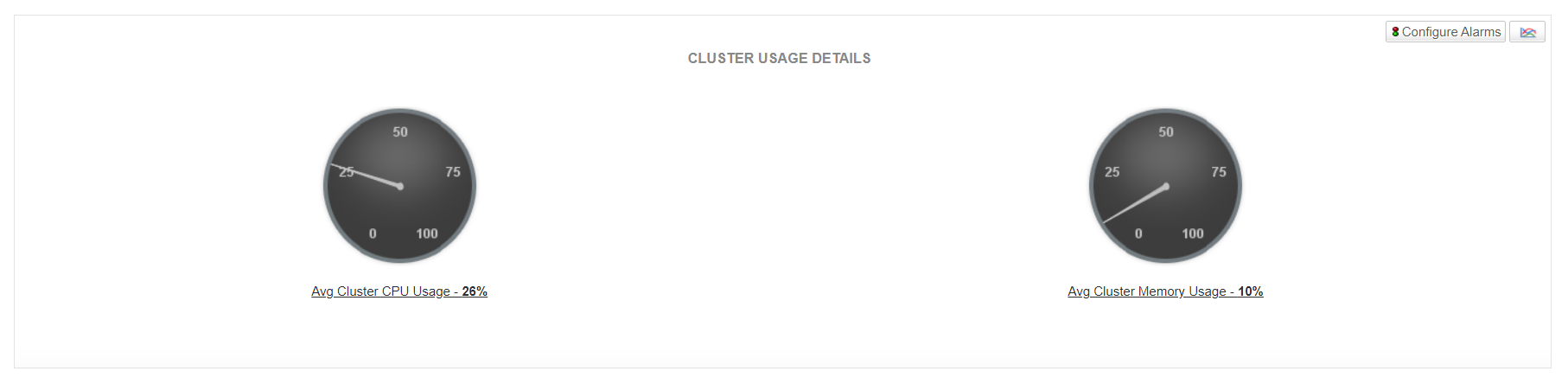
Become aware of *Cluster Status* and get to know basic cluster information such as *Cluster ARN* and *Cluster Endpoint* at a single glance. Using Applications Manager's Amazon EKS monitoring tools, keep tabs on cluster usage and get notified of increasing Cluster Memory/CPU usage. If this value keeps increasing, you may need to plan and implement scaling of cluster capacity as and when required.

## Monitor nodes and their usage
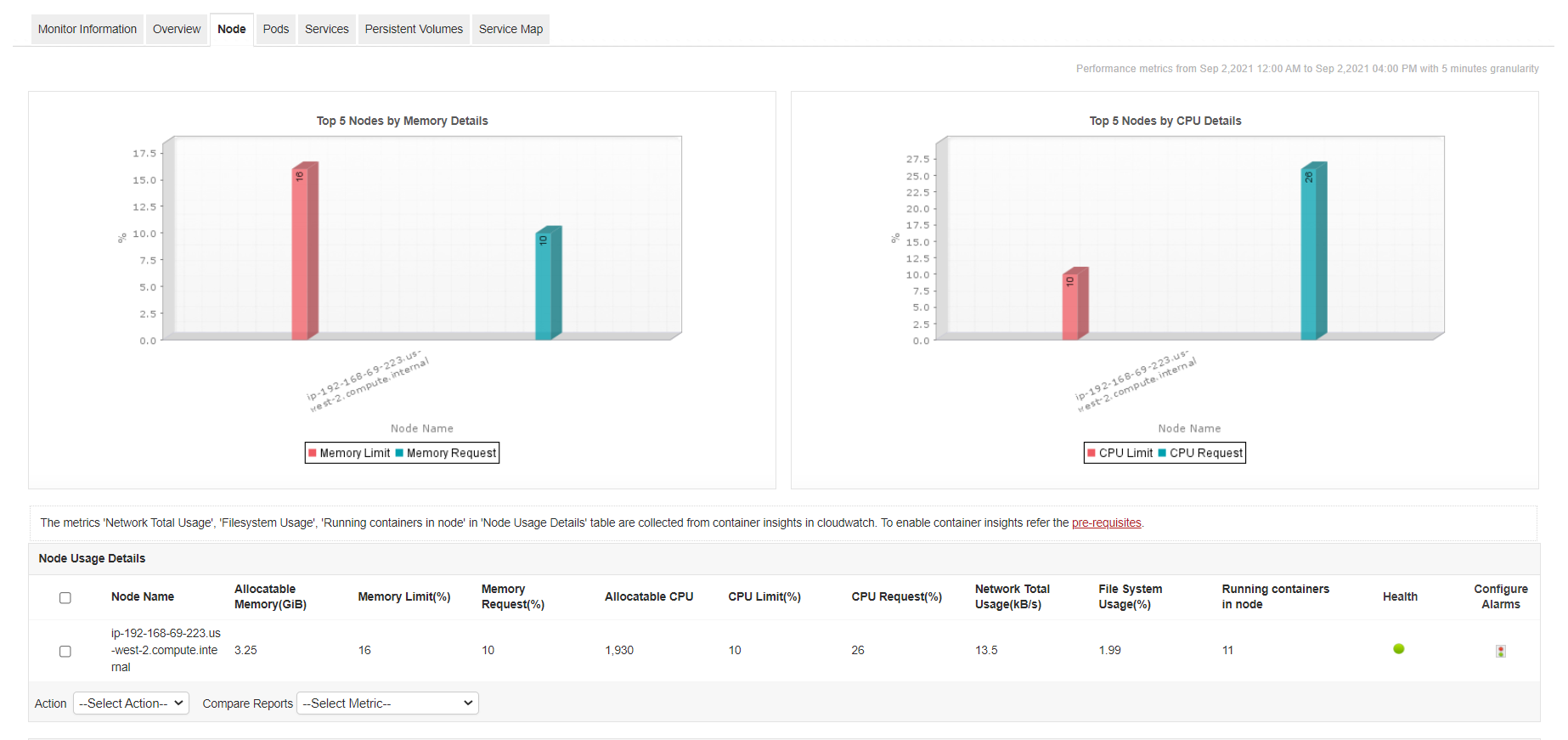
Tracking nodes and their corresponding CPU, memory and disk usage is pivotal to finding and fixing issues at the application level. Track *Memory Limit* and *Memory Request* metrics to understand overall memory usage in the node and ensure that it does not exceed the *Allocatable Memory*. These details help you to identify oversubscribed nodes and nodes under memory pressure, both of which can affect the cluster's ability to run workloads effectively. Similarly, Applications Manager's EKS application monitoring tool allows you to track node CPU usage constantly to avoid node throttling.
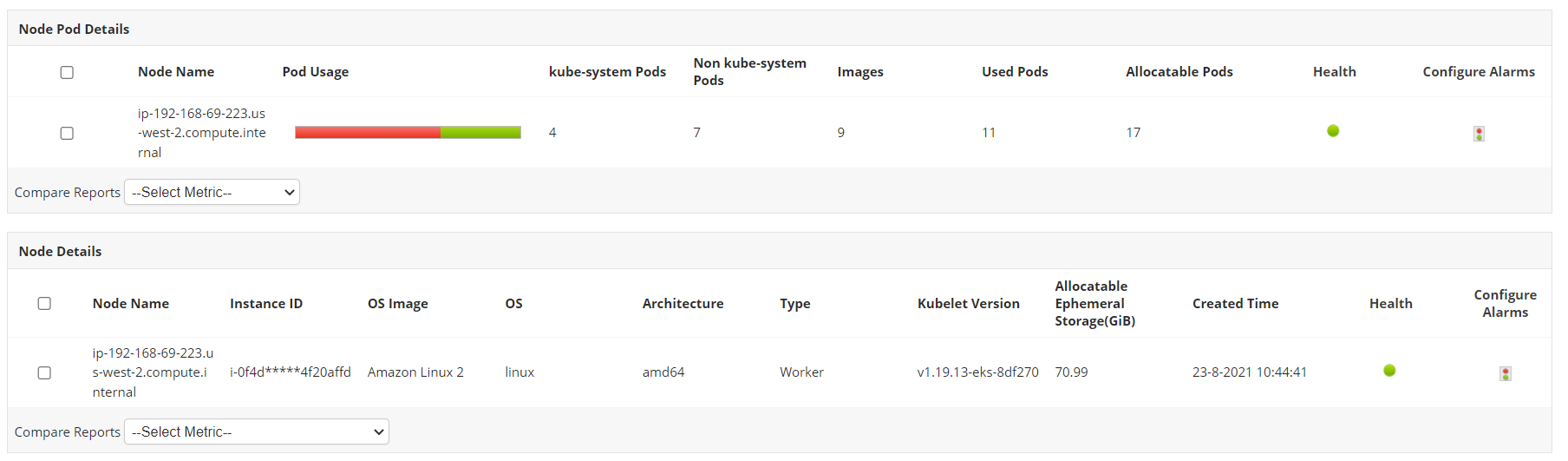
Furthermore, details about the pods in the nodes and important configuration details are also available at your disposal.
## Become aware of pod availability
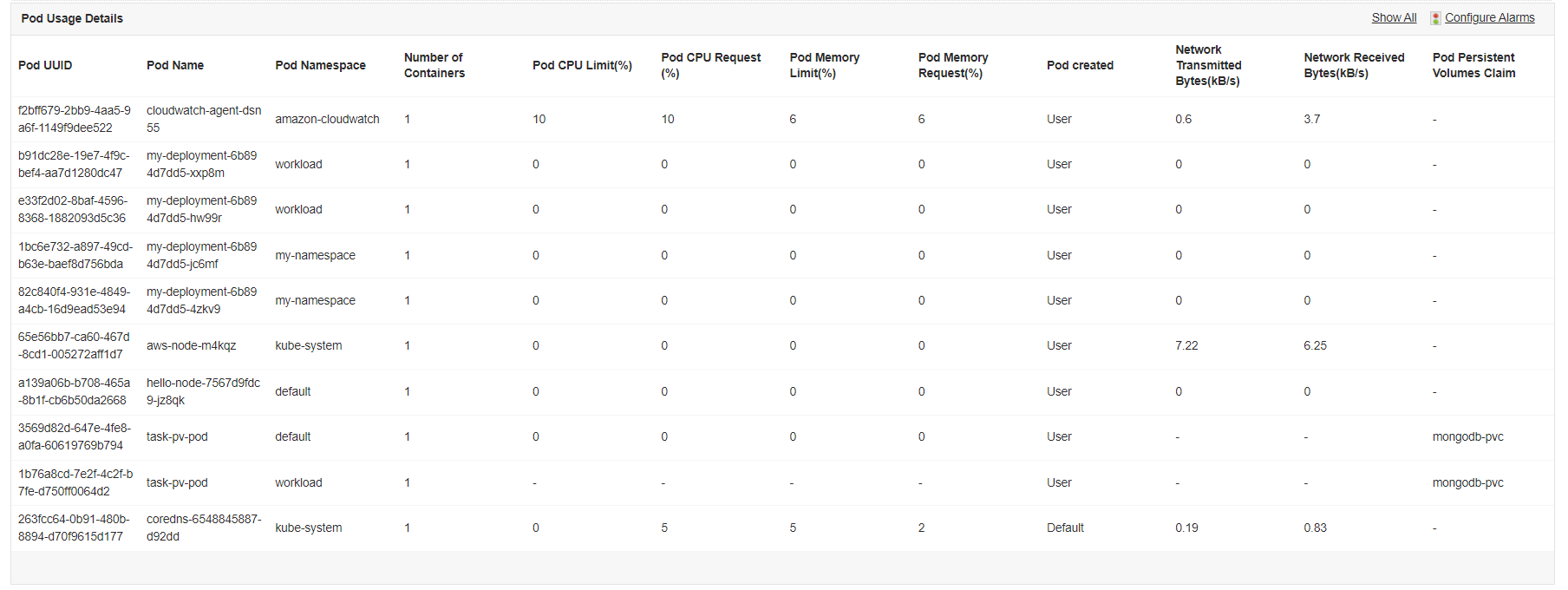
Using Applications Manager's Amazon Elastic Kubernetes Service monitoring tool, track critical pod related performance metrics and become aware of its state. Get notified of increased memory usage in pods to ensure they don't get terminated. Isolate pods with spiking memory requests. They may indicate improper configuration.
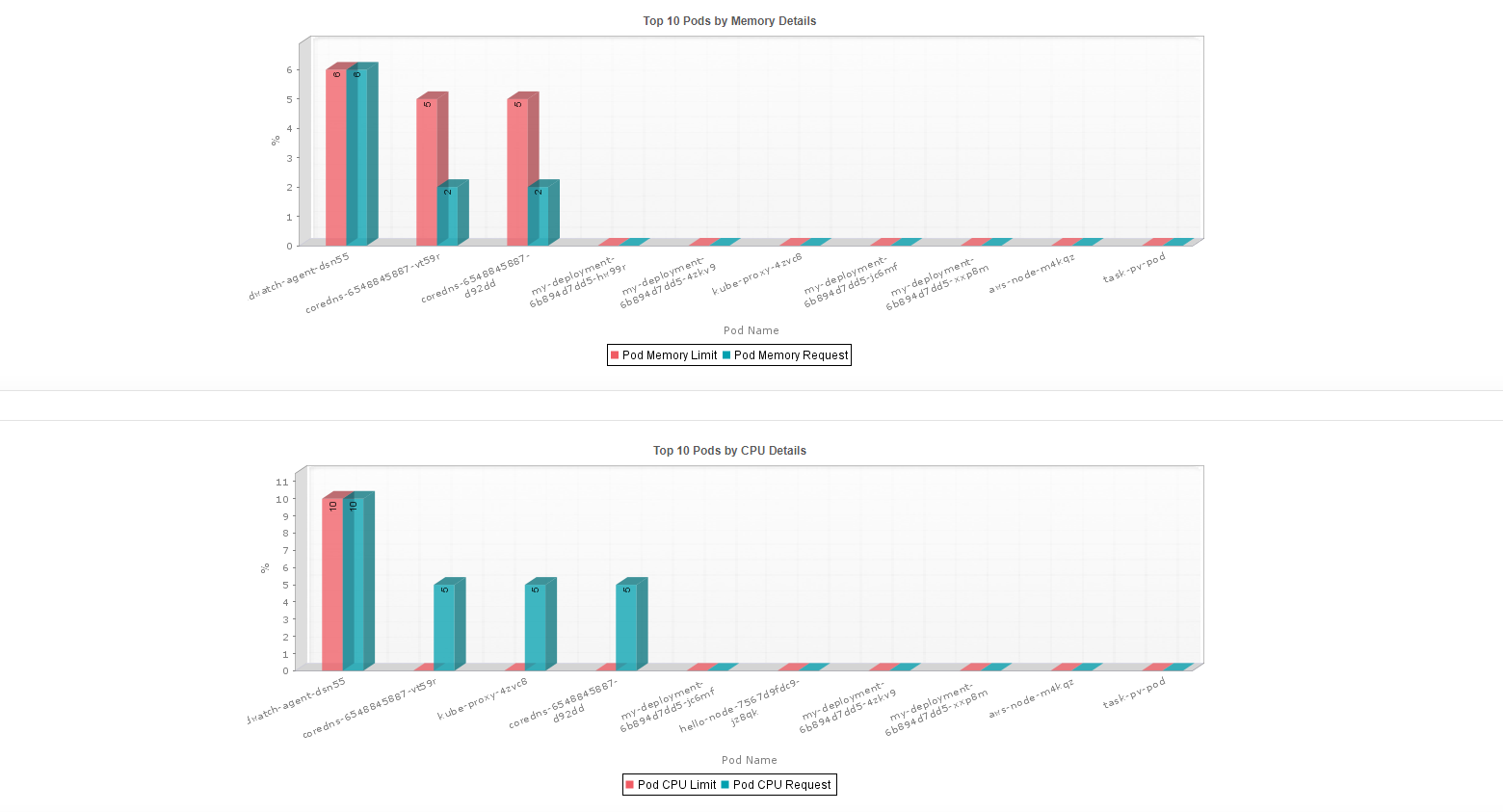
Visualize top 10 pods based on memory and CPU in graphical format to get a glimpse of overall performance of the pods at a single glance.
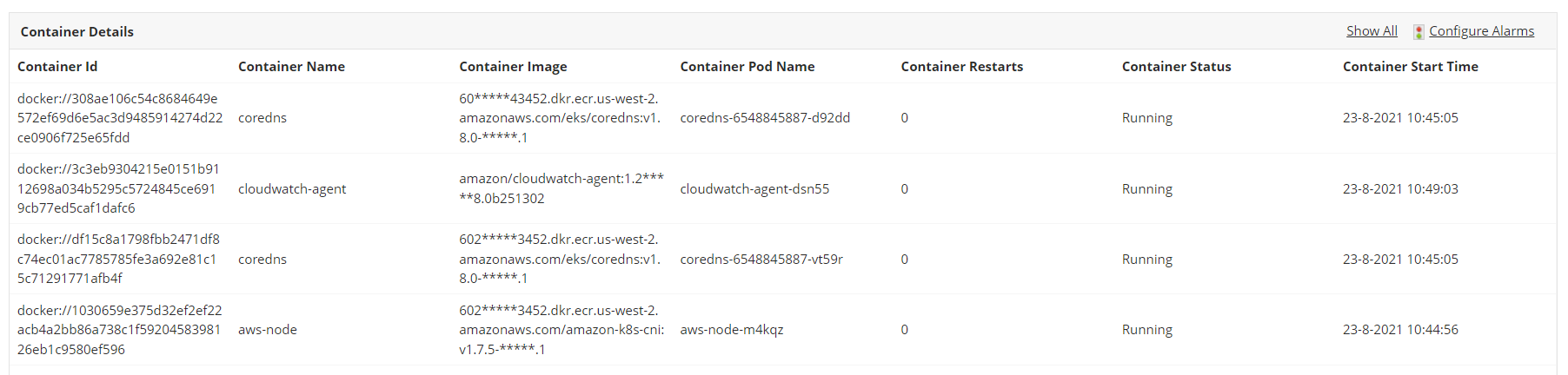
You can also get insights into container related metrics. Find and fix issues on problematic containers by getting notified on the *Container Restarts* metric.
## Monitor Services and Persistent Volumes
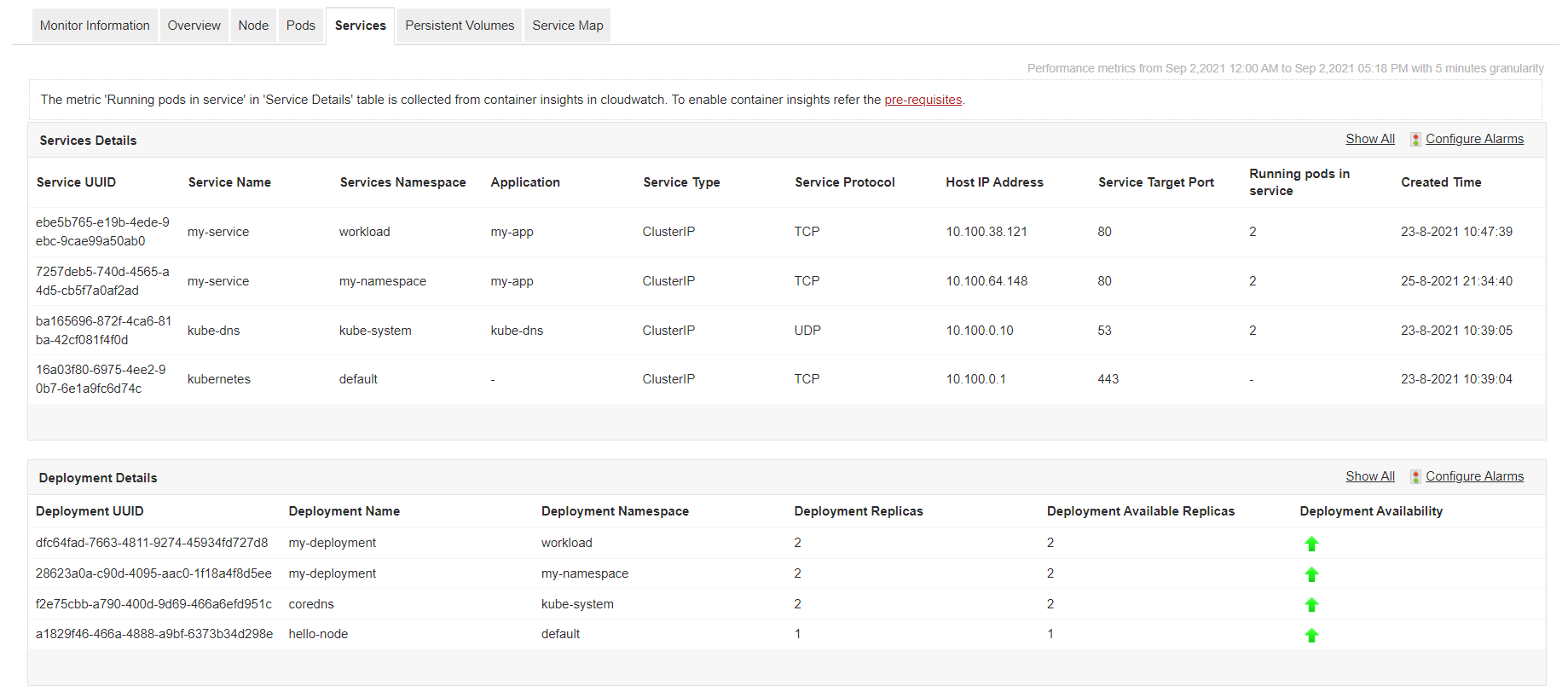
Track the services running in your clusters and become aware of Amazon EKS metrics such as *Service Type*, *Service Protocol*, and *Running pods in service*. Deployment details and its availability are also available at your disposal.
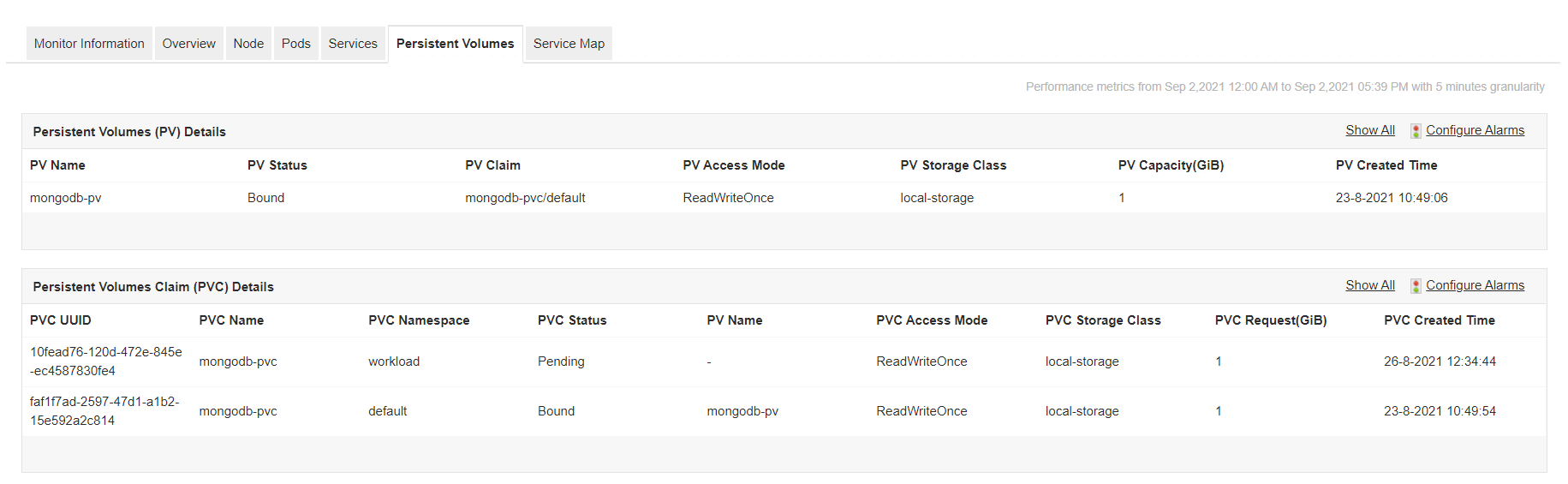
Get exclusive persistent volume (PV) details such as the status of PV, claim, capacity and the storage class it belongs to. You can also track Persistent Volume Claim (PVC) details such as its status, the capacity, etc.
## Visualize EKS Services and its components using Service Maps
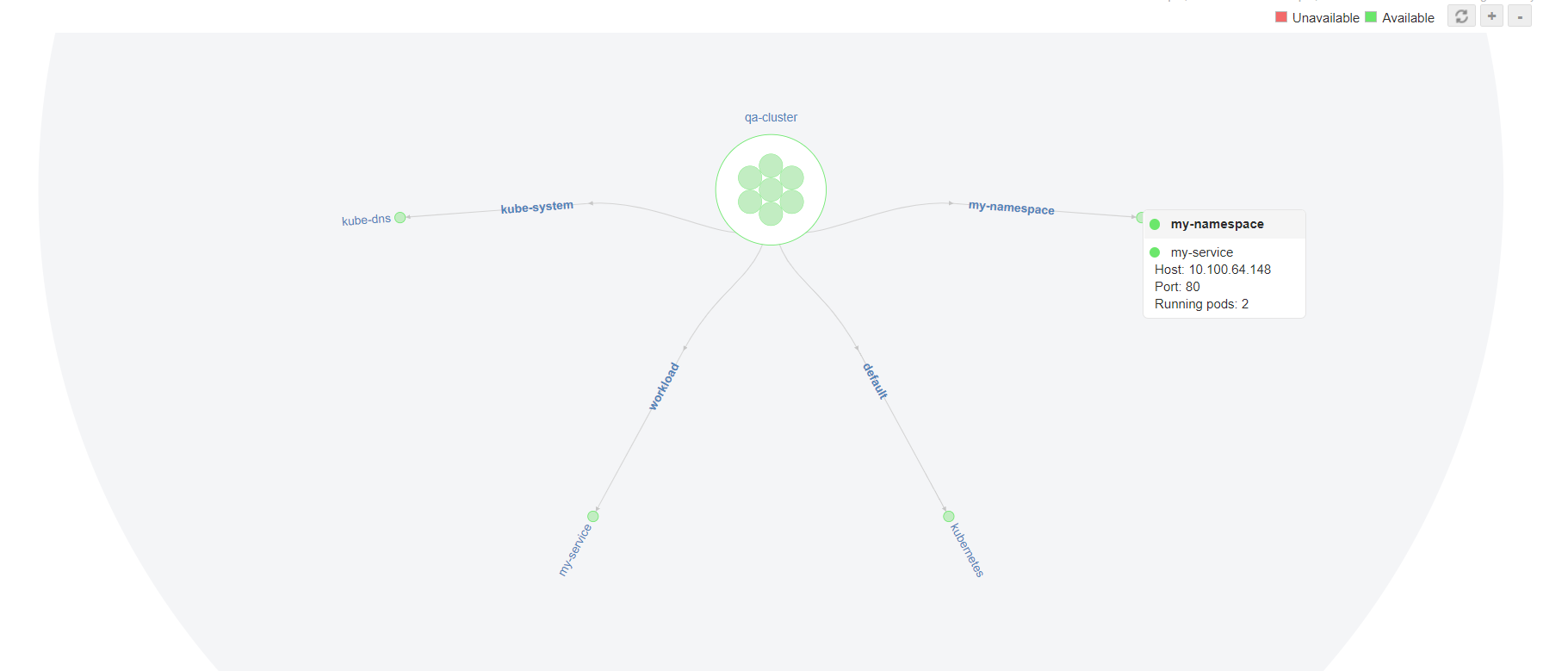
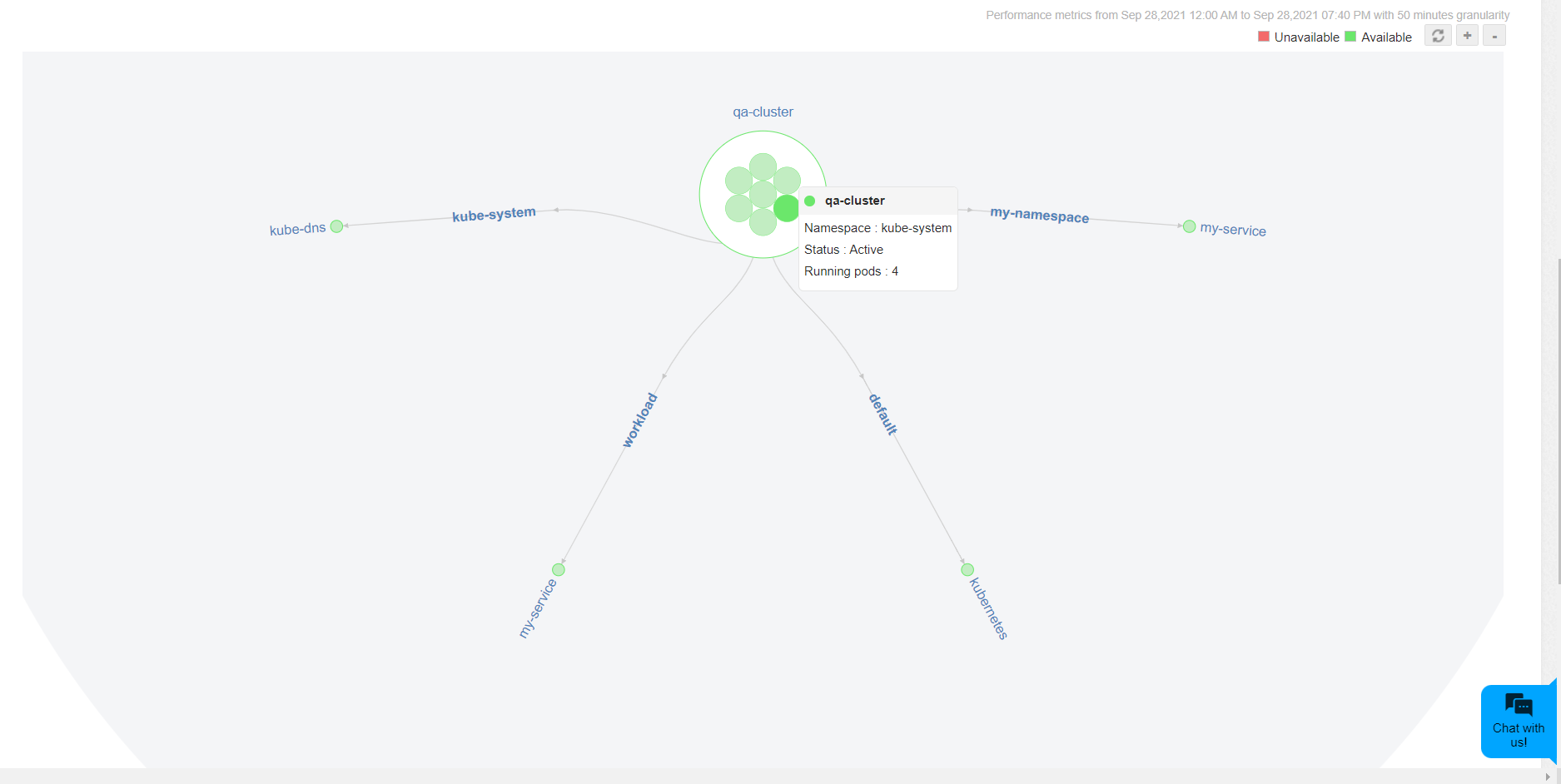
Use the Service Map feature available in Applications Manager's EKS performance monitoring tool to visualize all service and namespace details at a single glance. The graphical display helps you to discover various components of the services and their status. Identify namespaces that are available and unavailable by recognizing the color codes in which they are represented. Hover over the service to get details such as host IP, port and number of running pods.
Applications Manager's AWS performance monitoring service supports popular services like:
| | |
|---|---|
| - [Amazon Container Services Monitoring](https://www.manageengine.com/products/applications_manager/amazon-container-services-monitoring.html?EKS-monitoring)
- [Amazon EC2](https://www.manageengine.com/products/applications_manager/amazon-ec2-monitoring.html?EKS-monitoring)
- [Amazon RDS Monitoring](https://www.manageengine.com/products/applications_manager/amazon-rds-monitoring.html?EKS-monitoring)
- [Amazon DynamoDB](https://www.manageengine.com/products/applications_manager/amazon-dynamodb-monitoring.html?EKS-monitoring)
- [Amazon Aurora DB](https://www.manageengine.com/products/applications_manager/amazon-aurora-db-monitoring.html?EKS-monitoring)
- [Amazon Billing](https://www.manageengine.com/products/applications_manager/aws-billing.html?EKS-monitoring) | - [AWS ELB Monitoring](https://www.manageengine.com/products/applications_manager/aws-elb-monitoring.html?EKS-monitoring)
- [AWS SQS Monitoring](https://www.manageengine.com/products/applications_manager/aws-sqs-monitoring.html?EKS-monitoring)
- [AWS Lambda Monitoring](https://www.manageengine.com/products/applications_manager/aws-lambda-monitoring.html?EKS-monitoring)
- [AWS Elastic Beanstalk Monitoring](https://www.manageengine.com/products/applications_manager/aws-elastic-beanstalk-monitoring.html?EKS-monitoring)
- [AWS ECS Monitoring](https://www.manageengine.com/products/applications_manager/aws-ecs-monitoring.html?EKS-monitoring)
- [Amazon CloudFront Monitoring](https://www.manageengine.com/products/applications_manager/amazon-cloudfront-monitoring.html) |
## Start monitoring Amazon EKS now!
Along with other [AWS monitoring](https://www.manageengine.com/products/applications_manager/aws-monitoring.html) services, Applications Manager offers a fully-fledged 30-day free trial where you can explore the Amazon Elastic Kubernetes Service monitoring capability on your own. [Download now!](https://www.manageengine.com/products/applications_manager/download.html?amazon-elastic-kubernetes-monitoring)
## More on Amazon EKS Monitoring:
### What is the difference between Google Kubernetes Engine and Amazon Elastic Kubernetes Service and On-premise Kubernetes?
On-premise [Kubernetes](https://www.manageengine.com/products/applications_manager/kubernetes-monitoring.html?amazon-eks-monitoring) is an open source container orchestration platform which facilitates the automation of multiple manual processes that involve deploying, managing, and scaling containerized applications.
[Google Kubernetes Engine (GKE)](https://www.manageengine.com/products/applications_manager/gke-monitoring.html?amazon-eks-monitoring) is the first managed native Kubernetes service that was created for scaling, deploying and managing containerized applications in the cloud.
Amazon's Elastic Kubernetes Service (EKS) is a cloud based Kubernetes service that is fully compatible with native Kubernetes and facilitates smooth running of Kubernetes on both AWS and on-premises.
### How does Applications Manager help you monitor and manage your Amazon EKS effectively?
Unlike other popular EKS monitoring tools in the market, Applications Manager monitors AWS EKS APIs, container insights and Kubectl data helping you to get deep insights about your service and its performance.
### Are there any pre-requisites for adding an Amazon EKS monitor?
Yes, there are some pre-requisites for adding an Amazon EKS monitor. You can read more about the same [here](https://pitstop.manageengine.com/portal/en/kb/articles/aws-eks-troubleshooting-faqs).
### What are other Amazon services you can monitor with Applications Manager?
**Compute:**
- [Amazon EC2](https://www.manageengine.com/products/applications_manager/amazon-ec2-monitoring.html)
- [AWS Lambda](https://www.manageengine.com/products/applications_manager/aws-lambda-monitoring.html)
- [AWS Elastic Beanstalk](https://www.manageengine.com/products/applications_manager/aws-elastic-beanstalk-monitoring.html)
- [AWS ELB](https://www.manageengine.com/products/applications_manager/aws-elb-monitoring.html)
**Databases:**
- [Amazon DynamoDB](https://www.manageengine.com/products/applications_manager/amazon-dynamodb-monitoring.html)
- [Amazon AuroraDB](https://www.manageengine.com/products/applications_manager/amazon-aurora-db-monitoring.html)
- [Amazon RDS](https://www.manageengine.com/products/applications_manager/amazon-rds-monitoring.html)
**Others:**
- [AWS SQS](https://www.manageengine.com/products/applications_manager/aws-sqs-monitoring.html)
- [AWS ECS monitoring](https://www.manageengine.com/products/applications_manager/aws-ecs-monitoring.html)
- [Amazon CloudFront monitoring](https://www.manageengine.com/products/applications_manager/amazon-cloudfront-monitoring.html)