# AWS RDS Monitoring Tool - ManageEngine Applications Manager
## RDS Monitoring Tools
# AWS RDS Monitoring
## Monitor Amazon RDS Instances and Track Performance
Amazon RDS is a web service that makes it easy to set up, operate and scale a relational database in the cloud. Many organizations are opting to host their critical production databases in Amazon RDS instances in order to take advantage of the benefits it offers. It is therefore critical to track these instances with a tool for **Amazon RDS monitoring** to ensure business-critical services are not compromised, and also to ensure cloud resources are being effectively utilized.
ManageEngine Applications Manager's [AWS monitoring](https://www.manageengine.com/products/applications_manager/aws-monitoring.html) tool automatically discovers Amazon RDS instances and continuously monitors RDS instance's key performance indicators. With out-of-the-box reports, graphical views, alarms, thresholds and comprehensive fault management capabilities, AWS RDS monitoring provides visibility into the performance and resource utilization of RDS instances and the databases running on these instances. It also helps to check for breaks in service level agreements as well as ensure high quality of end-user experience.
## Monitor crucial Amazon RDS metrics
### Availability, CPU Utilization, Storage Space
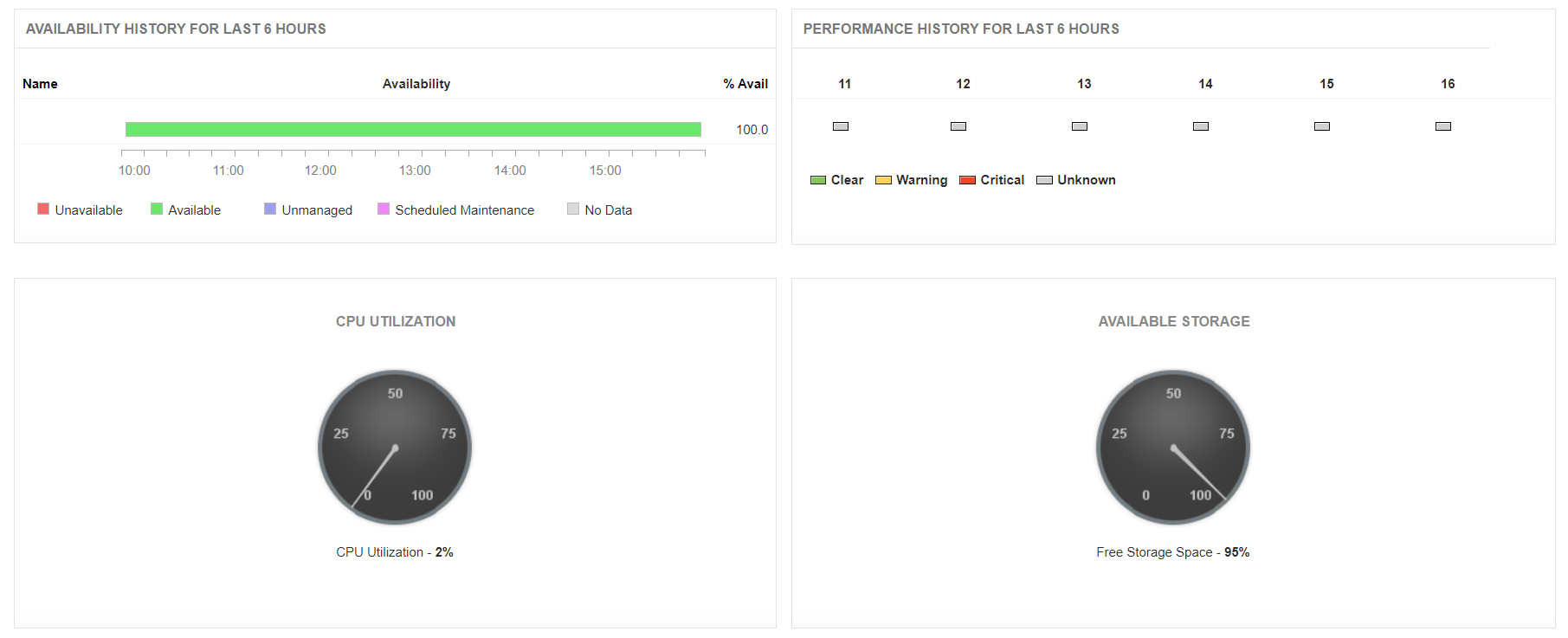
Monitor the current availability and health status of the RDS instances. Troubleshoot problems through the Root Cause Analysis (RCA) window. Know how much CPU is being utilized and the amount of storage space available using **RDS monitoring tools** like Applications Manager.
### Database Connections, Network Traffic, Network Latency
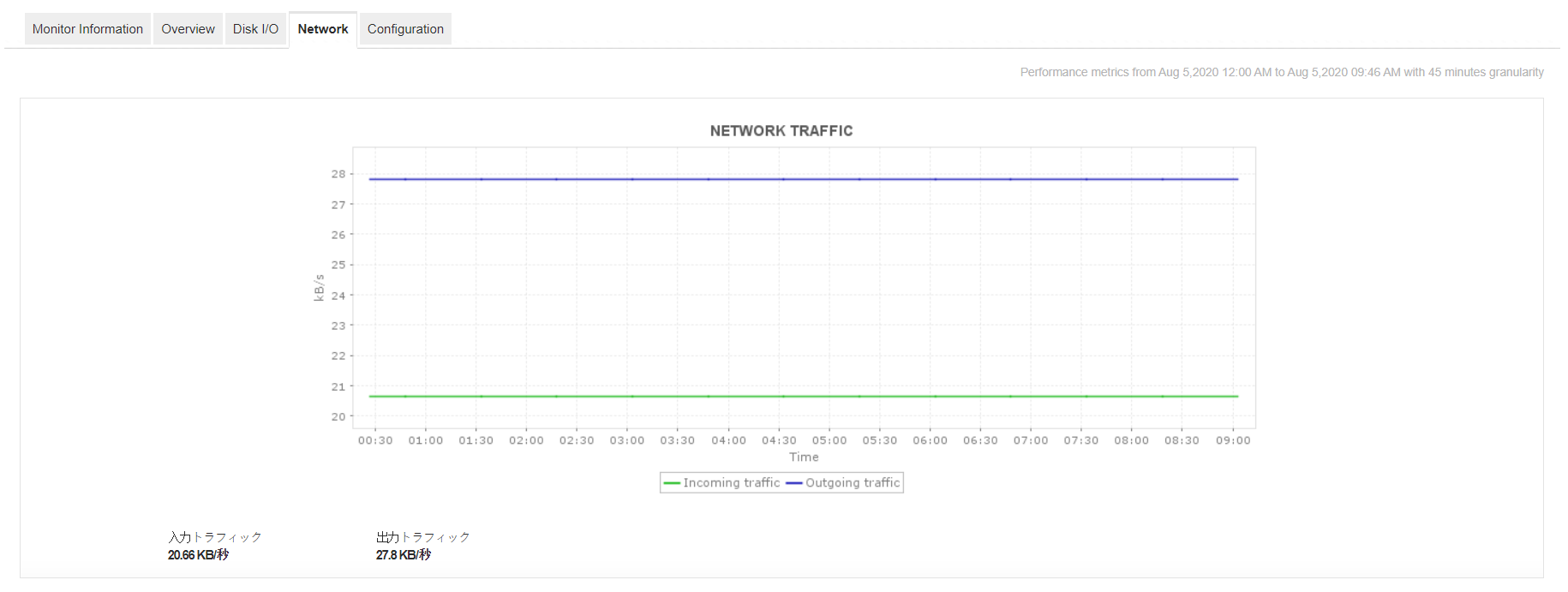
Monitor AWS RDS performance thoroughly by tracking the number of active database connections, throughput details, network read/write latency, and the average number of disk read/write operations per second with Applications Manager's Amazon RDS monitoring feature.
## Out-of-the-box AWS RDS Performance Reports
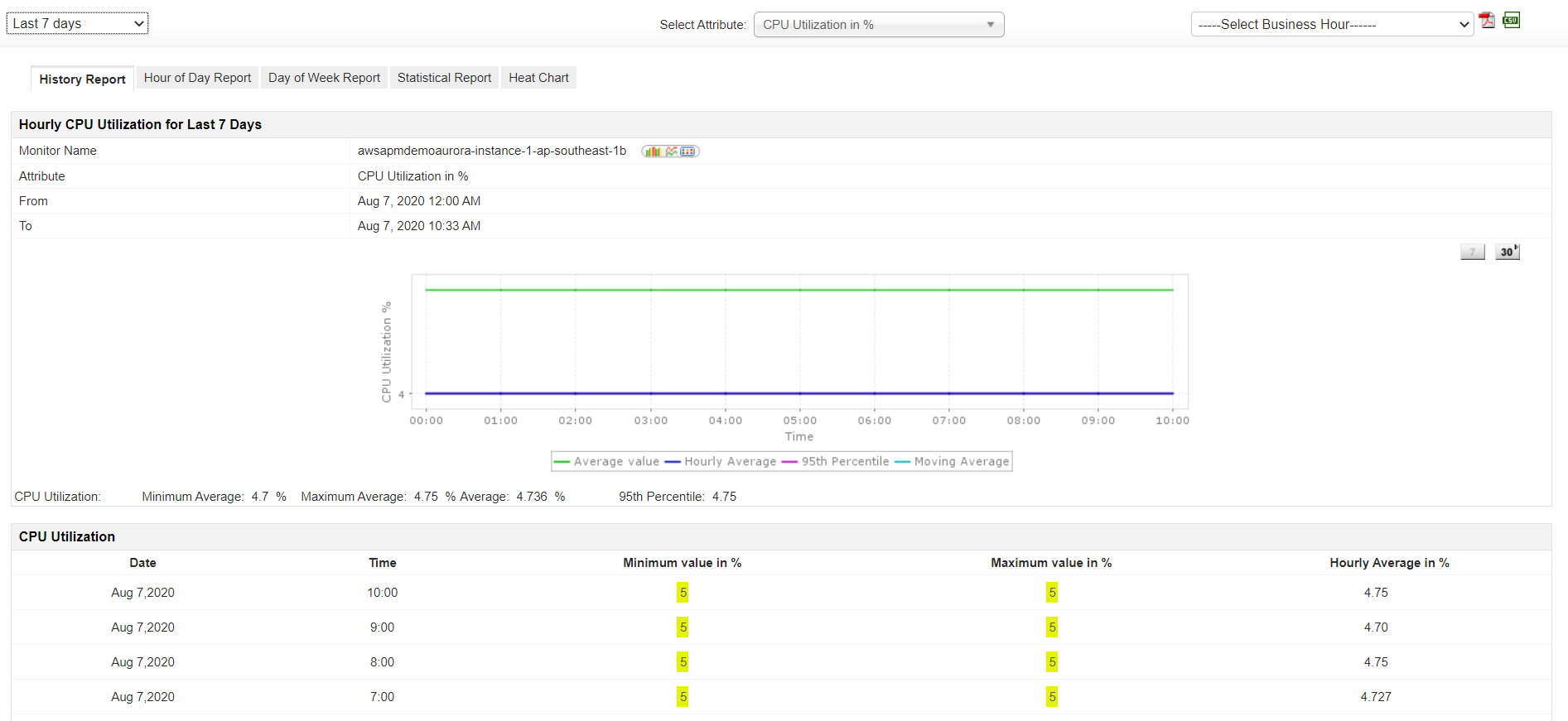
ManageEngine Applications Manager for Amazon RDS Performance Monitoring also provides out-of-the-box reports that help analyze the overall performance of RDS instances and help in [capacity planning](https://www.manageengine.com/products/applications_manager/capacity-planning.html).
## Benefits of using Applications Manager's RDS monitoring feature
As one of the leading tools in Amazon RDS monitoring, Applications Manager offers various benefits such as:
- Gain insight into the performance of your Amazon RDS environment; troubleshoot and resolve problems before end users are affected.
- Plan capacity and make educated decisions about allocating RDS instances.
- Single console for monitoring your physical, virtual and cloud infrastructure.
- Monitor production databases hosted on the RDS platform as well as inside your corporate data center.
- Agentless monitoring solution that is easy to set up and manage.
## Get started with Amazon RDS monitoring in just a few minutes!
Get your hands on Applications Manager's Amazon RDS monitoring tool by downloading the [30-day free trial!](https://www.manageengine.com/products/applications_manager/download.html) now
Applications Manager's AWS performance monitoring service supports popular services like:
| | |
|---|---|
| - [Amazon EKS Monitoring](https://www.manageengine.com/products/applications_manager/amazon-elastic-kubernetes-service-monitoring.html?serverless-monitoring)
- [Amazon EC2](https://www.manageengine.com/products/applications_manager/amazon-ec2-monitoring.html?serverless-monitoring)
- [Amazon RDS Monitoring](https://www.manageengine.com/products/applications_manager/amazon-rds-monitoring.html?serverless-monitoring)
- [Amazon DynamoDB](https://www.manageengine.com/products/applications_manager/amazon-dynamodb-monitoring.html?serverless-monitoring)
- [Amazon Aurora DB](https://www.manageengine.com/products/applications_manager/amazon-aurora-db-monitoring.html?serverless-monitoring)
- [Amazon Billing](https://www.manageengine.com/products/applications_manager/aws-billing.html?serverless-monitoring) | - [AWS ELB Monitoring](https://www.manageengine.com/products/applications_manager/aws-elb-monitoring.html?serverless-monitoring)
- [AWS SQS Monitoring](https://www.manageengine.com/products/applications_manager/aws-sqs-monitoring.html?serverless-monitoring)
- [AWS Lambda Monitoring](https://www.manageengine.com/products/applications_manager/aws-lambda-monitoring.html?serverless-monitoring)
- [AWS Elastic Beanstalk Monitoring](https://www.manageengine.com/products/applications_manager/aws-elastic-beanstalk-monitoring.html?serverless-monitoring)
- [AWS ECS Monitoring](https://www.manageengine.com/products/applications_manager/aws-ecs-monitoring.html?serverless-monitoring)
- [Amazon CloudFront Monitoring](https://www.manageengine.com/products/applications_manager/amazon-cloudfront-monitoring.html) |
## FAQ on AWS RDS monitoring
### What is RDS monitoring?
RDS monitoring involves tracking the performance, availability, and health of Amazon’s Relational Database Service (RDS) instances. It includes metrics like CPU usage, memory, storage, IOPS, query performance, and connection counts. Monitoring ensures optimal database performance, timely issue detection, and helps in capacity planning and maintaining application reliability.
### How to monitor RDS in AWS?
Monitor metrics like CPU, memory, IOPS, and storage in real-time for OS-level insights. Poll RDS performance to understand service availability and resource utilization at peak time. Set up smart alarms and adaptive thresholds for dynamic attributes. Leverage deep visibility for query-level analysis, and enable logging for audits.
### What does an RDS monitoring tool do?
An RDS monitoring tool helps you track database performance, resource usage, and KPIs like CPU, memory and connections. It aids you in detecting slow queries, optimizing RDS performance, and tackling unwanted downtime with real-time alerts, periodic analysis, and smart dashboards. It also helps you in capacity planning, issue diagnosis and cost optimization.
### Why is RDS monitoring important?
RDS monitoring is crucial to optimize database availability, performance, and health. It helps DBAs identify slow queries, resource bottlenecks, and potential performance anomalies before they slowdown applications. With real-time insights and alerts, admin teams will be able to enhance overall cloud performance, reduce downtime, and make data-driven decisions while planning capacity and resource allocation, ensuring a smooth end-user experience.