# Monitoring IBM i Jobs | ManageEngine Applications Manager
## Monitoring and controlling jobs running in IBM i server
- How do you keep track of the various jobs running in the IBM i server?
- How can you know which jobs are in clear, critical or warning states?
- Wouldn't you like to view job logs to find out how a job is executed in the IBM i server?
- How can you find out the number of threads being used by a job?
[](https://www.manageengine.com/products/applications_manager/images/as400-jobs-monitoring.png)
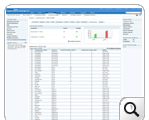
Applications Manager allows you to monitor and control the various jobs running in IBM i server. You can also configure alarms for these jobs and ensure high uptime.
Under the **Jobs** tab, Applications Manager monitors job status and health in detail. You can easily configure alarms for job details. Applications Manager pulls job details like Job Name, User, Number, Type, Status, Pool, Function, Priority, Threads, and Queue.
Some of the parameters that are monitored in the IBM i Jobs tab are:
| | |
|---|---|
| **Job Summary** | Displays the total number of jobs in clear, critical, and warning states along with the health of each attribute. You can view jobs in clear, critical, or warning state separately by clicking on the respective counts. |
| **Monitored Jobs** | Displays the jobs added for specific monitoring. You can configure alarms separately for each job added in **Monitored Jobs**. |
| **Job Details** | Displays a wealth of information on various jobs being executed in IBM i server. Jobs are classified into three categories: Batch Job, Interactive Job, and Autostart Job. |
| **Type** | The type of active job. Possible values are:
- ASJ: Autostart BCH: Batch
- BCI: Batch Immediate
- EVK: Started by a procedure start request
- INT: Interactive
- M36: Advanced 36 server job
- MRT: Multiple requester terminal
- PJ: Prestart job
- PDJ: Print driver job
- RDR: Reader
- SBS: Subsystem monitor
- SYS: System
- WTR: Writer Status |
| **Priority** | Displays the run priority of the job. A lower number indicates a higher priority. Run priority ranges from 1 (highest) to 99 (lowest). Jobs with the highest priority receive the best service from the CPU. |
| **Function** | Displays the last high-level function initiated by the initial thread. |
## The job status in IBM i is classified into three types
- Jobs in Clear state
- Jobs in Warning state
- Jobs in Critical state
Job details help identify if automated tasks are executed properly as planned. You can perform actions like end, hold, and release jobs. This can help save a lot of time and effort compared to monitoring jobs manually.
Now, you can add or remove new jobs to be specifically monitored in [Monitored Jobs](https://www.manageengine.com/products/applications_manager/as400-monitoring-jobs.html#monitoredjobs).
## IBM i Server Monitoring Capability
- [IBM i server - Monitoring Messages](https://www.manageengine.com/products/applications_manager/as400-monitoring-messages.html)
- [IBM i server - Monitoring History Logs](https://www.manageengine.com/products/applications_manager/as400-monitor-history-logs.html)
- [IBM i server - Monitoring Queues](https://www.manageengine.com/products/applications_manager/as400-monitoring-queues.html)
- [IBM i server - Monitoring Subsystems](https://www.manageengine.com/products/applications_manager/as400-monitoring-subsystem.html)
- [IBM i server Monitoring](https://www.manageengine.com/products/applications_manager/as400-monitoring.html)
For more information, refer to [IBM i Jobs Monitoring Online Help](https://www.manageengine.com/products/applications_manager/help/as400-iseries.html#jobs).