# Windows Event Log Monitoring
ManageEngine® Applications Manager can be used to monitor the various windows events. Event Log rules can be configured for generating alarms.
For eg., When an event of type Error occurs in System Log, you can generate a critical alarm which inturn will affect the Health of the Windows Monitor.
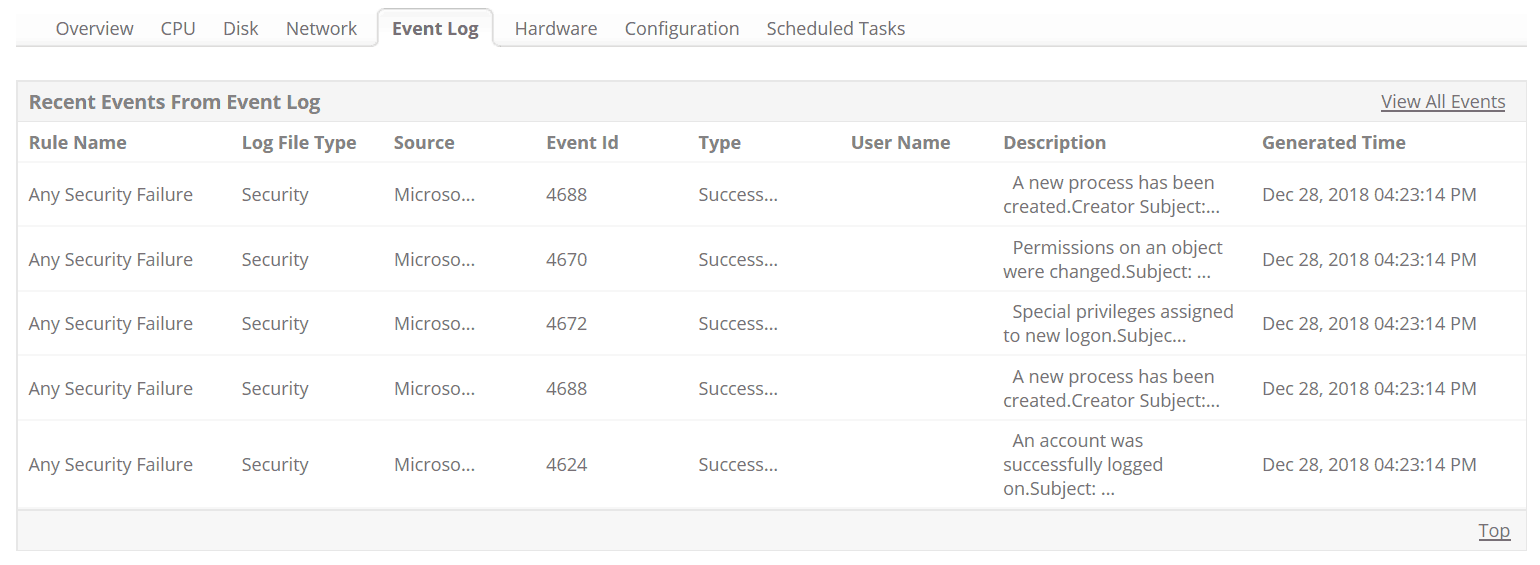
**Note:** Event Log monitoring is available in Windows Installations and also in WMI mode of monitoring only.
For receiving the windows events, you will have to configure the Event Log Rules. You can get notified by the events from the following Log Files:
- Application
- System
- Security
- File Replication Service
- DNS Server
- Directory Service
## Related Monitoring
| | |
|---|---|
| - [Windows Monitoring](https://www.manageengine.com/products/applications_manager/windows-monitoring.html)
- [MS SQL Server Monitoring](https://www.manageengine.com/products/applications_manager/sql-server-management.html)
- [Windows Performance Counters](https://www.manageengine.com/products/applications_manager/windows-performance-counters.html) | - [MS .NET Server](https://www.manageengine.com/products/applications_manager/monitoring-microsoft-net.html)
- [MS Office SharePoint Monitoring](https://www.manageengine.com/products/applications_manager/sharepoint-monitor.html)
- [Exchange Server Monitoring](https://www.manageengine.com/products/applications_manager/exchange-server-monitoring.html) |
[](https://www.manageengine.com/products/eventlog/windows-event-log-monitoring.html)
ManageEngine provides an exclusive Windows Event Log and Syslog Monitoring solution, EventLog Analyzer, for internal threat monitoring and exhaustive compliance reports. If you are interested in **Log Monitoring/Security Information Management (SIM)** solution, then take a look at our EventLog Analyzer product - [http://www.eventloganalyzer.com/](https://www.manageengine.com/products/eventlog/windows-event-log-monitoring.html)