# PHP Agent Configuration Options
The APM Insight PHP Agent Configuration file helps you fine tune the configuration for tracking web based transactions. These settings can be configured in the [web client](https://www.manageengine.com/products/applications_manager/help/apm-insight-agent-configuration-profile.html). Make sure that this file is present in the folder where you have deployed the APM Insight agent.
## Editing the configuration settings
These settings can be configured using the edit option available in the web client.
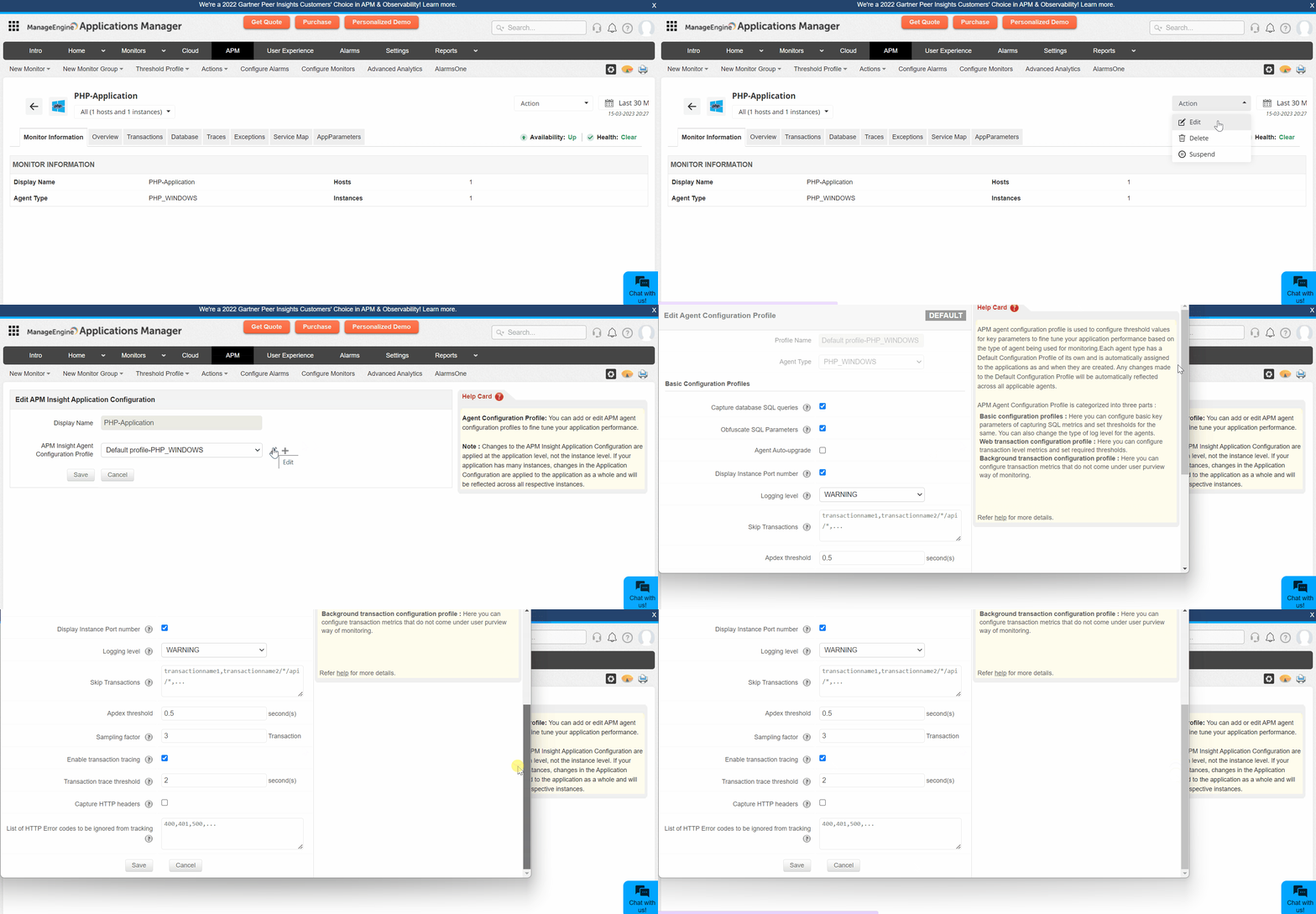
The APM Insight agent configuration profile is categorized into the following:
- [PHP configuration profile](https://www.manageengine.com/products/applications_manager/help/apm-insight-php-agent-configuration.html#php)
- [Web transaction configurations](https://www.manageengine.com/products/applications_manager/help/apm-insight-php-agent-configuration.html#webtransaction)
- [Background transaction configurations](https://www.manageengine.com/products/applications_manager/help/apm-insight-php-agent-configuration.html#bgtransaction)
- [Configurations available only in the apminsight.conf file](https://www.manageengine.com/products/applications_manager/help/apm-insight-php-agent-configuration.html#apminsightConfig)
**Note:** The asterisk * indicates that the highlighted default value applies for versions above Applications Manager v16470.
## PHP configuration profile
### Basic configuration profile
| Name | Description | Default value |
|---|---|---|
| Capture database SQL Queries | - Enabling this option will listen to all SQL Queries which gets executed.
- If this option is disabled, no Database Metrics will be collected. | True |
| Obfuscate SQL Parameters | - Enabling this option will parameterize all SQL Queries in Slow Transaction Traces. (if sql.capture.enabled set to true & transaction.trace.enabled set to true)
- Disabling this option will give you the real query (with parameters). **Note:** It is recommended to enable this option if there are queries getting executed using confidential parameters like credit card number, passwords, etc. | True |
| Stacktrace threshold for SQLs in transaction trace | - Enabling this option will collect the stacktrace whenever any sql query executed above this threshold time value. | 3 (seconds) |
| Display Instance Port number | - Port number of application instances will be shown, if this option is enabled. | True |
| Logging level | - The log level at which the APM Insight agent should record information.
- Supported levels are SEVERE,WARNING, INFO and FINE. | WARNING |
| Skip Transactions | - Provide regex patterns or transaction names that can be skipped from tracking. Multiple entries should be comma separated values. | None |
| Group similar transactions | - Provide a regex pattern of the transactions that can be grouped under a single transaction name.
- **For example:** ebay/shop/item/chocolate/.*=ebay/shop/chocolate; ebay/shop/item/stationary/.*=ebay/shop/stationary; ebay/shop/item/.*=ebay/shop/others | None |
| List of Exceptions to be skipped from tracking | - The list of exceptions that do not need to be tracked. | None |
| Exclude Grouping in Transaction Names | - Provides a list of alphanumeric keywords that should not be grouped together in the transaction names.
- For example, if you configure v1, v2, index1, index2, the transactions api/v2/web3/index2.html and api/v1/web3/index1.html will be obfuscated as api/v2/*/index2.html and api/v1/*/index1.html. | None |
| List of URL Extensions to be Skipped from Tracking | - Web transactions of the specified URL patterns will be skipped while tracking.
- Use comma(,) to separate multiple entries Example: transaction.skip.listening=*.jpeg, will skip listening to transactions ending with .jpeg | .css, .js, .gif, .jpg, .jpeg, .bmp, .png, .ico, .woff, .properties.jsf, .ttf, .woff2, .otf, .svg, .webp, .json, .js.map, .swf, .conf, .properties, *.yml |
## Web transaction configurations
| Name | Description | Default value |
|---|---|---|
| Group similar transactions by position | - Combine similar transactions under a single transaction by position for easy monitoring.
- Input format: **Transaction** [*a-zA-Z0-9_/.,-:] : **Position** [0-9] : **Group Name** [a-zA-Z0-9_] | None |
| Apdex Threshold | - Application Performance Index (simply called Apdex) is measurement of an Application's Performance ranging from 0 to 1.
- Detailed information about Apdex can be found at [www.apdex.org](http://www.apdex.org).
- If any transaction response time scores values below the apdex.threshold value, the transaction is labeled as Satisfied.
- If any transaction response time scores above four times the apdex.threshold, the transaction is labeled as Frustrated.
- If it is exactly equal to apdex.threshold or in between satisfied and frustrated threshold value it is labeled as Tolerating. | 0.5 (seconds) |
| Sampling Factor | - Sampling factor helps in tracking sampled transactions.
- If set to 5, APMInsight tracks only 1 in 5 requests of the same kind | 1 (request) |
| Enable Transaction Tracing | - Enabling this option will construct Trace for Slow Transactions.
- You can view the traces collected in Site24x7 APM Insight Edition Page by selecting Traces tab. | True |
| Transaction Trace Threshold | - Trace of any transaction whose response time scoring above the specified threshold value will be collected, provided if transaction.trace.enabled is set to true.
- The trace can be used to analyze, troubleshoot the transaction working. | 2 (seconds) |
| Capture CPU Time per Transaction | - Record CPU time for every HTTP request, if enabled. | True |
| Capture Memory Allocation per Transaction | - When enabled, memory allocations for all web transactions will be captured. | 2 (seconds) |
| Capture HTTP Parameters | - Enabling this option captures parameters of all GET & POST web requests.
- To skip capturing specific parameters use webtransaction.trace.input.params.ignore key.
- Captured parameters can be viewed by selecting the required transaction in Traces tab. | False |
| List of HTTP Parameters to Obfuscate | - To skip capturing specific web request parameters like password, PIN or any confidential values, specify those parameter names for this key.
- Use comma(,) to separate multiple entries. Values specified for this key are case-sensitive.
- If no value is specified, all request parameters will be recorded. | password, authKey |
| Capture HTTP Headers | - Enabling this option captures the HTTP headers of the trace. | False |
| List of HTTP Headers to Ignore | - To skip capturing specific HTTP headers, mention them.
- Use comma(,) to separate multiple entries.
- If no value is specified, all HTTP headers are captured. | Java- Accept, Cookie, Cache-Control, Connection, Host, Accept-Encoding, X-Site24x7-Id, X-SITE24X7-RUM-APPKEY, X-SITE24X7-RUM-TRACEID, Site24x7SyntheticKey
.NET, PHP, Node.js, Python- X-Site24x7-Id, X-SITE24X7-RUM-APPKEY, X-SITE24X7-RUM-TRACEID, Site24x7SyntheticKey |
| List of HTTP Error Codes to be Ignored from Tracking | - This is the list of HTTP error codes, like 400, 401, and 500, that will not be tracked. | None |
| Capture HTTP Bytes | - Captures Bytes in and out in network requests, if this option is enabled. | True |
## Background transaction configurations
| Name | Description | Default value |
|---|---|---|
| Track background transactions | - Upon enabling this option, the APM Insight agent starts tracking the background transactions.
- All transactions other than HTTP are considered as background transactions | True |
| Capture traces | - Enabling this option, the agent collects traces for slow background transactions, provided bgtransaction.tracking.enabled is set to true. | True |
| Transaction trace threshold | - Traces will be collected for background transactions whose response time have crossed the specified threshold value, provided bgtransaction.trace.enabled is set to true. | 5 (seconds) |
| Capture trace if external calls exceeds | - Trace snapshot will be taken for background transactions which has total external components (like MYSQL, MEMCACHED, etc) call count equal or higher than the configured number. | 50 (Count) |
| Capture CPU time per transaction | - Record CPU time for every background transaction, if enabled. | False |
| Capture Memory allocation per transaction | - Memory allocated for background transactions will be captured, if this option is enabled. | False |
| Sampling factor | - Sampling factor for background transactions.
- If value is set to 1, agent tracks every transaction. If value is set to n, agent tracks 1 in n transactions of same kind | 1 (Request) |
### Configurations available only in the *apminsight.conf* file
**Note:** This is only applicable to agent versions below 4.0.
Certain configuration files cannot be modified from the client. These settings can be configured in **apminsight.conf** file.
| Name | Description | Default value |
|---|---|---|
| application.name | - Specify the desired application's name to be displayed in Applications Manager.
- If there are multiple instances of your application and you would like to group them, then specify the same application name in all installed APM Insight Agent Configuration files.
- **For example:** myonlineshopping.com | PHP-Application |
| license.key* | - The API Key for the corresponding user.
- This will be available in the APM Insight home page, after login.
- Copy and paste the key as a value for this parameter.
- This key is user specific. Do not share it with anyone else. | |
| agent.server.port* | - Specify the HTTP listening port of the Application Server.
- It will be useful to distinguish Instances when more than one Application Server runs in same host. | |
| behind.proxy | - Specify whether the Agent installed Application Server is under a proxy network.
- If set to True, Proxy credential information should be given in order to send the metric data from the agent to Applications Manager. | |
**Note:** The * indicates mandatory values. If any of these entries are not provided or invalid, the Agent cannot be initialized/started. However, the Application Server (where the Agent is deployed) will start normally.