# Self Client - Authorization code flow
## Step 1: Generate an authorization code
1. Go to the created self client in the API console.
2. In the Generate Code tab:
- Enter the scopes your app needs to access. Use commas to separate multiple scopes. You can refer to the respective product's API documentation for the required scopes.
- Select an expiry time for the authorization code. By default, it is 3 minutes.
- Enter a description for the required scopes.
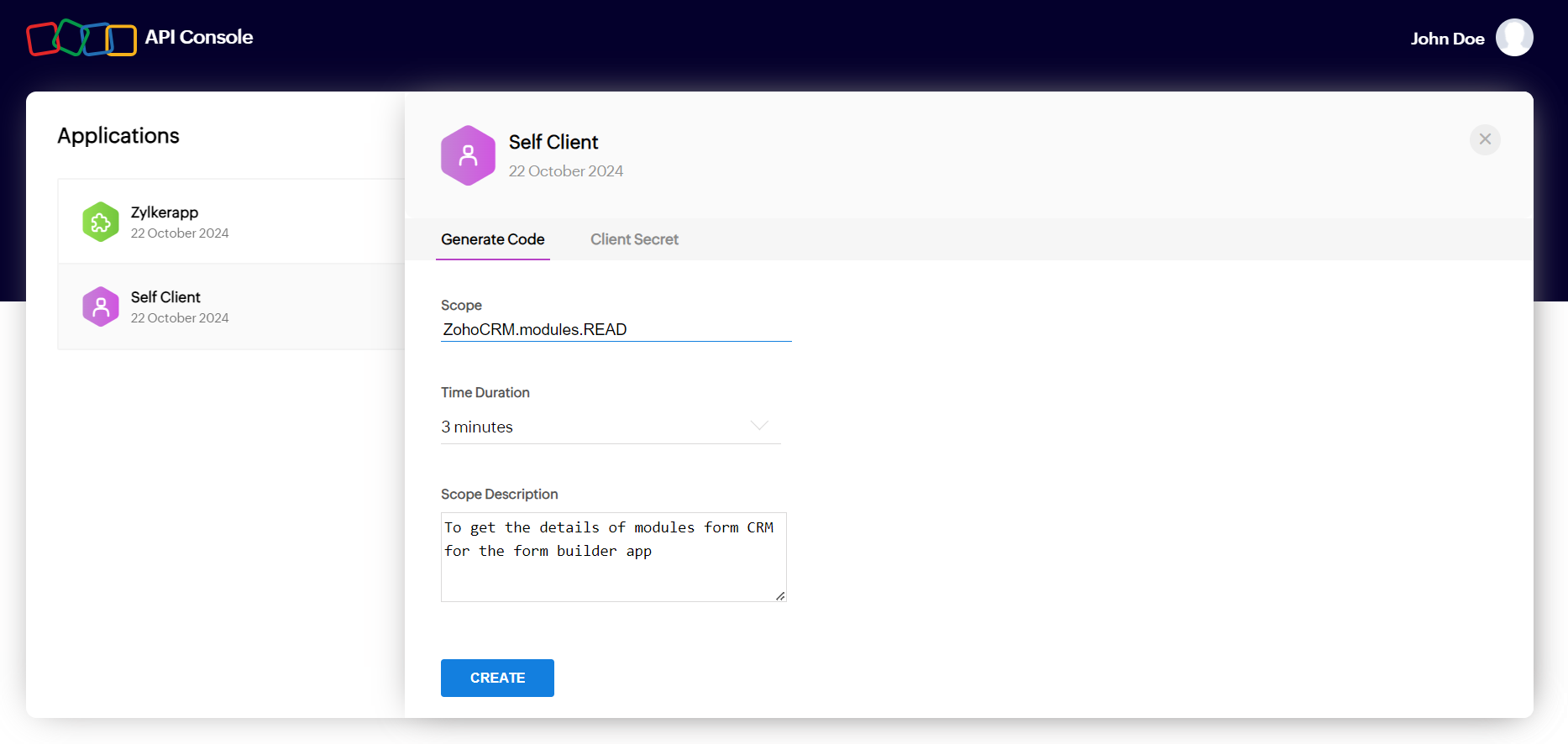
3. Click **CREATE**.
4. If prompted, select the Zoho app and then select the required portal the app needs to access.
5. Click **CREATE**. An authorization code will be generated and displayed.
6. Copy or download the authorization code.
## Step 2: Get access token and refresh token
Exchange the authorization code for an access token and a refresh token.
### Query parameters
| Parameter | Description |
|---|---|
| `client_id` | required
A unique ID displayed under **Self Client > Client Secret**. |
| `client_secret` | required
A unique confidential secret displayed under **Self Client > Client Secret**. |
| `grant_type` | required
Should be passed with the value `authorization_code`. |
| `code` | required
The authorization code generated in the previous step. |
### Response parameters
| Parameter | Description |
|---|---|
| `access_token` | An authorized key that can be used by your application to access the required resource (mentioned in the scope). Validity: 1 hour. |
| `refresh_token` | A special token that can be used by your application to refresh the access token once it is expired. This token won't expire. |
| `api_domain` | The domain the app needs to make service API requests to. |
| `token_type` | Indicates the type of access token that is generated. The token type that is used in Zoho's OAuth implementation is Bearer. |
| `expires_in` | Indicates the time (in seconds) in which the access token will expire. |
### Video
[YouTube video](https://www.youtube.com/embed/9te9T6ZsXyM)
### Endpoint
```text
POST {accounts-server-url}/oauth/v2/token
```
Note: The accounts-server-url is specific to the location (i.e., datacenter) where the client is registered. [See all the server-specific URLs](https://accounts.zoho.com/oauth/serverinfo)
### Request example
```curl
https://accounts.zoho.in/oauth/v2/token
?client_id=1000.XMDEG1KBDO9SE2IFTMDFSRPYYJ5L0U
&client_secret=1632308b34e2cf614fed922c5d6c4193c7778a5f13
&grant_type=authorization_code
&code=1000.406a3b53bad3f6824d4fb43108604cd7.a74aef3010243f0fae78111e2a673847
```
### Response example
```json
{
"access_token": "1000.875cf8ea310ae70c6fb26e25a5a48df0.be3bc88ab282cd58c6fd32f110c53c61",
"refresh_token": "1000.ce79a5110c4097744b17aecbb95dcfeb.db3167fy73ca0082fa4f6182474fc80e",
"api_domain": "https://www.zohoapis.in",
"token_type": "Bearer",
"expires_in": 3600
}
```
## Step 3: Use access token to make API calls
Make request calls to the service you want to access through the api_domain you get from the response of the access token request. Using an access token, you can access the resource for an hour, after which it will expire. To get a new access token, use the refresh token (see Step 4).
## Step 4: Refresh the access token when it expires
When an access token expires, get a new access token using the refresh token.
### Query parameters
| Parameter | Description |
|---|---|
| `client_id` | required
A unique ID displayed under **Self Client > Client Secret**. |
| `client_secret` | required
A unique confidential secret displayed under **Self Client > Client Secret**. |
| `grant_type` | required
Should be passed with the value `refresh_token`. |
| `refresh_token` | required
The refresh token you've obtained in step 2. |
### Response parameters
| Parameter | Description |
|---|---|
| `access_token` | An authorized key that can be used by your application to access the required resource (mentioned in the scope). Validity: 1 hour. |
| `api_domain` | The domain the app needs to make service API requests to. |
| `token_type` | Indicates the type of access token that is generated. The token type that is used in Zoho's OAuth implementation is Bearer. |
| `expires_in` | Indicates the time (in seconds) in which the access token will expire. |
### Endpoint
```text
POST {accounts-server-url}/oauth/v2/token
```
Note: The accounts-server-url is specific to the location (i.e., datacenter) where the client is registered. [See all the server-specific URLs](https://accounts.zoho.com/oauth/serverinfo)
### Request example
```curl
https://accounts.zoho.in/oauth/v2/token
?client_id=1000.GMB0YULZHJK411248S8I5GZ4CHUEX0
&grant_type=refresh_token
&client_secret=122c324d3496d5d777ceeebc129470715fbb856b7
&refresh_token=1000.18e983526f0ca8575ea9c53b0cd5bb58.1bd83a6f2e22c3a7e1309d96ae439cc1
```
### Response example
```json
{
"access_token": "1000.875cf8ea310ae70c6fb26e25a5a48df0.be3bc88ab282cd58c6fd32f110c53c61",
"api_domain": "https://www.zohoapis.in",
"token_type": "Bearer",
"expires_in": 3600
}
```