×![]()
×
×![]()
×
×
Configuring Scan Policy
The Scan Policy configuration is the engine of your proactive defense, shifting your security posture from reactive recovery to active threat hunting. By leveraging scan-based detection, the agent identifies and neutralizes malicious files, scripts, and system artifacts before they can execute.
Scan Controls
- On-Demand Agent Scan: Enabling this option allows users to manually initiate scans on specific files, folders or drives.
- Scanning Toast UI: Displays a real-time progress notification on the endpoint during USB, on-demand, and scheduled scans.
- Initiate Scan on Endpoint Registration: Triggers an immediate scan upon agent enrollment. If disabled, the endpoint will follow the standard scheduled scan configuration.

Removable Storage Device Security
Enable USB Scan to automatically check external drives for threats and block malicious files. This ensures your system stays protected every time you plug in a USB device.
Eject USB on Detection: Enabling this option will automatically eject the USB device if a threat is detected during the scan.

Scanning Schedules & Optimization
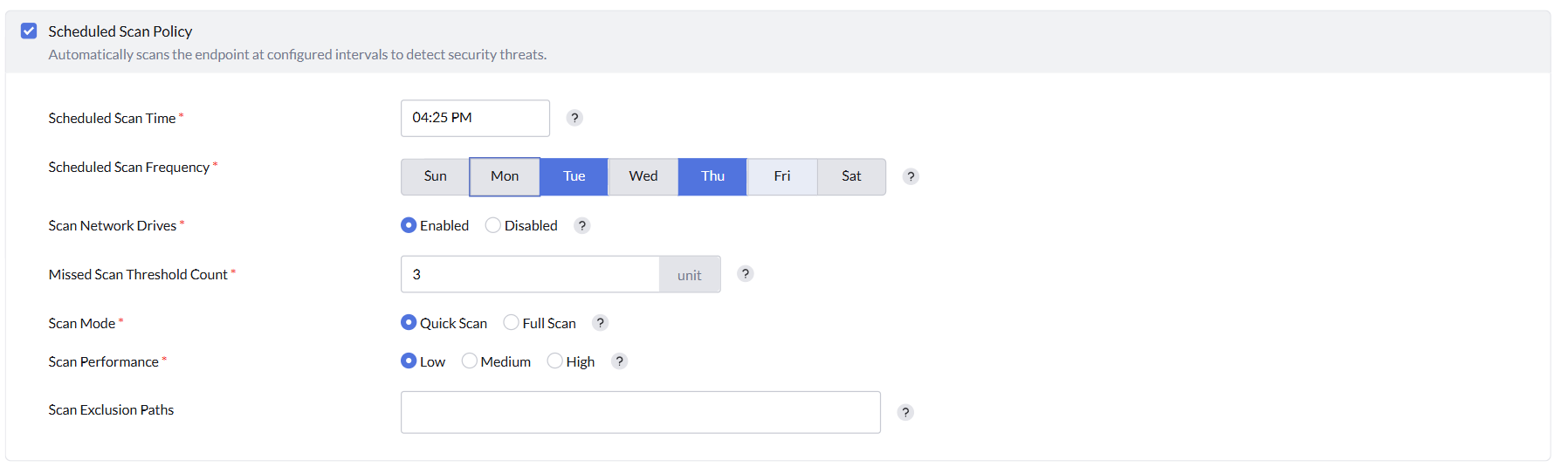
Set a Scanning Schedule to automate regular system checks and optimize performance by adjusting scan depth and resource usage.
- Scheduled Scan Time: Configure the time for scans to run automatically, ensuring regular system checks without manual intervention.
- Scheduled Scan Frequency: Configure which days of the week scans should run to maintain consistent protection.
- Scan Mapped Network Drives: Enable this option to include mapped network drives in the scan, extending protection to network resources.
- Missed Scan Threshold Count: This value is the threshold count on missed scans before a complete scan is triggered as soon as the machine is available.
- Scan Mode:
- Quick Scan: Scans only the critical areas of the system where malware is most likely to be found.
- Full Scan: Performs a comprehensive scan of the entire system, including all files and directories.
- Scan Performance: This option allows you to adjust the scan speed and resource usage to balance between scan duration and system performance.
- Scan Exclusions Path: Specify paths to exclude from scans to avoid scanning directories.