Patch Installation Failure: Unknown Error Code: 2145124329
You receive an error message, Unknown Error Code: 2145124329 - Operation was not performed because there are no applicable updates, while installing patches on your network computers using Endpoint Central.
Cause
This error might occur due to one of the following reasons:
- Superseded update - When a new update is released for an application/component, the existing (old) update(s) are superseded by the latest update.
- Update is already installed - The update that you're trying to install is already installed in the system.
- Update doesn't meet the system requirements - The updates to be installed don't meet the required system specifications.
- Missing prerequisites for update - Some updates require certain prerequisites (such as upgrading dependent applications to the latest versions) before they can be installed. Failure to meet the prerequisites can cause this error.
Resolution
There are six reasons as to why this error code might be shown, they can be resolved respectively as shown below:
- If the DB sync and patch scan has not occurred recently:
- Verify if the DB sync/scan has happened recently, if it hasn't happened, please perform a DB sync and patch scan and check whether the issue still exists.
- If no package is present in the registry hive mentioned below or the registry hive is empty in the customer system registry, we have released a separate troubleshooting patch to address this issue. You can follow the steps in this page to resolve this. If it still fails, contact Microsoft support.
- [HKEY_LOCAL_MACHINE\SOFTWARE\Microsoft\Windows\CurrentVersion\Component Based Servicing\Packages]
- Ensure you deploy the Servicing Stack Update (SSU) patch if it is detected as missing.
- If the patch failed with the above remark is shown for [Windows 7, 8.1 & Windows Server 2008, 2012] Security Only updates:
- Deploy the Latest Security Monthly Quality Roll-up to the above mentioned OS versions from the missing patches list.
- If the patch failed with the above remark is shown for [Windows 7, 8.1 & Windows Server 2008, 2012] Security Only updates for .NET Framework version installed in the systems:
- Deploy the Latest Security and Quality Roll-up update from the missing patches list to resolve the issue. If it still fails, then it probably means that the .NET framework has been corrupted.
- In this case, you need to deploy the Microsoft .NET Framework Repair Tool patch 108183 from Supported Patches View.
- Initiate a patch scan and then deploy the failed patches if it still appears in the missing patches list.
If the patch failed with the above remark is shown for Cumulative updates/Latest Security and Quality Roll-up update for the .NET Framework version installed in the systems:
- In this case, you need to deploy the Microsoft .NET Framework Repair Tool patch 108183 from Supported Patches View.
- If the issue still persists with the same error code, uninstall and reinstall the .NET framework version installed. Then restart the system, perform a patch scan and deploy the failed patch on it.
Note: The current version of the .NET Repair Tool supports repairing .NET Framework versions 4.8, 4.7.2, 4.7.1, 4.7, 4.6.2, 4.6.1, 4.6, 4.5.2, 4.5.1, 4.5, 4.0, and 3.5 SP1 (including .NET 3.0 SP2 and .NET 2.0 SP2). Therefore, do not recommend patch ID 108183 for .NET Framework 4.8.1. Refer to this page for more information.
If the affected systems have Defer updates configured in their GPO Policy
- Check whether the GPO policy given below is enabled. If enabled, then Disable it and deploy the updates or wait till the Deferral period is over
- Computer configuration > Administrative Templates > Windows Components > Windows Update > Windows Update for Business > Select when Quality Updates are Received
- Launch a Command-Line Window with admin rights and then run the command:
gpresult /H c:\gpresultoutput.html
An HTML file will be created at the specified path. Request the customer to send this HTML file.
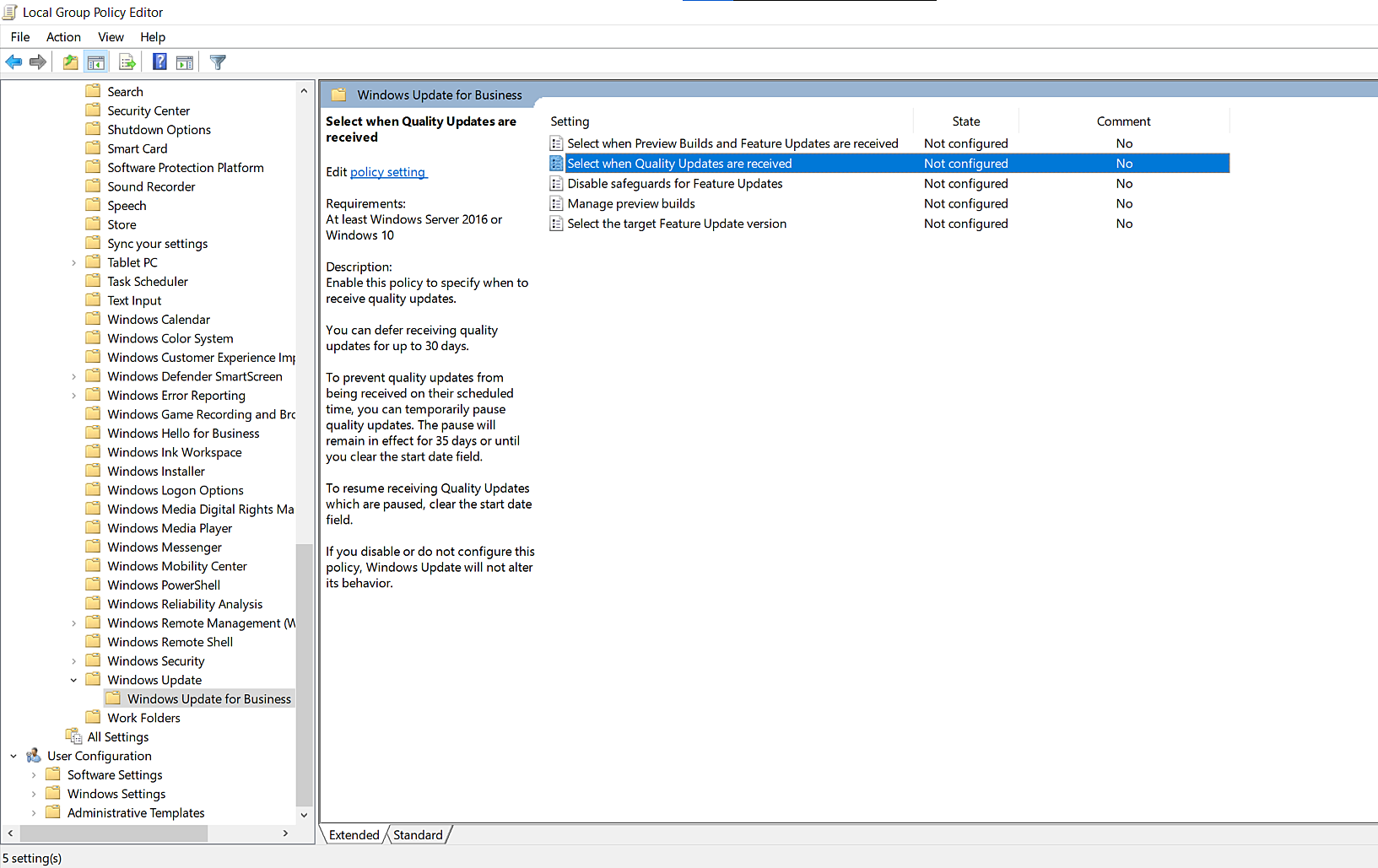
Note: Deferring simply means that you will not receive the update after it has been released for at least the number of deferral days you have specified.
If the issue still persists, contact endpointcentral-support@manageengine.com with the log files for further assistance.
FAQ
What does Not Applicable mean in patch deployment?
Not Applicable means the selected patch is not relevant to the target endpoint in its current state. This usually indicates that the patch does not apply to the installed operating system, application version, architecture, edition, or current patch state of that machine.
Does Not Applicable always mean there is a problem?
No. Not Applicable does not always indicate a product issue. In many cases, it simply means the patch is not required for that endpoint.
Why does a patch show Not Applicable?
A patch may show Not Applicable if the patch is already installed, the target machine does not meet the required version or edition, the patch has been superseded, required prerequisites are missing, or the patch is meant for a different operating system, application version, architecture, or language.
Can a patch show Not Applicable even if I try to deploy it manually?
Yes. If a patch is manually deployed to a machine where it is not actually detected as missing or supported for that target, the deployment can still return Not Applicable.
What should I check first when a patch shows Not Applicable?
First verify the patch ID, application or operating system version, edition, architecture, and whether the patch is actually listed as missing for that endpoint. Also check whether the patch has been superseded or whether a prerequisite patch is missing.
Where should I verify whether the patch is really missing?
Check the Missing Patches view, Detailed View, and the deployment summary PDF for that endpoint. These views help confirm whether the patch is truly detected as missing and whether the deployment result matches the endpoint’s current patch state.
Can comparing with similar machines help?
Yes. If the same patch applies successfully to similar machines but appears as Not Applicable on one endpoint, compare the operating system version, application version, architecture, edition, and missing-patch state between those machines.
Can superseded patches appear as Not Applicable?
Yes. If a newer patch has replaced the selected patch, the older patch may no longer be considered applicable for deployment.
Can missing prerequisites cause a patch to show Not Applicable?
Yes. Some patches require prerequisite updates, servicing stack updates, dependency patches, or component fixes before they can be treated as applicable.
Should I try patch ID 105979 in some Windows servicing cases?
Yes. In some Windows servicing or component-related cases, you may need to deploy patch ID 105979 first before retrying the failed or expected patch.
Why is a patch shown as Not Applicable even though the endpoint has a related issue?
This can happen when the problem on the endpoint is environmental rather than patch-specific. For example, component-store corruption, missing prerequisites, unsupported versions, or patch supersedence can prevent the expected patch from being considered applicable.
What should I do if I expected the patch to apply?
Verify whether the patch is listed under Missing Patches for that machine, review the Detailed View or deployment summary, confirm the exact endpoint version and build, and check whether a prerequisite or remediation patch must be deployed first.
What should I collect if Not Applicable looks incorrect?
If the result still looks inconsistent, collect the deployment or task PDF, scan summary, and relevant screenshots before proceeding with deeper analysis.
When should I investigate Not Applicable further?
You should investigate further if the patch is expected to apply based on the endpoint version, the same patch applies to similar machines but not this one, the endpoint recently changed state after scan or remediation, or the status appears inconsistent with the actual endpoint condition.