Quarantine Compliance
Use Endpoint Central's System Quarantine Policy to implement Network Access Control (NAC), proactively manage system compliance, reduce vulnerabilities, and enhance your organization's overall security posture.
Overview
In today's dynamic cybersecurity landscape, maintaining a secure and compliant IT environment is paramount. Network Access Control (NAC) plays an important role in this — it is the process of filtering access to corporate data by allowing only legitimate endpoints to access it. You can configure NAC using Endpoint Central's System Quarantine Policy to quarantine an endpoint from the network when it is found non-compliant with your organization's compliance policy.
Benefits of using Endpoint Central's System Quarantine Policy for NAC include:
- Real-time Compliance Management: Ensure system compliance by proactively identifying security vulnerabilities and non-compliant issues.
- Automated Enforcement: Streamline compliance enforcement with automated checks and actions. Mandate compliance policies for all systems present in the network.
- Enhanced Security Posture: By quarantining non-compliant systems, NAC-based policies contribute to a robust security posture, safeguarding sensitive data and critical infrastructure.
Applies to:
- Windows
Rules in System Quarantine Policy
- OS Patches: Ensure OS updates are deployed to systems within a specific period to enhance security.
- Software: Your system will be marked as non-compliant if certain applications are installed or uninstalled. Refer to the software name from Control Panel.
- Service: Your system will be marked as non-compliant if certain services are running or not running. Refer to the service name from Service Manager.
- Vulnerability: Your system will be marked as non-compliant if certain vulnerabilities are detected. You can categorize vulnerabilities based on their CVSS score and exploit availability.
- Registry and File Checks: Your system will be marked as non-compliant if the given criteria for Registry Value, Registry Path, Folder Path, File Path, or File Version is not adhered to. Registry Path checks that the key exists. Registry Value checks the named value. Use Registry Value when a missing value name must make the system non-compliant.
Execution Options
System Quarantine Policy has two primary options for enforcing compliance:
Audit Systems for Non-Compliance
Perform regular audits to identify systems that do not adhere to the compliance rules. Audit results provide insights into the non-compliance status, allowing for proactive remediation.
Quarantine Non-Compliant Systems
In cases of severe non-compliance, you have the authority to quarantine systems. Quarantined systems are isolated from the network to prevent potential security risks. The following network restrictions are available to isolate your systems:
- Block all network access: Your system will be isolated from the network except for the components of Endpoint Central.
- Block only intranet in range: Your system will be isolated from the local network.
- Block custom domain & IP: Your system will be isolated from specific domains and IP addresses.
- Allow access only to custom IP/VPN/Domains: Your system will be allowed to use only specific domains, VPN, or IP addresses.
Steps to Deploy System Quarantine Policy
- Navigate to Threats & Patches → Compliance → System Quarantine Policy.
- Click Create Policy.
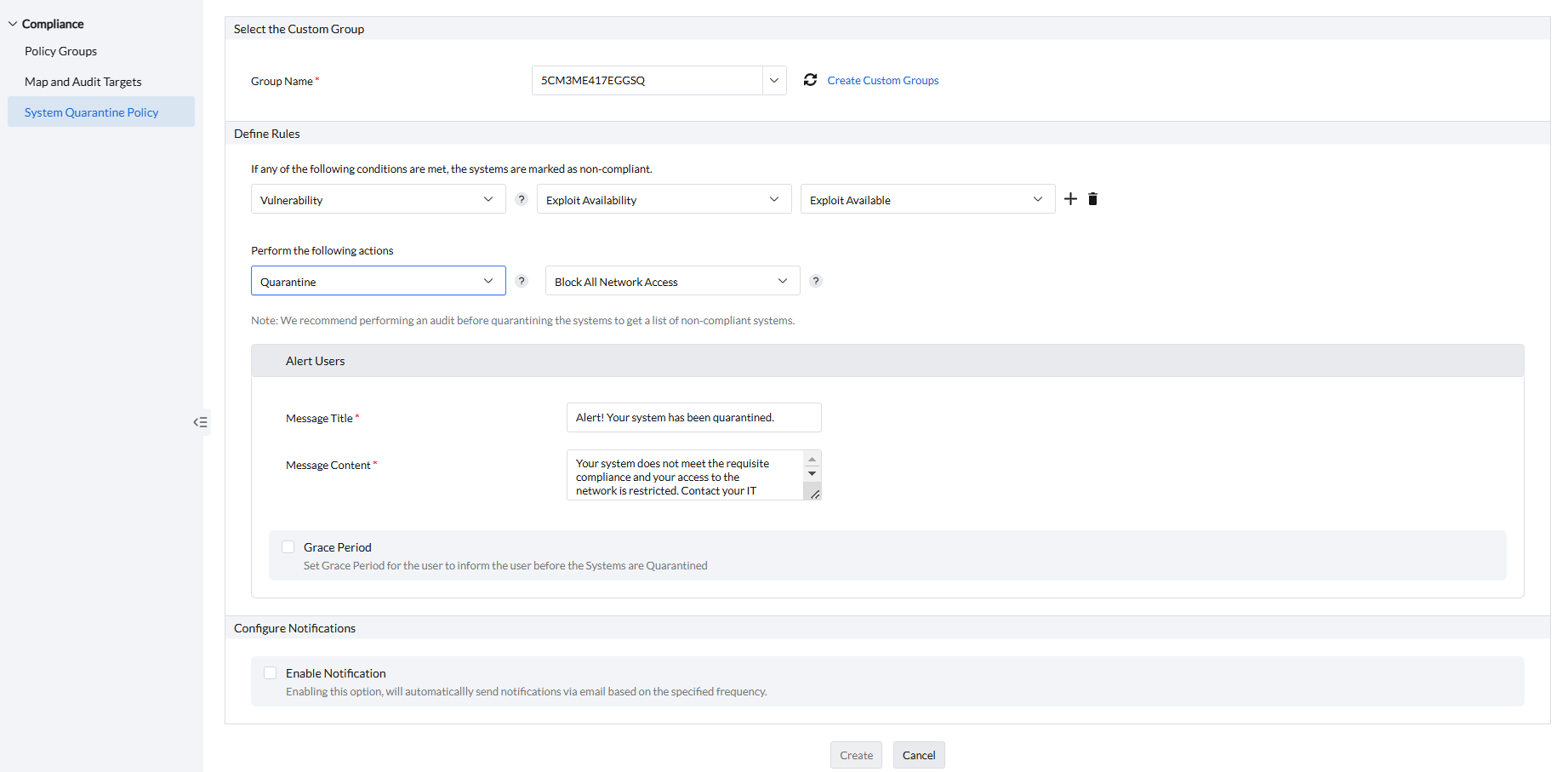
- Under Select the Custom Group, select the custom group to deploy this System Quarantine Policy from the Group Name field.
- Under Define Rules, select the rules to conduct compliance checks according to your requirements. Select If any of the following conditions are met when any one condition should mark a system as non-compliant. This option uses OR logic. If Quarantine is selected as the execution action, the system is moved to quarantine when any one condition matches. For example, you can define conditions to identify systems where required security software is missing or uninstalled, or where unauthorized antivirus software is detected.
- If you want to audit systems for compliance, choose Audit and set the warning message as required.
- If you want to quarantine non-compliant systems, choose Quarantine and select the type of network restriction.
- If you have selected Quarantine, set the alert message and grace period for the end-user under the Alert Users section.
- To receive notifications, navigate to Configure Notifications, select Enable Notifications, and enter the email address for notification.
- Click Create to finish creating the policy.
The policy is applied when the agent contacts the server during its next refresh cycle, which normally occurs every 90 minutes. The configured grace period begins after the policy is applied. When the grace period expires, the endpoint is evaluated and quarantined during a subsequent refresh cycle if it remains non-compliant. Therefore, the console can continue to show the endpoint as compliant until the refresh is completed.
Once deployed, you can view the Status of the policy. You can also Modify, Suspend, and Delete the policy as needed.
When an endpoint does not meet the configured compliance criteria, the user receives the alert defined in the policy. To identify who configured the policy, check the Created By column in the System Quarantine Policy view.