Silent Deployment of Logi Options+ on Mac via Endpoint Central
This document explains how to silently deploy Logi Options+ on Mac devices using Endpoint Central through Manual Package Deployment.
Prerequisites
- The target machine must be enrolled on MDM with User Approved MDM (UAMDM) status.
- The PPPC Configuration must be deployed on the affected machines before deploying the software package.
- For system requirements, refer to the official Logi Options+ documentation: Logi Options+ Guide
Why Deploy Configuration Settings Before Package Deployment?
Logi Options+ requires certain permissions to be enabled by the user during installation. Deploying the configuration settings beforehand automates these permission grants, eliminating the need for any user intervention during installation.
Configuration Settings
Navigate to Configuration → Mac Configuration and set up the following configuration before deploying the package.
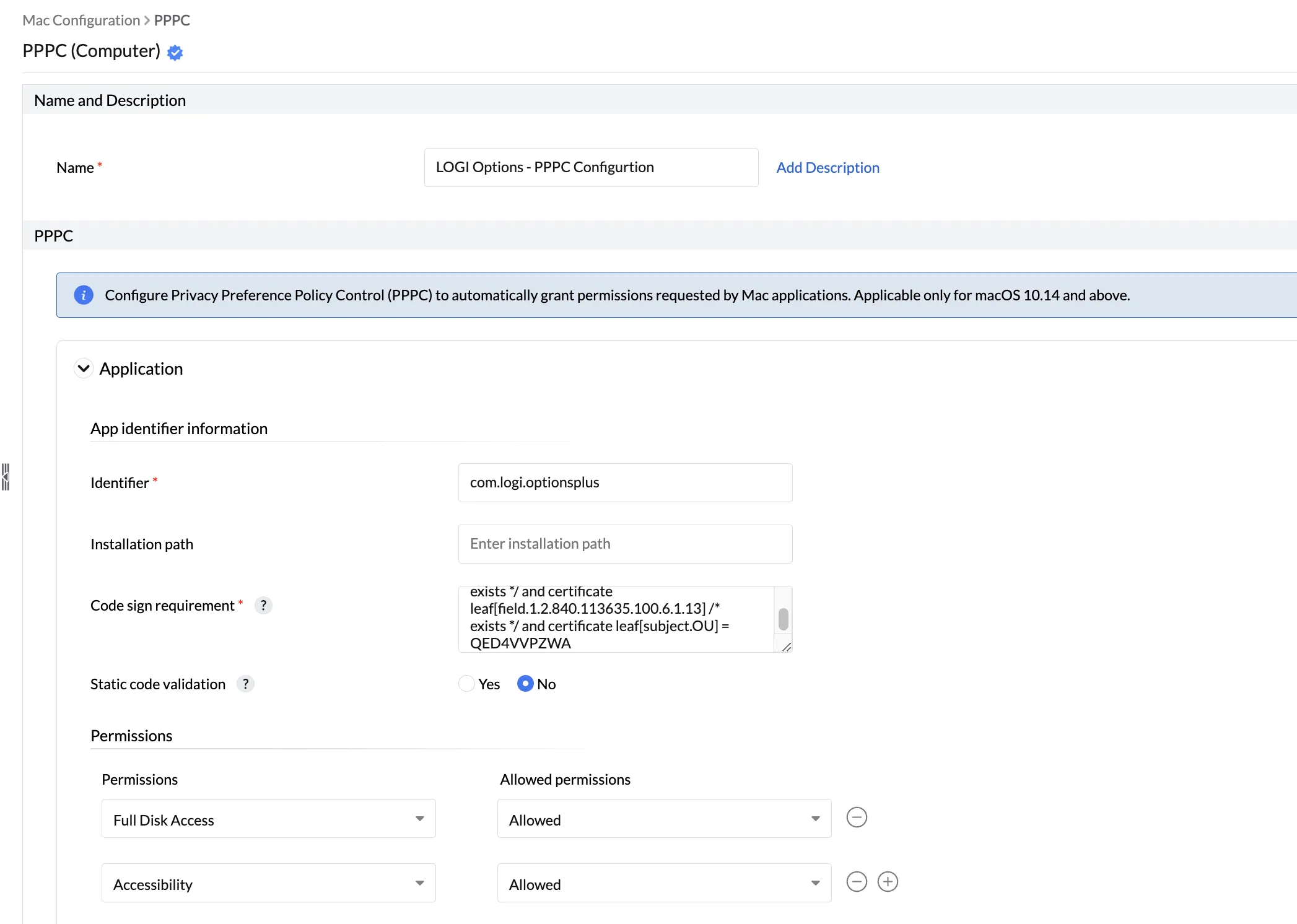
PPPC Configuration
Supported for macOS 10.14 or later.
| Field | Value |
|---|---|
| Configuration Name | LOGI Options - PPPC Configuration |
| Identifier | com.logi.optionsplus |
| Code Sign Requirement | identifier "com.logi.optionsplus" and anchor apple generic and certificate 1[field.1.2.840.113635.100.6.2.6] /* exists */ and certificate leaf[field.1.2.840.113635.100.6.1.13] /* exists */ and certificate leaf[subject.OU] = QED4VVPZWA |
| Allowed Permissions | Accessibility, Full Disk Access |
Note
- Accessibility settings can be handled by the PPPC Configuration above.
- For Bluetooth and Input Monitoring settings, access must be granted manually by the user.
Package Preparation
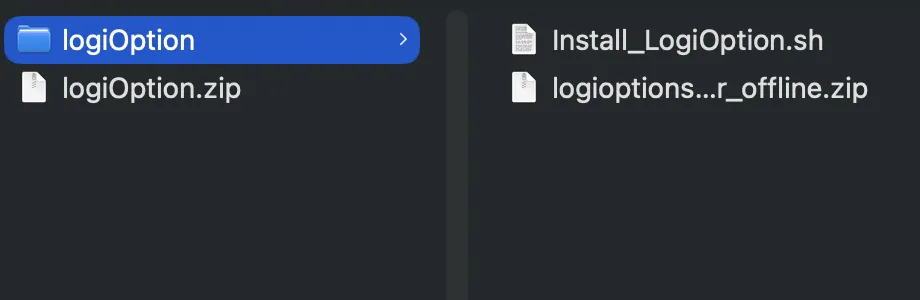
Before creating the package in Endpoint Central, prepare the installer bundle as follows:
- Place
logioptionsplus_installer_offline.zipandInstall_LogiOption.shinto a folder namedlogiOption. - Compress the
logiOptionfolder into a ZIP file namedlogiOption.zip.
Installation Script (Install_LogiOption.sh)
Install_LogiOption.sh
#!/bin/bash

# Define variables

cd logiOption

ZIP_FILE="logioptionsplus_installer_offline.zip"

INSTALLER_PATH="./logioptionsplus_installer_offline.app/Contents/MacOS/logioptionsplus_installer"

# Unzip the ZIP file

unzip "$ZIP_FILE"

# Execute the installer with the provided command

"$INSTALLER_PATH" --quiet
Uninstallation Script (Uninstall_LogiOption.sh)
Uninstall_LogiOption.sh
#!/bin/bash
echo "Starting Logitech Options+ FORCE removal..."

############################################################
# Root Check
############################################################
if [[ $EUID -ne 0 ]]; then
    echo "Run this script as root"
    exit 1
fi

############################################################
# Stop Logitech Processes (SAFE)
############################################################
echo "Stopping Logitech processes..."
pkill -9 -x logioptionsplus 2>/dev/null
pkill -9 -x logioptionsplus_agent 2>/dev/null
pkill -9 -x logioptionsplus_updater 2>/dev/null
pkill -9 -x logi_crashpad_handler 2>/dev/null
pkill -9 -x FirmwareUpdateTool 2>/dev/null
sleep 2

############################################################
# Remove Launch Services
############################################################
echo "Removing launch services..."
launchctl bootout system /Library/LaunchDaemons/com.logi.optionsplus.updater.plist 2>/dev/null
rm -f /Library/LaunchDaemons/com.logi.optionsplus.updater.plist
launchctl bootout gui/$(id -u) /Library/LaunchAgents/com.logi.optionsplus.agent.plist 2>/dev/null
rm -f /Library/LaunchAgents/com.logi.optionsplus.agent.plist
rm -f ~/Library/LaunchAgents/com.logi.optionsplus.agent.plist 2>/dev/null

############################################################
# Remove Application Files
############################################################
echo "Removing application files..."
rm -rf /Applications/logioptionsplus.app 2>/dev/null
rm -rf "/Applications/Logi Options+.app" 2>/dev/null
rm -rf "/Applications/Logi Options.app" 2>/dev/null
rm -rf /Applications/*logioptions* 2>/dev/null
rm -rf "/Library/Application Support/LogiOptionsPlus"
rm -rf "/Library/Application Support/Logitech"
rm -rf "/Library/Application Support/Logitech.localized"
rm -rf "/Users/Shared/LogiOptionsPlus"
rm -rf "/Library/Logs/LogiOptionsPlus"

############################################################
# Remove User Data
############################################################
echo "Removing user data..."
for u in /Users/*; do
  USER=$(basename "$u")
  if [[ "$USER" != "Shared" ]]; then
    rm -rf "$u/Library/Application Support/LogiOptionsPlus"
    rm -rf "$u/Library/Application Support/Logitech"
    rm -f "$u/Library/Preferences/com.logi.optionsplus.plist"
    rm -f "$u/Library/Preferences/com.logi.optionsplus.agent.plist"
    rm -rf "$u/Library/Logs/LogiOptionsPlus"
    rm -rf "$u/Library/Caches/com.logi.optionsplus"
  fi
done

############################################################
# Remove UEMS Cache
############################################################
echo "Removing UEMS installer cache..."
rm -rf "/Library/ManageEngine/UEMS_Agent/swpackage/Logi Option"

############################################################
# Clean Temporary Files
############################################################
echo "Cleaning temporary files..."
rm -rf /tmp/*logi* 2>/dev/null
rm -rf /private/tmp/*logi* 2>/dev/null

############################################################
# Verification
############################################################
echo "Checking for remaining Logitech processes..."
pgrep -fl logi
echo "Logitech Options+ removal completed."

exit 0
Manual Package Creation and Deployment Steps
Note
Replace the file name and version with the appropriate data in the steps below.
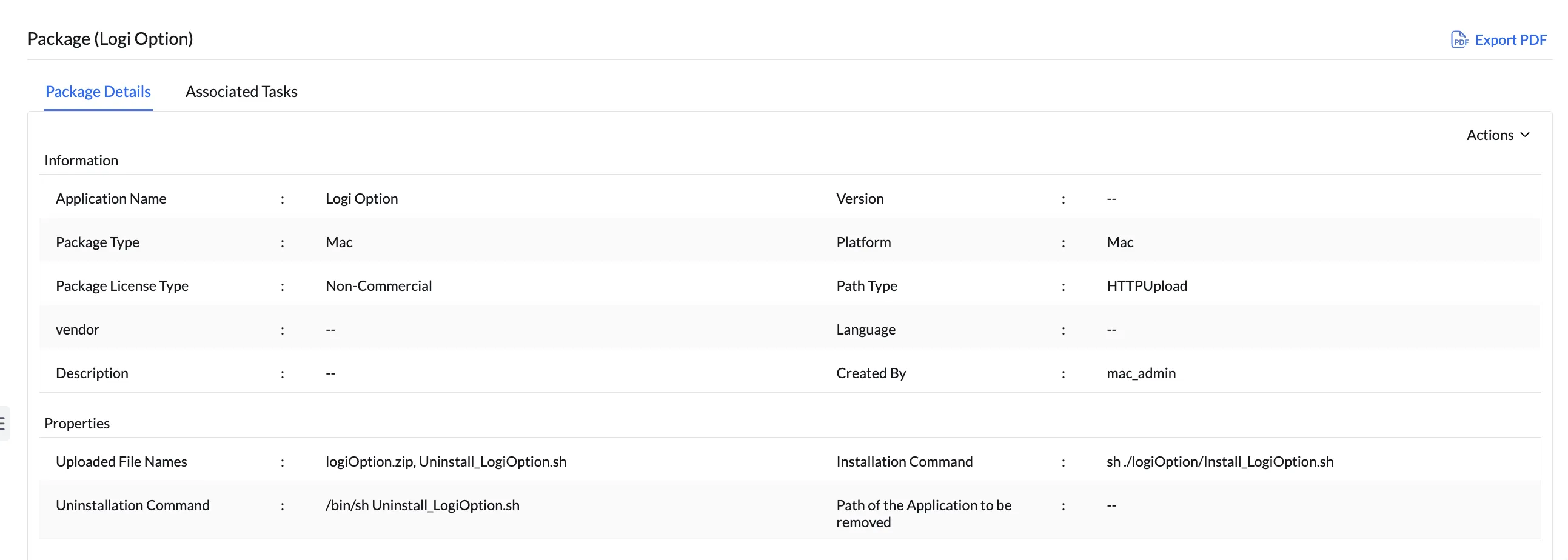
- Create a Mac package in Endpoint Central.
- Upload or provide the network path of the installer (
logiOption.zip). - Provide the following installation command:Installation Command
sh ./logiOption/Install_LogiOption.sh - Navigate to the Uninstall tab → Advanced Option → upload
Uninstall_LogiOption.sh. The uninstall command will be generated automatically. - Create the package and deploy it.
Tip
Test the deployment on a single machine first. If there are no issues, proceed to deploy on the remaining machines.


