Regulate Patch DB Sync
This section talks in detail about Regulate Patch DB Sync and elaborates on the steps to enable or disable the feature.
About Regulate Patch DB Sync
Regulate Patch DB Sync is a feature that enables ManageEngine to either defer or initiate the sync between the central server and the patch database in specific scenarios.
Note: This feature is available only for Vulnerability Manager Plus and the on-premises versions of Patch Manager Plus and Endpoint Central.
Scenarios showcasing the capabilities of Regulate Patch DB Sync
When enabled, Regulate Patch DB Sync ensures secure workflows between the central patch repository and the server. Here are some scenarios that illustrate this:
Scenario 1: Preventing bad patches from being downloaded to the servers and remote machines
There are instances when software vendors accidentally release bad patches, i.e., patches that can cause anomalies (system downtime or functional errors) when installed in systems.
With the Regulate Patch DB Sync feature enabled in the servers, ManageEngine defers the sync between the central server and the patch repository, thereby preventing the bad patches from being downloaded to the server and eventually being pushed to the systems.
Learn more about the Endpoint Central's architecture.
Scenario 2: Deploying critical patches and patches for zero-days immediately
Critical patches and patches for zero-day vulnerabilities need to be deployed as soon as they're released to prevent systems from being exploited. With the Regulate Patch DB Sync feature enabled, a database (DB) sync will be initiated automatically in the servers (irrespective of the sync schedule).
Let's look at a real-life example to better understand this:
- Scheduled Patch DB sync time: 05:00
- Critical patches released at: 07:00
- Time until next patch DB sync: 22 hours
Taking the above case into consideration, if the patch DB isn't manually synced before the next scheduled sync, the critical patches won't be deployed to the vulnerable systems for nearly an entire day, paving the way for system breaches or exploits.
Note: It is highly recommended to set up an automated patch testing and deployment workflow for effective patch management.
Steps to enable the Regulate Patch DB Sync option
In the Endpoint Central console, navigate to Patch Mgmt > Settings > Patch Database Settings > Regulate Patch DB Sync
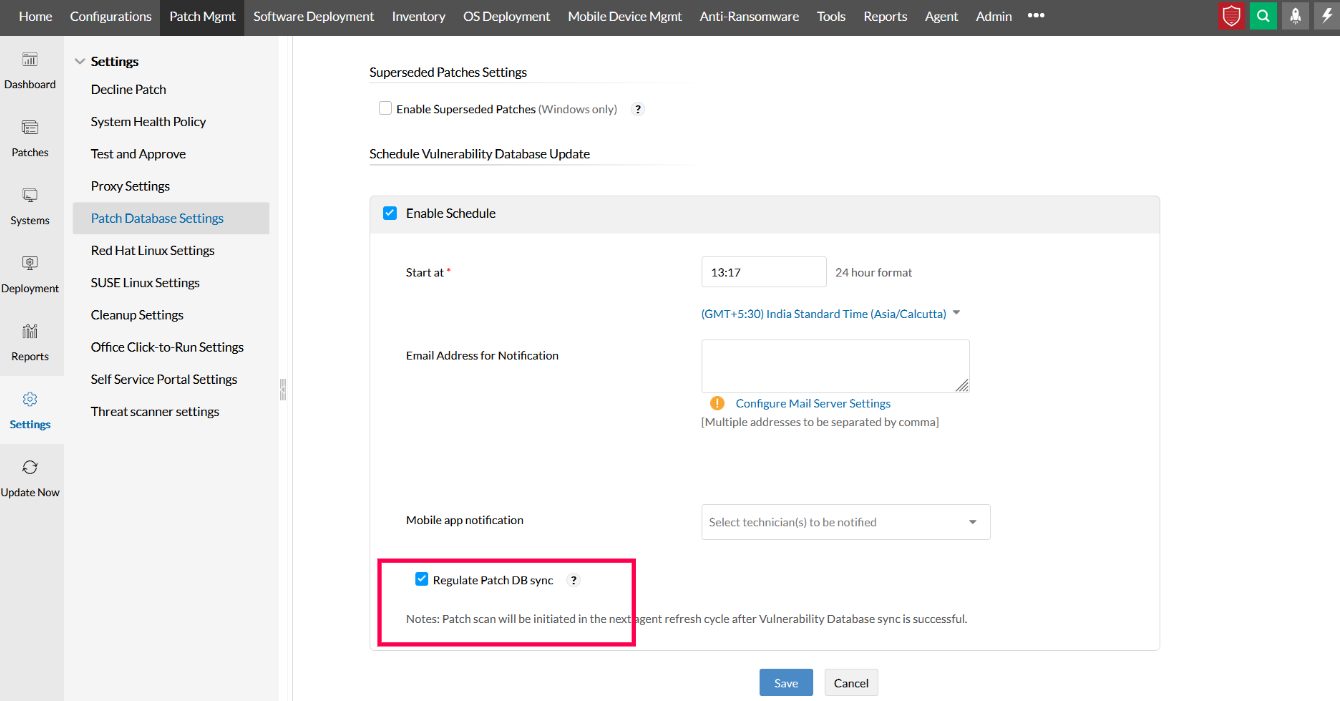
Note: The Enable Schedule feature needs to be selected to enable the Regulate Patch DB Sync option.




