# windows10-feature-pack-update
If you're using **Endpoint Central Build version 100319 and above**, you needn't follow the manual steps to download and deploy. This process is fully automated now. The patches will automatically be downloaded and deployed.
**Note:**
**If you're using Endpoint Central Build version 100319 and above of enterprise edition and Endpoint Central Build version 100318 and below of other editions, follow the steps given below**
## How to deploy Windows 10 feature packs using Patch management?
As you know, Microsoft's Windows 10 version updates are released as feature packs. Deploying few feature packs are tricky as dependency files (ISO files) are required. For successful deployment, we recommend downloading the respective dependency file (ISO file) from the vendor's site and place it in our Patch store prior deployment.
Before deployment, run through the [Compatibility Check](https://www.microsoft.com/en-us/windows/windows-10-specifications?howto) available under the **Important Notes** section to find if you meet all the minimum requirements that impact upgradeability. This document will provide you with the steps to manage **Windows 10 version 1803 spring creators update** using Endpoint Central's Patch Management.
**Note: You can deploy Windows 10 feature packs with Endpoint Central only if you are using build version 10.0.147 or above.**
To deploy Windows 10 feature packs, follow the below steps:
- Add the dependency patch (ISO file) to the Patch store.
- Deploy the feature pack as configuration.
### To add ISO file to the patch store
Follow the steps given below to add the respective ISO file to the patch store:
1. Download Windows 10 ISO file from [Volume Licensing Service Center](https://www.microsoft.com/Licensing/servicecenter/default.aspx) or from [here](https://www.microsoft.com/en-in/software-download/windows10).
2. **For Professional Edition:** Rename 32 bit ISO file as 105608-Win10_1803_enx32 (Ensure file is saved with extension .iso).
3. Rename 64 bit ISO file as 105610-Win10_1803_enx64 (Ensure file is saved with extension .iso).
4. **For Enterprise Edition:** Rename 32 bit ISO file as 106461-Win10_1803_en_enterprisex32.iso (Ensure file is saved with extension .iso).
5. Rename 64 bit ISO file as 106460-Win10_1803_en_enterprisex64.iso (Ensure file is saved with extension .iso).
6. Endpoint Central supports the deployment of feature packs for multiple languages. Click [here](https://www.manageengine.com/products/desktop-central/windows10-feature-packs-version-1803-update.html#language) to view the ISO setup file for the language of your choice.
7. Navigate to patch store location: Patch Management -> Cleanup Settings and copy the downloaded iso file manually into the store directory and rename the files accordingly.
**Note:** To deploy Win 10 feature packs in more than one language, check the respective ISO files for each language, download and place them in the patch store.
In order to identify the ISO files required (for different languages) for your machines, navigate to Patch Management -> Downloaded Patches. Apply the filter for Download failed patches view. In this view, you can find all the languages for which ISO files have to be downloaded. Refer to the screenshot below for better understanding.
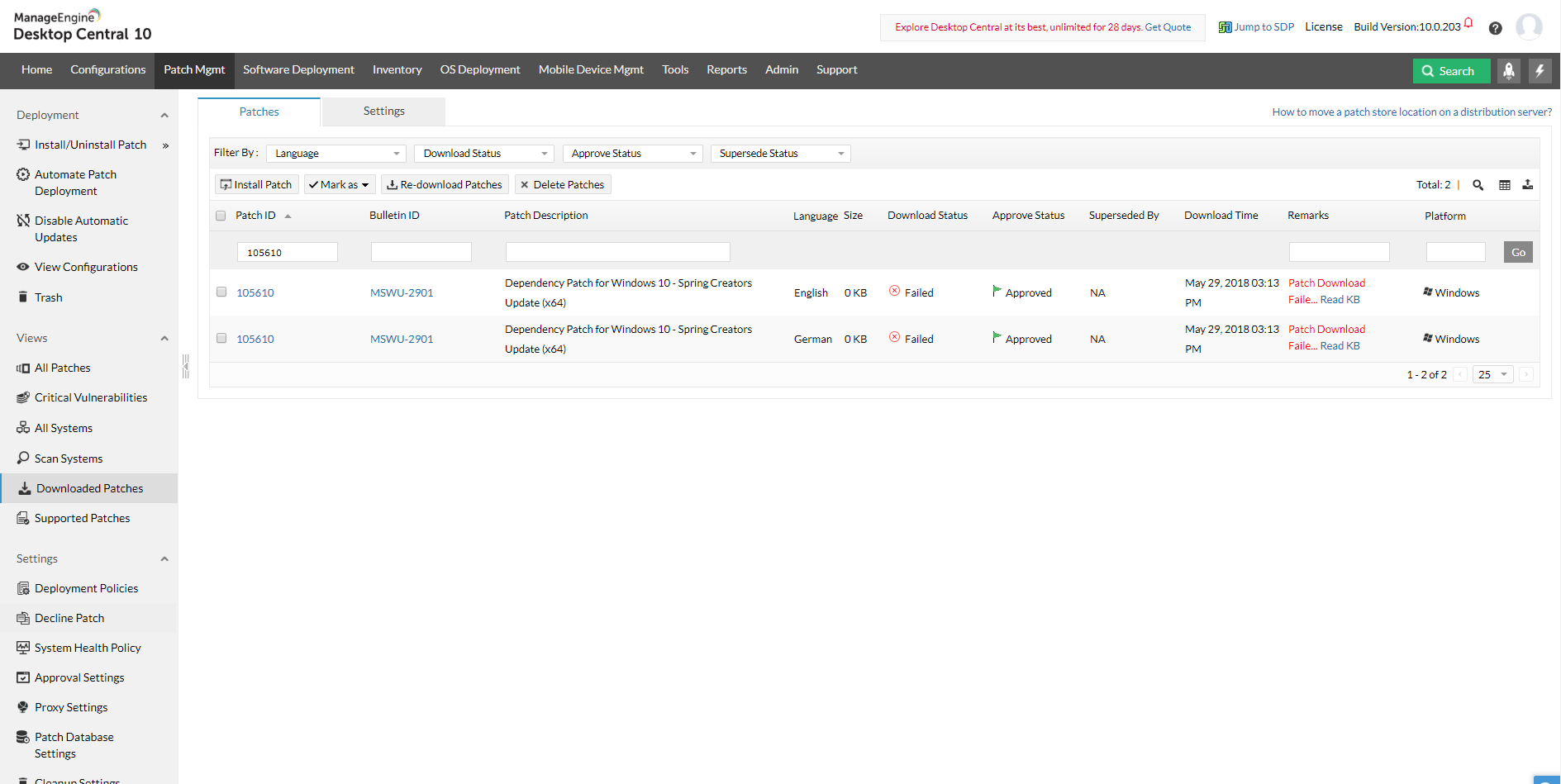
**To find patch store location:** Navigate to Patch Management -> Downloaded Patches -> Settings.
### To deploy the feature pack
1. **Create a configuration**
- **For Professional Edition:** After following the above steps, you can create a configuration from the missing patches (Patch ID: 105609 and 105611 for 32 and 64-bit respectively) and deploy it.
- **For Enterprise edition:** After following the above steps, you can create a configuration from the missing patches (Patch ID: 106425 and 106424 for 32 and 64-bit respectively) and deploy it.
- If the configuration that you created before following the above steps failed, make sure to repeat the same and redeploy the configuration.
2. **Automated Patch Deployment (APD):**
- To create an APD task for deploying feature packs, make sure to **select the feature pack check box while defining the patch task**.
- Once the dependency patch is downloaded and stored in the Patch Store, "Feature Packs" will be successfully deployed to the target computers during the subsequent deployment window. A separate configuration can be created for the particular patch on demand.
Are you facing issues while installing or upgrading to Windows 10? [Refer knowledge base for resolution](https://www.manageengine.com/products/desktop-central/windows10-installation-failed.html).
## ISO setup files by language
| Language | Other Editions | Enterprise Edition |
|---|---|---|
| English | 32-Bit: 105608-Win10_1803_enx32.iso
64-Bit: 105610-Win10_1803_enx64.iso | 32-Bit: 106461-Win10_1803_en_enterprisex32.iso
64-Bit: 106460-Win10_1803_en_enterprisex64.iso |
| Spanish | 32-Bit: 105608-Win10_1803_Spx32.iso
64-Bit: 105610-Win10_1803_Spx64.iso | 32-Bit: 106461-Win10_1803_Sp_enterprisex32.iso
64-Bit: 106460-Win10_1803_Sp_enterprisex64.iso |
| Arabic | 32-Bit: 105608-Win10_1803_Arx32.iso
64-Bit: 105610-Win10_1803_Arx64.iso | 32-Bit: 106461-Win10_1803_Ar_enterprisex32.iso
64-Bit: 106460-Win10_1803_Ar_enterprisex64.iso |
| Chinese (Simplified) | 32-Bit: 105608-Win10_1803_csx32.iso
64-Bit: 105610-Win10_1803_csx64.iso | 32-Bit: 106461-Win10_1803_cs_enterprisex32.iso
64-Bit: 106460-Win10_1803_cs_enterprisex64.iso |
| Chinese (Traditional) | 32-Bit: 105608-Win10_1803_ctx32.iso
64-Bit: 105610-Win10_1803_ctx64.iso | 32-Bit: 106461-Win10_1803_ct_enterprisex32.iso
64-Bit: 106460-Win10_1803_ct_enterprisex64.iso |
| Czech | 32-Bit: 105608-Win10_1803_Czx32.iso
64-Bit: 105610-Win10_1803_Czx64.iso | 32-Bit: 106461-Win10_1803_Cz_enterprisex32.iso
64-Bit: 106460-Win10_1803_Cz_enterprisex64.iso |
| Danish | 32-Bit: 105608-Win10_1803_Dax32.iso
64-Bit: 105610-Win10_1803_Dax64.iso | 32-Bit: 106461-Win10_1803_Da_enterprisex32.iso
64-Bit: 106460-Win10_1803_Da_enterprisex64.iso |
| Dutch | 32-Bit: 105608-Win10_1803_Dux32.iso
64-Bit: 105610-Win10_1803_Dux64.iso | 32-Bit: 106461-Win10_1803_Du_enterprisex32.iso
64-Bit: 106460-Win10_1803_Du_enterprisex64.iso |
| Finnish | 32-Bit: 105608-Win10_1803_Fix32.iso
64-Bit: 105610-Win10_1803_Fix64.iso | 32-Bit: 106461-Win10_1803_Fi_enterprisex32.iso
64-Bit: 106460-Win10_1803_Fi_enterprisex64.iso |
| French | 32-Bit: 105608-Win10_1803_Frx32.iso
64-Bit: 105610-Win10_1803_Frx64.iso | 32-Bit: 106461-Win10_1803_Fr_enterprisex32.iso
64-Bit: 106460-Win10_1803_Fr_enterprisex64.iso |
| German | 32-Bit: 105608-Win10_1803_Gex32.iso
64-Bit: 105610-Win10_1803_Gex64.iso | 32-Bit: 106461-Win10_1803_Ge_enterprisex32.iso
64-Bit: 106460-Win10_1803_Ge_enterprisex64.iso |
| Greek | 32-Bit: 105608-Win10_1803_Grx32.iso
64-Bit: 105610-Win10_1803_Grx64.iso | 32-Bit: 106461-Win10_1803_Gr_enterprisex32.iso
64-Bit: 106460-Win10_1803_Gr_enterprisex64.iso |
| Hebrew | 32-Bit: 105608-Win10_1803_Hbx32.iso
64-Bit: 105610-Win10_1803_Hbx64.iso | 32-Bit: 106461-Win10_1803_Hb_enterprisex32.iso
64-Bit: 106460-Win10_1803_Hb_enterprisex64.iso |
| Hungarian | 32-Bit: 105608-Win10_1803_Hnx32.iso
64-Bit: 105610-Win10_1803_Hnx64.iso | 32-Bit: 106461-Win10_1803_Hn_enterprisex32.iso
64-Bit: 106460-Win10_1803_Hn_enterprisex64.iso |
| Italian | 32-Bit: 105608-Win10_1803_Itx32.iso
64-Bit: 105610-Win10_1803_Itx64.iso | 32-Bit: 106461-Win10_1803_It_enterprisex32.iso
64-Bit: 106460-Win10_1803_It_enterprisex64.iso |
| Japanese | 32-Bit: 105608-Win10_1803_Jpx32.iso
64-Bit: 105610-Win10_1803_Jpx64.iso | 32-Bit: 106461-Win10_1803_Jp_enterprisex32.iso
64-Bit: 106460-Win10_1803_Jp_enterprisex64.iso |
| Japanese (NEC) | 32-Bit: 105608-Win10_1803_Jpx32.iso
64-Bit: 105610-Win10_1803_Jpx64.iso | 32-Bit: 106461-Win10_1803_Jp_enterprisex32.iso
64-Bit: 106460-Win10_1803_Jp_enterprisex64.iso |
| Korean | 32-Bit: 105608-Win10_1803_Kox32.iso
64-Bit: 105610-Win10_1803_Kox64.iso | 32-Bit: 106461-Win10_1803_Ko_enterprisex32.iso
64-Bit: 106460-Win10_1803_Ko_enterprisex64.iso |
| Norwegian | 32-Bit: 105608-Win10_1803_Nrx32.iso
64-Bit: 105610-Win10_1803_Nrx64.iso | 32-Bit: 106461-Win10_1803_Nr_enterprisex32.iso
64-Bit: 106460-Win10_1803_Nr_enterprisex64.iso |
| Polish | 32-Bit: 105608-Win10_1803_Pox32.iso
64-Bit: 105610-Win10_1803_Pox64.iso | 32-Bit: 106461-Win10_1803_Po_enterprisex32.iso
64-Bit: 106460-Win10_1803_Po_enterprisex64.iso |
| Portuguese (Brazil) | 32-Bit: 105608-Win10_1803_Pgx32.iso
64-Bit: 105610-Win10_1803_Pgx64.iso | 32-Bit: 106461-Win10_1803_Pg_enterprisex32.iso
64-Bit: 106460-Win10_1803_Pg_enterprisex64.iso |
| Portuguese (Portugal) | 32-Bit: 105608-Win10_1803_Pgx32.iso
64-Bit: 105610-Win10_1803_Pgx64.iso | 32-Bit: 106461-Win10_1803_Pg_enterprisex32.iso
64-Bit: 106460-Win10_1803_Pg_enterprisex64.iso |
| Russian | 32-Bit: 105608-Win10_1803_Rux32.iso
64-Bit: 105610-Win10_1803_Rux64.iso | 32-Bit: 106461-Win10_1803_Ru_enterprisex32.iso
64-Bit: 106460-Win10_1803_Ru_enterprisex64.iso |
| Swedish | 32-Bit: 105608-Win10_1803_sdx32.iso
64-Bit: 105610-Win10_1803_Sdx64.iso | 32-Bit: 106461-Win10_1803_Sd_enterprisex32.iso
64-Bit: 106460-Win10_1803_Sd_enterprisex64.iso |
| Turkish | 32-Bit: 105608-Win10_1803_Tkx32.iso
64-Bit: 105610-Win10_1803_Tkx64.iso | 32-Bit: 106461-Win10_1803_Tk_enterprisex32.iso
64-Bit: 106460-Win10_1803_Tk_enterprisex64.iso |
| Thai | 32-Bit: 105608-Win10_1803_Thx32.iso
64-Bit: 105610-Win10_1803_Thx64.iso | 32-Bit: 106461-Win10_1803_Th_enterprisex32.iso
64-Bit: 106460-Win10_1803_Th_enterprisex64.iso |
| Slovenian | 32-Bit: 105608-Win10_1803_Slx32.iso
64-Bit: 105610-Win10_1803_Slx64.iso | 32-Bit: 106461-Win10_1803_Sl_enterprisex32.iso
64-Bit: 106460-Win10_1803_Sl_enterprisex64.iso |
| Croatian | 32-Bit: 105608-Win10_1803_Crx32.iso
64-Bit: 105610-Win10_1803_Crx64.iso | 32-Bit: 106461-Win10_1803_Cr_enterprisex32.iso
64-Bit: 106460-Win10_1803_Cr_enterprisex64.iso |