
 Live Demo
 Free Edition
 Download Now
Event ID 1077: Storage limit
| Event ID | 1077 |
| Category | Exchange mailbox |
| Sub category | Storage limits |
| Description | Event occurs when mailbox storage exceeds the set “issue warning at” storage limit value. |
| Probable cause | Unmonitored mail inflow and over usage of storage space. |
Indications by Event ID 1077:
Every Exchange mailbox in your Organization has limited storage space. Storage limits can be managed and tracked using three main attributes: Issue warning at, prohibit send at, and prohibit send and receive at. Event ID 1077 indicates that the mailbox storage has exceeded the issue warning at storage limit. It is always prudent to know the day to day storage levels instead of being surprised when the mailbox storage actually reaches the quota values. This helps in effective planning of the storage space available.
Manage Exchange mailbox storage efficiently with Exchange Reporter Plus:
Exchange Reporter Plus is a reporting, monitoring and change auditing tool for Exchange servers, Exchange Online and Skype for Business servers. This tool offers pre-configured reports to track and monitor mailbox, and database size for both Exchange server and Exchange Online. Get regular updates on the size of mailboxes and databases before it actually reaches the maximum quota limit using this tool.
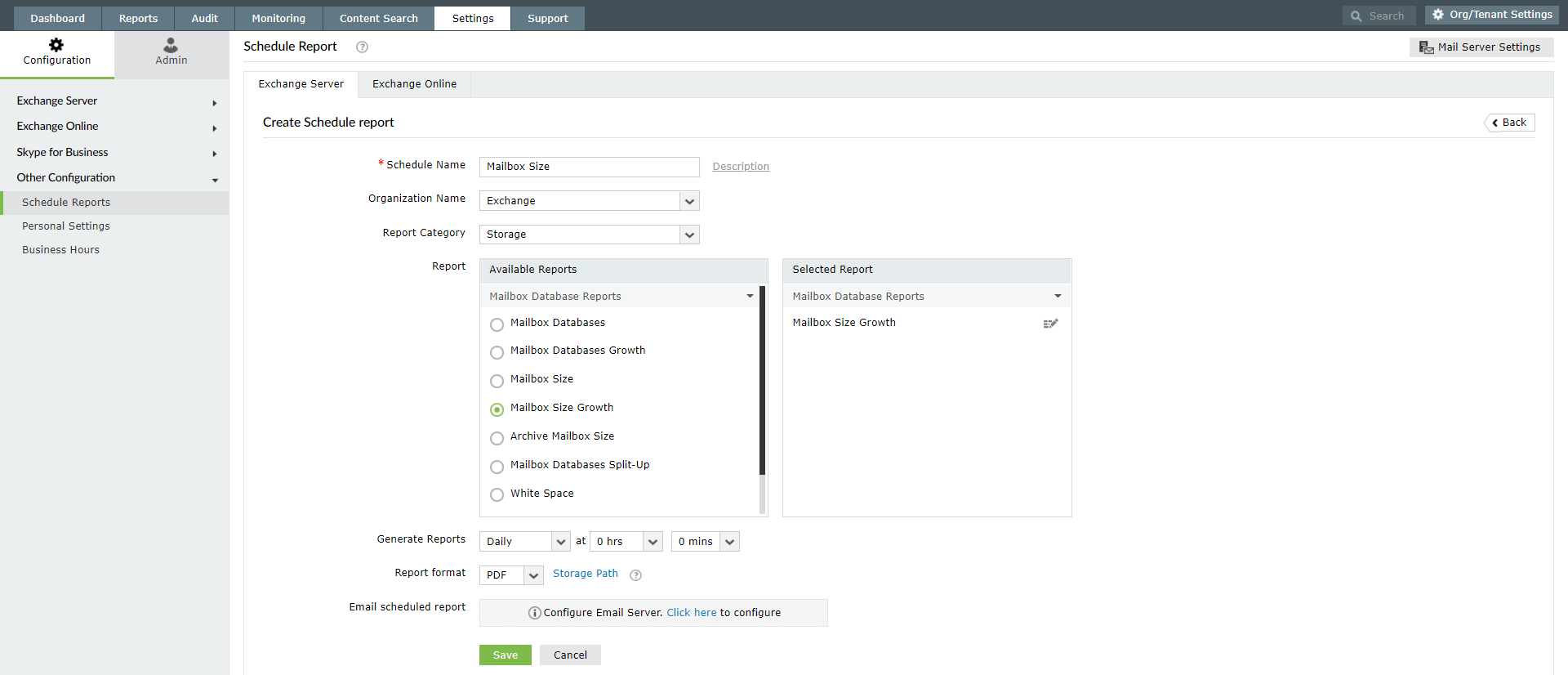
Schedule mailbox storage reports for regular updates:
- Go to the Reports tab
- Click on the Schedule Report option available on the top-right corner.
- Navigate between the Exchange Server or Exchange Online tabs as you require.
- Click on Create New Schedule.
- Enter a suitable Name for the schedule and Name of the Organization or tenant.
- Under report category, select Storage for Exchange Server and Exchange Online > Size Reports for Exchange Online.
- Set the frequency for report generate and format in which you would like to receive the report.
- Select an Email ID to which the reports must be mailed at set intervals.
- Click on Save.
Note: Reports like Mailbox Size Restrictions, Mailbox Size, Mailbox Size Growth, Current Mailbox Size vs Quota Reports can all be useful.
Thank you.
Thank you for registering with ManageEngine.
Stay informed about Exchange with Exchange Reporter Plus
- Related Products
- ADManager Plus Active Directory Management & Reporting
- ADAudit Plus Hybrid AD, cloud, and file auditing and security
- ADSelfService Plus Identity security with MFA, SSO, and SSPR
- EventLog Analyzer Real-time Log Analysis & Reporting
- M365 Manager Plus Microsoft 365 Management & Reporting Tool
- M365 Security Plus Microsoft 365 Auditing and Alerting
- RecoveryManager Plus Enterprise backup and recovery tool
- SharePoint Manager Plus SharePoint Reporting and Auditing
- DataSecurity Plus File server auditing & data discovery
- AD360 Integrated Identity & Access Management
- Log360 Comprehensive SIEM and UEBA
- AD Free Tools Active Directory FREE Tools