
 Live Demo
 Free Edition
 Download Now
Event ID 12025: MS Exchange Transport
| Event ID | 12025 |
| Category | MS Exchange transport. |
| Sub category | Internal certification. |
| Description | This event is an indication that the internal self-signed certificate used to establish mail transfer connection has expired. |
| Probable cause | Issues with the self-signed certificate for encryption. |
Need for monitoring Event ID 12025:
Event ID 12025 indicates one of the most important issues related to mail transport. In Exchange Server 2007 and above, a self-signed internal certificate is necessary for the mail transfer to occur successfully and securely. When the certificate expires, the established trust fails resulting in the generation of event 12025. It is necessary to keep a close watch on the established connection for seamless mail transfer.
How Exchange Reporter Plus helps to monitor Server transport service health:
Exchange Reporter Plus is a reporting, monitoring and change auditing tool for Exchange servers, Exchange Online and Skype for Business servers. This tool offers complete updates about the Exchange server health and mail transfer statuses. The product's simple and insightful dashboards save a lot of analysis time.
Steps to monitor Exchange Server Transport:
- Go to the Monitoring tab on the top pane.
- Navigate to Exchange Server > Servers drop-down.
- Look into the Service Status dashboard. (MSExchangeTransport section).
- Select the Server Name from the list of servers available.
- You can view if the service is fine and running or has some issue.
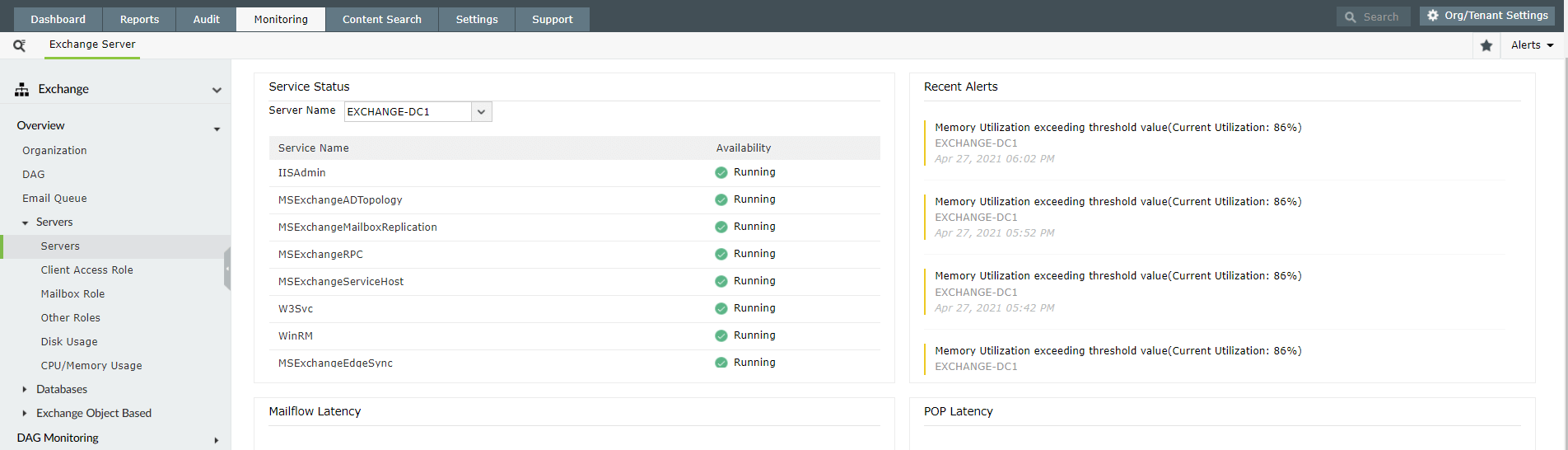
You can also configure alert profiles for the same and get real-time SMS or email notifications if Exchange Reporter Plus finds any anomalies.
Thank you.
Thank you for registering with ManageEngine.
Stay informed about Exchange with Exchange Reporter Plus
- Related Products
- ADManager Plus Active Directory Management & Reporting
- ADAudit Plus Hybrid AD, cloud, and file auditing and security
- ADSelfService Plus Identity security with MFA, SSO, and SSPR
- EventLog Analyzer Real-time Log Analysis & Reporting
- M365 Manager Plus Microsoft 365 Management & Reporting Tool
- M365 Security Plus Microsoft 365 Auditing and Alerting
- RecoveryManager Plus Enterprise backup and recovery tool
- SharePoint Manager Plus SharePoint Reporting and Auditing
- DataSecurity Plus File server auditing & data discovery
- AD360 Integrated Identity & Access Management
- Log360 Comprehensive SIEM and UEBA
- AD Free Tools Active Directory FREE Tools