
 Live Demo
 Free Edition
 Download Now
Event ID 566 – Mailbox permissions
| Event ID | 566 |
| Category | Mailbox. |
| Sub category | Permissions. |
| Description | This event logs the permissions used by a particular user during Active Directory object access. |
Event ID 566:
This Exchange event goes hand-in-hand with event ID 565 that logs the permissions requested by a user while accessing an Active Directory object. Event ID 566 logs all the permissions actually used by the user while accessing the object. Even though the object can be accessed several times and several permissions can be used, event ID 566 occurs only when a particular permission is used for the first time. Exchange Reporter Plus helps you track all permission changes made in your Exchange environment.
About Exchange Reporter Plus:
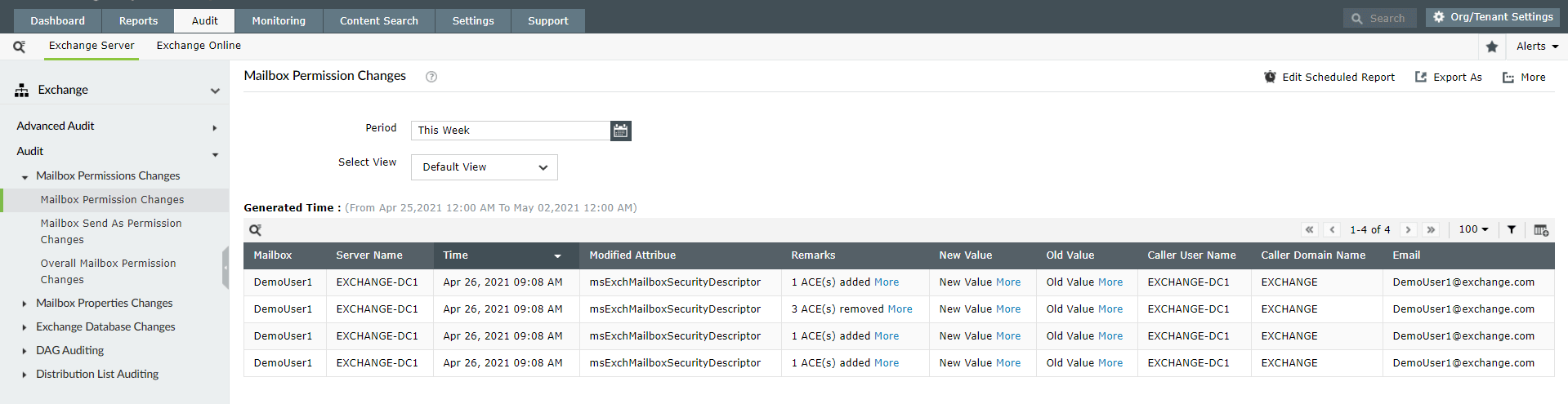
Exchange Reporter Plus is a reporting, monitoring and change auditing tool for Exchange servers, Exchange Online and Skype for Business servers. This tool offers simple and easy-to-analyse permissions changes reports. You can track the changes made by viewing the previous and the current values of permission-related attributes. The report also gives a record of the name of the user, time of modification, server, domain details and more.
Steps to generate mailbox permissions reports:
- Go to the Audit tab on the top pane.
- Navigate to Exchange Server > Advance Audit > Admin Audit Log.
- Click on the Mailbox Permission Changes report.
- Enter the period for report generation.
- Select the type of view for the report (Summary, Default, or Custom View).
Why Exchange Reporter Plus:
- Schedule reports to get regular updates about various Exchange objects.
- Export reports in any of the 4 formats: HTML, CSV, PDF and XLS.
- Add or remove columns from the report and customize them as and when you require.
- Use the advanced filter options to generate and scrutinise the reports further.
- Customise alert profiles to get immediate SMS or email notifications.
- Add new actions that you want to audit apart from the pre-defined ones.
Thank you.
Thank you for registering with ManageEngine.
Stay informed about Exchange with Exchange Reporter Plus
- Related Products
- ADManager Plus Active Directory Management & Reporting
- ADAudit Plus Hybrid AD, cloud, and file auditing and security
- ADSelfService Plus Identity security with MFA, SSO, and SSPR
- EventLog Analyzer Real-time Log Analysis & Reporting
- M365 Manager Plus Microsoft 365 Management & Reporting Tool
- M365 Security Plus Microsoft 365 Auditing and Alerting
- RecoveryManager Plus Enterprise backup and recovery tool
- SharePoint Manager Plus SharePoint Reporting and Auditing
- DataSecurity Plus File server auditing & data discovery
- AD360 Integrated Identity & Access Management
- Log360 Comprehensive SIEM and UEBA
- AD Free Tools Active Directory FREE Tools