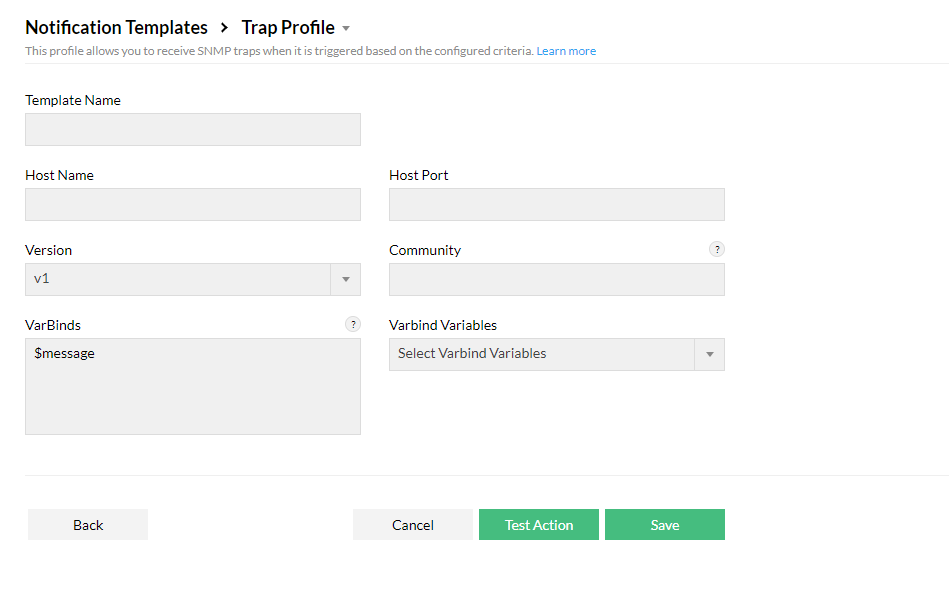
Trap Profile Notification Template


    Firewall Analyzer can be configured to forward SNMP Traps when an alert is triggered. Trap profiles are forwarded by the agent to Firewall Analyzer.

    • To create a Syslog Profile Notification Template, go to Settings > Others > Notification Template > Trap Profile.
    • Enter a Template Name.
    • Enter the Host Name, Host Port, Version (SNMP Version), Community (SNMP read community string) and Varbinds including Varbind Variables.
    • Click Test Action to test or Save to save the template.

    Firewall-Analyzer-trap-profile-Notification-template

    Thank you for your feedback!

    Was this content helpful?

    We are sorry. Help us improve this page.

    How can we improve this page?
    Do you need assistance with this topic?
    By clicking "Submit", you agree to processing of personal data according to the Privacy Policy.