

Switch port management is the process of discovering, monitoring, and controlling the ports on a network switch. Each port on a switch connects a device like a computer, printer, or IP phone, to the network.
Key takeaways:
- What it is: The process of discovering, monitoring, and controlling devices connected to each switch port.
- Why it matters: Helps prevent unauthorized access, optimize port usage, and maintain network performance.
- How it works: By mapping devices to ports, tracking status and utilization, and using automated alerts and historical records for troubleshooting and compliance.
Managing these ports helps network admins identify which device is connected to which port, track usage, detect inactive or unauthorized ports, and prevent network issues like IP conflicts or security breaches.
As enterprise networks grow, manual switch port tracking becomes time-consuming and prone to errors. Switch port management provides centralized visibility and control, helping IT teams maintain accurate device-to-port mappings, troubleshoot connectivity issues quickly, and strengthen network security.
Importance of switch port management
Every port on a switch serves as a potential entry point into your network. Knowing the status and activity of each port is essential for maintaining reliability, security, and compliance.
Each port has two distinct states:
- Administrative status, which shows whether the port is enabled or disabled by configuration.
- Operational status, which shows whether the port is physically active or inactive (up or down).
Monitoring both states helps administrators identify inactive ports, detect unauthorized devices, and prevent configuration mismatches that can disrupt connectivity.
Unmanaged or unused switch ports often become blind spots. They can be exploited by unauthorized users, or shadow IT connecting without approval, thereby creating serious security risks. Poor port visibility can also result in IP conflicts, network slowdowns, and inefficient capacity utilization.
Effective switch port capacity management ensures ports are optimally allocated to meet current and future needs, avoiding shortages during new deployments while minimizing stranded capacity. This helps IT teams plan upgrades, redistribute unused ports, and maintain seamless network connectivity.
In short, switch port management gives IT teams real-time visibility into every connected device, helping prevent unauthorized access, security breaches, and performance issues across the network.
How switch port mapping works
Switch port mapping is the process of identifying which device is connected to which port on a network switch. It works by correlating MAC and IP address data with the physical ports on switches through SNMP and other network discovery protocols.
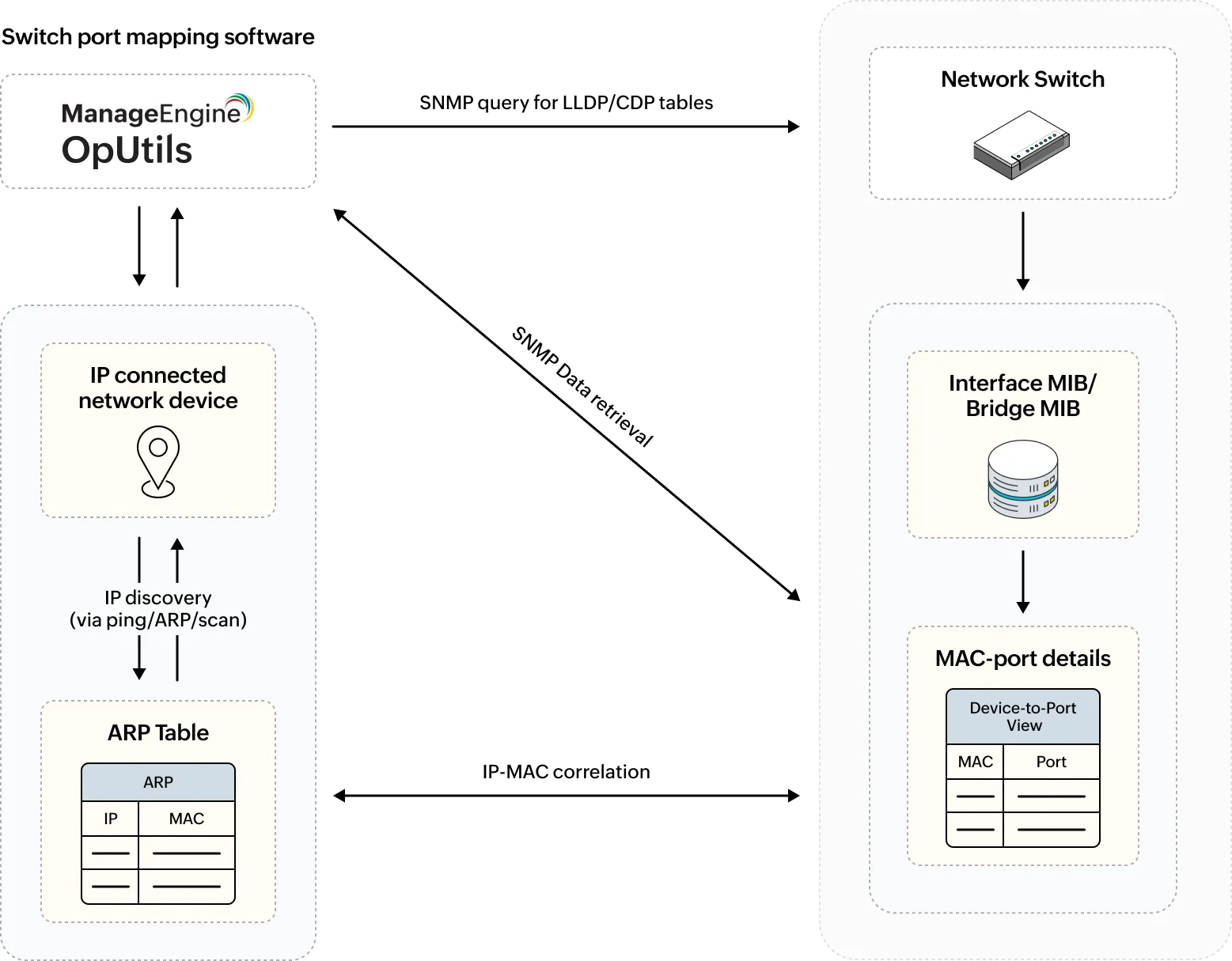
When a switch port management tool performs discovery, it sends SNMP queries to network switches to collect data from the Bridge MIB and Interface MIB. This data includes port indexes, interface names, MAC addresses, and operational statuses. The tool then cross-references this information with ARP tables and IP-MAC mappings retrieved from routers to build a complete device-to-port view.
In addition to SNMP, protocols like Link Layer Discovery Protocol (LLDP) and Cisco Discovery Protocol (CDP) enhance accuracy by sharing neighbor device details and port roles. These help identify connections even in cases where SNMP data is incomplete or inconsistent.
However, switch port mapping can face challenges. SNMP behavior varies between vendors, and differences between SNMPv1, v2c, and v3 can affect data completeness and access control. Each network vendor may use unique or proprietary MIBs, causing queries that work on one switch to fail on another.
Additionally, variations between SNMPv1, v2c, and v3 affect data access and completeness while v1 offers limited data, v2c improves efficiency, and v3 adds security controls that can restrict access if not properly configured. As a result, mapping accuracy can vary across multi-vendor environments or mixed SNMP setups.
Another limitation comes from MAC address table aging when inactive devices drop off the switch's MAC table, they disappear from the mapping results, reducing accuracy until the device communicates again.
Despite these challenges, automated switch port mapping tools continuously poll SNMP and discovery data to maintain real-time visibility across switches. To improve accuracy, many tools also perform port scanning alongside SNMP polling.
Port scans help verify whether mapped devices are reachable and actively responding, ensuring that the displayed switch port information truly reflects the real-time network state. This continuous correlation of SNMP, discovery, and scanning data enables IT teams to quickly locate devices, trace connectivity issues, and keep switch documentation consistently up to date.
Top 7 parameters to monitor for effective switch port management
Switch port management tools track multiple data points to help network administrators monitor connectivity, and device activity at the port level. These parameters ensure complete visibility into how every switch port is being used and whether it's functioning as expected.
- Port status (active/inactive): Indicates whether a port is operational (up) or not (down). Monitoring port status helps detect outages, cable issues, or intentionally disabled ports. A down or flapping port can cause downtime, broken links, or routing failures.
- Connected MAC and IP addresses: Maps each port to the device connected to it. This helps verify authorized endpoints and detect rogue systems that may consume bandwidth, bypass segmentation, or introduce security risks.
- Port speed and utilization: Shows the bandwidth capacity and usage rate of each port. Monitoring utilization helps identify congestion, bandwidth misuse, or reallocation opportunities. High utilization can cause packet drops, jitter, and slow application performance, while low utilization indicates underused ports.
- Real-time port visualization: Displays connected devices, their operational states, and physical locations in a single view. This simplifies diagnostics by helping teams quickly find bottlenecks, isolate failing links, or identify mispatched cables.
- VLAN and trunk assignments: Tracks which VLAN each port belongs to or whether it functions as a trunk. Correct assignments ensure proper segmentation and reduce broadcast traffic. Misconfigurations can cause broadcast storms, unauthorized access, or reachability issues.
- Device connection history: Maintains records of previously connected devices. This supports troubleshooting intermittent issues, tracking endpoint movement, detecting unauthorized access patterns, and meeting audit requirements.
- Power over Ethernet (PoE) status: Monitors power delivered to devices such as IP phones, cameras, and access points. This helps balance power allocation, prevent overloads, and quickly detect power delivery issues at the port level.
Types of switch port management approaches
Organizations manage switch ports in different ways depending on their network size, automation level, and available tools. These approaches range from manual command-line operations to fully automated systems with visual dashboards and reporting.
- Manual management: In smaller or legacy networks, administrators manage switch ports directly through command-line interfaces (CLI). Every status check, configuration change, and troubleshooting step must be executed manually, and documentation is maintained separately. While this method provides full control, it's time-consuming, error-prone, and difficult to scale across multiple switches.
- Semi-automated management: This approach uses SNMP-based polling tools, basic management consoles, or custom scripts to collect and present port data. These tools surface port status, connected devices, and VLAN assignments without requiring CLI access for every task, but configuration changes still require manual execution. Many organizations adopt this as a hybrid model, combining automation for visibility with manual steps for configuration to balance control, effort, and cost. Configuration backups and version control also become more common at this stage to track changes and support safe rollbacks.
- Automated management: Modern IT environments rely on dedicated switch port management tools that automate discovery, mapping, monitoring, and reporting. These platforms provide visual dashboards, real-time alerts, and intelligent reporting that eliminate manual effort. They also integrate configuration management features such as scheduled backups, role-based access control, and policy enforcement to streamline port management and ensure compliance.
By automating switch port management, organizations can significantly reduce mean time to detect (MTTD) and mean time to resolve (MTTR) network issues, as device connectivity problems and configuration changes are identified and addressed in real time rather than through periodic manual checks.
Benefits of monitoring switch ports
Proactive switch port monitoring helps IT teams maintain network reliability, security, and operational efficiency by offering complete visibility into device-to-port connections.
- Accurate hardware and port inventory management: Continuous port monitoring maintains an up-to-date inventory of switches, ports, and connected devices. It helps administrators instantly identify which devices are active, which ports are underutilized, and where new connections can be provisioned, thereby reducing guesswork and manual tracking.
- Enhanced visibility into device connections: Real-time mapping ensures every device's physical location and logical association are known, simplifying troubleshooting and capacity planning.
- Prevention of unauthorized or rogue access: Monitoring detects unfamiliar MAC or IP addresses connecting to switch ports, allowing administrators to block quickly or isolate rogue devices before they compromise the network.
- Optimized use of switch resources: By tracking port utilization, teams can reclaim unused ports, balance load across switches, and delay unnecessary hardware purchases.
- Faster root-cause analysis during outages: Historical port data helps trace faults to the exact switch and port, speeding up resolution during network incidents.
- Faster device onboarding and offboarding: With clear visibility into available and previously used ports, IT teams can quickly add or remove devices, improving IT agility and minimizing downtime during provisioning or decommissioning.
Common switch port issues
Even with proper monitoring, switch ports can encounter performance or security issues that impact network stability.
Below are some of the most frequent challenges administrators face and how to resolve them:
- Unauthorized device connections: Unused or unmonitored ports can become entry points for rogue or shadow IT devices. Disable idle ports, enable port security, or enforce 802.1X authentication to ensure only trusted endpoints can connect. Switch port management tools can automatically detect and block unfamiliar MAC addresses.
- Port congestion: High port utilization often leads to packet drops or latency. Check interface statistics for utilization spikes, analyze traffic patterns, and balance load across switches or VLANs to prevent bottlenecks. Network monitoring tools or traffic analyzers help pinpoint congestion sources and recommend redistribution strategies.
- Incorrect VLAN assignments: Misconfigured VLANs can cause connectivity failures or improper traffic segmentation. Periodically review port-to-VLAN mappings and automate configuration audits where possible. Automation platforms or configuration management tools can highlight misalignments and enforce consistent VLAN assignments across devices.
- Flapping or unstable ports: Frequent up/down transitions may indicate faulty cables, transceivers, or endpoint NICs. Inspect physical connections and test endpoints to isolate the cause. Cable testing tools and switch diagnostics like interface health or loop detection, help identify the exact failure point.
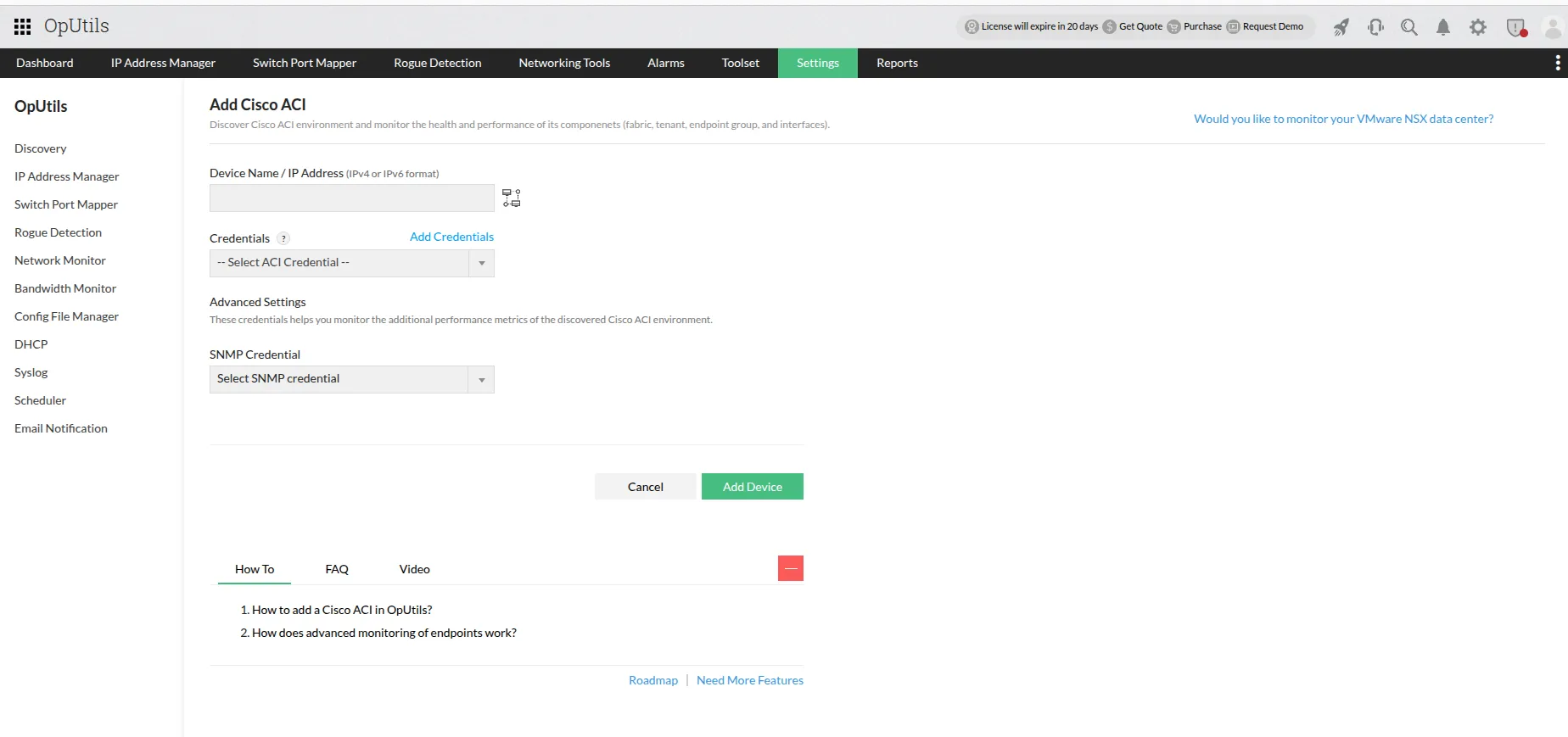
- Unreachable switches: SNMP polling or discovery failures can occur if the SNMP community string or credentials are incorrect, or if access is blocked by firewalls. Validate SNMP settings, ensure devices respond to queries, and verify network reachability. SNMP monitoring tools can flag authentication failures and help verify polling status in real time.
- High error rates: CRC or alignment errors on ports suggest duplex mismatches, poor cabling, or interference. Adjust duplex settings and replace cables to restore link stability. Port-level error dashboards or cable diagnostics available in many network management tools can quickly surface these issues.
- Port security violations: When ports exceed allowed MAC address limits or detect an unauthorized MAC, they may shut automatically. Review port security policies, clear violation counters, and investigate connected devices to confirm legitimacy. Security management or switch port control tools help identify the triggering device and automate port reactivation where appropriate.
Best switch port management tools
Switch port management tools help IT teams gain real-time visibility into network connections, track port utilization, and detect unauthorized devices.
Here are some of the widely used solutions on the market:
ManageEngine OpUtils: Offers automated switch port mapping, rogue device detection, port history tracking, and multi-vendor SNMP support - all from a single, intuitive console. Unlike many enterprise tools that come with steep pricing or feature limitations, OpUtils is affordable and offers a 30-day free trial, making it ideal for both SMBs and large organizations seeking full switch visibility without the complexity.
SW**** Switch Port Mapper: Provides visual switch-to-device mapping and port inventory reports for connected endpoints. Requires an additional add-on to enable full switch port visibility and mapping capabilities.
P*ler PR**: Uses sensors for real-time port status and performance monitoring.
WUp G***: Combines port monitoring with network topology visualization to help understand device connectivity.
When evaluating an ideal switch port management solution for your organization, consider multi-vendor compatibility, scalability, ease of automation and affordability. Tools like OpUtils deliver enterprise-grade functionality at a fraction of the cost, helping IT teams maintain accurate port documentation, detect rogue devices instantly, and improve network reliability from day one.
Strategic benefits of switch port management
Switch port management doesn't just simplify network visibility. It drives operational efficiency, strengthens governance, and supports long-term IT strategy. By automating port monitoring and documentation, organizations can better align network performance with business outcomes.
Key strategic benefits include:
- Reduced manual effort: Eliminates time-consuming cable tracing and manual port documentation.
- Optimized capacity planning and cost efficiency: Offers real-time insight into port utilization, helping teams forecast growth, avoid over provisioning, and make smarter hardware investments.
- Improved IT governance and compliance: Ensures every connected device is accounted for, supporting audit readiness and regulatory adherence.
- Reduced downtime through proactive detection: Identifies congestion, misconfigurations, or rogue connections early, preventing potential outages.
- Enhanced operational visibility: Provides centralized, accurate port data across multi-vendor switches, empowering IT teams to make faster, data-driven decisions.
When combined with automated tools like ManageEngine OpUtils, these benefits translate into stronger network reliability, simplified maintenance, and measurable cost savings.
Best practices for effective switch port management
Proactive switch port management ensures network stability, security, and scalability. By following these best practices, IT teams can maintain accurate documentation, prevent unauthorized access, and optimize hardware utilization:
- Maintain up-to-date port-to-device mapping records: Regularly update switch port maps to reflect new connections, device relocations, or decommissioned endpoints.
- Disable inactive or unused ports: Turn off ports that are not in use to reduce the attack surface and prevent unauthorized device access.
- Audit VLAN and access control configurations: Periodically review VLAN assignments, trunk settings, and ACLs to ensure correct segmentation and policy compliance.
- Enable SNMP-based monitoring and alerts: Use SNMP polling and traps to track port status changes, bandwidth usage, and link errors in real time.
- Automate switch discovery: Leverage automated tools to detect switch and port connections and status changes, minimizing human error and ensuring up-to-date visibility.
- Track and analyze historical port usage: Maintain records of port activity trends to support capacity planning, detect anomalies, and justify hardware upgrades.
Following these best practices helps network administrators stay ahead of configuration drift, maintain compliance, and ensure smooth operations across complex switch environments.
Emerging trends in switch port management
As enterprise networks grow more dynamic and distributed, switch port management is evolving beyond traditional SNMP-based monitoring. Modern solutions now focus on automation, intelligence, and unified visibility to keep pace with hybrid environments and complex device ecosystems.
Key trends shaping the future of switch port management include:
- Integration with network automation and SDN platforms: Switch port management tools are increasingly aligning with automation frameworks and Software-Defined Networking (SDN) systems to enable centralized control, policy-driven provisioning, and faster response to configuration changes.
- AI- and ML-powered anomaly detection: Artificial intelligence helps identify rogue devices, unusual traffic patterns, or port misuse in real time, enabling proactive threat mitigation and network hygiene.
- Cloud-based management dashboards: Cloud-enabled switch management platforms offer centralized visibility across multiple sites, making it easier for distributed IT teams to monitor and manage ports remotely.
- Unified IPAM and switch port management: The convergence of IP address management (IPAM) and port monitoring simplifies troubleshooting and asset tracking, providing a complete end-to-end view of device connectivity.
- Integration with network access control (NAC) systems: Modern tools integrate with NAC frameworks to enforce access policies, ensuring that only authorized users and devices connect to the network.
Together, these trends signal a shift from static port monitoring to intelligent, automated, and unified switch port management, where tools like ManageEngine OpUtils are paving the way for smarter, more secure, and scalable network operations.
How OpUtils simplifies switch port management
ManageEngine OpUtils is a comprehensive DDI solution that takes the complexity out of switch port management by offering complete visibility, automation, and control across your switching infrastructure. It helps IT teams discover, monitor, and manage ports across multi-vendor environments, eliminating manual cable tracing and ensuring accurate device-to-port mapping always.
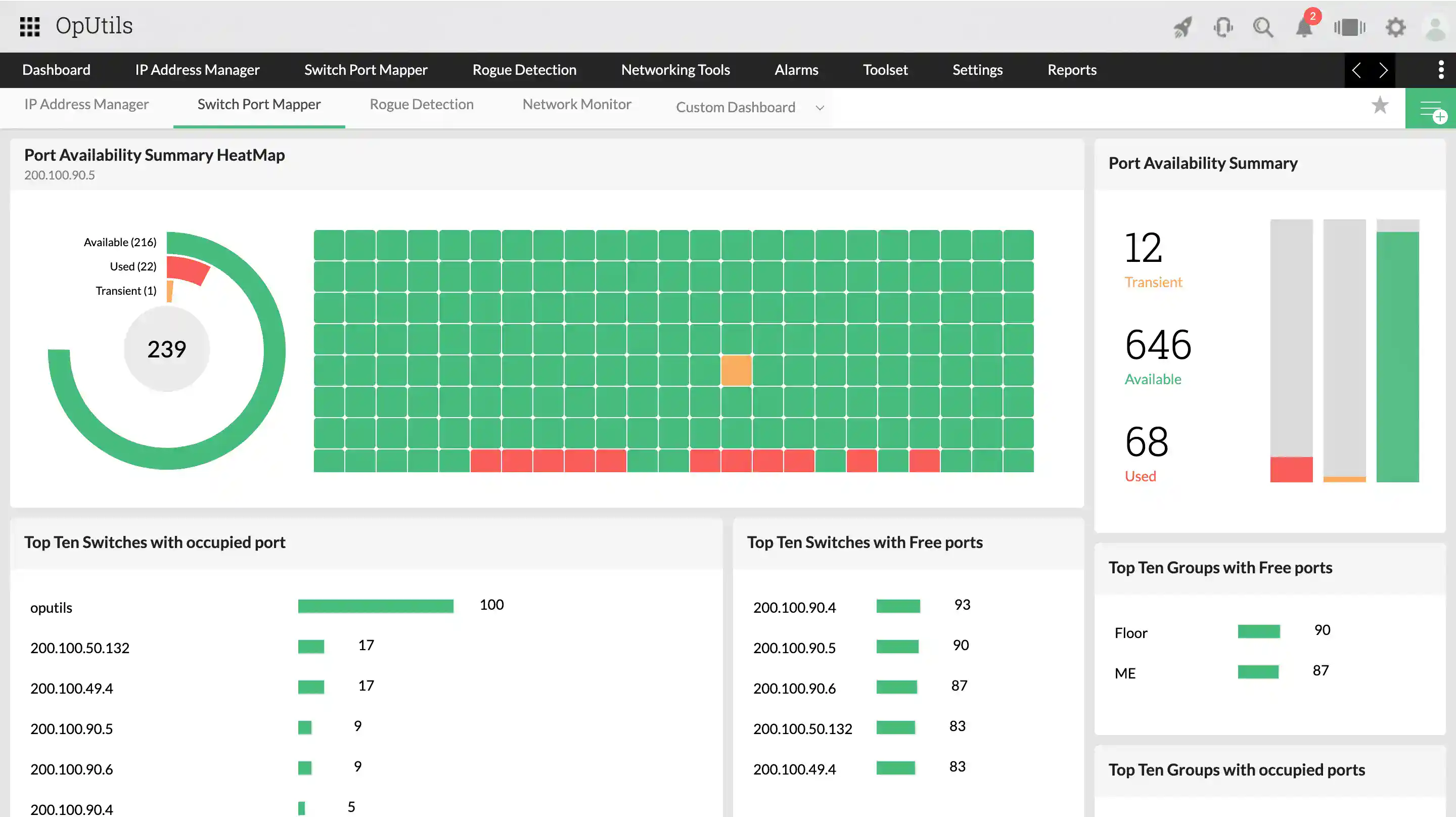
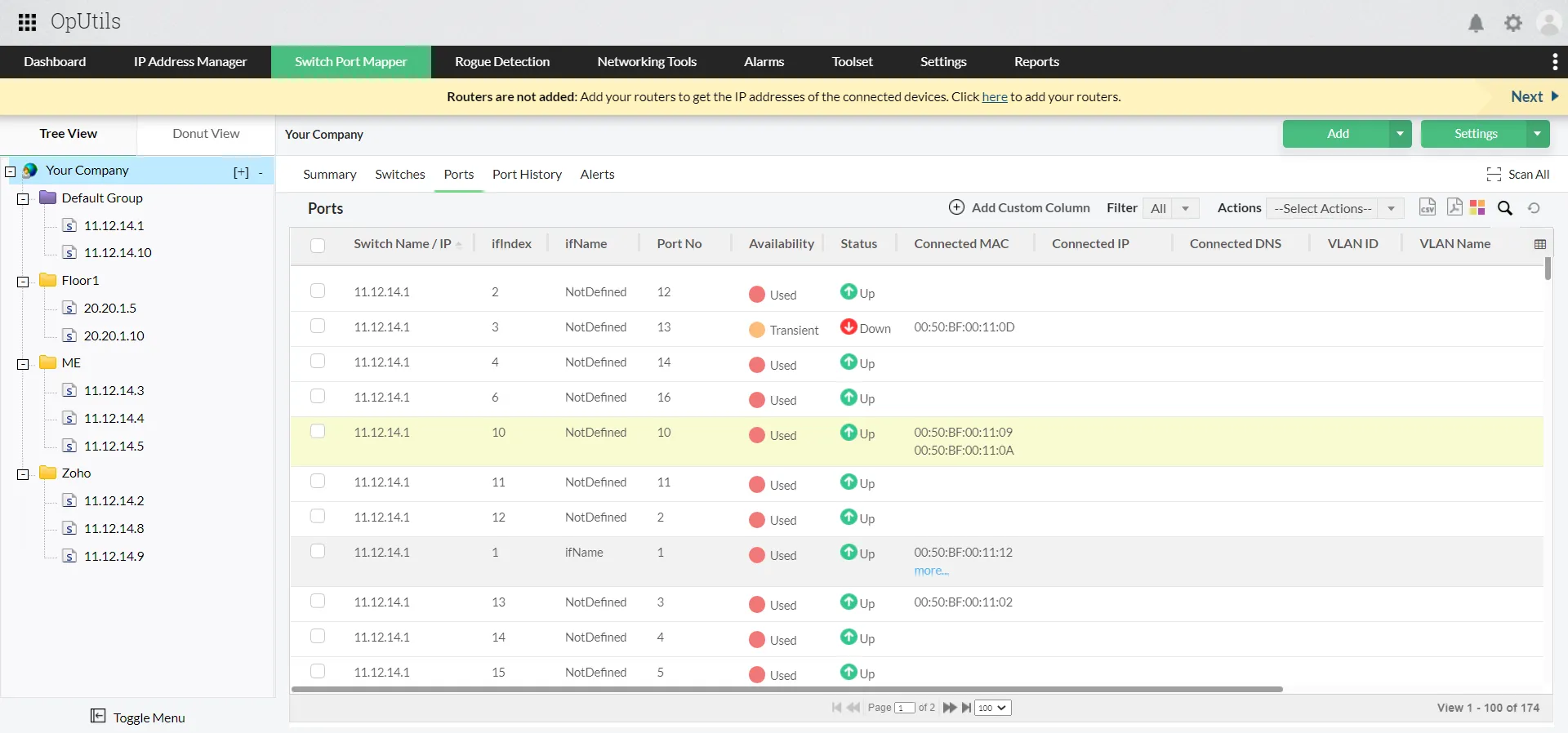
With automated switch discovery and mapping, OpUtils identifies devices connected to each switch port, tracks their MAC and IP addresses, and keeps this information updated through continuous SNMP polling. The Port View feature gives administrators a detailed look at each switch interface, port number, displaying port availability, operational status, connected MAC and IP addresses, all in real time.
OpUtils also supports different port types, including:
- Ports with multiple MAC addresses (shared ports or those connected to IP phones and PCs via a single uplink)
- Stacked ports, where multiple switches operate as one logical unit
- Devices with virtual IPs, enabling visibility even in virtualized or clustered environments
Through integrated port scanning, OpUtils performs real-time ping sweeps and device validation to confirm whether mapped endpoints are active and reachable, ensuring that displayed data always reflects the true network state. Administrators can also enable or disable interfaces directly from the console, or unmanage specific ports, all from a single console.
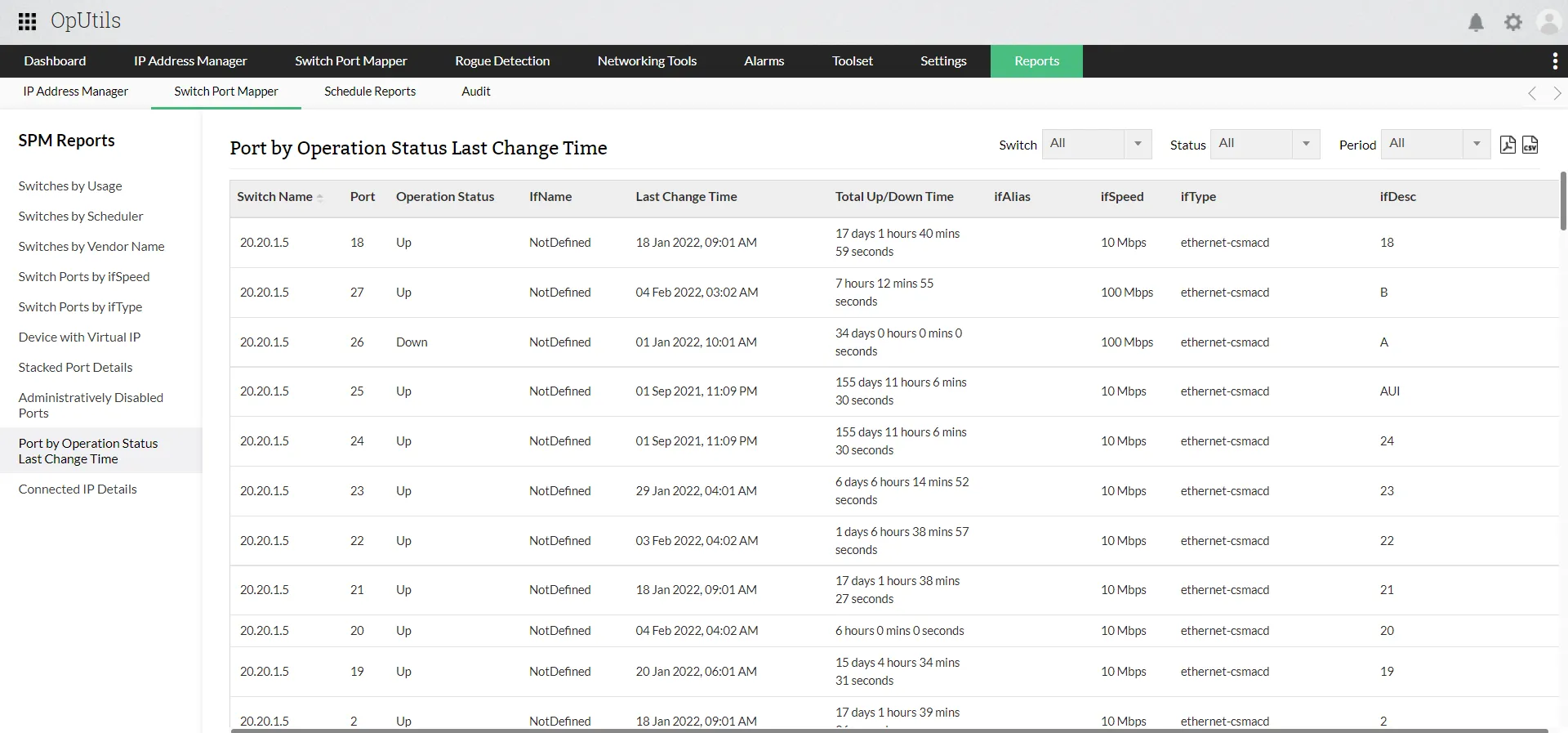
OpUtils also maintains detailed port history records, helping IT teams trace device movement, audit connection changes, and identify potential policy violations. Coupled with alerting and rogue device detection, it provides a strong layer of security and compliance enforcement.
In essence, OpUtils turns switch port management from a manual, error-prone process into an automated, insight-driven function.
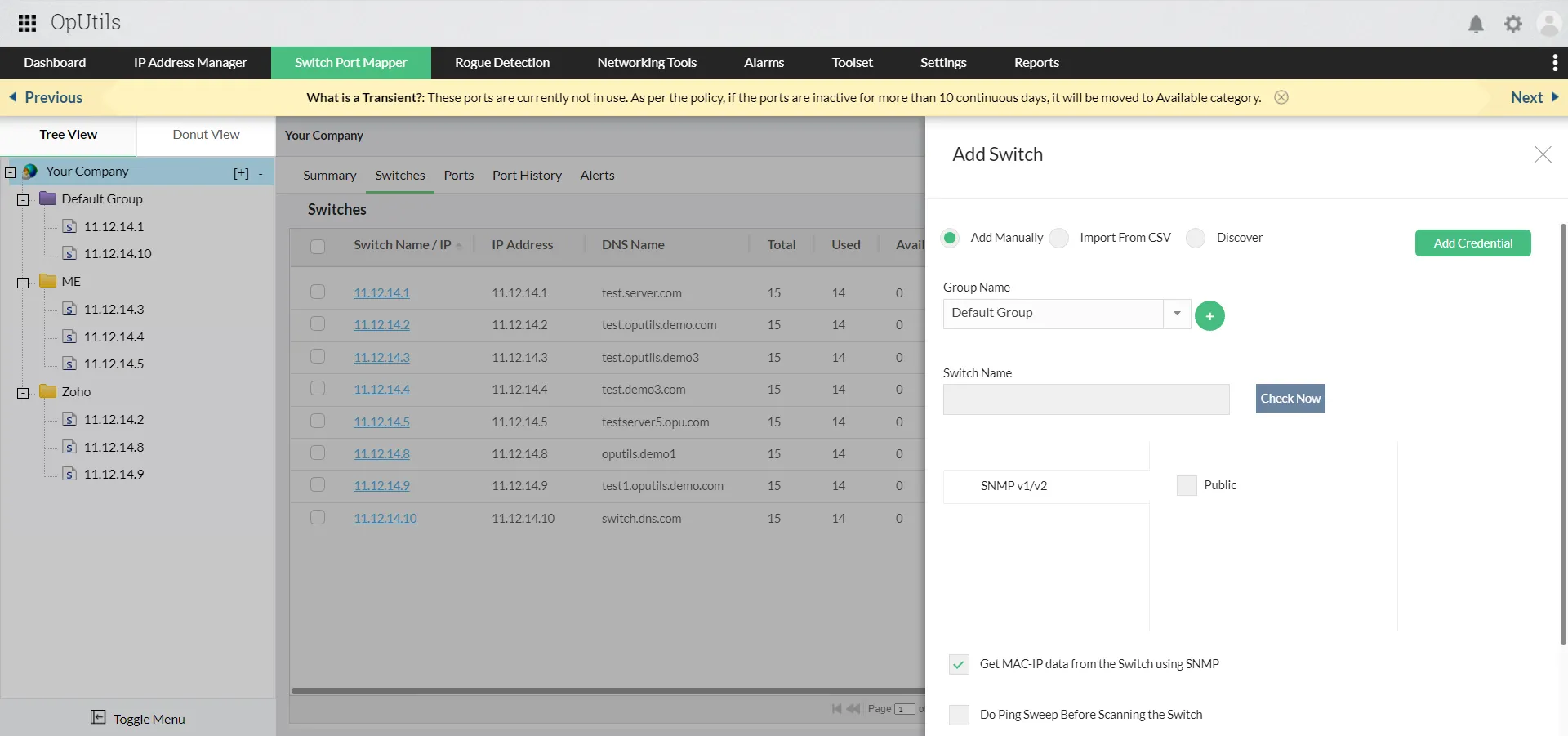
With its visual dashboards, historical tracking, multi-vendor support, and actionable controls, IT teams can ensure optimal port utilization, faster troubleshooting, and stronger network security.
Try OpUtils for free for the next 30 days or schedule a free, personalized demo and we will connect you with a product expert, right away.

By Aiswarya Giridharan,
Product Marketer, ManageEngine
Ensure simplified IP address management with OpUtils
Try OpUtils for free today