Configuring SAML SSO for Cybozu, Cybozu Office, Garoon, and Mailwise
These steps will guide you through setting up the single sign-on functionality between ADSelfService Plus and Cybozu.
Prerequisite
- Login to ADSelfService Plus as an administrator.
- Navigate to Configuration → Self-Service → Password Sync/Single Sign On → Add Application, and select Cybozu from the applications displayed.Note: You can also find Cybozu application that you need from the search bar located in the left pane or the alphabet wise navigation option in the right pane.
- Click IdP details in the top-right corner of the screen.
- In the pop-up that appears, copy the Login URL and download the SSO certificate by clicking on the Download Certificate.
Cybozu (Service Provider) configuration steps
-
Login to Cybozu with an administrator’s credentials.
(https:// <subdomain>.cybozuoffice.com/admin) -
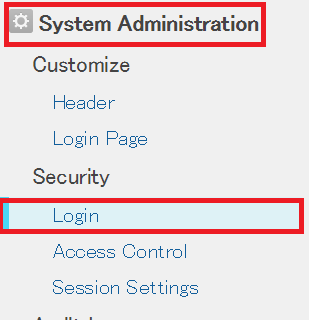
Navigate to System Administration → Security → Login.
- Navigate to SAML Authentication and toggle to enable.
-
Under SAML Authentication paste the URL, copied in Step 4 of Prerequisite, in the Login URL and Log out URL
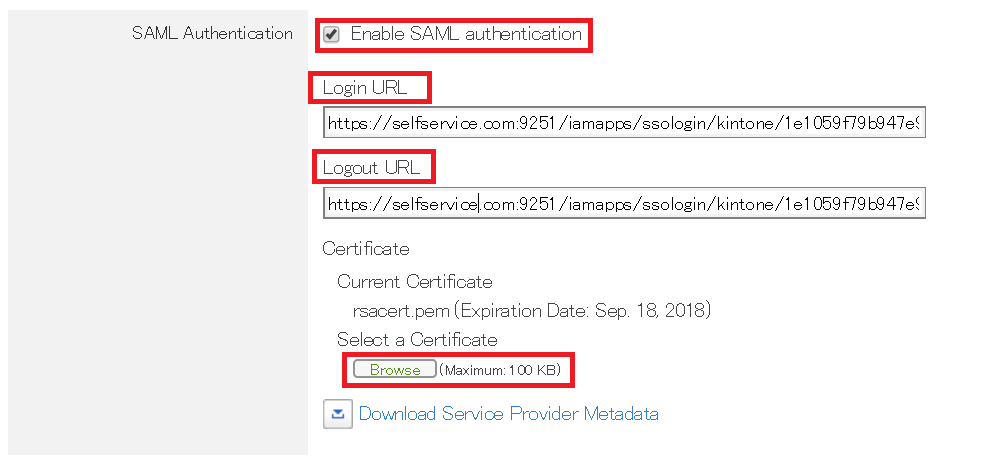
- Upload the downloaded certificate in Select a Certificate field.
- You can save the configuration.
ADSelfService Plus (Identity Provider) configuration steps
- Now, switch to ADSelfService Plus’ Cybozu configuration page.
- Enter the Application Name and Description.
-
In the Assign Policies field, select the policies for which SSO need to be enabled.
Note: ADSelfService Plus allows you to create OU and group-based policies for your AD domains. To create a policy, go to Configuration → Self-Service → Policy Configuration → Add New Policy.
- Select Enable Single Sign-On.
- Enter the Domain Name of your Cybozu account. For example, if you use johndoe@thinktodaytech.com to log in to Cybozu, then thinktodaytech.com is the domain name.
- Enter Cybozu admin account SP-Identifier in the respective field.(https://<SP_Identifier>.cybozuoffice.com)
- In the Name ID Format field, choose the format for the user login attribute value specific to the application.
- Click Add Application
Note: Use Unspecified as the default option if you are unsure about the format of the login attribute value used by the application
Note: For Cybozu, single sign-on is supported for SP and IDP initiated flow.