Password security
Strong password security is the foundation of identity protection. ManageEngine ADSelfService Plus offers a complete set of tools that enables administrators to enforce robust password practices, ensure periodic password renewals, and enhance the overall security of enterprise endpoints. Below are the key configurations to implement comprehensive password security.
Step 1: Create a self-service policy
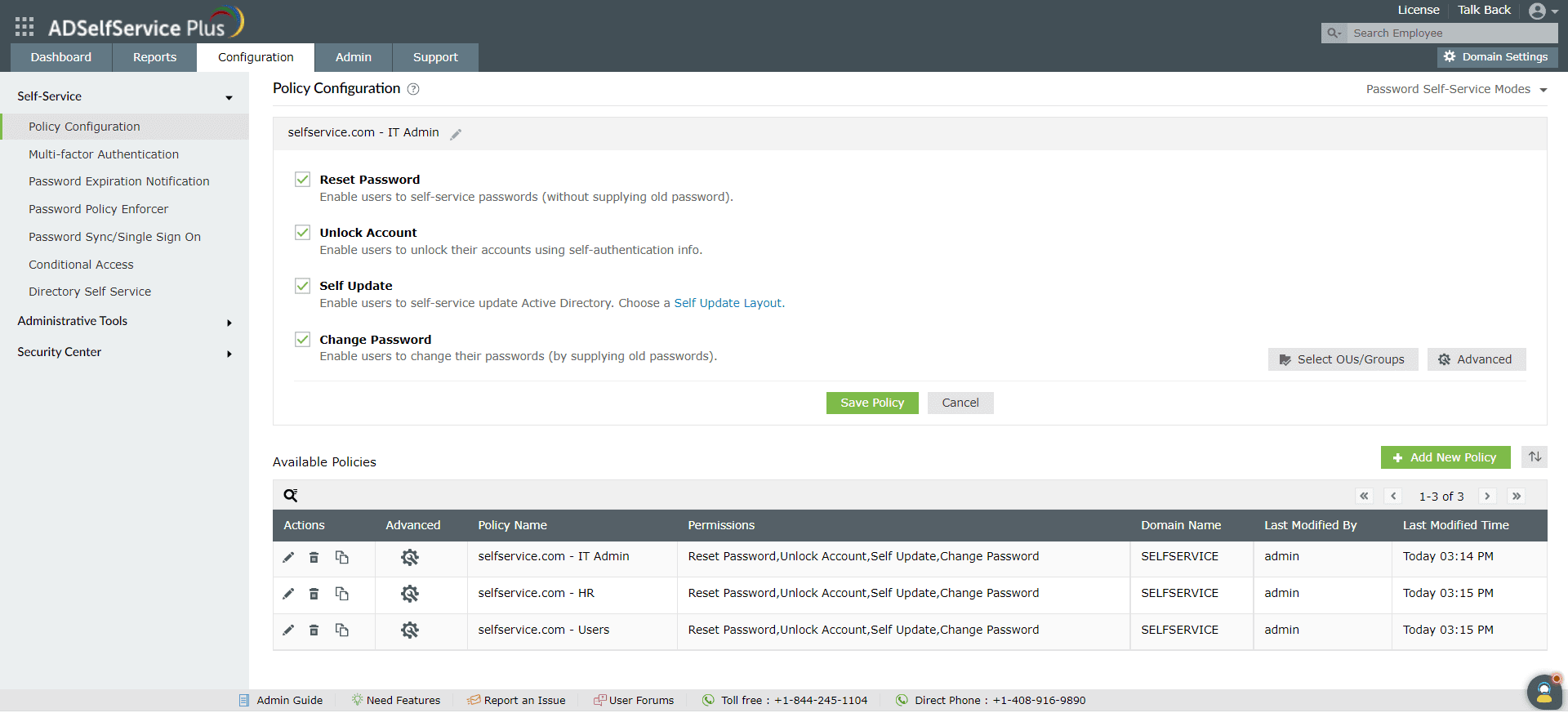
Self-service policies are the foundation of all configurations in ADSelfService Plus. A policy links a specific set of users defined by domains, OUs, or groups to authorized self-service actions and security configurations. You must define the target audience via a policy before enforcing password complexity rules.
To create a self-service policy:
- Navigate to Configuration > Self-Service > Policy Configuration.
- Click +Add New Policy.
- Enter a descriptive policy name that reflects the target users (for example, Remote users policy or Privileged accounts policy)
- Select the boxes for the self-service features you want to enable, such as Reset Password or Unlock Account.
- Click Select OUs/Groups and assign the policy to the desired users. You can apply policies based on OU, group membership, or a combination of both.
TipCreate separate policies for different user roles to enforce stricter security controls on privileged accounts.
- Click Save Policy.
Step 2: Set up the Password Policy Enforcer
Weak or reused passwords expose organizations to significant risks. The ADSelfService Plus Password Policy Enforcer enables administrators to define and apply advanced password policies that can be tailored to organizational standards.
You can configure granular password rules such as:
- Mandatory inclusion of numeric, special, and uppercase characters
- Restrictions on dictionary words, palindromes, and patterns
- Enforcing password history to prevent the reuse of old passwords.
Once configured, users see an interactive password creation interface that validates password strength in real time. These custom policies can be enforced consistently across supported on-premises and cloud applications integrated via password synchronization.
To enforce policies during password changes outside the web portal, install the ADSelfService Plus login agent. This agent extends the password policies to the Windows login screen (Ctrl+Alt+Del) and the Active Directory Users and Computers (ADUC) console.
To configure password policy rules:
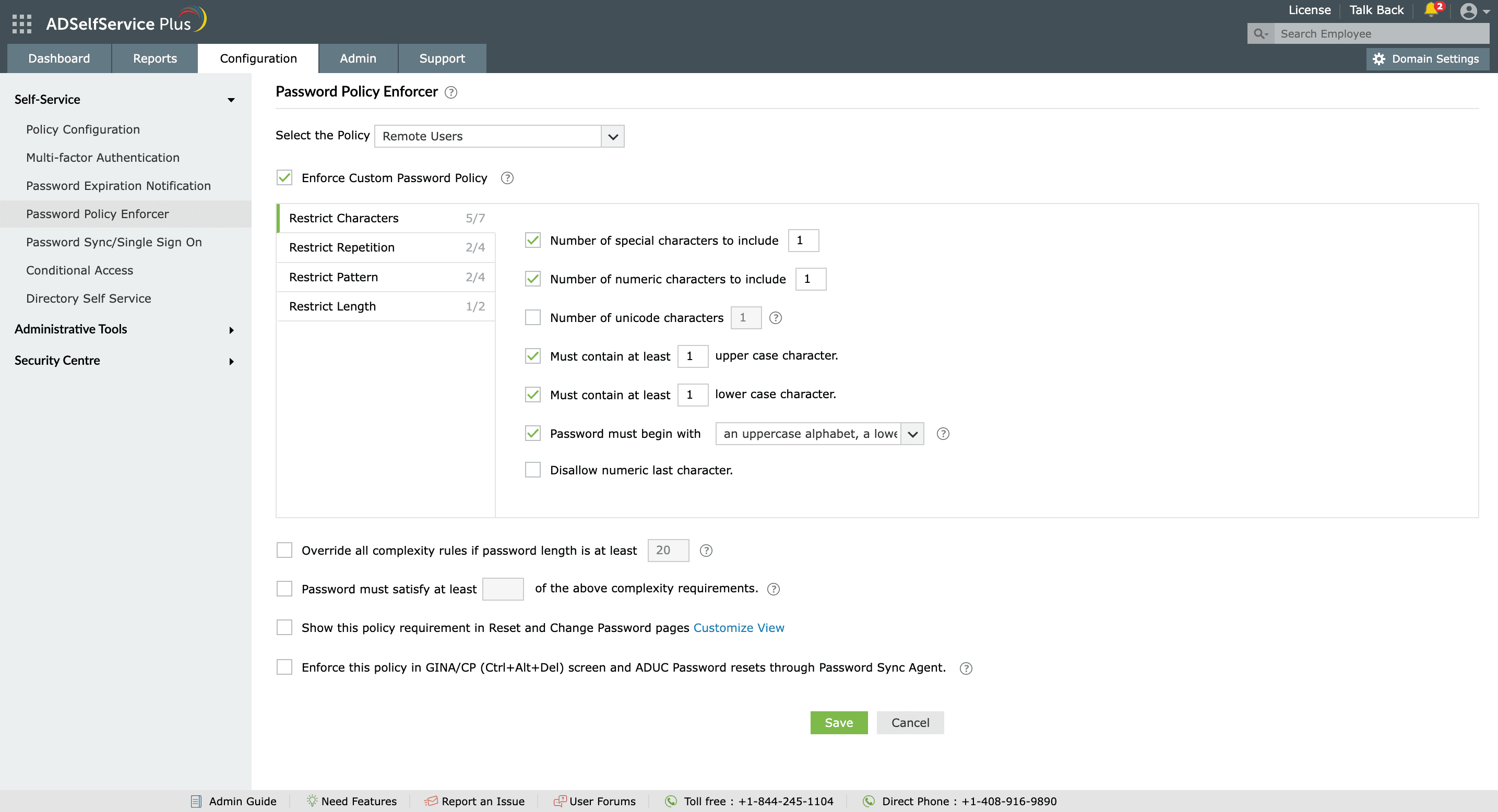
- Navigate to Configuration > Self-Service > Password Policy Enforcer.
- Select the policy you want to apply the password rules to.
- Enable the Enforce Custom Password Policy option.
- Define your desired complexity settings, including:
- Allowed or restricted character types
- Prevention of character repetition and reuse
- Enforcement of password history
- Blocking of dictionary words, palindromes, or common patterns
- Configuring minimum and maximum password length
- Click Save to apply the changes.
Step 3: Configure password expiration notifications
Regularly updating passwords reduces the risk of credential-based attacks. However, users often overlook password expiration deadlines, leading to account lockouts and downtime.
The Password Expiration Notification feature ensures users receive timely reminders before their passwords or accounts expire. Notifications can be delivered through email, SMS, and push messages, keeping users informed and preventing disruptions to account access.
To configure password expiration notifications:
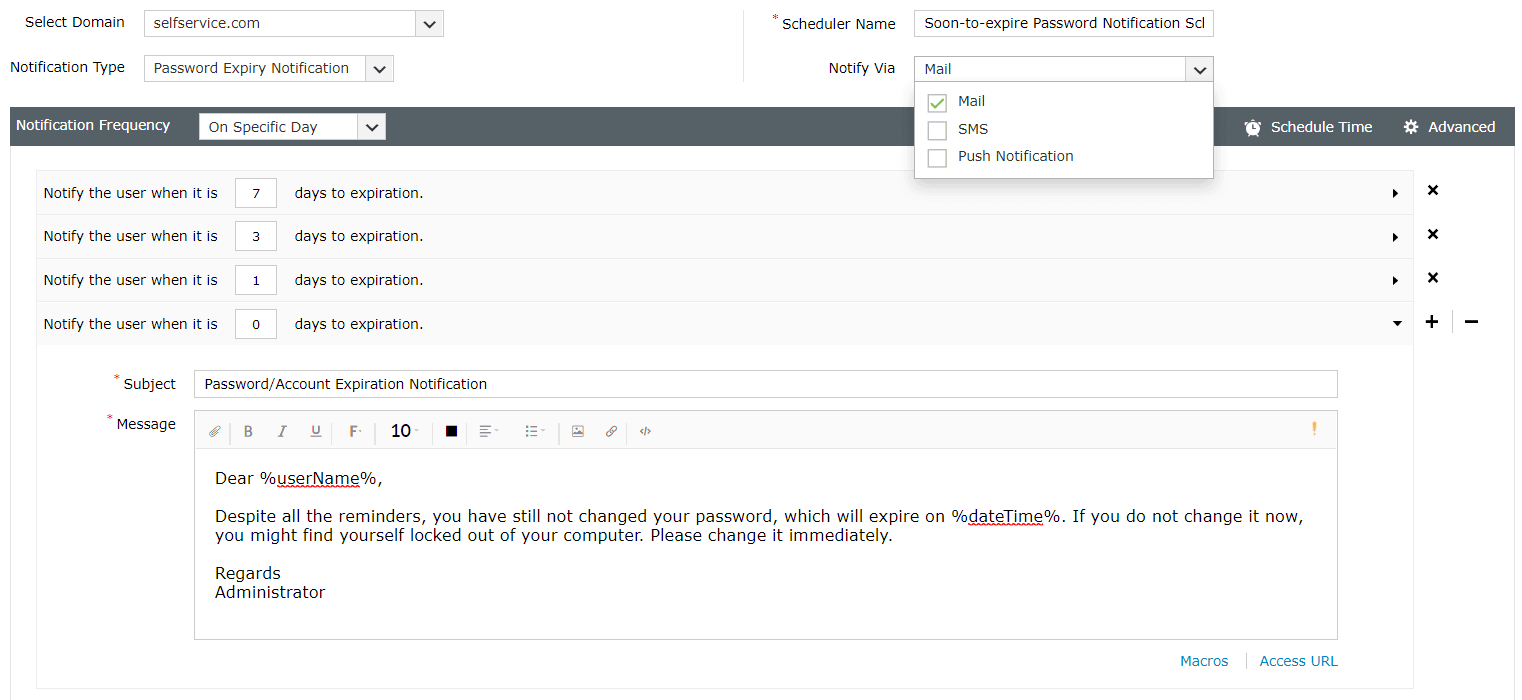
- Navigate to Configuration > Self-Service > Password Expiration Notification.
- Click Add New Notification button in the top-right corner.
- Select the target domains, OUs, or groups for the notification.
- Choose the notification type (password expiry or account expiry).
- Assign a descriptive scheduler name.
- Choose one or more notification methods (email, SMS, or push notification) and set the delivery frequency and time.
- Specify the number of days before expiry to trigger the alert.
- Customize the notification subject and message content. Use macros to personalize messages for each user.
- Click Save to activate the notification scheduler.
Best practices for password security
Complement the password controls with a strong security strategy.
Adopt layered protection: Combine password policies with MFA for additional defense against credential theft.
Monitor and prevent compromised passwords: Use the Have I Been Pwned? integration in ADSelfService Plus to automatically block passwords known to be exposed in breaches.
Use passphrases over complex passwords: Encourage users to create longer, memorable passphrases instead of short, complex passwords.
Set realistic complexity requirements: Avoid overly restrictive password rules that lead to user frustration and unsafe storage practices.
Audit regularly: Use ADSelfService Plus reports to review password reset logs and policy compliance. Look for signs of abuse, accounts with frequent lockouts, or other suspicious activity.