Active Directory MFA

Improve your security posture using MFA with Active Directory.

Download Now 
 

Active Directory MFA that powers up your cyber protection

Implementing multi-factor authentication (MFA) for Active Directory user identities reduces the attack surface across your network and protects your business by requiring a higher level of identity assurance. With ManageEngine ADSelfService Plus, you can effortlessly deploy MFA for Active Directory, securing all users and systems across both cloud and on-premises applications and endpoints while strengthening your overall security posture.
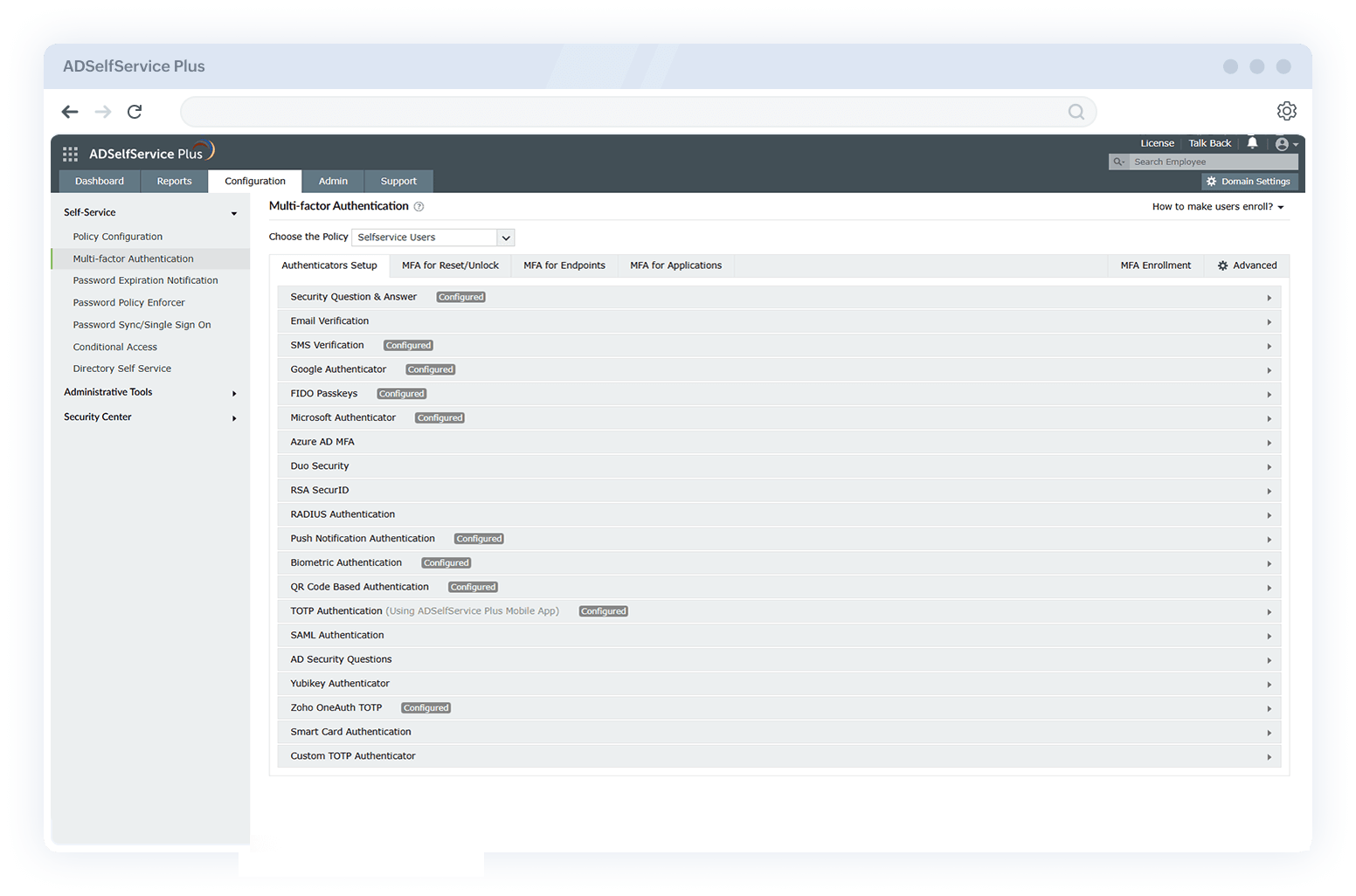
  • Authenticators in ADSelfService Plus for Active Directory MFA.
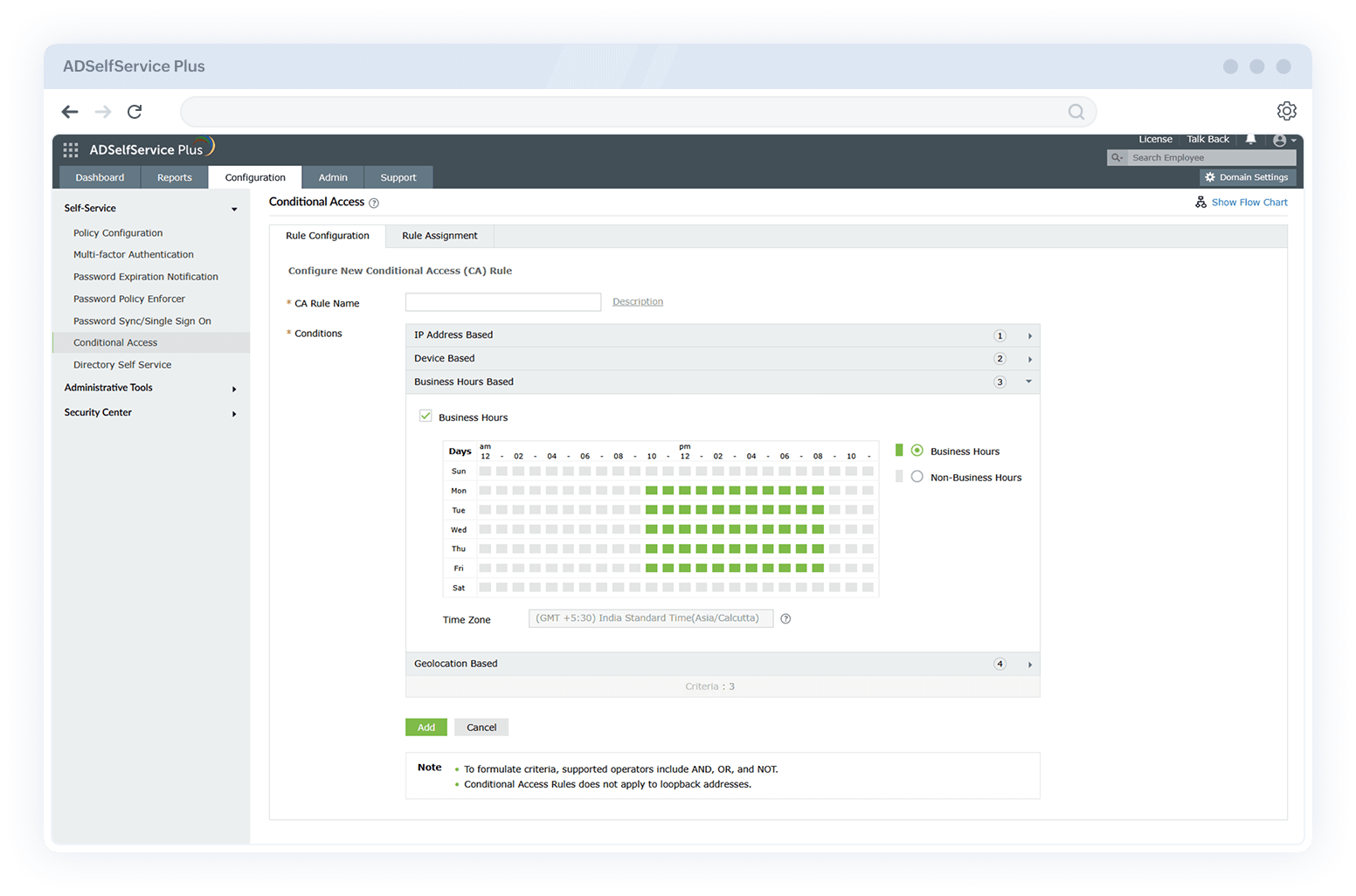
  • Dynamic authentication configuration in ADSelfService Plus.
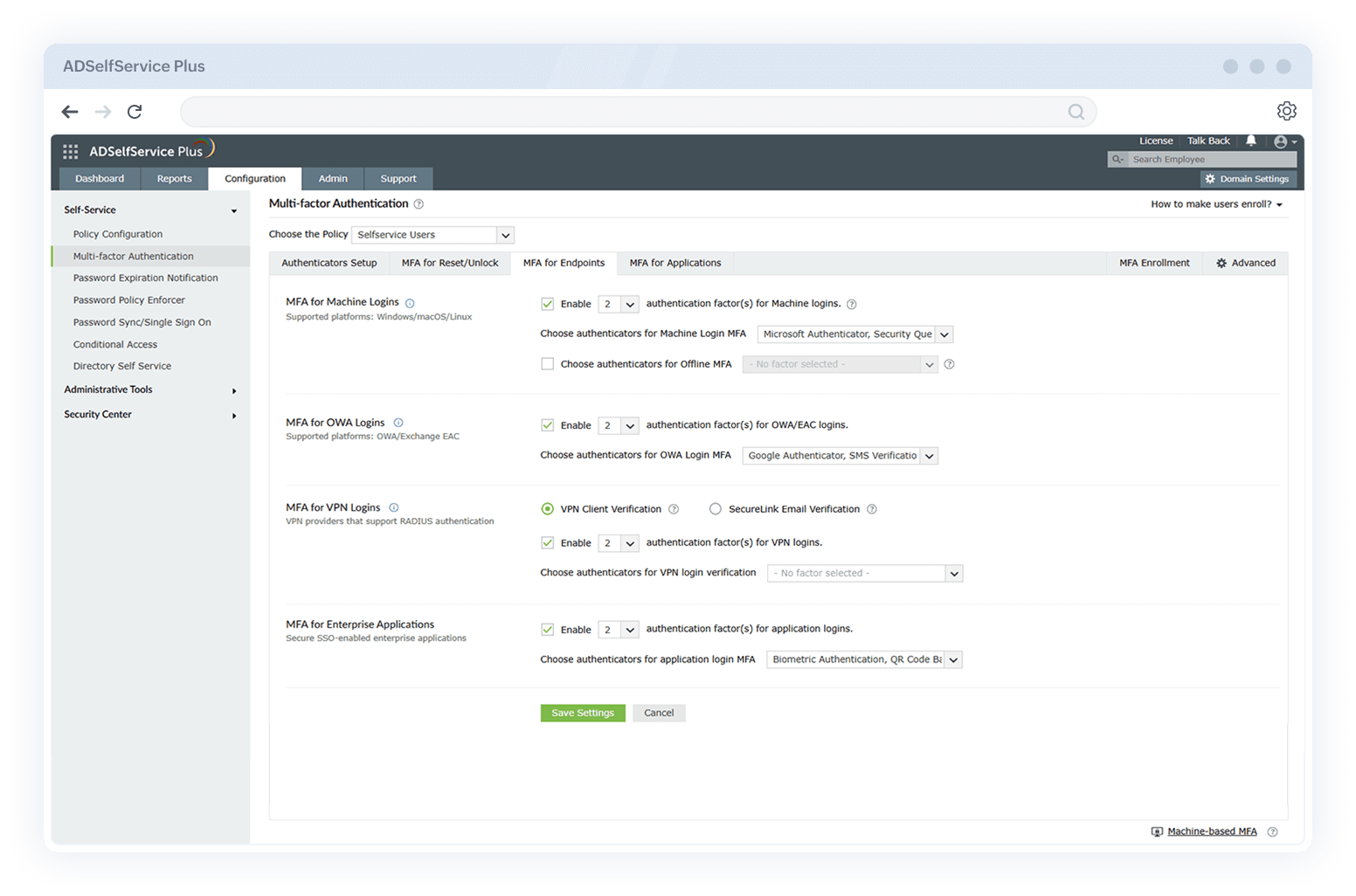
  • MFA for Active Directory endpoint configuration in ADSelfService Plus.

Comprehensive protection for Active Directory

Secure Windows, Mac, and Linux endpoints connected to your Active Directory domain

Enforce MFA during machine logins across Windows, macOS, and Linux systems to validate user identities and seamlessly integrate endpoint protection into your Active Directory environment.

Enable dynamic authentication for privileged accounts based on risk factors

Leverage conditional access policies to enforce stronger MFA for high-risk or privileged sessions. Authenticate users based on real-time risk factors like geolocation, time of access, device used, or IP address.

Ensure protection for remote users with offline MFA

Allow secure logins for remote or traveling users, even without internet connectivity. Ensure consistent identity verification regardless of location or network status.

Protect VPN, RDP, UAC, and OWA access

Add MFA layers to VPN, RDP, UAC prompts, and OWA logins to block credential-based attacks. Ensure only verified users can access critical systems and services remotely or locally.

Safeguard critical servers with machine-centric MFA

Apply machine-based MFA to secure logins to sensitive servers and workstations. Limit access to mission-critical infrastructure based on user, device, and network context.

ADSelfService Plus integrates strong MFA with Active Directory to deliver holistic security and prevent unauthorized access. It offers comprehensive protection through robust MFA controls and real-time monitoring.

Seamless MFA integration with your existing Active Directory setup

ADSelfService Plus works natively with your on-premises Active Directory for seamless MFA enforcement. It requires no complex reconfigurations; just install it and secure user access instantly.

Tight Active Directory integration—no schema extensions or domain-wide changes

Integrate ADSelfService Plus directly with Active Directory without altering its schema or requiring major changes. Maintain your existing domain structure while enhancing authentication.

No need to integrate with Microsoft Entra ID or other cloud services

All MFA capabilities are delivered on-premises without relying on cloud identity providers, making ADSelfService Plus ideal for organizations with strict data residency or compliance requirements.

Simple deployment

Set up MFA for your Active Directory in minutes with an intuitive UI and ready-to-use configurations. ADSelfService Plus supports quick integration into existing environments.

How does Active Directory MFA work using ADSelfService Plus?

When an Active Directory user tries to log in to their Windows, macOS, or Linux machine, here’s how ADSelfService Plus' MFA works:

  • The user enters their Active Directory username and password, which are verified using the domain controller or cached credentials.
  • If the credentials are valid, the user is taken through the MFA steps configured by the administrator.
  • ADSelfService Plus checks the user’s enrollment and applicable policy, then prompts them with the required MFA authenticators from a list of 20 supported options.
  • Once MFA is successfully completed, the user gains access to their machine.

A complete list of authenticators supported by ADSelfService Plus

Security questions and answers

Users enroll in ADSelfService Plus by answering several user-specific questions; the answers are then stored securely in the ADSelfService Plus database after encryption. To reset their password or unlock their account, the users are required to prove their identity by answering the questions previously provided. IT admins can further strengthen identity verification with options to prevent users from using the same answers to multiple questions, or any word from the questions, and other parameters.

SMS and email verification codes

When users attempt to reset their passwords or unlock their accounts, a verification code is sent to their mobile number or email address. IT admins also have the option to send a secure link via email that enables the user to reset their password, or to specify the number of invalid attempts a user can enter before they are temporarily blocked from logging in. To send the password reset link, IT admins can configure ADSelfService Plus to acquire the mobile number and email address information from the corresponding Lightweight Directory Access Protocol (LDAP) attributes in Active Directory (AD).

Google Authenticator

ADSelfService Plus supports Google Authenticator, a widely-used, third-party authentication application for mobile phones. Users enroll with ADSelfService Plus by scanning a QR code. When performing any self-service operation, users are required to open the app and enter the code displayed in Google Authenticator to prove their identity.

Microsoft Authenticator

ADSelfService Plus supports Microsoft Authenticator, a widely-used, third-party authentication application for mobile phones. Once users are enrolled in ADSelfService Plus, they can prove their identity during password self-service actions and endpoint logins by entering the code displayed in Microsoft Authenticator.

YubiKey Authenticator

ADSelfService Plus supports YubiKey, an authentication device that identifies itself as a keyboard, and delivers a one-time password. Once enrolled, users can use the YubiKey device to prove their identity during password self-service actions and endpoint logins.

Using YubiKey to prove identity from

  • 1. Workstation: Users plug in the YubiKey device to their desktop or laptop, place the cursor in the corresponding field, and press or hold the button on the plugged-in YubiKey device. The code is automatically updated.
  • 2. Mobile device: When users tap their YubiKey device with their mobile devices, they are redirected to a page displaying a passcode. They copy the passcode and paste it in the respective field to prove their identity.
Load More

Duo Security

ADSelfService Plus supports Duo Security for MFA. Users are first required to enroll with Duo Security. When this authentication technique is enabled and users attempt to reset passwords or unlock accounts, they are required to select a mode of communication (push notification, SMS, or call) through which Duo Security sends a verification code. Upon successful verification, users can employ password self-service to manage their password and accounts.

RSA SecurID

ADSelfService Plus can be integrated with RSA SecurID to provide protected authentication for users trying to access a network resource. When resetting a password or unlocking an account, users can use the security codes generated by the RSA SecurID mobile app, hardware tokens, or tokens received by email, or SMS to log in to ADSelfService Plus.

RADIUS

ADSelfService Plus enables IT admins to add RADIUS as an additional resource for user authentication. Users are required to provide their RADIUS passwords to authenticate themselves. Once their accounts are verified, users can perform self-service operations, or advance to the next authentication factor as required by the protocol.

Push notifications

This is one of the easiest and quickest methods of authentication. With push notifications enabled, users will receive a login request sent fromADSelfService Plus to their registered mobile device. They can either approve the authentication request, or reject it if they did not initiate the request. Once enrolled, users can also reset their password, or unlock their account from their mobile app using push notifications.

Fingerprint authentication

A person's fingerprints are unique, and fingerprint authentication is one of the easiest, yet most secure authentication methods. If a user's registered mobile device has a fingerprint sensor, they can use their fingerprint to authenticate password resets, and account unlocks from the ADSelfService Plus mobile app.

Face ID authentication

Biometrics authentication is one of the most foolproof authentication techniques available today. ADSelfService Plus supports identity verification through Face ID (facial recognition) in iOS mobile devices for users that have installed and set up the ADSelfService Plus mobile app on their iPhone.

QR code-based authentication

The ADSelfService Plus mobile app is all that users need to use QR codes for authentication. Users can simply scan the QR code displayed on their ADSelfService Plus web portal from their registered mobile device to complete the process.

Time-based one-time password (TOTP)

One of the most commonly used methods of authentication is TOTP. ADSelfService Plus' mobile app generates TOTPs that change every minute. Users are required to enter the 6-digit passcode during the authentication process within a minute to complete their identity verification.

AD-based security questions

ADSelfService Plus enables IT admins to establish Active Directory-based security questions as one of the MFA methods to verify user identity during a self-service password reset. When this method is enabled, the security questions are linked to an Active Directory attribute, and users are successfully authenticated when their answers match that specific attribute's value. For example, assume that the IT admin has selected "What is your social security number?" as an AD-based security question. Whenever the user attempts a password reset, they're required to enter their social security number as an answer, the specified value of the custom attribute. If entered incorrectly, the password reset operation is canceled. Since this technique utilizes the users' Active Directory attributes, they need not enroll with ADSelfService Plus separately.

FIDO2 Passkeys

FIDO2 passkeys offer passwordless, phishing-resistant authentication using public key cryptography. Users can log in with a biometric or PIN on trusted devices. It enhances security while simplifying the user login experience.

Microsoft Entra ID MFA

This method adds a second layer of authentication using Microsoft Entra ID (formerly Azure AD). Users verify identity through methods like phone calls, text codes, or app notifications. It protects accounts from unauthorized access with minimal user friction.

SAML Authentication

SAML enables single sign-on (SSO) by passing authentication data between an identity provider and ADSelfService Plus. Users can access services without managing multiple credentials. It improves user convenience and strengthens identity federation.

Smart Card Authentication

Smart card authentication requires users to log in using a physical card and associated PIN. It provides strong two-factor authentication for secure access to self-service features. Ideal for highly regulated environments demanding strict identity verification.

Key benefits of using MFA for Active Directory
with ADSelfService Plus

Enable granular MFA policies

Allows IT admins to enforce different MFA methods for users based on their OU, domain, or group using a preconfigured authentication workflow.

Implement automated or forced enrollment options

Automatically prompts users to enroll in MFA during login or enforce mandatory enrollment policies to ensure complete coverage without manual intervention or delays.

Reduce reliance on passwords

Strengthens identity assurance by shifting toward passwordless and biometric authentication methods, like FIDO2 passkeys, minimizing password-related risks.

Improve user experience and security

Balances security and convenience by providing 20 different authentication methods, allowing users to choose from familiar, secure MFA options.

Keep track with comprehensive reports

Helps monitor MFA enrollment status, authentication attempts, and failures with detailed, audit-ready reports to gain visibility into user activity and compliance across your Active Directory environment.

Ensure regulatory compliance

Helps meet major compliance standards like NIST SP 800-63B, the NYCRR, the PCI DSS, the GDPR, and HIPAA by enforcing strong, adaptive authentication policies.

Trusted by


Get ADSelfService Plus
and solve all your password management troubles.

Download Now 
×

Thank you for downloading!

Your download should begin automatically in 15 seconds. If not, click here to download manually.

Start your 30-day free trial

  •  
  • *
     
  •  
  •  
  •  
  • By clicking 'Submit' you agree to processing of personal data according to the Privacy Policy.