How does MFA for OWA logins work?
To configure MFA for OWA and EAC logins, the ADSelfService Plus' OWA connector must be installed in the Exchange server. The connector acts as the intermediary between the Exchange server and ADSelfService Plus to enable MFA during OWA and EAC logins. Once these requirements are fulfilled, the process shown below takes place:
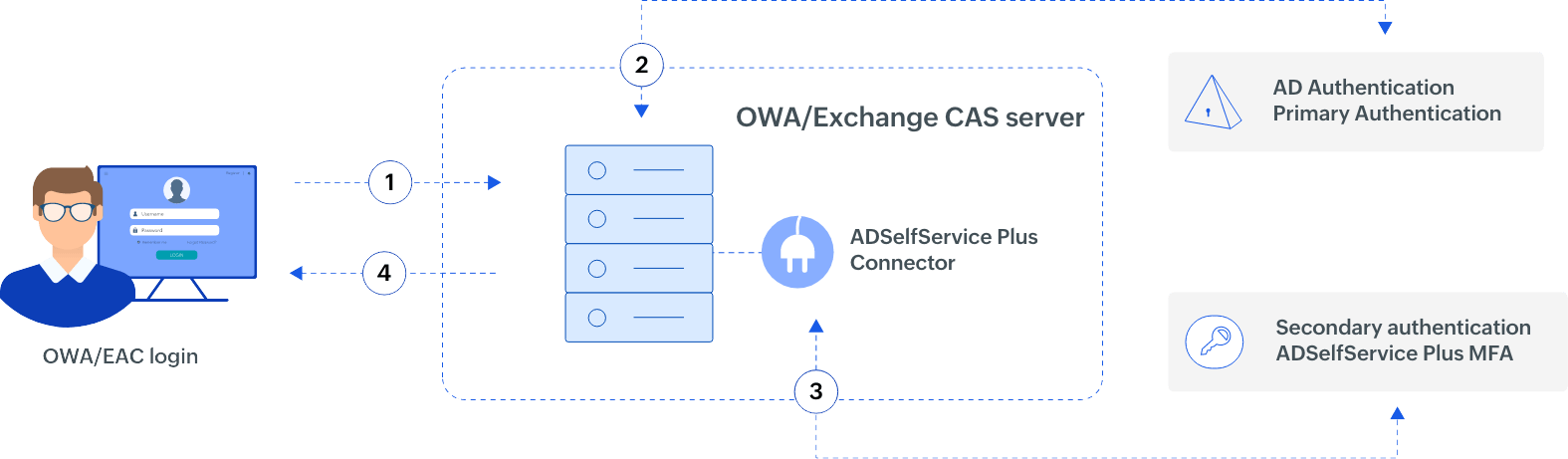
- The user attempts to login to OWA or the EAC.
- If this is successful, the OWA application passes a request to the ADSelfService Plus connector which informs ADSelfService Plus to proceed with the authentication factors.
- The user is asked to complete the primary authentication in OWA application.
- If the user completes all the required authentication factors successfully, they are logged in to OWA or the EAC.
MFA for OWA and EAC logins can be configured for the following Exchange versions:
Exchange Server 2012, 2013, 2016, 2019
ADSelfService Plus supports
Authenticators
Why choose ADSelfService Plus?
-
Customizable and granular configuration
Enable specific authentication methods and choose the number of authentication factors required for users belonging to certain domains, groups, and organizational units.
-
Real-time audit reports
View detailed reports on OWA and EAC login attempts with information like time of logon, authentication methods used, and authentication success or failure status.
-
Holistic configuration
Use MFA to secure OWA and EAC logins; local and remote logins into Windows, macOS, and Linux machines; and VPN logins for comprehensive endpoint security.
-
Achieve regulatory compliance
Comply with regulatory mandates such as NIST and the PCI DSS, which recommend enabling MFA for accessing email accounts.
Secure OWA logins and more with ADSelfService Plus' MFA
Download nowThank you for downloading!
Your download should begin automatically in 15 seconds. If not, click here to download manually.