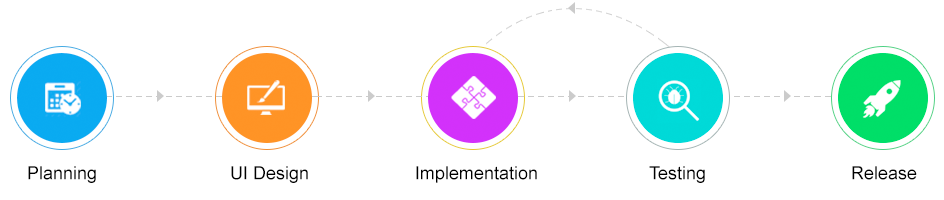
This page provides an overview of what is coming in the future releases of ServiceDesk Plus MSP.
Note: This is only a tentative schedule. The implementation of the feature set may vary based on our internal priorities.
If you would like to see something added into our plans, please head here.
Planning
Account
Account onboarding. Present step by step process to create Account and get it ready for hosting.
Mandate some fields while create/update an Account
Account details
Print Account details.
Home
Ability to show default technicians alone while choosing All accounts / sites in Scheduler page under Groups option.
Changes
Account based Change notification.
Restricting the addition of CAB members to only change managers & The change owners can only be assigned to certain users.
Conflicts/Collision Detection
Display collision/conflicts in the Change Details page when two changes have common CIs and contain overlaps in their schedules.
Change Workflow based Stage / Status Listing
Ability to list only the stage and status configured in change workflow
Problems
Move Problem from one Account to another.
Business Rules
Configure business rules to automate various actions for problem requests.
Field and Form Rules
Define field and form rules to be executed when Problem Requests are loaded, edited, and submitted.
SLA
Configure SLAs,mark SLA violation, and escalate on SLA violation.
Problem Life Cycle
Configure the sequence of statuses a problem request must go through, along with actions for each status change.
Projects
'All in Associated Accounts' role option to be provided in Projects similar to Requests.
Move Projects from one account to another.
Link projects to improve efficiency.
Customer onboarding workflow via project template.
Feature to restrict the "Available Users List" under projects.
UI Enhancements
New icons for edit and create actions.
Project Collaboration
Send emails from inside the project. Conversations, comments, and other project collaborations collected together under a tab.
Solutions
Additional Fields
Capture different types of information into the knowledge base by using additional fields.
Group-specific Solutions
Add solutions that are accessible only to a specific group.
Insert Solutions in Reply Template
In the reply template, add relevant solutions to the user.
Assets
Asset Booking
Asset Scan in mobile app
Alerts
Be notified of under-licensed software, overwritten machines, and the like.
Audit
Periodically assess the status of your assets. Check if the procured assets are available, list the missing assets, and inventory assets that must be acquired.
asset
Asset History Revamp
Reports
Reports Should be made import ready.
Integrations
Service Now Integration.
CISCO Integration.
DB Trigger - Option to write custom trigger criteria and script based on tables.
DB Trigger - Option to write custom trigger criteria and script based on tables.
UEM
UEM product integration support
Dashboard Enhancements
Custom script to generate data.
YoY QoQ Comparison widgets.
personalization
Personalize Site or group filters by view based.
Time Sheet
Time sheet Enhancements
Add Work Log from Time sheet details page.
Criteria based auto approval.
Mobile and SMS notifications.
Approval and Submission Comments.
Export Time sheet.
Highlight Holidays and Leaves in details page.
Activities
Track to-do items, events and meetings.
Maps
Feature Request to support Chinese based MAPS App Integration like with BAIDU MAPS and/or AMAPs.
Admin
Account Manager
Ability for an Account Manager to edit of his account's requesters details.
User Search
Enhancement Search users by defining custom criteria
Notification
Add account manager and point of contact roles for problem notifications
Billing
Units based Billing.
Include service catalog charges in Billing.
Ability to copy account contract for other accounts.
Ability to approve worklog and approved worklogs should be considered for Billing.
Roles for Billing.
Project Billing.
Requests
Feature request to assign requests to the technicians based on the geographic locations.
Follow Requests.
Assign read-only permission to the technicians with whom requests are shared.
Action Matrix
Based on ticket status and role permissions, restrict specific user actions under a ticket.
Based on ticket status and role permissions, restrict specific user actions under a ticket.
Service Catalog
Creating dependent requests for service request through templates.
Business Rules
Assign to site option under Business rule "Actions".
Request Custom Filter
Enhanced criteria section with $My_groups, $Today, and $This_Week place holders.
Related Workflow
Creating dependent requests for service request through templates.
Job Sheet Enhancements
Customizable Work Log format.
Work log Additional Cost Items.
Notes as template variable.
Work Logs
Consolidated Work Log List View.
Admin
Events Schedule and manage events.
E-Mail
Separate outgoing mail server for sending common notifications
Purchases
Purchase Order Form Customization
Customize, mandate fields, remove, and reorder fields.
Purchase Order Conversations
Collate all system-generated notifications and all replies under the purchase order.
Purchase Order Custom Triggers
Configure custom control when a purchase order is added, updated, or deleted.
Support Return of PO
Support item return within PO
PO Workflow
Define the sequence of steps that a purchase order must follow to be processed.
Quote Management
Enable Quote field in PO/PR to include quotes from various vendors.
Puchases
Site-based Purchase Order Scoping
Allow technicians to view purchase orders only from their sites
Asset Contract
Site scoping for asset contracts
Allow technicians to view asset contracts only for their sites
Billng
Ability to associate contracts for existing Requests
Dashboard
Dashboard
Customizable Graph & Table Request widgets in Dashboard
UI Design
Billing
Ability to provide Custom messages in Bills
Billing across modules for Problem & Change.
Ability to bill Request Task Work logs
Account
Account specific signatures.
Account Info -> Show Asset contracts.
Ability to show Account specific attribute created in Account info page.
Ability to choose Domain Name in Account list page
Account details Enhancements
Include billing details, Integration with other product links.
Ability to show the requester details when we click on the Number of Requester(s) under the Account details page.
ADMIN
Revamp Organization details in Admin tab using Account Tab UI.
Implement projects that are aligned to changing business needs by incorporating iterative feedback from cross-functional teams and their customers or end-users.
Configure Sprints and schedule time-bound tasks under each module.
Provide better visibility of project through dashboards and KPI charts.
Drag and drop canvas for Gantt view and resource management charts
Assets
Cloud software license management - Office 365
Identify unused subscriptions.
Automatic Categorizing of Managed Software Type
Unidentified software will be automatically categorized as managed software based on database information.
Maps
Maps Enhancements
Ability to call/sms technician from Maps UI.
Ability to show site address if we click on the site icon in maps.
Admin
Factor in the technician shift timings and assign requests based on their shifts.
Requests
SLA Escalation Timesheets.
Gamification
Break the monotony of the every day and motivate technicians to enjoy their work.
Ability to include all types of incident/service catalog additional fields under SLAs conditions.
Service Templates
Map resources across templates
Chat Enhancements
Integration with other chat tools, such as Telegram, Slack, and Zoho Cliq.
Changes
Change Freeze Date
Mark out a freeze window (period/interval) when no changes can be scheduled due to high business hours or holidays
Tasks in Change Template
Add implementation tasks to the change template.
Release Management
Release Template
Mandate Roles in Release Template
Implementation
Assets
Assets in mobile app
Cloud software license management - Office 365
Fetch subscriptions, licenses, and user information from MS Office 365.
Software Metering Enhancements
Integrate Desktop Central to monitor software usage.
Discovery
Endpoint Central MSP bundling
API
Making siteid field as optional in Asset API
Requests
FFR Mobile Support
Service Request
Enable technicians to recommend a request template to the end user by email.
Global Search
Look through Requests, Requesters, Assets, Changes, and Solutions to find the required information.
General
Option to show advisory for Requesters
Broadcast Enhancements
Broadcasting a message to the selected sites and groups.
TFA
Account Based TFA
Account
Account Role for CRUD operation.
Custom views for Accounts
Inactive Account
Ability to Activate/Deactivate accounts
Admin
Survey
Option to provide Survey reports access to Account Admin.
Changes
Copy Change across accounts
Account based Change SLA.
CIs involved
Support for 'CIs involved' field in change module
Projects
Add Users from other accounts in MSP Project.
Option to add Account column under Project list view.
Filters for Project History
Allowing to search, sort and filter the history of a project based on fields or operations performed on the project or the time that the operation was performed instead of manually scrolling down through the history to fetch a record.
Kanban and Classic Views
Streamline the scheduling and managing of projects, milestones, tasks effectively by using the Kanban and Classic Views.
Project list view revamp
Project List View in Project tab and association pages are revamped based on V3 API.
Milestone list view
A new API based Table View with Quick Add, PickUp, Assign, Selected Records support for milestones.
Solutions
View solutions via non-login url.
Add Links
Custom view for Solution list view
Trash Support for Solution & topics
Reports
Billing Contract reports in MSP.
Account specific billing/ revenue reports.
SLA based Reports and Columns
New query reports are added under the Reports by site, support group and technician folder in Custom Reports.
A new query report is added under the Login Reports folder. This report shows the technicians details, their last login time, and their login names available under each support group.
API based reporting
Report API Framework support for request and custom modules
Report Config Role
A role to be introduced, which will provide admin privileges in reports module to the user
Integrations
Integration with Desktop Central in the Standard Edition.
Key Manager Plus Integration
Advanced Analytics
External widget for Analytics custom table integration.
Need to export our allowance and other details in a bill to Analytics.
Support to sync custom module data into Advanced Analytics
CMDB
API
CI Relationship API
Billing
Flexibility in Contract extension and renewal
Ability to configure allowance and Cost in Contracts
Ability to manually mark Work logs as Billed
Problems
Problem list view revamp
Problem List View to be revamped based on V3 API.
Change Association
Option to associate multiple changes in a problem
Problem Admin Entities
Problem Admin Entities to be revamped based on V3 API.