# Download service packs - ManageEngine SupportCenter Plus
## Please read the below points before upgrading the SupportCenter Plus installation.
- Take a trimmed backup of the SupportCenter Plus application. Learn how to do this [here](https://pitstop.manageengine.com/portal/en/kb/articles/8121-backup-file).
- We highly recommend performing the upgrade in a test environment before upgrading the production environment. Learn how to create a test environment [here](https://pitstop.manageengine.com/portal/en/kb/articles/how-to-build-a-test-environment-for-supportcenter-plus).
- Upon successful upgrade, ensure that all the functionalities are intact and do either of the following:
- Restore the upgraded database into a new installation and convert it as the production server. In this case, do not uninstall the existing production server until the process is complete.
- Upgrade the production server during non-operational hours.
- This upgrade applies only for paid users. To pay for Annual Maintenance Service, please contact our sales team at [sales@manageengine.com](mailto:sales@manageengine.com).
- Support will be provided only for the latest SupportCenter Plus builds (released within one year from the current date).
- The forced back entry skip code is provided only for stopped PPMs.
For any support assistance contact - [support@supportcenterplus.com](mailto:support@supportcenterplus.com)
## Service Pack Downloads
| Who should upgrade? | Download and Install |
|---|---|
| Migrate from Build
**15110 to 15140** | [Service pack](https://www.manageengine.com/products/support-center/64045241/ManageEngine_SupportCenter_Plus_15140_SP-0.ppm) \| [How to Install](https://help.supportcenterplus.com/portal/en/kb/articles/upgrading-and-installing-patches) \| [README](https://www.manageengine.com/products/support-center/readme.html)
**MD5Sum Value** - d85fd73301654e9b7fabf2c12a29b929
**SHA256 Value** - af83457a60886c82bfa2ab5d87e6a7157f3f53b328e96bfea40ddbd1b37aed82 |
| Migrate from Build
**14950 to 15110** | [Service pack](https://www.manageengine.com/products/support-center/64045241/ManageEngine_SupportCenter_Plus_15110_SP-1.ppm) \| [How to Install](https://help.supportcenterplus.com/portal/en/kb/articles/upgrading-and-installing-patches) \| [README](https://www.manageengine.com/products/support-center/readme.html)
**MD5Sum Value** - ef5f2624a1ec188a02d9ab1b1a0a4591
**SHA256 Value** - 3ac718ae1ade76836cfea668c1ee3dbd6de4a488fb34a7bb9f1b2d29cca79708
**Skip the forced backup Entry:** `-DSkipBackUp=f3zgccs8va8k3tb3stmu5qp9frx8n97b`
**Windows**
- Go to `\bin\scripts`
- Open UpdMgr.bat. Search for `-Xmx2512m %JAVA_OPTS% -Dtier-type=BE` and add `-DSkipBackUp=f3zgccs8va8k3tb3stmu5qp9frx8n97b`
- Save and execute the file to skip the forced backup process.
**Linux**
- Go to `\bin`
- Open UpdMgr.bat. Search for `$JAVA -Xmx2512m $JAVA_OPTS -Dtier-type=BE` and add `-DSkipBackUp=f3zgccs8va8k3tb3stmu5qp9frx8n97b`
- Save and execute the file to skip the forced backup process. |
| Who should upgrade? | Download and Install |
|---|---|
| Migrate from Build
**14840, 14900, 14920, 14930, 14940 to 14950** | [Service pack](https://www.manageengine.com/products/support-center/64045241/ManageEngine_SupportCenter_Plus_14950_SP-0.ppm) \| [How to Install](https://help.supportcenterplus.com/portal/en/kb/articles/upgrading-and-installing-patches) \| [README](https://www.manageengine.com/products/support-center/readme.html)
**MD5Sum Value** - d30275d6ddb258ad0ce3313f577ca7f8
**SHA256 Value** - dd036f7ac44cffae78ffb86f4cf3c6e02b3213eca8487cd72557f427179ea84b
**Skip the forced backup Entry:** `-DSkipBackUp=2a12cd7d750cafb4a18f2b78b9ed90e2` |
| Migrate from Build
**14600, 14700, 14730, 14800, 14820, 14830 to 14840** | [Service pack](https://www.manageengine.com/products/support-center/64045241/ManageEngine_SupportCenter_Plus_14840_SP-1.ppm) \| [How to Install](https://help.supportcenterplus.com/portal/en/kb/articles/upgrading-and-installing-patches) \| [README](https://www.manageengine.com/products/support-center/readme.html)
**MD5Sum Value** - 815a680125ca81c02a885bff06b60906
**SHA256 Value** - 4b0c6e8ca664698964f4d59a5244adf11019e2f1771ed287d1eaf0f63f153bfd
**Skip the forced backup Entry:** `-DSkipBackUp=Ffirn4a5ltMgabjnohryR6e7luejamske` |
| Migrate from Build
**14500, 14501, ..., 14507 to 14600** | [Service pack](https://www.manageengine.com/products/support-center/64045241/ManageEngine_SupportCenter_Plus_14600_SP-1.ppm) \| [How to Install](https://help.supportcenterplus.com/portal/en/kb/articles/upgrading-and-installing-patches) \| [README](https://www.manageengine.com/products/support-center/readme.html)
**MD5Sum Value** - 7c31b42df7f1331684c30e0c079558a1
**SHA256 Value** - d7edde9a173755b9b7a8591dfeecd00b28cb76d91315528a63b521a85cb05d71
**Skip the forced backup Entry:** `-DSkipBackUp=AquwteorUtpyduaitoep` |
| Who should upgrade? | Download and Install |
|---|---|
| Migrate from Build
**14300, 14302, ..., 14305 to 14500** | [Service pack](https://www.manageengine.com/products/support-center/64045241/ManageEngine_SupportCenter_Plus_14_5_0_SP-0_0_0.ppm) \| [How to Install](https://help.supportcenterplus.com/portal/en/kb/articles/upgrading-and-installing-patches) \| [README](https://www.manageengine.com/products/support-center/readme.html)
**SHA256 Value** - d61807ce6a6946594d748ccc751b7430bc5357420e678fc36d27d5cd4a4e4824
**Skip the forced backup Entry:** `-DSkipBackUp=zaq1xsw2cde3vfr4` |
| Migrate from Build
**14200, 14201 to 14300** | [Service pack](https://www.manageengine.com/products/support-center/64045241/ManageEngine_SupportCenter_Plus_14_3_0_SP-0_0_0.ppm) \| [How to Install](https://help.supportcenterplus.com/portal/en/kb/articles/upgrading-and-installing-patches) \| [README](https://www.manageengine.com/products/support-center/readme.html)
**SHA256 Value** - bba4a97e4fc581b8e770ffe91d6312d2932b557a17e27f1c0ecc92e6e94a2386
**Skip the forced backup Entry:** `-DSkipBackUp=dloansvliagpt25411` |
| Migrate from Build
**14200 to 14201** | [Service pack](https://www.manageengine.com/products/support-center/64045241/ManageEngine_SupportCenter_Plus_14_2_0_SP-0_1_0.ppm) \| [How to Install](https://help.supportcenterplus.com/portal/en/kb/articles/upgrading-and-installing-patches) \| [README](https://www.manageengine.com/products/support-center/readme.html)
**SHA256 Value** - 520817dab0f7964dce5056f9bab52bc55dbb785e8acfaf58e751582fdea6aae1 |
| Migrate from Build
**14000, 14001 to 14200** | [Service pack](https://www.manageengine.com/products/support-center/64045241/ManageEngine_SupportCenter_Plus_14_2_0_SP-0_0_0.ppm) \| [How to Install](https://help.supportcenterplus.com/portal/en/kb/articles/upgrading-and-installing-patches) \| [README](https://www.manageengine.com/products/support-center/readme.html)
**SHA256 Value** - fefb3a30f2447b46009019f2a26e3f3eabfb48b5c74143f4e8719f4653f82a83
**Skip the forced backup Entry:** `-DSkipBackUp=298sd0zdrg174pk` |
| Who should upgrade? | Download and Install |
|---|---|
| Migrate from Build
**14000 to 14001** | [Service pack](https://www.manageengine.com/products/support-center/64045241/ManageEngine_SupportCenter_Plus_14_0_0_SP-0_0_1.ppm) \| [How to Install](https://help.supportcenterplus.com/portal/en/kb/articles/upgrading-and-installing-patches) \| [README](https://www.manageengine.com/products/support-center/readme.html)
**SHA256 Value** - c0fc001c659f4051baa47f1e65e9ec4463f2644920d3149b1f68a61e94bed364 |
| Migrate from Build
**11027 to 14000** | **Windows** - [Service pack](https://www.manageengine.com/products/support-center/64045241/ManageEngine_SupportCenter_Plus_14_0_0_SP-0_0_0_windows.ppm)
**SHA256 Value** - 8529d7441de78119902f75eb88996419f87d4fe89e28d8ffa3bf56ad6facee11
**Linux** - [Service pack](https://www.manageengine.com/products/support-center/64045241/ManageEngine_SupportCenter_Plus_14_0_0_SP-0_0_0_linux.ppm)
**SHA256 Value** - d1c911639748077057cb1a76a78d9c4011575ef77a3417d4167edb27a25c7f12
**Skip the forced backup Entry:** `-DSkipBackUp=216ca7fcdb648de` |
| Migrate from Build
**11000, ..., 11024, 11026 to 11027** | [Service pack](https://www.manageengine.com/products/support-center/64045241/ManageEngine_SupportCenter_Plus_11_0_0_SP-0_27_0.ppm) \| [How to Install](https://help.supportcenterplus.com/portal/en/kb/articles/upgrading-and-installing-patches) \| [README](https://www.manageengine.com/products/support-center/readme.html)
**SHA256 Value** - f9b5fbfd153c8694c41dcd68ece18540c90200ec98190b2b33d74270baed6c6a |
| Who should upgrade? | Download and Install |
|---|---|
| Migrate from Build
**8121 to 11011** | Refer [link](https://pitstop.manageengine.com/portal/en/community/topic/update-on-supportcenter-plus-11-0-build-11000-behavior-and-api-changes) for behaviour changes in SCP 11.0
**Windows** - [Service pack](https://www.manageengine.com/products/support-center/64045241/ManageEngine_SupportCenter_Plus_11_0_0_SP-0_11_0_windows.ppm)
**MD5Sum Value** - 86a15a2c329feb472eb9257adc4cb9c0
**Linux** - [Service pack](https://www.manageengine.com/products/support-center/64045241/ManageEngine_SupportCenter_Plus_11_0_0_SP-0_11_0_linux.ppm)
**MD5Sum Value** - 7167d4a64753b0a90c32da44265f3003 |
| Customers using build
**8100, 8101, 8102, ..., 8117, 8118, 8119, 8120** | [Upgrade Pack](https://www.manageengine.com/products/support-center/64045241/ManageEngine_SupportCenter_Plus_8_1_0_SP-2_1_0.ppm) ([README](https://supportcenter.wiki.zoho.com/ReadMe-V3.html#8121)) to move to **build 8121** (for both Windows, Linux)
**SHA256 Value** - f3a7528d37265d567172b4515a0dd74c92c5507ac8cc2e89f0e04bdb0fd06f5f
**Important:** Clear browser cache before accessing the web client. |
| Customers using build
**8015** | [Upgrade Pack](https://www.manageengine.com/products/support-center/64045241/ManageEngine_SupportCenter_Plus_8_0_0_SP-2_0_0.ppm) ([README](https://supportcenter.wiki.zoho.com/ReadMe-V3.html#8100)) to move to **build 8100** (for both Windows, Linux)
**Important:** Clear browser cache before accessing the web client. |
| **Other Build** | contact: [support@supportcenterplus.com](mailto:support@supportcenterplus.com) |
**Note:** We strongly recommend you to take backups before migrating. This helps you prevent accidental loss of data.
## Instructions to apply the HotFix
1. Shut down SupportCenter Plus Server.
2. Run the script UpdateManager.bat (UpdateManager.sh for Linux) in the `/bin` folder. This opens the Update Manager tool.
3. Click "Browse" to select the HotFix file (`ManageEngine_SupportCenter_Plus__0_0_SP-x_0.ppm` file that you had downloaded) and then click "Install...".
4. Follow the on-screen instructions to apply the Service Pack.
5. Once the upgrade is complete, start SupportCenter Plus Server.
6. Clear the browser cache before accessing the web client.
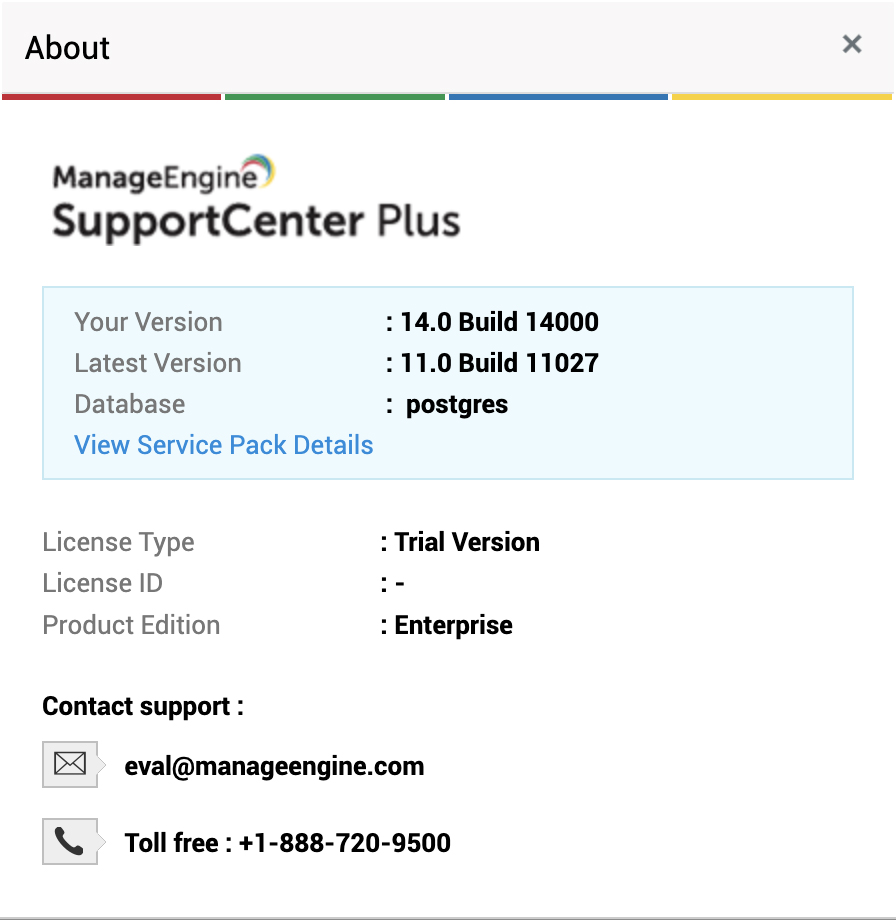
## How can I find the Build Number of SupportCenter Plus?
1. In the SupportCenter Plus web client, click the "Help >> About Product" link on top right of the page.
2. You should see the Build number mentioned on the top right of the page.
3. Check the following image guide to locate the build number.
## Please read this before upgrading :
1. Please ensure that a full backup has been taken before upgrade. **DON'T EVER UPGRADE WITHOUT A BACKUP.**
2. Please double check the server is stopped. Since there are possibilities that the operating system would automatically start the service.
3. Ensure that you are applying the appropriate patch as per the table above.
4. When you see an error during upgrade, please follow the steps in the section ["On upgrade failure"](https://www.manageengine.com/products/support-center/service-packs.html#onupgradefailure) for uninterrupted service. **DON'T EVER TRY TO ROLL BACK BY CLICKING ON 'UNINSTALL' BUTTON IN THE UPDATE MANAGER WIZARD.**
5. When you come across an error during upgrade, **DON'T EVER START THE APPLICATION.** Please follow the steps in the section ['On upgrade failure'](https://www.manageengine.com/products/support-center/service-packs.html#onupgradefailure).
6. When attempting to do multiple upgrades, **START THE APPLICATION AFTER EACH UPGRADE.** If it fails on one of the upgrades, please follow the steps in the section ['On upgrade failure'](https://www.manageengine.com/products/support-center/service-packs.html#onupgradefailure).
## On Upgrade failure :
If an upgrade fails, you will not be able to start the application. Don't panic! This is done to save you from unexpected problems due to corrupted data.
Here are the options to fix it:
Reach our support staff at **+1 408-352-9115**. They shall assist you further to fix it. Also, we would need the files updatemanager0,1,2 available under `/server/default/log`. Please compress them and send for investigation to determine why the upgrade failed.
In case you would like to restore into the original state, please follow the steps below:
1. Moving the backup to a safe location
- Copy the backup folder — The backup taken prior to the upgrade will be available under the folder `/backup`. Please copy this folder to a different location on your PC to save the data.
2. Re-install SupportCenter Plus
- Rename the existing installation folder and uninstall the application through Start >> Programs >> Manageengine SupportCenter Plus >> Uninstall.
- Download and install the build from which you were trying to upgrade from https://archives.manageengine.com/support-center (click on the folder with the build number and download the installation file `.exe` for Windows / `.bin` for Linux).
If you do not remember the build number, go to the backup folder and find the recent backup taken. The file name will have the date on which it was taken and the build number.
Example:
`2009_1_8_10_5_36_backup_supportcenter_7012_fullbackup_01_08_2009_13_47.data`
In this, **7012** is the build number.
- After installing, start the server once.
3. Restore the data backup in the new installation
- Stop the server and restore the data backup onto the new server ([How to restore the data?](https://www.manageengine.com/products/support-center/help/installationguide/installation/back-up-supportcenter-plus.html#restoringlin)).
- Start the server and check all the data & configurations are available.
## Need help ?
Want help with upgrading SupportCenter Plus to the latest version? Contact [SupportCenter Plus Support](https://www.manageengine.com/products/support-center/support.html).