
Open API Specification (OAS)
API Collection
OAuth
Authentication
SoM
Common
Introduction
The Remote Access Plus API provides a comprehensive interface to facilitate seamless integration with third-party tools. By leveraging these APIs, you can automate endpoint management tasks within your IT ecosystem that often require collaboration across multiple tools.
The APIs allow you to fetch and modify data across various RemoteAccessPlusCloud modules, including SOM and more.
All APIs follow standard HTTP methods and error codes and support commonly used data formats such as JSON.
You can find the list of supported modules that offer APIs in the left sidebar. If you require additional APIs, please contact us with your requirements.
© 2025, Zoho Corporation Pvt. Ltd. All Rights Reserved.
API Guide Index
SoM
| Method Name | Method Type | URL | OAuth Scope | Operation |
|---|---|---|---|---|
| Get Remote Office List | GET | /api/1.4/som/remoteoffice | RemoteAccessPlusCloud.SOM | READ |
| Install Remote Access Plus Agent | POST | /api/1.4/som/computers/installagent | RemoteAccessPlusCloud.SOM | UPDATE |
| Get Computers | GET | /api/1.4/som/computers | RemoteAccessPlusCloud.Common | READ |
| Uninstall Remote Access Plus Agent | POST | /api/1.4/som/computers/uninstallagent | RemoteAccessPlusCloud.SOM | UPDATE |
| Get Summary for SoM Computers | GET | /api/1.4/som/summary | RemoteAccessPlusCloud.Common | READ |
| Remove Managed Computer | POST | /api/1.4/som/computers/removecomputer | RemoteAccessPlusCloud.SOM | UPDATE |
No APIs found for this search.
Common
| Method Name | Method Type | URL | OAuth Scope | Operation |
|---|---|---|---|---|
| Server Properties | GET | /api/1.4/desktop/serverproperties | RemoteAccessPlusCloud.Common | READ |
No APIs found for this search.
© 2025, Zoho Corporation Pvt. Ltd. All Rights Reserved.
Select API Scopes
API Scopes
Copied!
SOM
Common
| Operation Type | Description |
|---|---|
| ALL | Full access to the resource |
| READ | Allow access to read data from the resource |
| CREATE | Allow access to create data in the resource |
| UPDATE | Allow access to update an existing data in the resource |
| WRITE | Allow access to edit data in the resource (Alias for CREATE, UPDATE, and DELETE) |
| DELETE | Allow access to delete data in the resource |
| CUSTOM | Custom Operation Type |
© 2025, Zoho Corporation Pvt. Ltd. All Rights Reserved.
OAuth 2.0 for APIs - An Overview
The RemoteAccessPlusCloud API uses the OAuth 2.0 protocol for authentication. OAuth 2.0 is an industry-standard protocol specification that enables third-party applications (clients) to gain delegated access to protected resources in Zoho via an API.
Key Terminologies in OAuth 2.0
Why should we use OAuth 2.0?
- Clients are not required to support password authentication or store user credentials.
- Clients gain delegated access, i.e., access only to resources authenticated by the user.
- Users can revoke the client's delegated access anytime.
- OAuth 2.0 access tokens expire after a set time. If the client faces a security breach, user data will be compromised only until the access token is valid.
How OAuth 2.0 works?
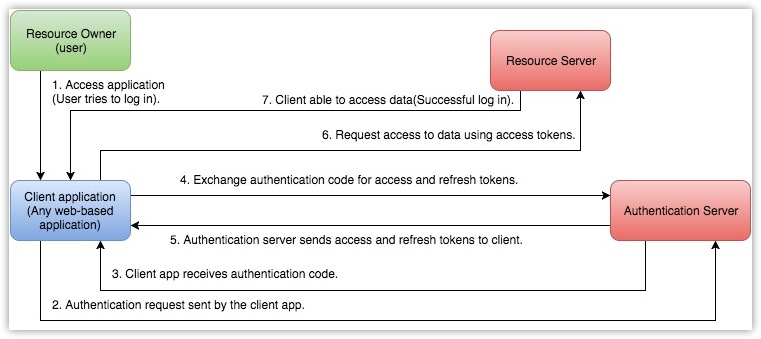
Key Terminologies in OAuth 2.0
The following are some terms you need to know before you start using the RemoteAccessPlusCloud APIs.
Resource owner
Any end-user of your account, who can grant access to the protected resources.
Client
An application that sends requests to the resource server to access the protected resources on behalf of the end-user.
Client ID
The consumer key generated from the connected application.
Client Secret
The consumer secret generated from the connected application.
Authentication server
Authorization server provides the necessary credentials (such as Access and Refresh tokens) to the client.
Authentication code
The authorization server creates a temporary token and sends it to the client via the browser. The client will send this code to the authorization server to obtain access and refresh tokens.
Tokens
Access Token
A token that is sent to the resource server to access the protected resources of the user. The Access token provides secure and temporary access to the protected resources and is used by the applications to make requests to the connected app. Each access token will be valid only for an hour and can be used only for the set of operations that are described in the scope.
Refresh Token
A token that can be used to obtain new access tokens. This token has an unlimited lifetime until it is revoked by the end-user.
Important
User Access Token must be kept confidential since it provides access to protected resources. Do NOT expose your Access Token anywhere in public forums, public repositories or on your website's client-side code like HTML or JavaScript. Exposing it to the public may lead to data theft, loss or corruption.
© 2025, Zoho Corporation Pvt. Ltd. All Rights Reserved.
Scopes
Scopes limit the level of access given to a client for protected resources. It enables a user to provide delegated access to a client.RemoteAccessPlusCloud APIs use selected scopes, which control the type of resource that the client application can access. Tokens are usually created with various scopes to ensure improved security. For example, you can generate a scope to create or view a lead, or to view metadata and so on. Scopes contain three parameters — service name, scope name, and operation type. The format to define a scope is scope=service_name.scope_name.operation_type
For example, RemoteAccessPlusCloud.SOM.READ
Here, RemoteAccessPlusCloud is the service API name, SOM is the scope name, and READ is the operation type.
- Service API name is the name of the service the client is making API calls to.
- Scope name is the name of the module in the service the client needs access to.
- Operation type is the type of operation that is permissible for the client. It can be CREATE, READ, UPDATE, DELETE.
Separate Scopes
Separate scopes are used to provide access to data in a particular module without access to other modules.
https://accounts.zoho.com/oauth/v2/auth?scope=RemoteAccessPlusCloud.SOM.UPDATE,RemoteAccessPlusCloud.SOM.READ&client_id={client_id}&response_type=code&access_type={"offline"or"online"}&redirect_uri={redirect_uri}
The above scope gives the user access to only the SOM module from the client RemoteAccessPlusCloud account.
Additionally, you can set specific permissions, like read, create, update or delete, for each module. For examples:
- scope=RemoteAccessPlusCloud.SOM.READ(Read-only permission)
- scope=RemoteAccessPlusCloud.SOM.UPDATE
Multiple Scopes
Access tokens can also be generated with multiple scopes. In such cases, the scopes should be separated by commas. The format to provide multiple scope is service_name.scope_name.OPERATION_TYPE,service_name.scope_name.OPERATION_TYPE. For example,RemoteAccessPlusCloud.SOM.READ,RemoteAccessPlusCloud.Inventory.READ.
© 2025, Zoho Corporation Pvt. Ltd. All Rights Reserved.
Register your Application
Before you get started with authorization and make any calls using the RemoteAccessPlusCloud APIs, you need to register your application with RemoteAccessPlusCloud.
To register,
Go to Zoho Developer Console and click on GET STARTED.
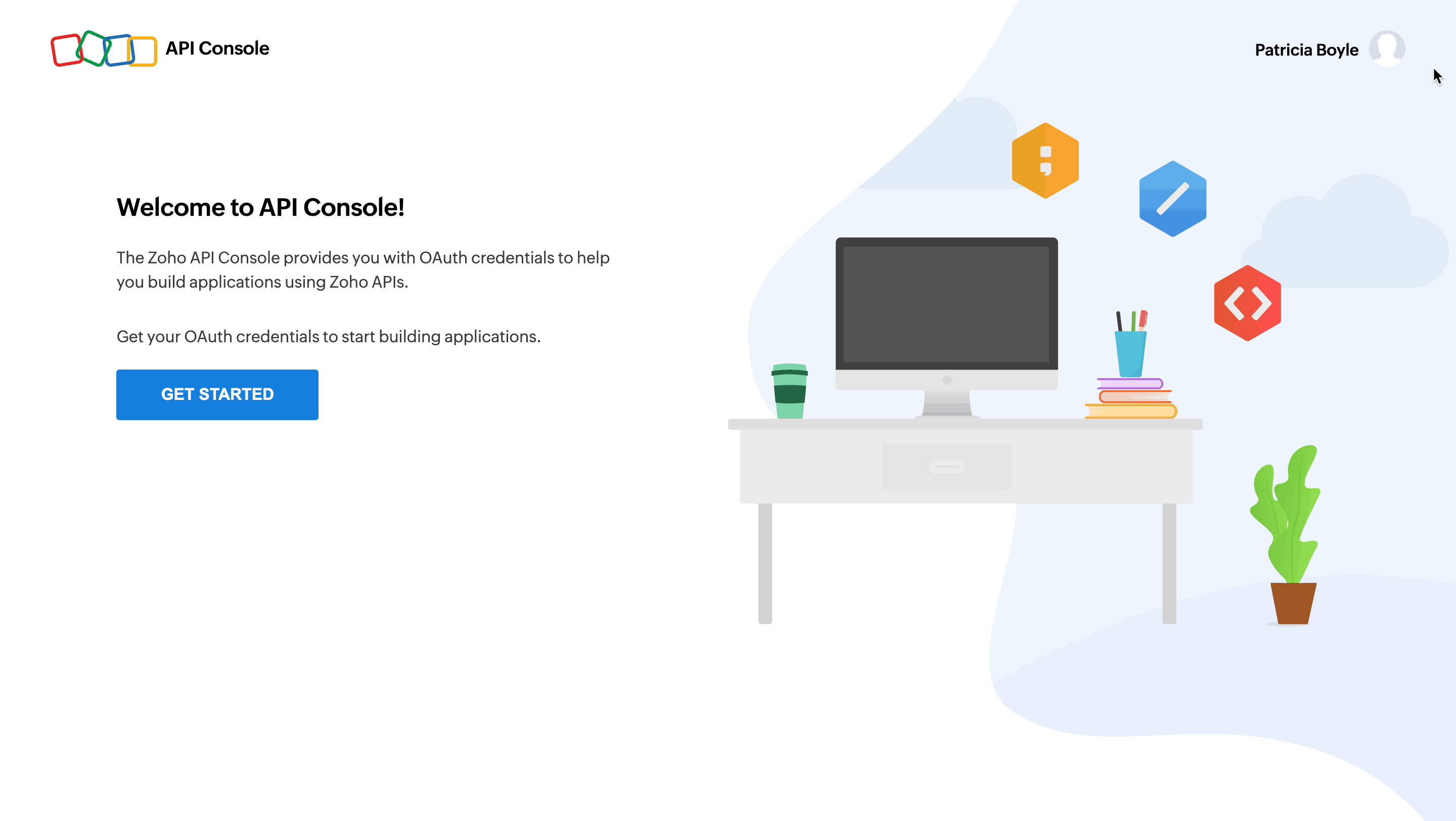 Choose a client type and click CREATE NOW:
Types of Clients
Client-based Applications
Applications that run exclusively on a browser and are independent of web servers.
Server-based Applications
Applications that are intended for use by multiple Zoho accounts. This app could be solving a special use case for all Zoho accounts and should have both a dedicated backend server and web UI to handle the authorization process and the app's logic. The app redirects users to Zoho for the authorization process using a web browser. Users grant permission for the app to access their Zoho data on their behalf. The app will consume data for its intended purposes on behalf of the user who authorized the app.
Mobile-based Applications
Applications that are built to run on smart phones and tablets.
Non-browser Mobile Applications
Applications that run on devices without browsers such as smart TVs and printers.
Self Client
Applications that does not have a redirect URL or a web UI, operating solely in the backend without requiring user interaction. A self-client is commonly employed when both the application and Zoho services are managed by the same person, aiming to establish secure communication between them.
For more details, refer to OAuth Overview.
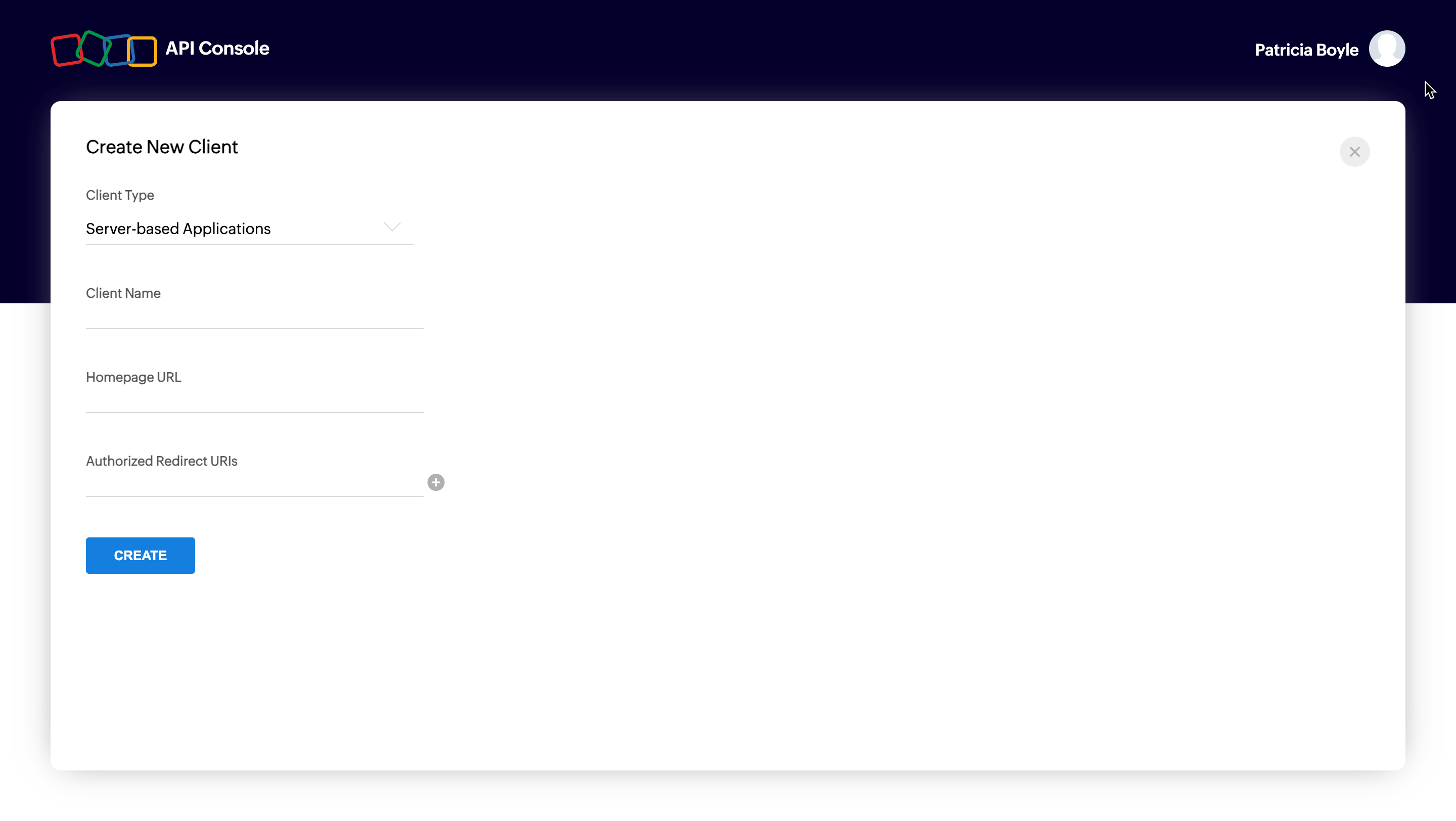
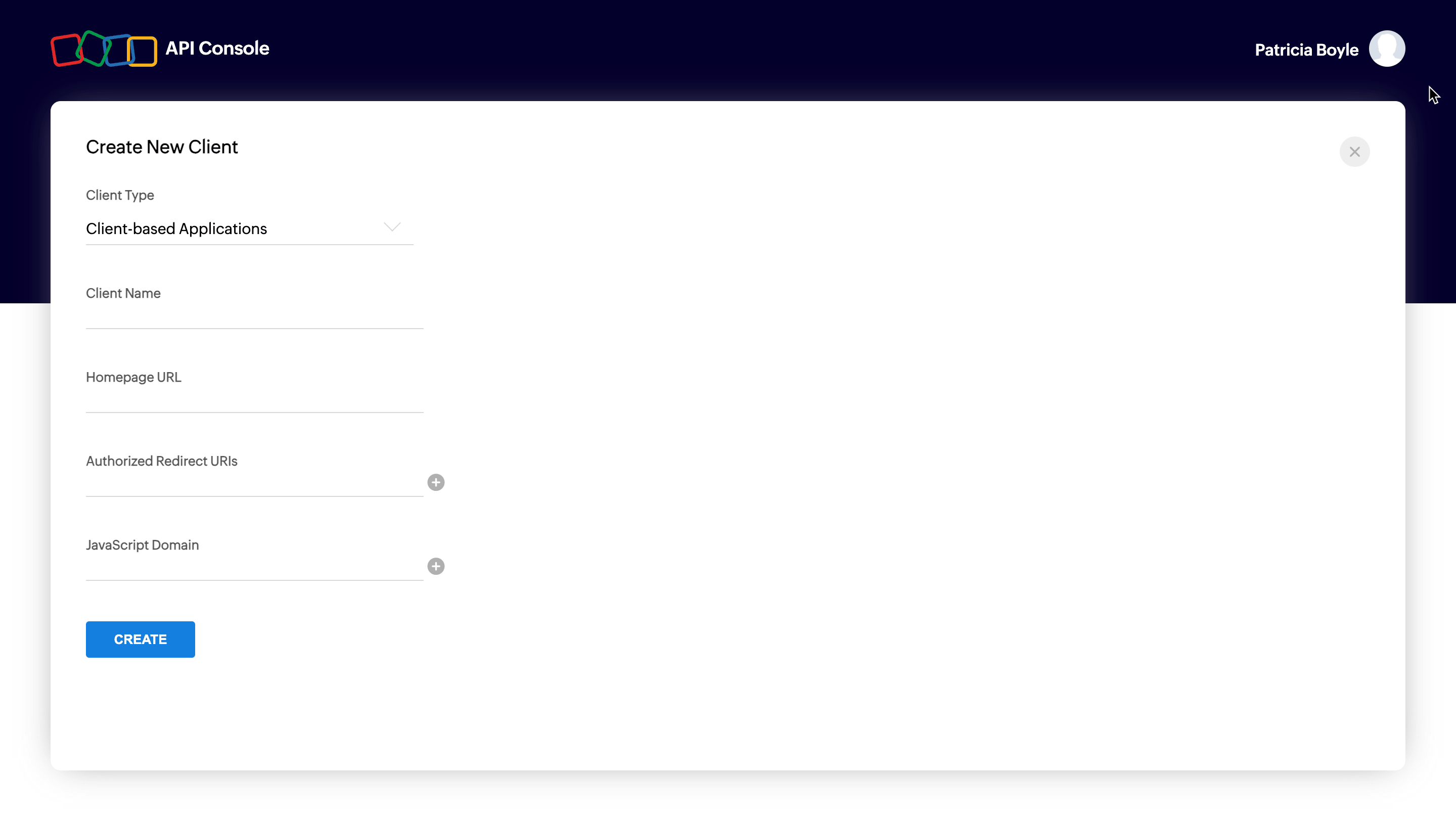
Enter mandatory entries for corresponding client type and click on CREATE.
Mandatory Entries for Different Client Types
The following are the mandatory entries for different client types.
| Client Type | Client Name | Homepage URL | Redirect URIs | JS Domains |
|---|---|---|---|---|
| Java Script | Y | Y | Y | Y |
| Web-based | Y | Y | Y | NA |
| Mobile | Y | Y | Y | NA |
| Self Client | N | N | N | NA |
| Device | Y | Y | N | NA |
Server-based applications
Client-based applications
Self client
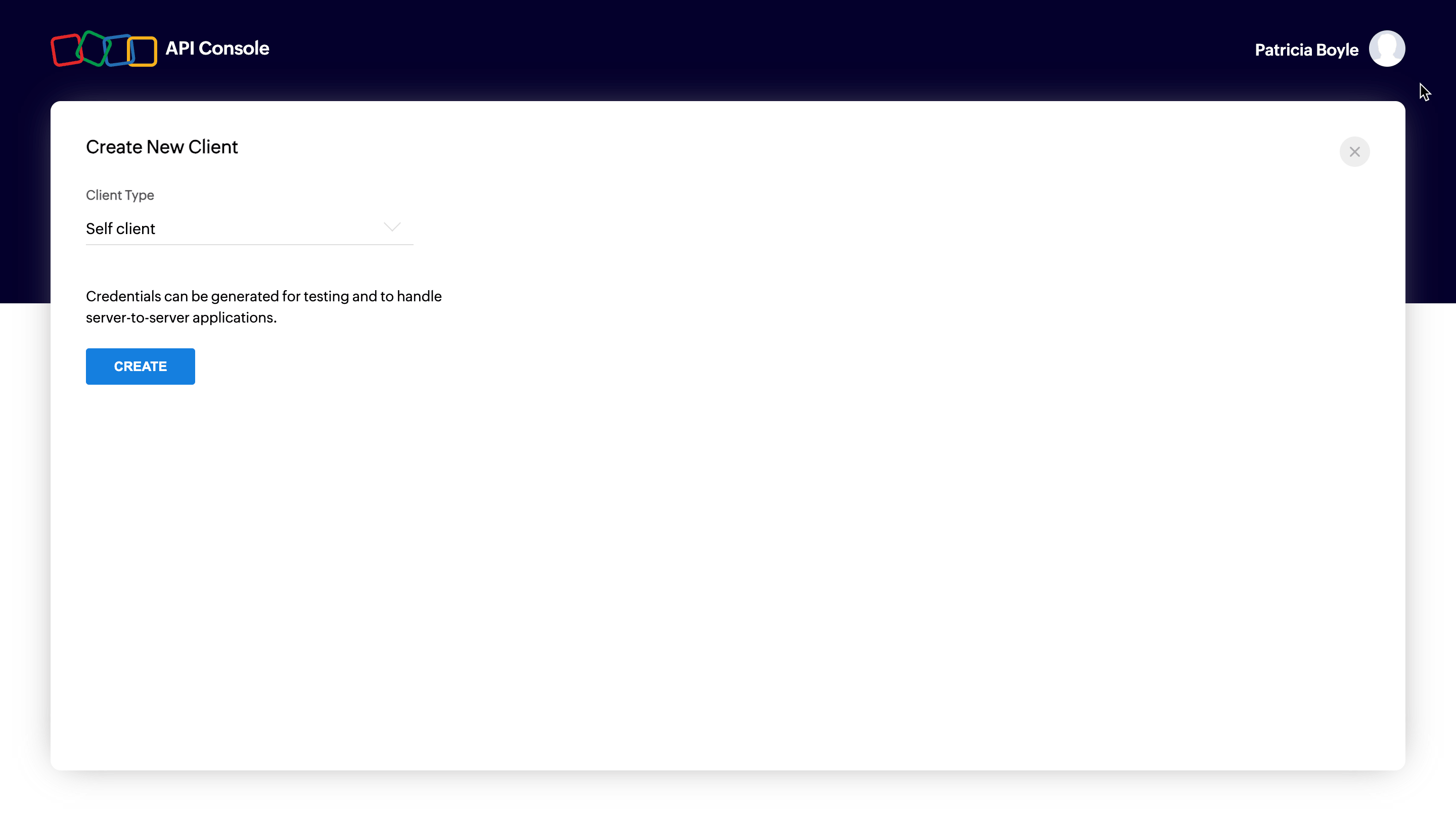
You will receive the client credentials such as Client ID and Client Secret in the Client Secret tab.
Possible Errors
| Error | Resolution |
|---|---|
| Enter a valid client name | The client name has a special character. The client name must not contain any special characters except "_" and "&". |
| Enter a valid JavaScript Domain URI | The JavaScript domain is incorrect. Specify valid JavaScript domains, separated by commas, and they must start with 'http' or 'https'. |
| Enter a valid redirect URI | The redirect URI is incorrect. Specify a valid redirect URI in the format "https://www.your-domain.com/callback". |
| Enter a valid homepage URL | The homepage URL is invalid. Specify a valid homepage URL in the format "https://www.yourdomain.com". |
© 2025, Zoho Corporation Pvt. Ltd. All Rights Reserved.
Authorization Request
To use the RemoteAccessPlusCloud APIs, the users must authenticate the application to make API calls on their behalf with an access token.
The access token, in return, must be obtained from a authorization code. The RemoteAccessPlusCloud APIs use the authorization code grant type to provide access to protected resources.
There are two ways in which you can generate the authorization code based on the client type.
Self-client - Authorization code flow
Self-Client option
Use this method to generate the organization-specific authorization code if your application does not have a domain and a redirect URL. You can also use this option when your application is a standalone server-side application performing a back-end job.
Go to Zoho Developer Console and log in with your RemoteAccessPlusCloud username and password.
Choose Self Client from the list of client types, and click Create Now.
Click OK in the pop up to enable a self client for your account.
Now, your client ID and client secret are displayed under the Client Secret tab.
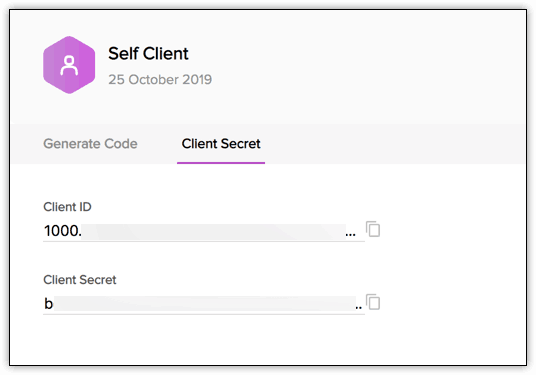
Click the Generate Code tab and enter the required scope separated by commas. Refer to our list of Scopes, for more details. The system throws an 'Enter a valid scope' error when you enter one or more incorrect scopes.
Select the Time Duration for which the authorization code is valid. Please note that after this time, the authorization code expires.
Enter a description
*
Click Create to generate < code>

Note
- Generating the authorization code is a one-time process, provided you generate the access and refresh tokens within the time the authorization code is valid for.
Web-based application
Web-based applications are chosen when your application is used by multiple users and requires user intervention during authorization. For this client type, you must use redirection-based code generation. In this authorization flow,
The user clicks the Login with Zoho button on any third-party web-based application.
The application redirects the user to the Zoho Login page, and the user enters the Zoho credentials.
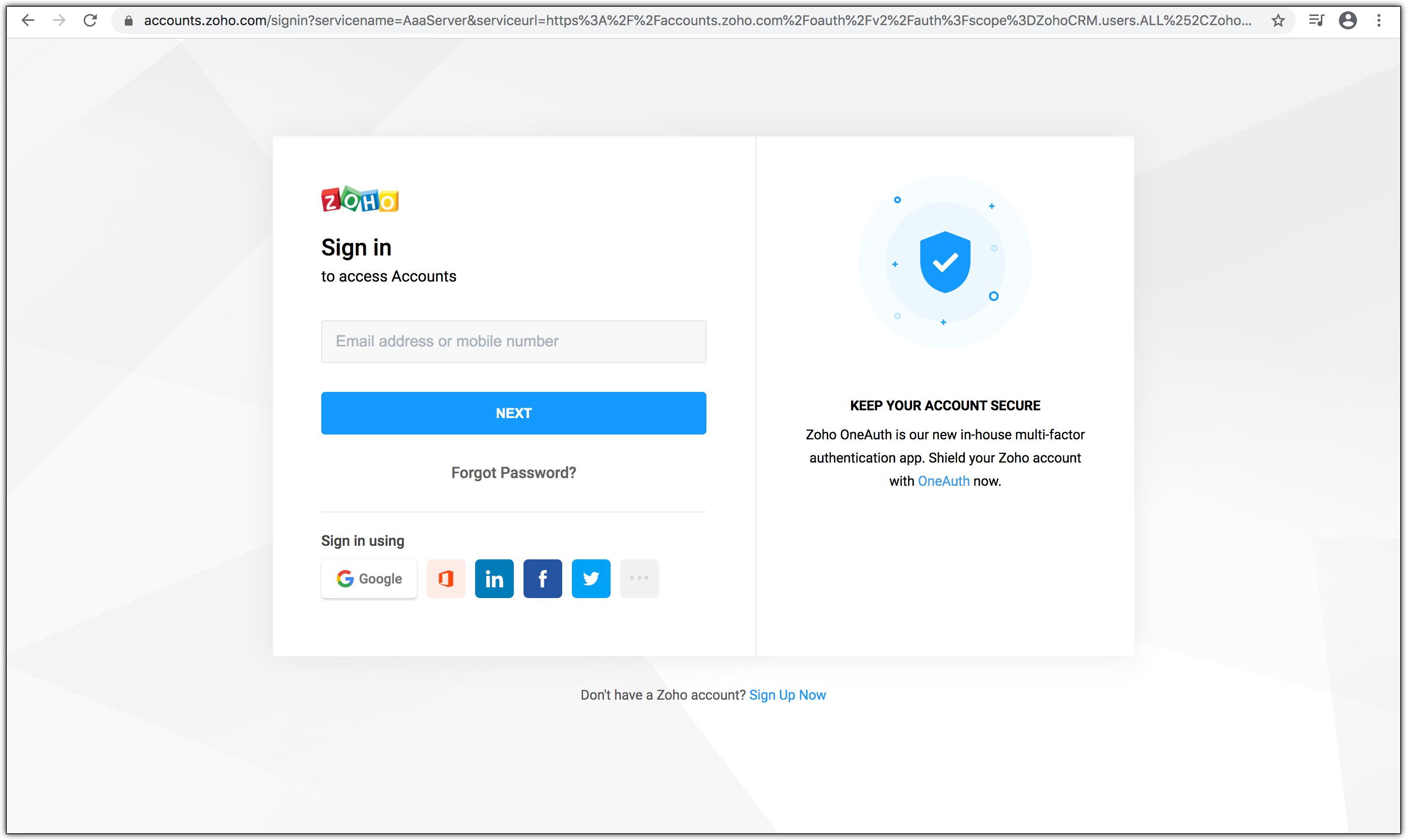
The web application redirects the user to the Zoho OAuth server with the required scope in the Accounts URL:
https://accounts.zoho.com/oauth/v2/auth?scope=RemoteAccessPlusCloud.SOM.READ&client_id={client_id}&response_type=code&access_type={"offline"or"online"}&redirect_uri={redirect_uri}

The page displays the organization and the data (scope) that the application wants to access. Also, the request URL has the following parameters:
- scope: Scope limits the level of access the application has to access protected resources.Refer to Scopes for more details.
- client_id: Client ID(consumer key) that you obtained during client registration.
- response_type: This parameter is sent with value code
- access_type: Enter access_type as online or offline. If you want to generate the refresh token, set this value as offline.
- redirect_uri: The URI to which the authorization server will redirect the browser back with the authorization code. It must be the same URI provided when registering the app in the API console. It should start with http:// or https://. For example: https://www.zylker.com/oauthredirect
- Based on the user's login details, the system automatically detects the user's domain and uses the domain-specific authentication URL to obtain the authorization code.
When the user clicks Accept: The application gets authorized. The authorization code is sent as a parameter in the redirect_uri.

- A back-end script from your end needs to store the following details from the above URL.
- code={authorization_code} - This is used to generate access and refresh tokens.
- location={domain} - This tells you the domain of the user from which you have to make API calls.
- accounts-server={accounts_URL} - This is your accounts URL which you have to use to generate access and refresh tokens.
- The application exchanges the authorization code for an access token.
- When the user clicks Reject: The browser redirects to the redirect URI with the parameter error=access_denied, and your application is denied access to the user's data in Zoho Service.
Note
- The authorization code is valid only for two minutes. Refer to the Token Validity page for more details.
- The authorization URL has the scope for Users. You can change the scope as per your requirement.
Possible Errors
| Error | Resolution |
|---|---|
| ERROR_invalid_response_type | The value of the "response_type" key is not "code". Update the value as "code". (or) You have not passed the mandatory keys in the request. Pass all the mandatory keys in the request to generate the authorization code. |
| ERROR_invalid_client | The client ID is wrong or empty. Pass the right client ID. You can check your client ID from the developer console. |
| ERROR_invalid_redirect_uri | he redirect URI value passed, and the one registered in the developer console mismatches. Pass the right redirect URI. |
| ERROR_invalid_scope | The scope is invalid. Pass valid scopes. You can refer to the list of scopes here. |
© 2025, Zoho Corporation Pvt. Ltd. All Rights Reserved.
Generate Access Token and Refresh Token
OAuth2.0 requests are usually authenticated with an access token, which is passed as bearer token. To use this access token, you need to construct a normal HTTP request and include it in an Authorization header along with the value of Bearer.
To generate access and refresh token:
Make a POST request with the following URL. Replace {accounts_URL} with your domain-specific Zoho accounts URL when you make the request.
{accounts_URL}/oauth/v2/token
Note: For security reasons, pass the below parameters in the body of your request as form-data.
Request Parameters
| Parameter | Description |
|---|---|
| grant_type | Enter the value as "authorization_code". |
| client_id | Specify client-id obtained from the connected app. |
| client_secret | Specify client-secret obtained from the connected app. |
| redirect_uri | Specify the Callback URL that you registered during the app registration. |
| code | Enter the authorization code you received after you made the authorization code request. |
If the request is successful, you would receive the following:
       {
          "access_token": "{access_token}",
          "refresh_token": "{refresh_token}",
          "api_domain": "https://www.zohoapis.com",
          "token_type": "Bearer",
          "expires_in": 3600
       }
Response Parameters
| Parameter | Description |
|---|---|
| access_token | Access token to access RemoteAccessPlusCloud APIs. |
| refresh_token | Refresh token to obtain new access tokens. |
| expires_in | Time in seconds after which the access token expires. |
| token_type | Type of token obtained. "Bearer" indicates this is an access token. |
This completes the authentication. Once your app receives the access token, send the token in your HTTP authorization header to RemoteAccessPlusCloud API with the value Zoho-oauthtoken {access_token} for each endpoint (for each request).
Note
- Each access token is valid for only an hour and can be used only for the operations defined in the scope.
- A refresh token does not expire. Use it to refresh access tokens when they expire. For more details on the validity of the tokens, refer to Token Validity page.
Possible Errors
| Error | Resolution |
|---|---|
| invalid_client | You have passed an invalid Client ID or secret. Specify the correct client ID and secret. (or) There is a domain mismatch. You have registered the client and generated the authorization code in a certain domain (US), but generating the tokens from a different domain (EU). Ensure that you generate the authorization code, access, and refresh tokens from the same domain using the same domain URL or Enable Multi-DC for your client to generate tokens from any domain. (or) You have passed the wrong client secret when multi-DC is enabled. Each DC holds a unique client secret. Ensure to pass the right client secret for that DC. |
| invalid_code | The authorization code has expired. The authorization code is valid only for two minute in the redirection-based flow. Generate the access and refresh tokens before the authorization code expires. (or) You have already used the authorization code. You can use the authorization code only once. (or) The refresh token to generate a new access token is wrong or revoked. Specify the correct refresh token value while refreshing an access token |
| invalid_redirect_uri | The redirect URI in the request mismatches the one registered in the developer console. Specify the correct redirect URI in the request. |
© 2025, Zoho Corporation Pvt. Ltd. All Rights Reserved.
Managing OAuth Tokens
To manage your OAuth tokens after they have been generated, follow the processes below to refresh an expired access token and revoke a refresh token when necessary.
Refresh Access Token
Access tokens expire after an hour of generation. To generate a new access token, use the refresh token you generated earlier.
Make a POST request with the following URL:
{Accounts_URL}/oauth/v2/token?refresh_token={refresh_token}&client_id={client_id}&client_secret={client_secret}&grant_type=refresh_token
You must use your domain-specific Zoho accounts URL to refresh your access token.
If the request is successful, you will receive the following output:
         {
             "access_token": "{new_access_token}",
              "expires_in": 3600,
             "api_domain": "https://www.zohoapis.com",
             "token_type": "Bearer"
          }
Revoking Refresh Token
If you want to revoke your refresh token,
Make a POST request with the following URL:
{Accounts_URL}/oauth/v2/token/revoke?token={refresh_token}
You must use your domain-specific Zoho accounts URL to revoke your refresh token.
© 2025, Zoho Corporation Pvt. Ltd. All Rights Reserved.
Incremental Authorization
Incremental Authorization is an OAuth strategy that allows a client to request specific authorization scopes as and when needed. This means that the client does not have to request every possible scope that might be needed upfront, which might result in a bad user experience. Incremental Authorization is considered a best practice in Oauth Authorization Request as:
- Users are not overloaded with scopes in the initial stage
- Users can control the amount of data they share
For detailed information on implementing incremental authorization in your application, refer to the Zoho Accounts Incremental Authorization page.
© 2025, Zoho Corporation Pvt. Ltd. All Rights Reserved.
Token Validity
Authorization code
- Authorization code is a one-time use token and valid for three minutes, by default. If you want to extend the expiry time, choose the required time from the drop-down while generating the token from the API console (applicable only to self-clients).
- You can generate a maximum of 10 authorization code in a span of 10 minutes per client ID. If the limit is reached, "access_denied" exception will be thrown for the remaining time.
Access Token
- Each access token is valid for one hour.
- A maximum of 10active access tokens can be stored per refresh token. When the 11th token is requested, the oldest token is invalidated. When an invalid access token is used, INVALID_OAUTHTOKEN exception will be thrown.
- You can generate a maximum of 10 access tokens from a refresh token in a span of 10 minutes.
- If the 10-minute throttle limit is reached, Access Denied error will be thrown. Reuse valid tokens to avoid this exception.
       {
           "error_description":"You have made too many requests continuously. Please try again after some time.",
           "error":"Access Denied"
       }
Refresh Token
- Refresh tokens do not expire until a user revokes them.
- A maximum of 20 refresh tokens can be stored per user.
- When you generate the 21st refresh token, the first created refresh token gets invalidated.
© 2025, Zoho Corporation Pvt. Ltd. All Rights Reserved.
Multiple data centres
RemoteAccessPlusCloud is hosted at multiple data centers, and therefore available on different domains. There are 7 different domains for Remote Access Plus cloud APIs, so you can use the one that is applicable to you.
Data centre | Domain | RemoteAccessPlus_Server_URI | ZohoAccounts_Server_URI | DeveloperConsole |
|---|---|---|---|---|
United States. | .com | |||
Europe | .eu | |||
India | .in | |||
Australia | .com.au | |||
China | .cn | |||
Japan | .jp | |||
Canada | .ca | |||
United Kingdom | .uk |
The APIs on this page are intended for organizations hosted on the .com domain. If your organization is on a different domain, replace ".com" with the appropriate domain for the API endpoints before using them.
Note: You can find out which domain you're accessing by checking the URL while accessing Remote Access Plus.
© 2025, Zoho Corporation Pvt. Ltd. All Rights Reserved.
Open API Specification (OAS)
Overview
An OpenAPI Specification (OAS) is a standardized way to describe RESTful APIs. It defines API structure, authentication methods, endpoints, request and response formats, in JSON or YAML.
Why use the Open API Specification ?
The Open API Specification is designed to provide:
- API Endpoints: The request URL and HTTP methods are specified, along with the optional and mandatory parameters required to make an API call request. The response formats for all possible HTTP response codes are available.
- Authorization: Supports OAuth authentication for secure access.
- Request and Response formats: Standardized request formats for GET, POST, PUT, and DELETE operations, detailed response schemas to explain returned data structures, and error handling guidelines to help developers debug API requests.
© 2025, Zoho Corporation Pvt. Ltd. All Rights Reserved.
API Collection
What is an API Collection?
The REST API Postman collection is a set of all the API requests. Using these boilerplate requests, you can test and explore the APIs in various environments for multiple organizations.
Why use API collection?
Going through the entire API documentation to set up environments, variables, authorization, and so on every time you need to test an API can be tedious. Using the API Postman collection can make the process of exploring APIs swift and effortless. It also significantly reduces the risk of errors.
© 2025, Zoho Corporation Pvt. Ltd. All Rights Reserved.
Endpoints
Copy full URL
Sample Request
Curl
Java
Python
Copied!
curl --request GET \
  --url 'https://{serverurl}/api/1.4/som/remoteoffice?page=SOME_STRING_VALUE&pagelimit=SOME_STRING_VALUE' \
--header 'Authorization: Zoho-oauthtoken d92d4xxxxxxxxxxxxx15f52'▼ Show full
Sample Response: HTTP 200
Copied!
            {
    "message_type": "remoteoffice",
    "message_response": {
      "total": 3,
      "limit": 25,
      "page": 1,
      "remoteoffice": [
        {
          "updated_time": 1756445282837,
          "ds_status": 29,
          "is_https": true,
          "branch_office_name": "DS RemoteOffice",
          "agent_arc_loc": "",
          "compression_type": 1,
          "replicationpolicydetails.policy_name": "Policy_1",
          "branch_office_id": 301,
          "proxy_details_branch_office_id": 301,
          "resource_id_string": "309",
          "policytobranchofficerel.policy_id": 1,
          "agent_comm_branch_office_id": 301,
          "ds_dns_name": "ds.mycomp.com",
          "branch_office_desc": "--",
          "ds_version": "11.4.2522.01",
          "policytobranchofficerel.branch_office_id": 301,
          "proxy_port_number": 80,
          "last_contact_time": -1,
          "is_proxy": true,
          "colorquality_type": 16,
          "ds_https_port": "8384",
          "proxy_username": "Alex",
          "adgroupremoteofficemapping.branch_office_id": 301,
          "has_masteragent": true,
          "managed_computers": 1,
          "replicationpolicydetails.policy_id": 1,
          "error_code_kb_url": "--",
          "ds_sync_status": 1,
          "error_kb_url": "$(dcUrl)/agent_installation_logon_failure.html?",
          "ds_ipaddress": "10.92.8.98",
          "branch_office_customer_id": 1,
          "proxy_server_name": "Proxy - Server",
          "resource_id": 309,
          "disserverdetails.branch_office_id": 301,
          "error_code": 60006,
          "customer_name": "DC_CUSTOMER",
          "customer_id": 1,
          "resource_name": "Alex",
          "remarks": "[i18n]dc.som.agentinstall.remarks.unknown_credential[/i18n]"
        }
      ]
    },
    "message_version": "1.4",
    "status": "success"
  }
▼ Show full
Endpoints
post /api/1.4/som/computers/installagent
Copy full URLSample Request
Curl
Java
Python
Copied!
curl --request POST \
  --url https://{serverurl}/api/1.4/som/computers/installagent \
  --header 'Authorization: Zoho-oauthtoken d92d4xxxxxxxxxxxxx15f52' \
  --header 'content-type: application/json' \
--data '{"resourceids":[301]}'▼ Show full
Sample Request Body
Copied!
            {
    "resourceids": [
      301
    ]
  }
▼ Show full
Sample Response: HTTP 200
Copied!
            {
    "message_type": "computers",
    "message_response": {
      "computers": {
        "Status": "Installation initiated successfully"
      }
    },
    "message_version": "1.4",
    "status": "success"
  }
▼ Show full
Endpoints
Copy full URL
Sample Request
Curl
Java
Python
Copied!
curl --request GET \
  --url 'https://{serverurl}/api/1.4/som/computers?branchofficefilter=SOME_STRING_VALUE&pagelimit=SOME_STRING_VALUE&fqdnfilter=SOME_STRING_VALUE&computernamefilter=SOME_STRING_VALUE&domainfilter=SOME_STRING_VALUE&platformfilter=SOME_STRING_VALUE&residfilter=SOME_STRING_VALUE&installstatusfilter=SOME_STRING_VALUE&liveStatusfilter=SOME_INTEGER_VALUE&searchcomputerfilter=SOME_STRING_VALUE&servicetagfilter=SOME_STRING_VALUE&page=SOME_STRING_VALUE&agentcontactfilter=SOME_STRING_VALUE' \
--header 'Authorization: Zoho-oauthtoken d92d4xxxxxxxxxxxxx15f52'▼ Show full
Sample Response: HTTP 200
Copied!
            {
    "message_type": "computers",
    "message_response": {
      "total": 3,
      "limit": 25,
      "page": 1,
      "computers": [
        {
          "modernappdetails.remarks": "--",
          "remarks_args": "--",
          "agent_installed_on": 1756446785862,
          "agent_executed_on": 1756446785862,
          "processorarchtype.processor_arch_name": "x64-based PC",
          "os_platform_name": "Windows",
          "resource_id_string": "311",
          "service_pack": "Windows 11 Version 24H2 (x64)",
          "computer.processor_arch_type_id": 3,
          "computer.processor_architecture": 2,
          "os_platform": 1,
          "managedcomputer.previous_installation_status": -1,
          "agent_logged_on_users": "Alex",
          "resourcemacip.dhcp_server_ip_address": "10.92.2.20",
          "osflavor_id": 0,
          "search_tag": "--",
          "status_label": "dc.db.som.status.installed_successfully",
          "error_kb_url": "--",
          "full_name": "Alex",
          "owner_email_id": "--",
          "managedcomputertoerrcode.operation_type": 0,
          "agent_upgraded_on": -1,
          "installation_status": 22,
          "error_code": 0,
          "managedcomputer.agent_status": 0,
          "modernappdetails.enrollment_type": "--",
          "computer_status_update_time": 1756447132008,
          "managed_status": 61,
          "branch_office_name": "Local Office",
          "managedcomputer.re_installation_status": -1,
          "agent_last_contact_time": 1756463358000,
          "description": "--",
          "domain_netbios_name": "ZOHOCORP",
          "fqdn_name": "ALEX.ZOHOCORP.COM",
          "managedcomputer.agent_version_num": 114252201,
          "mac_address": "a0:ce:c8:b9:ae:15",
          "owner": "--",
          "modernappdetails.last_contact_time": 0,
          "managedcomputer.friendly_name": "a0:ce:c8:b9:ae:15 ZOHOCORP 10.92.11.44",
          "resourcemacip.gateway_ip_address": "10.92.8.1",
          "resourcemacip.subnet_mask": "255.255.252.0",
          "os_version": "10.0.26100",
          "last_sync_time": 1756463913344,
          "modernappdetails.installed_at": 0,
          "ip_address": "10.92.11.44",
          "agent_uninstalled_on": -1,
          "agent_version": "11.4.2522.01.W",
          "resourcemacip.subnet_ip_address": "10.92.8.0",
          "agent_last_bootup_time": 1756275716000,
          "resource_id": 311,
          "os_name": "Windows 11 Professional Edition (x64)",
          "location": "--",
          "managedcomputer.friendly_name_type": 0,
          "computer_live_status": 1,
          "customer_name": "DC_CUSTOMER",
          "modernappdetails.status": "--",
          "resource_name": "Alex",
          "customer_id": 1,
          "remarks": "dc.db.agent.install.success"
        }
      ]
    },
    "message_version": "1.4",
    "status": "success"
  }
▼ Show full
Endpoints
post /api/1.4/som/computers/uninstallagent
Copy full URLSample Request
Curl
Java
Python
Copied!
curl --request POST \
  --url https://{serverurl}/api/1.4/som/computers/uninstallagent \
  --header 'Authorization: Zoho-oauthtoken d92d4xxxxxxxxxxxxx15f52' \
  --header 'content-type: application/json' \
--data '{"resourceids":[301]}'▼ Show full
Sample Request Body
Copied!
            {
    "resourceids": [
      301
    ]
  }
▼ Show full
Sample Response: HTTP 200
Copied!
            {
    "message_type": "computers",
    "message_response": {
      "computers": {
        "Status": "UnInstallation initiated successfully"
      }
    },
    "message_version": "1.4",
    "status": "success"
  }
▼ Show full
Endpoints
Copy full URL
Sample Request
Curl
Java
Python
Copied!
curl --request GET \
  --url https://{serverurl}/api/1.4/som/summary \
--header 'Authorization: Zoho-oauthtoken d92d4xxxxxxxxxxxxx15f52'▼ Show full
Sample Response: HTTP 200
Copied!
            {
    "message_type": "summary",
    "message_response": {
      "summary": {
        "last_contact_time_summary": {
          "equal_3_day": 2,
          "8_day_to_15_day": 0,
          "16_day_to_30_day": 0,
          "greater_30_day": 0,
          "4_day_to_7_day": 1
        },
        "installation_status_summary": {
          "uninstallation_failed": 1,
          "installed": 1,
          "total": 3,
          "installation_failed": 0,
          "yet_to_install": 1,
          "uninstalled": 0
        },
        "live_status_summary": {
          "down": 0,
          "live": 3,
          "unknown": 0
        }
      }
    },
    "message_version": "1.4",
    "status": "success"
  }
▼ Show full
Endpoints
get /api/1.4/desktop/serverproperties
Copy full URLSample Request
Curl
Java
Python
Copied!
curl --request GET \
  --url https://{serverurl}/api/1.4/desktop/serverproperties \
--header 'Authorization: Zoho-oauthtoken d92d4xxxxxxxxxxxxx15f52'▼ Show full
Sample Response: HTTP 200
Copied!
            {
    "message_response": {
      "serverproperties": {
        "branch_offices": [
          "Direct Comm",
          "Intern Ds Remote",
          "Local Office"
        ],
        "domains": [
          "ZOHOCORP",
          "DESKTOPCENTRAL",
          "WORKGROUP",
          "macosgroup"
        ],
        "custom_groups": [
          "All Computers Group",
          "All Users Group",
          "Default_iOS_Corporate",
          "Default_iOS_Personal",
          "Default_Android_Corporate",
          "Default_Android_Personal",
          "Default_Windows_Corporate",
          "Default_Windows_Personal",
          "Inactive_Users_ZOHOCORP",
          "Inactive_Computers_ZOHOCORP",
          "test",
          "sathish"
        ]
      }
    },
    "message_type": "discover",
    "message_version": "1.0",
    "status": "success"
  }
▼ Show full
Endpoints
post /api/1.4/som/computers/removecomputer
Copy full URLSample Request
Curl
Java
Python
Copied!
curl --request POST \
  --url https://{serverurl}/api/1.4/som/computers/removecomputer \
  --header 'Authorization: Zoho-oauthtoken d92d4xxxxxxxxxxxxx15f52' \
  --header 'content-type: application/json' \
--data '{"resourceids":[301]}'▼ Show full
Sample Request Body
Copied!
            {
    "resourceids": [
      301
    ]
  }
▼ Show full
Sample Response: HTTP 200
Copied!
            {
    "message_type": "computers",
    "message_response": {
      "computers": {
        "Status": "Computer Removal initiated successfully"
      }
    },
    "message_version": "1.4",
    "status": "success"
  }
▼ Show full
© 2025, Zoho Corporation Pvt. Ltd. All Rights Reserved.